Repository navigation
Releases: gasb07/NeoEnabler
Release list
NeoEnabler 0.4.0

- The 8 GiB memory feature is now called 8GB Mode in the panel and notifications.
- The games page now shows one card per game with Play, which starts the game, and Patches, which opens a window in
the page with the game and update versions, the number of patches, a patch search and the patch checkboxes. - Consoles whose browser cannot show the new page get a simpler panel with the same games, Play and patch pages.
- In a collection, enabling a patch that needs 8GB Mode for a game started from the collection menu now also
switches the menu game to its 8GB Mode patch, since the memory is set when the collection starts. Patches without
8GB Mode keep selecting the menu game patch without it. - Patches that need 8GB Mode and were enabled in the ps-patch-system Patch Manager are now turned off when 8GB Mode
is not available, and also when a game launch could not get 8GB Mode, before the game reads its patches.
NeoEnabler 0.3.5
- The 8 GiB memory mode now works without an HV unlock on firmware 13.20 and 13.60. It turns on automatically
for enabled patches that need it. Bloodborne has reached Native 4K gameplay on both firmwares. - Fixes an issue that could prevent 8 GiB from becoming available on 13.60.
- The memory status now shows "ready" when 8 GiB is available with no game running, "enabled" while active,
and "unavailable" when it cannot be activated. - GPU boost is now available on other firmwares when the console supports clock control. It is confirmed
working on 13.20 and 13.60 and is off by default.
NeoEnabler 0.3.5-experimental
13.60 padding test candidate
Download neo-manager-hook-padding-test.elf to test the ShellCore preflight correction. Build: NeoEnabler 0.3.5-experimental-hook-padding-test.
The diagnostic report showed occupied bytes before the hook reservation while all four actual slots were empty. This candidate leaves that prefix untouched and validates only the reserved slots. Unknown bytes inside a reserved slot still prevent installation. The owner of the occupied prefix is unknown; validation on the affected 13.60 console is pending.
With no PS4 game running, use the current manager’s Quit option before loading this candidate. Send its status first; if the hook installs and 8 GiB becomes ready, test Bloodborne gameplay and cleanup after closing the game.
Local validation passed for both firmware profiles, including the reported prefix bytes, occupied-slot rejection, sanitizer checks, and native shim tests. Source and evidence.
The main neo-manager.elf download remains unchanged. This is a separate experimental test asset.
Diagnostic build for the 13.60 hook failure
Download neo-manager-hook-diagnostic.elf to investigate No-HV launch hook unavailable (rc=-4).
It reports the failed check in /status as mount_preflight and mount_check_address, with additional detail in memory_last_result. Diagnostic v2 also reports module boundaries, the occupied padding bytes (mount_padding_bytes) and the nonzero-byte count for each reservation (mount_slot_nonzero_bytes; -1 means unreadable). These are read-only observations; occupied padding still refuses installation.
It validates the same signatures, reservations and permissions as the original build; it does not bypass a failed check.
Its build name is NeoEnabler 0.3.5-experimental-hook-diagnostic-v2. It uses the original firmware query for this investigation.
Close any game and stop the current manager using its web panel's Quit button before loading the diagnostic ELF.
Then send the complete /status output with the firmware version. A fresh boot avoids confusing retained hooks with a signature or permission failure.
Diagnostic SHA-256: f046336127282d74bb99f2f1a1a9674063d10cdf7754369efd4c5ca493a65c0d.
The regular neo-manager.elf remains the previously working build. The diagnostic has passed local build, hook/controller and sanitizer tests, but the failing 13.60 console result is still needed.
Rollback: the label-fix update has been withdrawn after a 13.60 activation failure report. The attached ELF is the original working build. The idle label can still incorrectly say "not supported"; diagnosis is pending the affected console status.
-
Integrates the existing 13.20 no-HV DATA transaction into the manager and ports the launch profile to 13.60.
Kernel TEXT is not read or patched by this path. The controller confirms POST/CLAIM/HELD before applying the
extension and retains launch serialization until the global is restored after game teardown. -
Bloodborne on 13.20 reached gameplay with a reported 8192 MiB DMEM budget; the constructor value and automatic
restoration were verified; the maintainer also confirmed Bloodborne gameplay at native 4K. 13.60 is implemented and checked offline against its ShellCore/libkernel dumps,
but still needs hardware testing. These checks do not establish stability for every game or full backing coverage. -
Adds transaction, native shim, hook lifecycle and controller failure tests, and exposes DATA ownership,
constructor and gate state in/status. Quit refuses while an owned DATA transaction is active. -
GPU boost is no longer limited to firmware 13.20. It is offered on every firmware where the
/dev/mp1driver
answers a clock read. Only 13.20 is tested: on other firmwares the clock request may fail or behave differently.
The attached ELF is the exact binary tested on the maintainer's PS5 13.20.
SHA-256: 1f517c869d7b98e9c4af5321e01ffd43171f68f06d5c89968893cf8794bf12a8.
Firmware 13.60 has a community report of Bloodborne Native 4K gameplay with 8 GiB enabled. Please include firmware, game/version, memory status and logs in further test reports.
NeoEnabler 0.3.4
- The launch hook now finds the
ATTRIBUTEoffset in the app info at each launch instead of trusting the
per-firmware table, which was never measured on 13.00. On 13.00 the hook read the wrong field, so every game
started in base mode and resolution patches crashed it (Bloodborne at the splash screen, The Order at boot). The
manager compares the app info with the game'sparam.sfoand tells the hook which offset to use. The table
offset is still the fallback. - The hook now asks the manager about every PS4 launch, not only when the table offset held the expected value.
- When NeoEnabler starts before ps-patch-system has set up its hook (both payloads sent together, or sent again),
it now installs its hook as soon as ps-patch-system is ready, checking every 2 seconds. Before, the hook stayed
off until NeoEnabler was sent again, so games started in base mode and Pro mode patches crashed them. - The log shows the offset used for each launch (
launch: <title>: ATTRIBUTE ...), and the app info around the known
offsets when it differs from the table. The status page shows the last offset found (attr_detected).
NeoEnabler 0.3.3
Collection games, such as Uncharted: The Nathan Drake Collection, require this version or newer.
- Collections: the Games page allows one resolution entry for each game of a collection, told apart by the
executable it patches (AppElf). Before, ticking a resolution of one game turned off the resolution of the other
games of the same title ID. An entry without AppElf counts aseboot.bin. - A collection starts in
eboot.bin, which sets PS4 Pro mode for the other games it starts, so a resolution of
another game crashed without a resolution of theeboot.bingame. Ticking one now also ticks theeboot.bin
resolution with the same resolution in its name ("Game - 1440p (PS4 Pro mode)" matches "1440p (PS4 Pro mode)"),
or the first one listed, when none is on. Unticking the lasteboot.binresolution also unticks the other games'
ones. The panel says what else changed, and those entries are tagged with the game they need. - The patch sync matches entries by Name, AppVer and AppElf, so two games of a collection with an entry of the
same name keep their own entry. Before, the entry of one game replaced the other's.
NeoEnabler 0.3.2
- The patch sync now also uses the title IDs listed in each repository file (regions and special editions): the file
of every listed title ID gets the patches, even when it names the game differently, and is created when missing.
Before, a game whose file had another Title, or that had no file, only got a file under the repository file's own
title ID, so the patch loader did not find the patches for other regions. - A patch that needs 8 GiB is turned off when 8 GiB is not available (no hypervisor exploit, or an unsupported
firmware): at start, when the 8 GiB state changes and at the launch of its game, with a notification. Before, the
game started in Pro mode with the original memory. - Keep 8 GiB on is cleared and saved when 8 GiB is not available, at start and when the state changes, so it
does not stay on without effect. Turning it on is refused in that state, and launches no longer try to switch
8 GiB on. - The kernel log keeps only the last 128 KiB and the system overwrites it within seconds, so reports lost the
NeoEnabler lines. NeoEnabler now also writes its own log to/data/neo-enabler/neo.log(rotated at 256 KiB to
neo.log.old), with the console time, and copies the hook's[NEO <title ID>]launch lines and the crash report
of a game from the kernel log into it. Every line has the console time to the millisecond and the seconds since
the manager started, because the console clock is often wrong. The patch sync logs how long it took. - The report also lists the size and a fingerprint (fnv64) of the
eboot.binof every game seen mounted, so two
title IDs can be compared, and the ps-patch-system patch database version. - NeoEnabler reads the kernel log four times a second and keeps every new line in
/data/neo-enabler/kernel.log,
so a report covers far more than the last 128 KiB the system keeps. The log is split in three files of at most
30 minutes or 4 MiB (kernel.log,kernel.log.1,kernel.log.2), which keeps at least an hour unless a file
reaches its size first. Repeated lines and the system's memory tables, authentication errors, mount and metadata
dumps, resource dumps and service warnings are left out (a note once a minute counts them). IP and MAC addresses,
e-mail addresses and account, user and device ids are removed. This is rule based, so check a log before posting it. - Show Logs, the new Download Logs and Save Logs give one text: a report (version, firmware, hook
state, 8 GiB, GPU, games and enabled patches), NeoEnabler's own log and the kernel log. Download Logs sends it as
a file from/logs/download. - The log text is cut at the newest 1 MiB, from a full line. Before, a kernel log above 1 MiB made the read fail.
NeoEnabler 0.3.1
- When the panel reports "unknown code in the hook area", the log now also records where the hook call points
and what the hook area holds (addresses, read result, first differing byte, older NeoEnabler markers and the
first bytes). Save Logs includes it, so the cause can be found from a report.
NeoEnabler 0.3.0
Games page with automatic PS4 Pro mode and 8 GiB
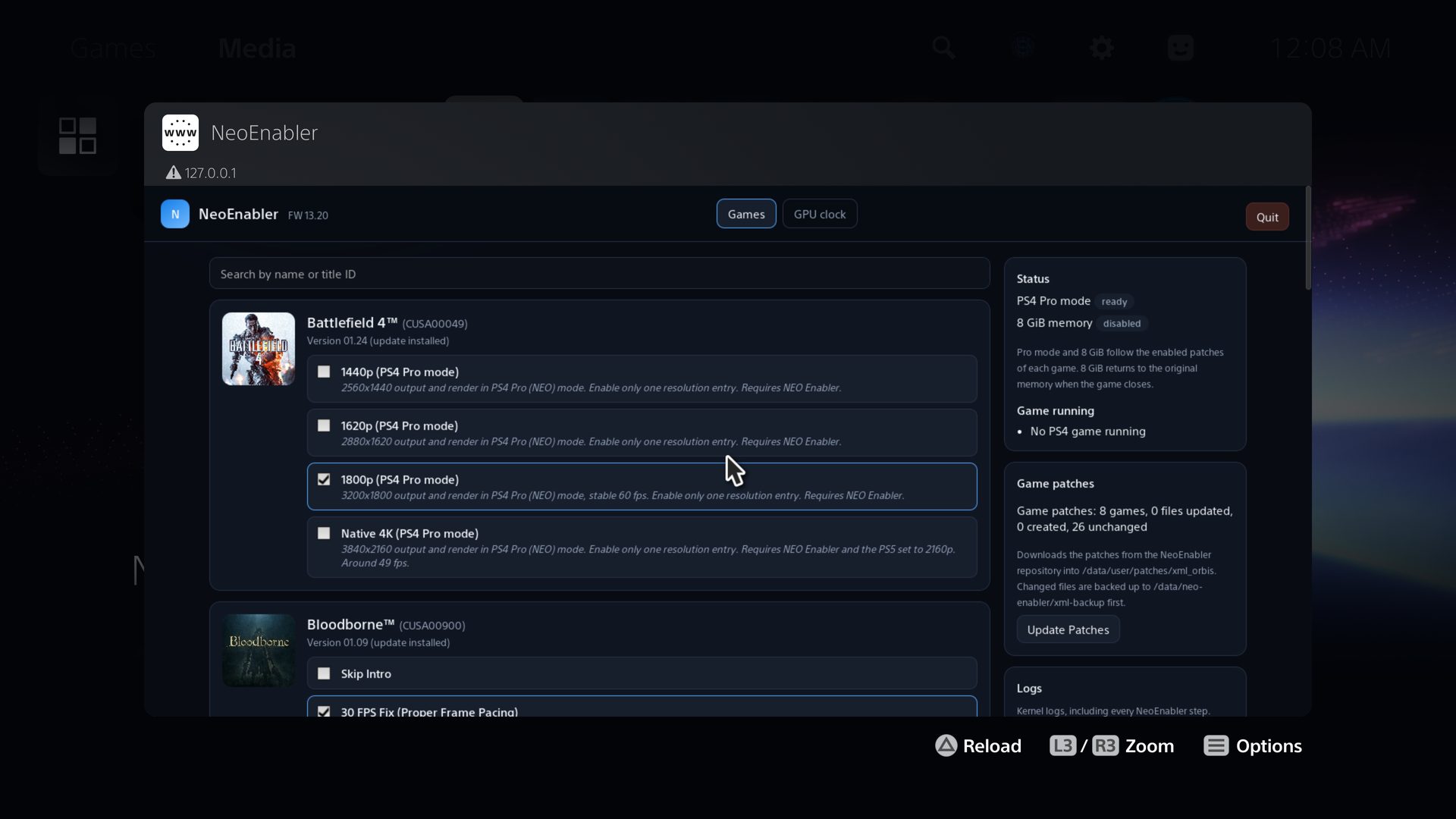
- New Games page: every installed PS4 game that has a NeoEnabler patch for its installed version, with its
icon, name, title ID, version (and whether an update is installed) and all of its patches with their
descriptions. Tick a patch to enable it: it is written to the ps-patch-system settings at once, with no Patch
Manager and nothing to save. A search bar finds games by name or title ID. - PS4 Pro mode and 8 GiB now follow the enabled patches of each game. When a PS4 game starts, NeoEnabler checks
its enabled patches: the game starts in Pro mode only when one of them needs it, and 8 GiB is switched on before
the game starts only when one of them needs it. After the game closes, memory returns to the original 5.25 GiB.
Every other game starts as usual. There is no limit on the number of games. - Only one NeoEnabler resolution entry per game can be on: ticking one turns the others off.
- Patches that need 8 GiB are greyed out unless the console is on firmware 13.20 or 13.60 (pending testing) with
the hypervisor exploit enabled. - The NEO and 8 GiB on/off buttons are replaced by a collapsed Advanced section: Pro mode for every PS4 game,
and keep 8 GiB on. Both are saved at once. Amemory_8gib=1saved by an older version is ignored. - The status shows the PS4 Pro mode of the running game, the 8 GiB state and the running game.
- The hook of an older NeoEnabler is replaced automatically. Quitting the manager stops the automatic Pro mode and
8 GiB until it runs again.
Automatic patch install
- At startup and with Update Patches, NeoEnabler downloads the patches from this repository and adds them to
every ps-patch-system file of the same game (all regions, matched by the game title). Entries already there are
updated and other patches are kept. An entry with the same patch lines under another name gets the repository
name and description and stays enabled if it was. A game without a file gets a new one. - Changed files are backed up first to
/data/neo-enabler/xml-backup/<date-time>/; the last 5 backups are kept. - Every step of the download and install is written to the system log.
- Every NeoEnabler patch entry now says what it needs (
NeoRequires="pro"or"pro,8gib"). ps-patch-system
ignores it.
Game patches
- The 1080p entries were removed from every game.
- Driveclub: new 4K, 1620p render entry (needs 8 GiB). 1440p: no more black flashes in the pause menu, and the
frame rate no longer drops to 30 when a frame is late. Known issues: 4K with 1620p or 1800p render may show
blocky artifacts in the clouds and on other surfaces; in native 4K, snow can show inside the car. - The Order: 1886: the Native 4K 60fps entry runs with the original memory (no 8 GiB needed).
GPU clock tab
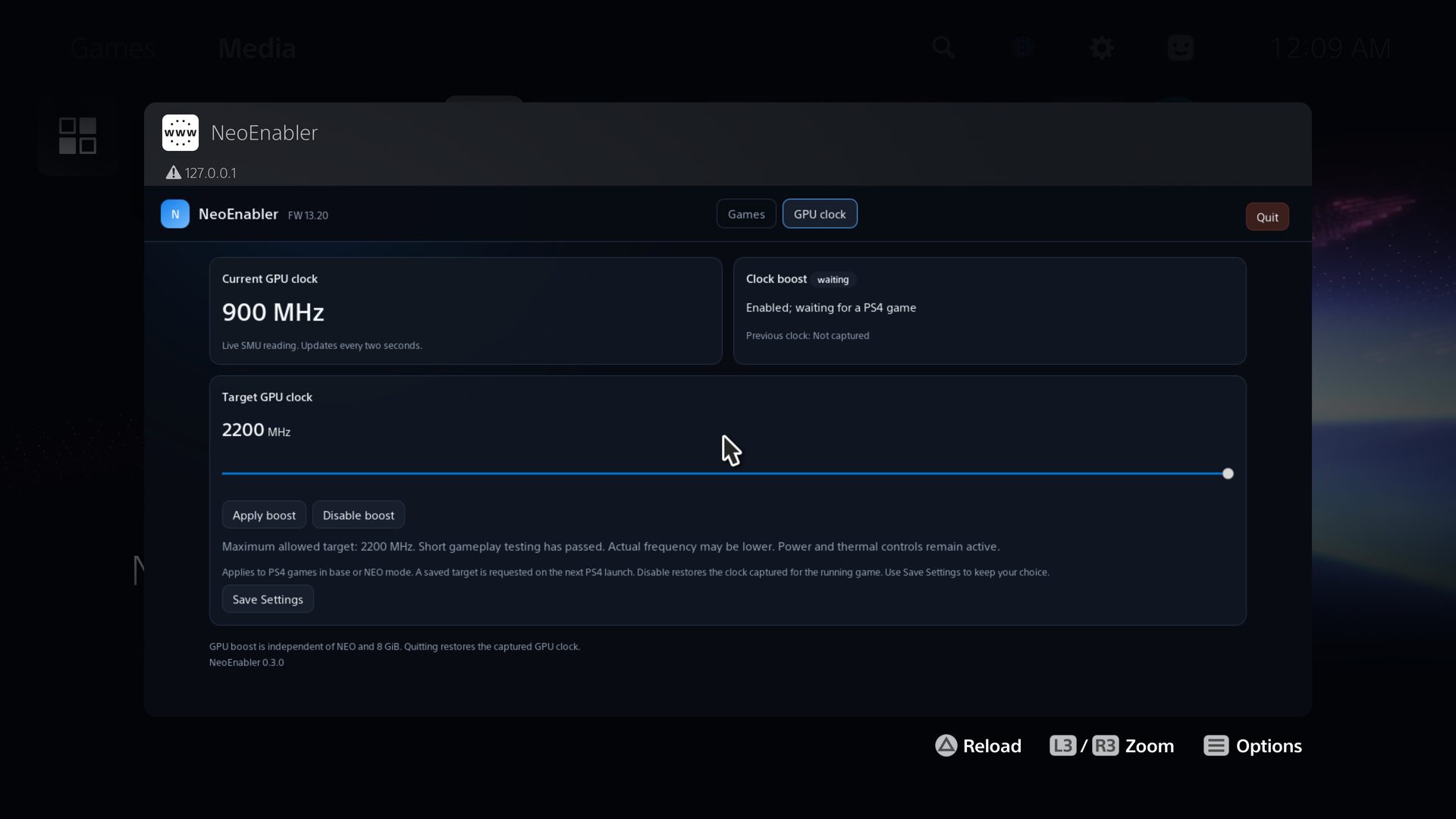
- New GPU clock tab with a 1800–2200 MHz target slider, a live SMU clock reading, Apply boost and Disable.
Uses the original MP1 driver on firmware 13.20 only. Default is off, with a 2200 MHz target.
Requests above 2200 MHz are rejected, including saved settings. - GPU clock enable state and target are included in Save Settings (
/data/neo-settings). Old settings files
remain compatible. Settings writes use a flushed temporary file followed by rename. - A saved GPU target is requested for a running/new PS4 game, independently of NEO and 8 GiB. The manager sends
no repeated SET requests to fight frequency changes made by the SMU. Actual frequency can be below the target. - Disable and Quit request the clock captured before applying boost to the running game. On game exit/transition,
the system resumes its power policy; the next PS4 launch captures a new baseline. Restoration errors remain
visible and block further boost requests until Disable succeeds. - Added
GET /gpu/statusand GPU fields in/statusand system logs. Form requests are bounded and read fully
before applying settings; invalid GPU frequencies are rejected. - The GPU clock tab is only shown on firmware 13.20 when the MP1 driver answers; elsewhere its page is not served.
Screenshots
NeoEnabler 0.2.1
- The manager writes every action and its result to the system log: startup, loaded settings, NEO on/off, 8 GiB
requests and changes, Save Settings, errors and Quit, each followed by astate:line with the NEO hook and the
8 GiB state. Lines start with[NeoEnabler]and are included when you use Save Logs (/data/neo-logs.txt). - 8 GiB can only be turned on from firmware 13.20 (tested) or 13.60 (pending testing). On other firmwares the
controls stay greyed out, the panel refuses the request and a saved 8 GiB setting is ignored. On 13.60 the panel
shows that the firmware is pending testing. - Notifications say "memory" instead of "budget" and "8 GiB enabled for PS4 games" instead of "for new NEO launches";
the "no budget write needed" and "readback verified" notes are gone. Disabling 8 GiB says "original 5.25 GiB memory
restored".
NeoEnabler 0.2.0
8 GiB PS4 Pro memory budget
Selects an 8 GiB PS4 Pro memory budget when the required kernel access is available. Detection uses
page permissions and verified kernel bytes, without depending on Byepervisor markers or a specific
hypervisor exploit. Without that access, the normal NEO feature remains available.
The 8 GiB budget is disabled by default. Enable it from the web panel and use Save Settings to
keep it across restarts. It is currently compatible with and tested on firmware 13.20 only.
Firmware 13.60 has verified offsets from kernel analysis but the application memory areas offset is
unverified and needs a hardware test. If you are on 13.20 or 13.60, please test and report your
results.
- Separate NEO and 8 GiB status indicators and controls. Disabling one keeps the other setting unchanged.
- Memory changes requested while a game is open wait until games are closed.
- Kernel layout checks, readback verification and rollback protect memory-budget changes. Unknown layouts are
refused; normal NEO functionality remains available when the 8 GiB adjustment is unavailable. - Shows each running PS4 game's reported DMEM budget.
Persistent settings
Save Settings saves both NEO hook and 8 GiB state to /data/neo-settings on the PS5. Settings are
restored on the next manager startup. Without a settings file, NEO is enabled and 8 GiB is disabled.
Firmware diagnostic
Save Diagnostic writes a JSONL metadata capture to /data/neo-diagnostic.jsonl on the PS5, for
extraction via FTP. The web panel also serves GET /diagnostic for direct access. This collects
firmware version, running games, driver presence and DMEM/FMEM queries without applying patches or
reading kernel code. Used to port the 8 GiB budget to other firmwares.
System logs
Save Logs saves the last 1 MB of the kernel message buffer to /data/neo-logs.txt on the PS5, for
extraction via FTP. Show Logs opens the log in the browser.
Web panel
- Renamed to NeoEnabler. New icon (black background, green text).
- Two-column grid layout with sticky header, inspired by PS4Mount.
- Save Settings and Quit moved to the header bar.
- Firmware version displayed in the header.
- 8 GiB controls are greyed out on unsupported firmwares.
- A second manager cannot change settings if the web-panel port is already occupied.
Game patches
- New game: Driveclub (01.28), 1080p and 1440p in PS4 Pro mode, plus 4K with 1800p render and native 4K.
Driveclub 4K entries need the 8 GiB memory budget and are tested on firmware 13.20 only. - Bloodborne: native 4K in PS4 Pro mode (needs the 8 GiB memory budget, tested on firmware 13.20 only).
- The Order: 1886: new Native 4K 60fps entry with triple buffering. Vsync stays on (no tearing) and the frame rate goes
up to 60 instead of dropping to 30. Uses the 60 FPS Unlock patch by illusion. - The Order: 1886, Native 4K: fixed faint vertical stripes on characters under strong light.
- The Order: 1886, Native 4K: on-screen text, objectives and button prompts are no longer cut in the middle of the
screen. - The Order: 1886, Native 4K: fixed small black and grey blocks flickering on trees, bushes and other foliage, also
visible as dark outlines on clothing edges. - Bloodborne patches renamed to the same pattern as the other games ("1440p (PS4 Pro mode)" and so on). If you
had one enabled, enable it again after updating the file. - Patch descriptions in Bloodborne, Just Cause 3 and Resident Evil 6 rewritten in plain language.
- The game patch files only carry patches made in this project. Community patches (60 FPS, debug camera and
others) were removed and stay available from their original authors.
Build and CI
- The payload file is now named
neo-manager.elf. - Host unit tests cover page access, memory changes, automatic/manual controls and rollback.
- CI runs unit tests, firmware diagnostic toolkit tests, cppcheck, shellcheck, secret scan and CodeQL.
- README: explains how to add the patches to a patch file the game already has, and that every game needs its
patch to work in PS4 Pro mode.