Animated Alert View written in Swift but ported to Objective-C, which can be used as a UIAlertView or UIAlertController replacement.

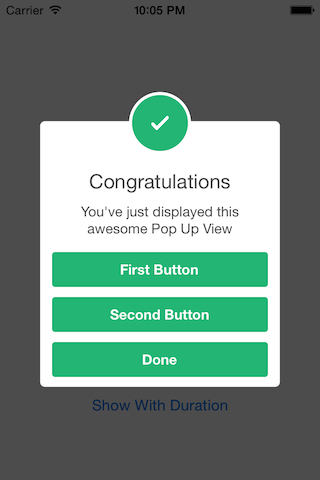 _
_
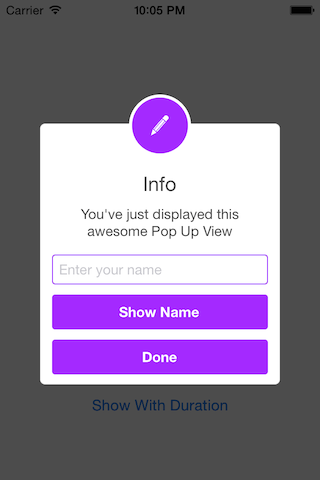
###Easy to use
// Get started
SCLAlertView *alert = [[SCLAlertView alloc] init];

[alert showSuccess:self title:@"Hello World" subTitle:@"This is a more descriptive text." closeButtonTitle:@"Done" duration:0.0f];

// Alternative alert types
[alert showError:self title:@"Hello Error" subTitle:@"This is a more descriptive error text." closeButtonTitle:@"OK" duration:0.0f]; // Error
[alert showNotice:self title:@"Hello Notice" subTitle:@"This is a more descriptive notice text." closeButtonTitle:@"Done" duration:0.0f]; // Notice
[alert showWarning:self title:@"Hello Warning" subTitle:@"This is a more descriptive warning text." closeButtonTitle:@"Done" duration:0.0f]; // Warning
[alert showInfo:self title:@"Hello Info" subTitle:@"This is a more descriptive info text." closeButtonTitle:@"Done" duration:0.0f]; // Info
[alert showEdit:self title:@"Hello Edit" subTitle:@"This is a more descriptive info text with a edit textbox" closeButtonTitle:@"Done" duration:0.0f]; // Edit

// Advanced
SCLAlertView *alert = [[SCLAlertView alloc] init];

[alert showTitle:self // Parent view controller
    title:@"Congratulations" // Title of view
    subTitle:@"Operation successfully completed." // String of view
    style:Success // Styles - see below.
    completeText:@"Done" // Optional button value
    duration:2.0f]; // Duration to show before closing automatically

// Add buttons
SCLAlertView *alert = [[SCLAlertView alloc] init];

// Add Text Attributes
alert.attributedFormatBlock = ^NSAttributedString* (NSString *value)
{
    NSMutableAttributedString *subTitle = [[NSMutableAttributedString alloc]initWithString:value];

    NSRange redRange = [value rangeOfString:@"Attributed" options:NSCaseInsensitiveSearch];
    [subTitle addAttribute:NSForegroundColorAttributeName value:[UIColor redColor] range:redRange];

    NSRange greenRange = [value rangeOfString:@"successfully" options:NSCaseInsensitiveSearch];
    [subTitle addAttribute:NSForegroundColorAttributeName value:[UIColor greenColor] range:greenRange];

    NSRange underline = [value rangeOfString:@"completed" options:NSCaseInsensitiveSearch];
    [subTitle addAttributes:@{NSUnderlineStyleAttributeName:@(NSUnderlineStyleSingle)} range:underline];

    return subTitle;
};

//Using Selector
[alert addButton:@"First Button" target:self selector:@selector(firstButton)];

//Using Block
[alert addButton:@"Second Button" actionBlock:^(void) {
    NSLog(@"Second button tapped");
}];

//Dismiss on tap outside (Default is NO)
alert.shouldDismissOnTapOutside = YES;

//Using sound
alert.soundURL = [NSURL fileURLWithPath:[NSString stringWithFormat:@"%@/right_answer.mp3", [[NSBundle mainBundle] resourcePath]]];

[alert showSuccess:self title:@"Button View" subTitle:@"This alert view has buttons" closeButtonTitle:@"Done" duration:0.0f];

// Add a text field
SCLAlertView *alert = [[SCLAlertView alloc] init];

UITextField *textField = [alert addTextField:@"Enter your name"];

[alert addButton:@"Show Name" actionBlock:^(void) {
    NSLog(@"Text value: %@", textField.text);
}];

[alert showEdit:self title:@"Edit View" subTitle:@"This alert view shows a text box" closeButtonTitle:@"Done" duration:0.0f];
####Alert View Styles
typedef NS_ENUM(NSInteger, SCLAlertViewStyle)
{
    Success,
    Error,
    Notice,
    Warning,
    Info,
    Edit
};SCLAlertView-Objective-C is available through CocoaPods.
To install add the following line to your Podfile:
pod 'SCLAlertView-Objective-C'
I tried to build an easy to use API, while beeing flexible enough for multiple variations, but I'm sure there are ways of improving and adding more features, so feel free to collaborate with ideas, issues and/or pull requests.
###Incoming improvements
- More animations
- Performance tests
- Remove some hardcode values
- Design @SherzodMx Sherzod Max
- Development @hackua Viktor Radchenko
- Improvements by @bih Bilawal Hameed, @rizjoj Riz Joj