
Replies: 3 comments 8 replies

|
I like this! Pure win - the dozens of I also have a lot of projects open. Another win would be sorting projects by |

|
( to be clear: sorting should stay in separate discussion ) |

|
doesnt affect sorting at all, just removes the "+ New Workspace" lines |

|

|
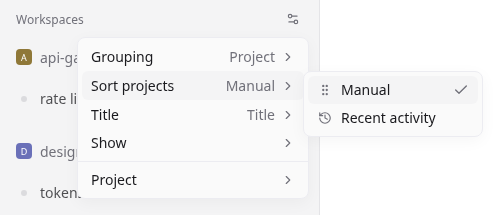
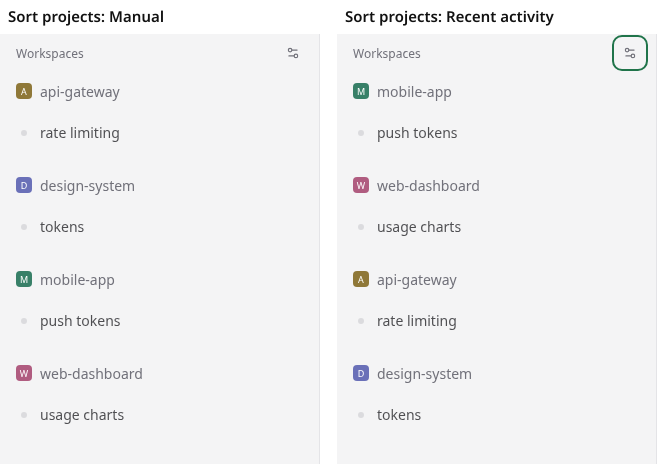
@ChrisjanWust on sorting by last updated — I built that one. It's been running on my own daemon with a dozen projects for the past week. Sort projects lives in the sidebar display menu and only shows in project grouping. Manual is today's drag order; Recent activity puts the project with the freshest workspace activity first.
Fresh activity moves a project to the top live, with no manual reorder:
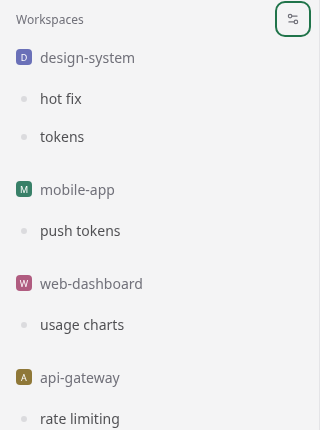
Two decisions worth flagging, since they're the parts that could be wrong:
Code, tests and QA are in #4140 (closed under the feature-PR policy — I'd opened #4138 first, but this thread is plainly where the shared need actually is, so I'll keep it here). @fbettag if the compact project row lands, the sort composes with it cleanly — happy to rebase onto yours or hand the sort over, whichever is less work for whoever reviews it. |
|
Really like this! Will continue in the discussion you opened. |
|
You can try out my fork from #3747 - already does that but got closed because i didn't discuss it =) Also your 2 points are completely unaffected by this change. |
|
Same with my PRs, like this one that adds support for 9 languages like |
|
very nice! supported! |
|
I have both of your work + latest origin main now merged into my fork - it's wonderful 
|


Uh oh!
There was an error while loading. Please reload this page.
I have more than 50 projects in Paseo. When browsing the project list, the separate “+ New Workspace” row under each expanded project takes up a lot of vertical space. Across that many projects, it means more scrolling and makes it harder to scan the list and find the project I want.
I’d like to keep workspace creation available directly from the project row, while fitting more projects on screen.
I tried a compact layout that puts the workspace status and the “+” action alongside the project name. Here’s what that looks like in my setup:
The useful difference for me is removing the separate creation row. The screenshot shows two projects, but the space saving becomes much more noticeable with 50+.
I explored this in #3747 before opening a discussion. I should have started with the workflow here. The screenshot is one possible approach, and I’m open to a different solution that fits Paseo’s design.
Does anyone else manage a similar number of projects? How do you keep the sidebar easy to navigate?
All reactions