Architecture
FreeCAD AI is built around a few core principles:
-
Zero external dependencies. The entire workbench uses only Python stdlib (
urllib,json,threading,ssl,subprocess). Nopip installrequired beyond FreeCAD itself. -
PySide2/6 compatibility. FreeCAD 1.0 bundles PySide2; newer builds may use PySide6. A shim module (
ui/compat.py) handles the import. - Safety over convenience. Tool calls wrap operations in undo transactions. Code execution goes through static validation, optional subprocess sandboxing, and undo rollback on failure.
- Provider-neutral conversation format. Messages are stored in an internal format and converted to OpenAI or Anthropic API format on-the-fly.
-
FreeCAD's
exec()loading. FreeCAD loadsInit.pyandInitGui.pyviaexec(), meaning__file__is not defined. Helper functions must live in importable modules, not at the top level of these files.
freecad-ai/
├── Init.py                        # Non-GUI init: adds package to sys.path
├── InitGui.py                     # Workbench registration, FreeCAD commands
├── package.xml                    # FreeCAD addon metadata (v0.1.0)
├── pyproject.toml                 # Project metadata + pytest config
├── mcp_server_entry.py            # MCP server entry point (see MCP Integration)
│
├── freecad_ai/                    # Main package
│   ├── config.py                  # AppConfig dataclass, singleton, JSON persistence
│   ├── i18n.py                    # Translation helpers (PySide2/6 compat)
│   ├── paths.py                   # Workbench root / icon / translations path utils
│   │
│   ├── llm/                       # LLM communication layer
│   │   ├── client.py              # LLMClient: HTTP, SSE streaming, tool calling
│   │   └── providers.py           # Provider registry (6 providers + custom)
│   │
│   ├── tools/                     # Tool calling system
│   │   ├── registry.py            # ToolParam, ToolDefinition (with lazy_params), ToolResult, ToolRegistry
│   │   ├── freecad_tools.py       # 33 tool handlers
│   │   └── setup.py              # Default registry factory (built-in + MCP)
│   │
│   ├── ui/                        # Qt user interface
│   │   ├── compat.py              # PySide2/PySide6 import shim
│   │   ├── chat_widget.py         # Chat dock widget + agentic tool loop
│   │   ├── message_view.py        # HTML rendering for messages, tool calls, thinking
│   │   ├── code_review_dialog.py  # Code review dialog for Plan mode
│   │   └── settings_dialog.py     # Settings UI with provider + MCP config
│   │
│   ├── core/                      # Core logic
│   │   ├── executor.py            # Code execution: validate, sandbox, undo, execute
│   │   ├── context.py             # Document state inspector (objects, properties)
│   │   ├── system_prompt.py       # System prompt builder with context + skills
│   │   └── conversation.py        # Conversation history, API formatting, compacting
│   │
│   ├── extensions/                # Extension points
│   │   ├── agents_md.py           # AGENTS.md loader (search, includes, variables)
│   │   └── skills.py              # Skills registry, slash command matching
│   │
│   └── mcp/                       # Model Context Protocol
│       ├── protocol.py            # JSON-RPC 2.0 helpers
│       ├── transport.py           # STDIO transports (client + server)
│       ├── client.py              # MCPClient: connect, discover, call, deferred schemas, search
│       ├── manager.py             # MCPManager singleton: multi-server, deferred registration, search
│       └── server.py              # MCPServer: expose tools to external clients
│
├── skills/                        # Built-in skill definitions (6 skills)
│   ├── enclosure/SKILL.md         # Electronics enclosure with snap-fit lid
│   ├── gear/SKILL.md              # Involute spur gear
│   ├── fastener-hole/SKILL.md     # Standard fastener holes
│   ├── thread-insert/SKILL.md     # Heat-set thread inserts
│   ├── lattice/SKILL.md           # Lattice/infill patterns
│   └── skill-creator/SKILL.md     # Meta-skill: create new skills
│
├── translations/                  # Qt translation files (.ts, .qm)
│   └── compile_ts.py             # Script to compile .ts to .qm
│
├── resources/icons/               # Workbench icon
│
└── tests/                         # Test suite
    ├── conftest.py                # Shared fixtures
    ├── unit/                      # unit tests (pure Python, no FreeCAD)
    │   ├── test_config.py         # 20 tests
    │   ├── test_conversation.py   # 35 tests
    │   ├── test_executor.py       # 19 tests
    │   ├── test_registry.py       # 26 tests
    │   ├── test_protocol.py       # 25 tests
    │   ├── test_mcp_deferred.py   # 24 tests (deferred loading, search, lazy params)
    │   ├── test_agents_md.py      # 24 tests
    │   ├── test_skills.py         # 19 tests
    │   └── test_i18n.py           # 3 tests
    └── integration/               # 29 integration tests (FreeCAD AppImage)
        ├── test_create_primitive.py         # 7 tests
        ├── test_create_body_sketch_pad.py   # 6 tests
        ├── test_pocket_sketch.py            # 3 tests
        ├── test_boolean_transform.py        # 6 tests
        └── test_enclosure_workflow.py       # 1 test (full end-to-end)
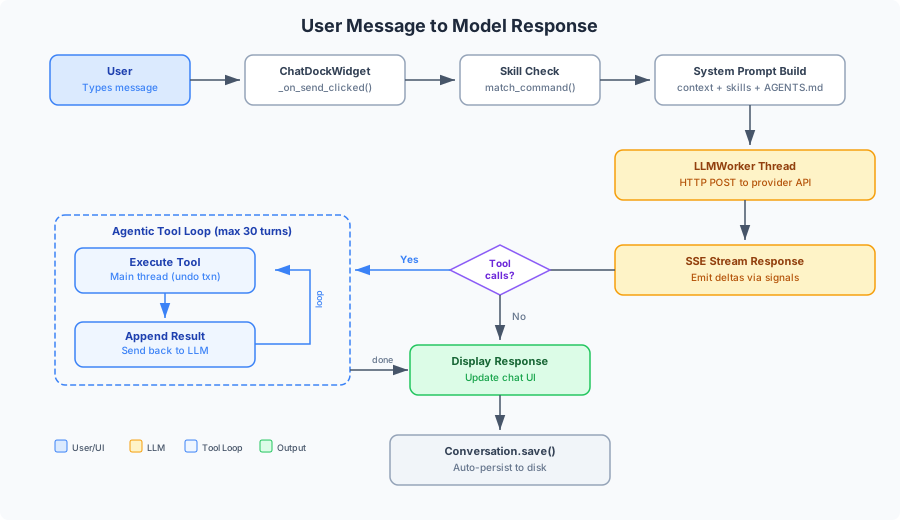
User types message
        |
        v
ChatDockWidget._send_message()
        |
        ├── Check for /skill command → SkillsRegistry.match()
        |
        ├── conversation.add_user_message(text)
        |
        ├── Check conversation.needs_compaction()
        │     └── If yes: spawn _CompactionWorker to summarize older messages
        |
        ├── Build system prompt:
        │     system_prompt.build_system_prompt(mode, tools_enabled)
        │       ├── Identity + mode instructions (Plan/Act/Act+Tools)
        │       ├── Code conventions (full API ref without tools, abbreviated with tools)
        │       ├── Document context from context.get_document_context()
        │       └── AGENTS.md from agents_md.load_agents_md()
        |
        ├── Get messages: conversation.get_messages_for_api(api_style)
        │     ├── Truncate older messages to fit max_chars
        │     ├── Never split tool_call/tool_result pairs
        │     └── Convert to OpenAI or Anthropic format
        |
        └── Spawn _LLMWorker thread
              ├── create_client_from_config() → LLMClient
              └── If tools enabled:
              │     _tool_loop(client)     [agentic loop]
              └── Else:
                    _simple_stream(client)  [plain streaming]
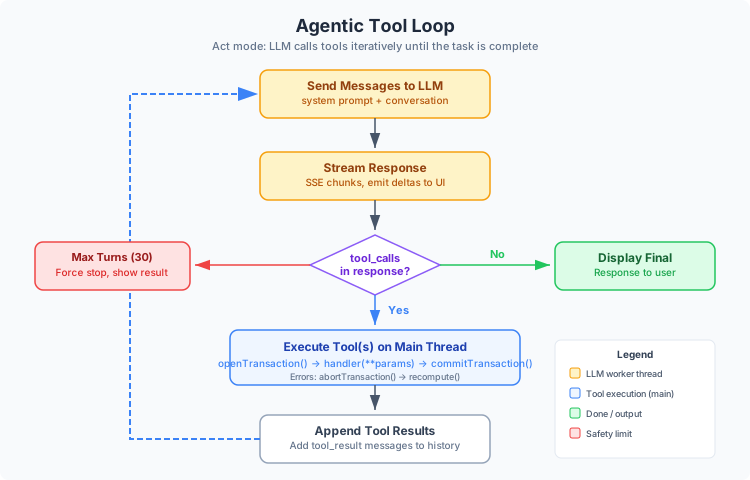
_tool_loop(client):
    for turn in range(30):           # Max 30 tool turns
        |
        ├── client.stream_with_tools(messages, system, tools)
        │     Yields LLMStreamEvents: text_delta, thinking_delta,
        │     tool_call_start, tool_call_delta, tool_call_end, done
        │
        ├── Emit text deltas to UI via token_received signal
        │
        ├── If no tool_calls → response_finished → return
        │
        ├── Append assistant message (with tool_calls) to messages
        │
        ├── For each tool_call:
        │     ├── Emit tool_call_started signal to UI
        │     ├── _execute_tool_on_main_thread(name, args)
        │     │     ├── Emit tool_exec_requested signal (queued connection)
        │     │     ├── Block on QMutex/QWaitCondition (30s timeout)
        │     │     └── Main thread runs ToolRegistry.execute()
        │     │           └── handler(**params) inside undo transaction
        │     ├── Emit tool_call_finished signal to UI
        │     └── Append tool result message to messages
        │
        └── Loop back to stream next LLM turn
The critical detail here is the main thread dispatch. FreeCAD's Python API is not thread-safe, so all tool executions must happen on the Qt main thread. The worker thread:
- Emits
tool_exec_requestedvia aQt.QueuedConnectionsignal - Blocks on a
QMutex/QWaitCondition - The main thread's slot calls
ToolRegistry.execute()and thenworker.set_tool_result() - The worker thread unblocks and continues
Each tool handler in freecad_tools.py wraps its operation using _with_undo():
def _with_undo(label: str, func):
    doc = App.ActiveDocument
    doc.openTransaction(label)
    try:
        result = func(doc)
        doc.recompute()
        doc.commitTransaction()
        return result
    except Exception as e:
        doc.abortTransaction()
        doc.recompute()
        return ToolResult(success=False, output="", error=str(e))
For the execute_code tool (raw Python execution), additional safety layers apply:
-
Static validation -- blocks
os.system(),subprocess,shutil.rmtree(), and checks for known FreeCAD crash patterns (full-circle revolution, etc.) - Subprocess sandbox -- optionally runs the code in a headless FreeCAD subprocess first; catches segfaults (signal -11) before they hit the main process
-
Undo transaction -- wraps execution in
openTransaction()/commitTransaction()withabortTransaction()on failure -
Auto-save -- writes a recovery snapshot of the document before execution so crashes do not lose work. Snapshots live in a managed backups directory (
<FreeCADAI dir>/backups/, one hash-tagged file per document), not beside your project file; bound their number with themax_backupssetting.
The LLMClient class in llm/client.py supports two API styles:
| API Style | Providers | Endpoint |
|---|---|---|
openai |
OpenAI, Ollama, Gemini, OpenRouter, Custom | /chat/completions |
anthropic |
Anthropic | /v1/messages |
The provider is selected by name, and providers.py maps each name to its API style:
PROVIDERS = {
    "anthropic": {"api_style": "anthropic", "supports_tools": True, ...},
    "openai":    {"api_style": "openai",    "supports_tools": True, ...},
    "ollama":    {"api_style": "openai",    "supports_tools": True, ...},
    "gemini":    {"api_style": "openai",    "supports_tools": True, ...},
    "openrouter":{"api_style": "openai",    "supports_tools": True, ...},
    "custom":    {"api_style": "openai",    "supports_tools": False, ...},
}
All HTTP communication uses urllib.request (no requests library). Streaming uses SSE (Server-Sent Events) parsing. The client handles both simple text streaming and structured tool-call streaming for both API styles.
The thinking feature enables LLM reasoning chains:
| Provider | Mechanism |
|---|---|
| Anthropic |
thinking block with budget_tokens (4096 for "on", 16384 for "extended") + beta header |
| Ollama/qwen3 |
/think and /no_think tags appended to system prompt |
| OpenAI (o1/o3) |
reasoning_effort parameter ("medium" for "on", "high" for "extended") |
Thinking content is streamed via thinking_delta events and rendered separately from the main response text.
Messages are stored in a provider-neutral internal format:
# User message
{"role": "user", "content": "Create a 50mm cube"}

# Assistant message with tool calls
{"role": "assistant", "content": "I'll create that for you.",
 "tool_calls": [{"id": "tc_1", "name": "create_body", "arguments": {"name": "Cube"}}]}

# Tool result
{"role": "tool_result", "tool_call_id": "tc_1", "content": "Created body 'Cube'"}

# System message (stored as user message with prefix)
{"role": "user", "content": "[System] Code executed successfully."}
Conversation.get_messages_for_api() converts to provider-specific format:
-
OpenAI format: tool results become
{"role": "tool", "tool_call_id": ...}, tool calls include{"type": "function", "function": {"name": ..., "arguments": json_string}} -
Anthropic format: tool results become
{"role": "user", "content": [{"type": "tool_result", ...}]}, tool calls become content blocks[{"type": "tool_use", ...}]
When estimated tokens exceed 20,000 and there are more than 6 messages, the conversation auto-compacts:
- A
_CompactionWorkerthread sends older messages to the LLM with a summarization prompt - On completion,
Conversation.compact(summary, keep_recent=4)replaces old messages with a summary - The summary is stored as a user message prefixed with
[Context Summary ...] - Tool call/result pairs are never split during compaction
FreeCAD loads workbench files via exec(), so __file__ is undefined. The pattern used throughout:
# In InitGui.py -- import inside methods, not at module level
class FreeCADAIWorkbench(Gui.Workbench):
    def __init__(self):
        from freecad_ai.paths import get_icon_path  # Import here, not at top
        icon = get_icon_path()
        if icon:
            self.__class__.Icon = icon
Init.py adds the workbench directory to sys.path by deriving it from FreeCAD.getUserAppDataDir().
_config: AppConfig | None = None

def get_config() -> AppConfig:
    global _config
    if _config is None:
        _config = load_config()
    return _config
Configuration is stored as JSON at <FreeCADAI dir>/config.json. The AppConfig dataclass includes provider settings, mode, max tokens, temperature, thinking mode, and MCP server configs. <FreeCADAI dir> is resolved at module-import time via _resolve_config_dir() in freecad_ai/config.py — see Configuration#configuration-paths for the resolution order and the v0.13.0-alpha migration logic.
The ToolRegistry can export its tools in three formats:
-
to_openai_schema()-- OpenAI function calling format -
to_anthropic_schema()-- Anthropic tool_use format -
to_mcp_schema()-- MCP tools/list format
All three use the same underlying _params_to_json_schema() function that converts ToolParam objects to JSON Schema. All three call ToolDefinition.resolve_params() before serializing, which triggers lazy parameter loading for deferred MCP tools.
The registry also supports search_tools(query) for keyword-based tool discovery across all registered tools.
MCP tools from external servers are registered as regular ToolDefinition objects with category="mcp" and server__tool namespacing. The agentic loop does not need any special handling -- MCP tools are executed through the same ToolRegistry.execute() path as built-in tools.
When a server is configured with "deferred": true (the default), MCP tools are registered with a lazy_params callable instead of eagerly-loaded parameters. The ToolDefinition.resolve_params() method invokes this callable on first access, fetching the full input schema from the cached tools/list response. This avoids parsing and storing schemas for tools that may never be used.
All settings live in <FreeCADAI dir>/:
| Path | Content |
|---|---|
config.json |
Provider, model, tokens, temperature, thinking mode, MCP servers |
conversations/ |
Saved chat sessions (JSON, one file per conversation) |
skills/ |
User-defined skills (one directory per skill with SKILL.md) |
AGENTS.md |
Global project instructions fallback |
logs/ |
Session debug logs |
The test suite is split into two categories:
Pure Python tests that do not require FreeCAD. They test the core logic modules using mocks:
pytest tests/unit/ -vThese run by default (integration tests are excluded via addopts = "-m 'not integration'" in pyproject.toml).
Modules tested: config, conversation, executor, registry, protocol, mcp_deferred, agents_md, skills, i18n, select_geometry, new_tools.
Require the FreeCAD AppImage to be installed. They spawn headless FreeCAD processes that execute tools and verify geometry:
pytest tests/integration/ -v -m integrationWorkflows tested: primitive creation, body/sketch/pad, pocket operations, boolean operations, transformations, and a full end-to-end enclosure construction.
Integration tests write temporary Python scripts, run them via FreeCAD.AppImage -c script.py, and verify results from a JSON output file.
Translation files use Qt's .ts / .qm system:
-
.tssource files live intranslations/ -
translations/compile_ts.pycompiles them to.qmbinary files -
InitGui.pyregisters the translation path viaGui.addLanguagePath() - All user-facing strings use
translate("Context", "String")fromi18n.py
The i18n.py module handles the PySide2/PySide6 difference:
try:
    from PySide6.QtCore import QCoreApplication
except ImportError:
    from PySide2.QtCore import QCoreApplication

def translate(context: str, text: str) -> str:
    return QCoreApplication.translate(context, text)