Deferral and Deadlines
When Patcher is ready to apply an update and a blocking process is running, users can defer the installation. Deadlines ensure that deferral cannot go on indefinitely.
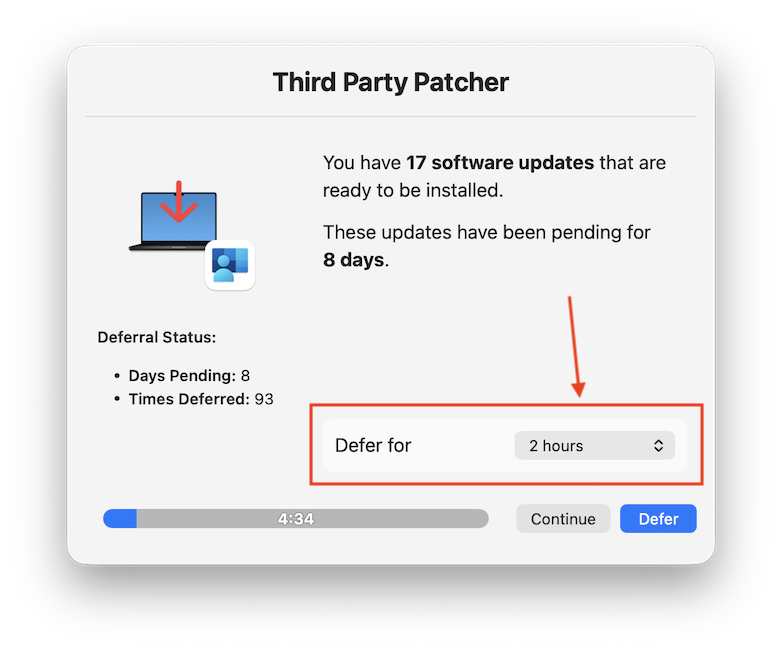
When a blocking process dialog appears, the user can choose to defer. The deferral menu presents options defined by DeferralTimerMenu:
5 minutes / 30 minutes / 1 hour / 2 hours / 8 hours / 24 hours
(Configurable via DeferralTimerMenu as a comma-separated list of minutes.)
Each time the user defers, a deferral count is incremented and an expiry timestamp is recorded. Patcher will not re-prompt until the expiry time has passed.
If FocusCheckEnabled is true, Patcher checks for active Focus modes, Do Not Disturb, or active Screen Sharing before displaying any prompt. When one of these is detected:
- The apply phase is deferred silently for
DeferralTimerFocusminutes (default: 60). - No dialog is shown to the user.
- The deferral count is not incremented — Focus deferrals do not push users toward the hard deadline.
This prevents Patcher from interrupting users during meetings, presentations, or focused work sessions, without penalizing them for it.
| Key | Default | Description |
|---|---|---|
FocusCheckEnabled |
true |
Enable Focus/DND detection |
DeferralTimerFocus |
60 |
Minutes to defer when Focus is active |
If the deferral dialog is displayed but the user doesn't interact with it, a countdown timer fires after DeferralCountdownSeconds seconds. The action taken is controlled by DeferralAutomaticAction:
| Value | Behavior |
|---|---|
"defer" |
Defer for the default duration (DeferralTimerDefault) |
"apply" |
Proceed with the update |
| Key | Default |
|---|---|
DeferralCountdownSeconds |
300 (5 minutes) |
DeferralAutomaticAction |
"defer" |
DeferralTimerDefault |
1440 (24 hours) |
Two deadline thresholds control how long a user can defer.
Once a pending update has been waiting for DeadlineDaysFocus days, Focus/DND auto-deferral is disabled. The user will be prompted even if they have Focus active.
Default: 4 days
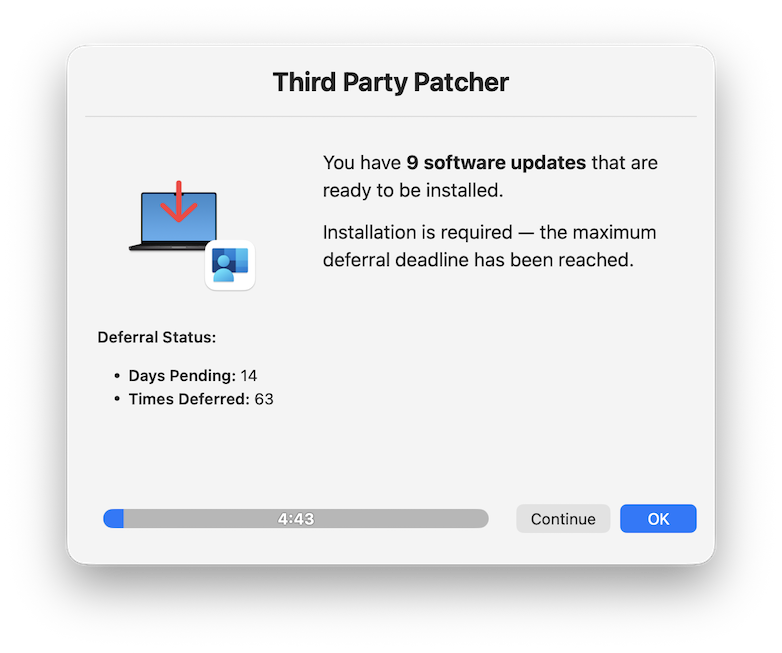
Once a pending update has been waiting for DeadlineDaysHard days, deferral is removed entirely. At the next apply cycle, the update is applied regardless of blocking processes or user interaction. No dialog is shown.
Default: 14 days
The deadline counter measures how long a specific update has been pending for the user.
Days pending = days since firstPendingDate (the first time the update was ready to apply for this label).
When MonthlyPatchingCadenceEnabled is true, days pending = days since the configured patch day of the current cycle. An update that arrives mid-cycle has fewer days pending than if it had arrived before patch day.
This prevents updates that become available near the end of a monthly cycle from having an artificially large pending count.
Day 0:  Update staged, first apply attempt → user defers
Day 1–4: User can defer; Focus auto-deferral active
Day 5:  Focus deadline passed → Focus auto-deferral disabled, user always prompted
Day 6–14: User can still manually defer
Day 14+: Hard deadline → no more deferral, update applied at next cycle
To reset the deferral count and deadline tracking for a label (e.g. after a user escalation or a fresh install):
sudo /usr/local/bin/tpp/patcher resetHistory googlechromeThis removes the LabelHistory/googlechrome.json file, clearing the deferral count and firstPendingDate. The next apply cycle starts fresh.
To reset all labels:
sudo /usr/local/bin/tpp/patcher resetHistory