Repository navigation
whatwatts v1.0

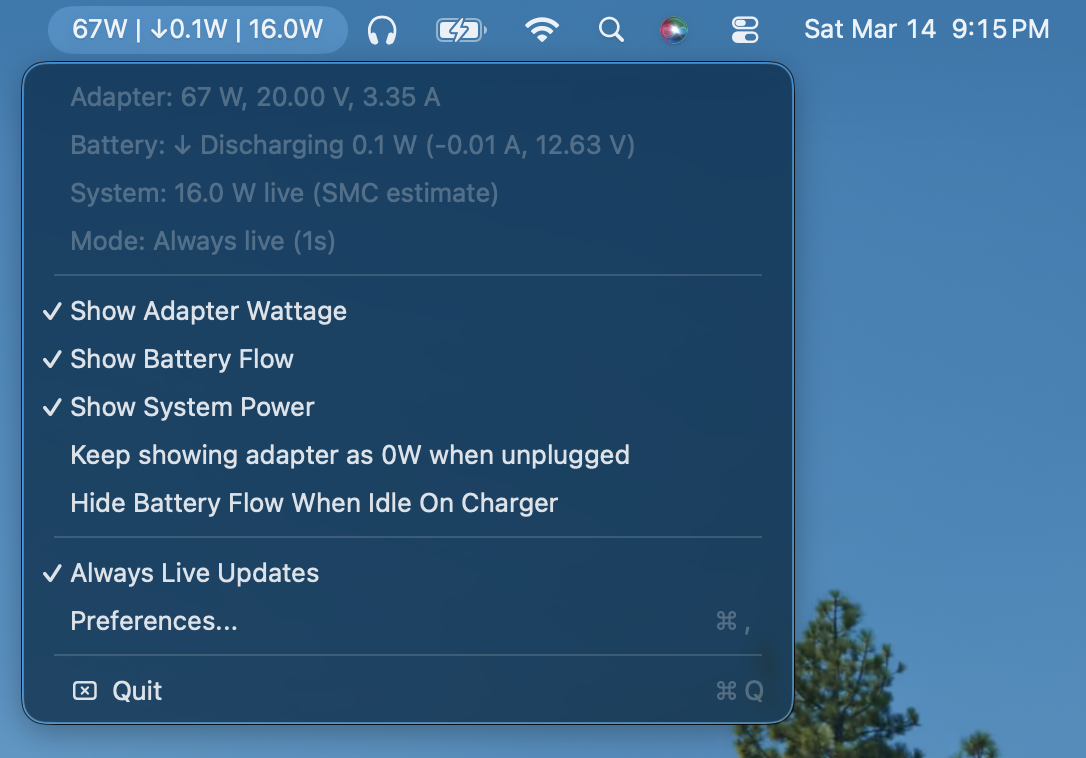
whatwatts is a lightweight menu bar app for seeing what your Mac is doing right now when it is plugged in: charger wattage, battery flow, and an optional system-power estimate.
What is new in v1.0:
- adapter, battery, and optional SMC system-power readout in one compact menu bar item
- rolling 60-second system-power average in low-power mode
- live 1-second updates when Always Live Updates is enabled
- optional hide-battery-flow behavior for full or optimized-charge hold states
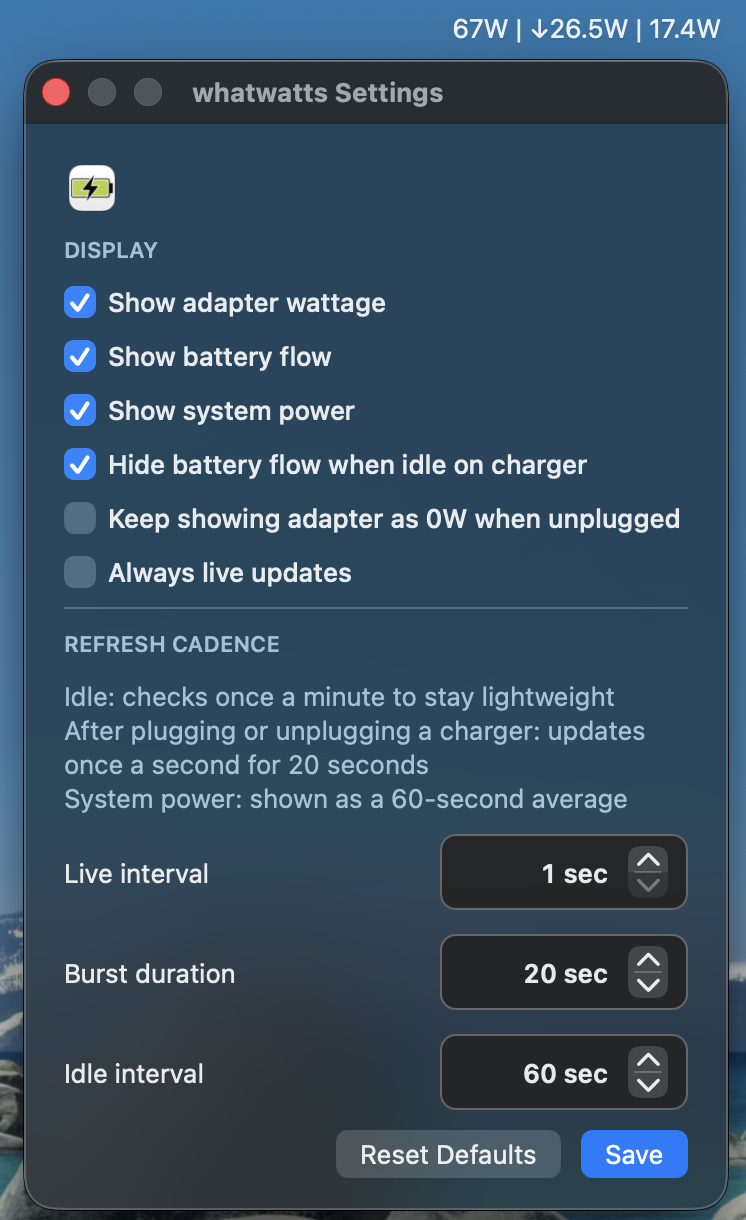
- menu and preferences toggles for each displayed metric
- cleaned up preferences window and documentation
Screenshots:
App
Preferences
Downloads:
- whatwatts-intel.zip for Intel Macs
- whatwatts-apple-silicon.zip for Apple Silicon Macs
Source is public in this repo, so you can inspect exactly what the app does before running it.
Low-power mode behavior:
- Idle: checks once a minute to stay lightweight
- After plugging or unplugging a charger: updates once a second for 20 seconds
- System power: shown as a 60-second average unless Always Live Updates is enabled
Trust and first launch:
- If macOS blocks the app, you can always use
System Settings > Privacy & Security > Open Anyway - If you prefer Terminal, there are two options:
- Use a
test runcommand if you want to launchwhatwattsfrom~/Downloadsfirst. This does not require an administrator password. - Use an
installcommand if you want to move it into/Applications. This usually requires an administrator password. - Pick the command that matches your Mac, paste it into Terminal, and press Return.
Intel test run:
curl -L https://github.com/git-anish/whatwatts/releases/download/v1.0/whatwatts-intel.zip -o ~/Downloads/whatwatts-intel.zip && ditto -x -k ~/Downloads/whatwatts-intel.zip ~/Downloads && xattr -dr com.apple.quarantine ~/Downloads/whatwatts-intel.app && open ~/Downloads/whatwatts-intel.appApple Silicon test run:
curl -L https://github.com/git-anish/whatwatts/releases/download/v1.0/whatwatts-apple-silicon.zip -o ~/Downloads/whatwatts-apple-silicon.zip && ditto -x -k ~/Downloads/whatwatts-apple-silicon.zip ~/Downloads && xattr -dr com.apple.quarantine ~/Downloads/whatwatts-apple-silicon.app && open ~/Downloads/whatwatts-apple-silicon.appIntel install:
curl -L https://github.com/git-anish/whatwatts/releases/download/v1.0/whatwatts-intel.zip -o ~/Downloads/whatwatts-intel.zip && ditto -x -k ~/Downloads/whatwatts-intel.zip ~/Downloads && sudo rm -rf /Applications/whatwatts.app && sudo mv ~/Downloads/whatwatts-intel.app /Applications/whatwatts.app && sudo xattr -dr com.apple.quarantine /Applications/whatwatts.app && open /Applications/whatwatts.appApple Silicon install:
curl -L https://github.com/git-anish/whatwatts/releases/download/v1.0/whatwatts-apple-silicon.zip -o ~/Downloads/whatwatts-apple-silicon.zip && ditto -x -k ~/Downloads/whatwatts-apple-silicon.zip ~/Downloads && sudo rm -rf /Applications/whatwatts.app && sudo mv ~/Downloads/whatwatts-apple-silicon.app /Applications/whatwatts.app && sudo xattr -dr com.apple.quarantine /Applications/whatwatts.app && open /Applications/whatwatts.appWhat the commands do:
curl -L ...downloads the release zip from GitHubditto -x -k ...unzips the appxattr -dr com.apple.quarantine ...removes macOS quarantine so the app can launchopen ...launches the appsudo rmandsudo mvonly appear in the install version because moving the app into/Applicationsusually needs admin access
Note: the SMC system-power value is inspired by SAP Power Monitor and uses private Apple interfaces. It works now, including on an Intel Mac we tested, but it may stop working on future macOS or hardware revisions.