x/tools/gopls: experimentalWorkspaceModule: Incorrectly flags packages as missing in go.sum #48364

Description

What version of Go are you using (go version)?
$ go version
go version go1.16.6 darwin/amd64
Does this issue reproduce with the latest release?
Yes
What operating system and processor architecture are you using (go env)?
go env Output
$ go env
GO111MODULE=""
GOARCH="amd64"
GOBIN=""
GOCACHE="/Users/thomaseckert/Library/Caches/go-build"
GOENV="/Users/thomaseckert/Library/Application Support/go/env"
GOEXE=""
GOFLAGS=""
GOHOSTARCH="amd64"
GOHOSTOS="darwin"
GOINSECURE=""
GOMODCACHE="/Users/thomaseckert/go/pkg/mod"
GONOPROXY=""
GONOSUMDB=""
GOOS="darwin"
GOPATH="/Users/thomaseckert/go"
GOPRIVATE=""
GOPROXY="https://proxy.golang.org,direct"
GOROOT="/usr/local/go"
GOSUMDB="sum.golang.org"
GOTMPDIR=""
GOTOOLDIR="/usr/local/go/pkg/tool/darwin_amd64"
GOVCS=""
GOVERSION="go1.16.6"
GCCGO="gccgo"
AR="ar"
CC="clang"
CXX="clang++"
CGO_ENABLED="1"
GOMOD="/dev/null"
CGO_CFLAGS="-g -O2"
CGO_CPPFLAGS=""
CGO_CXXFLAGS="-g -O2"
CGO_FFLAGS="-g -O2"
CGO_LDFLAGS="-g -O2"
PKG_CONFIG="pkg-config"
GOGCCFLAGS="-fPIC -arch x86_64 -m64 -pthread -fno-caret-diagnostics -Qunused-arguments -fmessage-length=0 -fdebug-prefix-map=/var/folders/f1/2p5xy4c5675f9m84ngmw0d300000gq/T/go-build865026977=/tmp/go-build -gno-record-gcc-switches -fno-common"
What did you do?
Summary
I am using the gopls setting for experimental workspace modules and getting errors on my go.mod files when opening the repository from its root in VS Code which do not match with errors observed when the directories containing the go.mod files are opened on their own, even with the experimental workspace modules flag set to true.
I would like to be able to open the repository from its root and have it work correctly so that I can set up the repository for Codespaces and ease the burden on contributors.
Repro Steps
- Clone the repository consul-k8s
- Open the repository in VS Code at the root of the repository
code consul-k8s. The repository has 4 Go modules in it. - Ensure you are using the Go extension for VS Code.
- Open
settings.jsonwithCMD+SHIFT+Pand entering "Preferences: Open Settings (JSON)". - Set
goplsto usebuild.experimentalWorkspaceModuleby adding the following setting:
"gopls": {
    "build.experimentalWorkspaceModule": true
}- Reload VS Code with
CMD+SHIFT+Pand entering "Developer: Reload Window". - Allow time for extensions to start working.
- Check the error output for
./control-plane/go.modand./charts/consul/tests/acceptance/go.mod. These errors do not occur when the directory containing the module itself is opened (e.g.code ./control-plane/).
What did you expect to see?
I would expect the output of gopls when running from the root of the project with experimental workspace modules on to match the output when running from the directory containing the module.
What did you see instead?
Issue with acceptance module
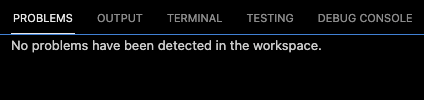
When the acceptance module is opened with code ./charts/consul/test/acceptance, gopls does not raise any errors with the go.mod file. Note that the experimental workspace module flag is true and no errors are raised.

When the repository is opened from its root, gopls raises an issue with the github.com/gruntwork-io/terratest v0.31.2 module in go.mod.
error while importing github.com/gruntwork-io/terratest/modules/k8s: missing go.sum entry for module providing package github.com/moby/spdystream (imported by k8s.io/apimachinery/pkg/util/httpstream/spdy); to add:
	go get k8s.io/apimachinery/pkg/util/httpstream/spdy@v0.21.1
The extension also offers the suggested fix 17 times:

Applying the fix via the quick-fix menu does not fix the problem. It returns the error "Command 'gopls.go_get_package' failed: Error: edits not applied because of ."

However, running the suggested command go get k8s.io/apimachinery/pkg/util/httpstream/spdy@v0.21.1 from the command line does fix the problem by updating other packages.
require (
	github.com/gruntwork-io/terratest v0.31.2
	github.com/hashicorp/consul/api v1.9.0
	github.com/hashicorp/consul/sdk v0.8.0
-       github.com/stretchr/testify v1.5.1
-	gopkg.in/yaml.v2 v2.2.8
+	github.com/stretchr/testify v1.6.1
+	gopkg.in/yaml.v2 v2.4.0
	k8s.io/api v0.19.3
-	k8s.io/apimachinery v0.19.3
+	k8s.io/apimachinery v0.21.1
	k8s.io/client-go v0.19.3
)
After this update, gopls no longer reports an error on this module. However, I don't think it should have reported the error in the first place as it did not report the error when the directory itself was opened.
Issue with control-plane module
I have not been able to solve the similar issue with the control-plane module.
When the control-plane module is opened with code ./control-plane, gopls does not raise any errors with the go.mod file. Note that the experimental workspace module flag is true and no errors are raised.
When the repository is opened from its root, gopls raises 8 issues with the github.com/hashicorp/go-discover v0.0.0-20200812215701-c4b85f6ed31f module in go.mod.
It raises this error twice:
error while importing github.com/hashicorp/go-discover/provider/azure: missing go.sum entry for module providing package github.com/Azure/azure-sdk-for-go/services/network/mgmt/2015-06-15/network (imported by github.com/hashicorp/go-discover/provider/azure); to add:
	go get github.com/hashicorp/go-discover/provider/azure@v0.0.0-20200812215701-c4b85f6ed31f
this error 5 times
error while importing github.com/hashicorp/go-discover/provider/azure: missing go.sum entry for module providing package github.com/Azure/go-autorest/autorest/azure/auth (imported by github.com/hashicorp/go-discover/provider/azure); to add:
	go get github.com/hashicorp/go-discover/provider/azure@v0.0.0-20200812215701-c4b85f6ed31f
and this error once
error while importing github.com/hashicorp/go-discover/provider/vsphere: missing go.sum entry for module providing package github.com/vmware/govmomi/vim25/soap (imported by github.com/hashicorp/vic/pkg/vsphere/tags); to add:
	go get github.com/hashicorp/vic/pkg/vsphere/tags@v1.5.1-0.20190403131502-bbfe86ec9443

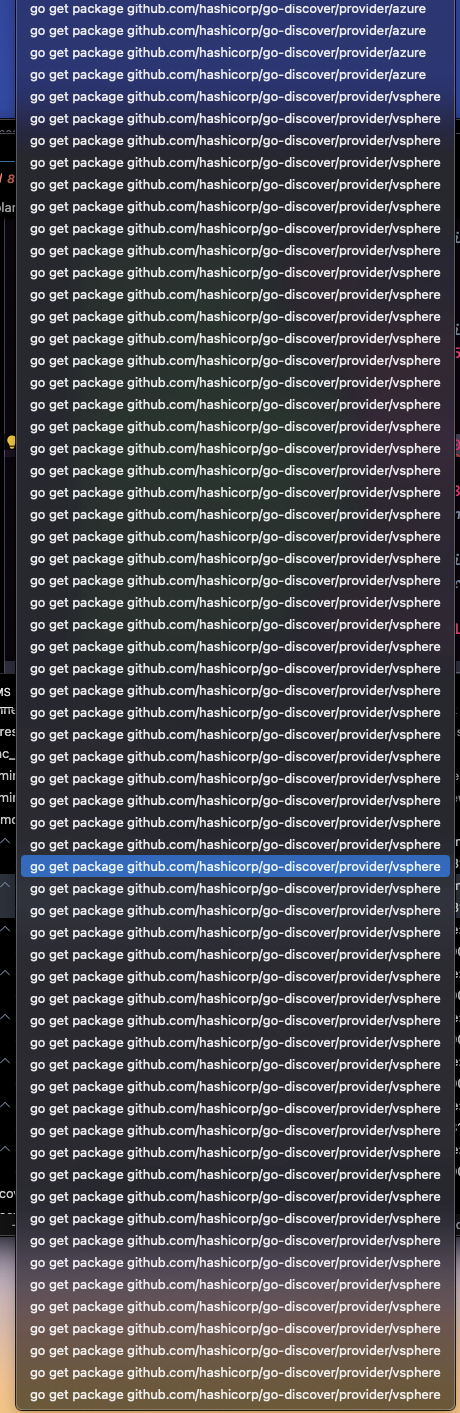
It provides the quick fix option for updating the package many times:
As with the acceptance module, running the quick-fix solution does not fix the problem. Running the suggested commands in the terminal does not fix the problem either.