





Website · Docs · MCP · MCP Registry · Security · License
Automatic eval suites from the prompt logs you already have.
redline turns real prompt-response logs into regression tests. It watches or imports existing outputs, selects representative cases, replays your changed prompt, and shows the behavioral diff before a bad prompt ships.
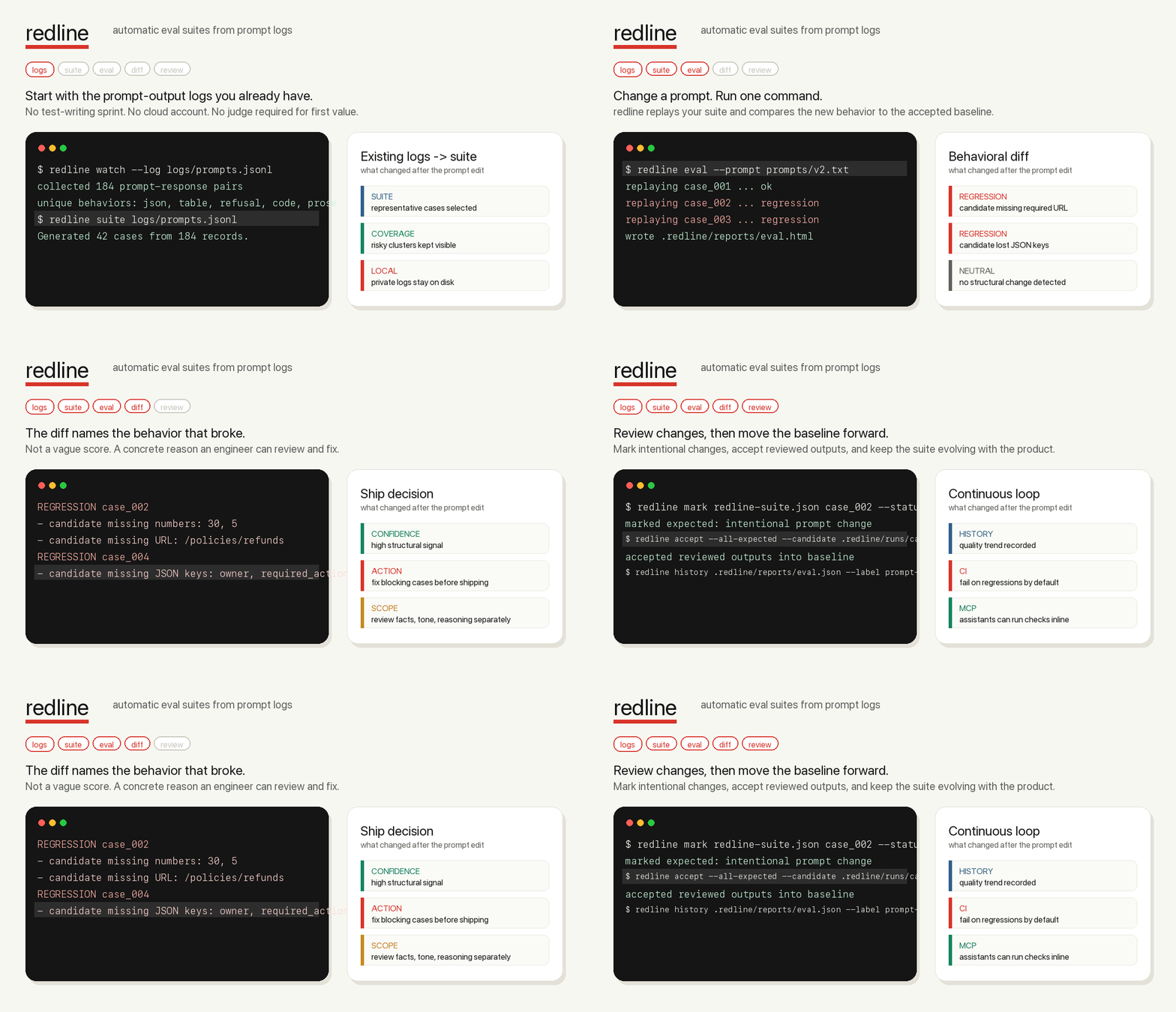
In under five minutes, on a real prompt log, redline should catch one regression you did not want to ship.
That promise is intentionally narrow. redline is not a hosted eval platform, a generic score, or a replacement for human judgment. It is the local safety loop between "I changed the prompt" and "this is safe enough to merge."
Most teams already have the raw material for evals: prompts, outputs, support tickets, traces, model responses, and production logs. What they usually do not have is time to hand-write a full regression suite before every prompt edit.
redline makes the first suite free:
- Use the logs you already have.
- Cluster behavior into representative cases.
- Re-run the suite after a prompt change.
- See exactly what broke: JSON keys, required numbers, URLs, tables, code blocks, refusals, empty answers, and other high-signal changes.
- Mark intentional changes, accept reviewed outputs, and keep the suite moving with the product.
Install from PyPI:
python -m pip install redline-aiRun the public proof:
redline demo --public --compactThe demo catches ten synthetic regressions without API keys, private logs, a
cloud account, or an LLM judge. It writes JSON, Markdown, and self-contained
HTML reports under .redline/demo.
Open the local report index:
redline dashboard --openBuild a suite from baseline logs:
redline suite logs/baseline.jsonl --out redline-suite.jsonEvaluate a changed prompt file through your configured runner:
redline eval --prompt prompts/v2.txtOr compare candidate outputs you already generated:
redline diff redline-suite.json logs/candidate.jsonlWhen redline finds a blocking change, it exits non-zero for CI and prints the reason:
REGRESSION case_004
- candidate missing JSON keys: owner, required_action
- candidate missing URL: https://example.com/policies/refunds

Confidence: HIGH | fix blocking cases before shipping
| Signal | Example regression |
|---|---|
| JSON validity and keys | Candidate stops returning valid JSON or drops owner. |
| Tables, lists, and code blocks | Markdown table becomes prose; code fence disappears. |
| Numbers, URLs, and entities | Refund window, ticket ID, policy URL, or owner is missing. |
| Empty outputs and refusals | Candidate newly refuses a safe task or returns nothing. |
| Content drift | Same-shape response changes substantially. |
| Explicit requirements | Pinned cases require or forbid exact strings. |
redline is deterministic and local-first by default. Optional judge commands are
available for ambiguous changed cases, but redline does not call a cloud model
unless you explicitly configure that command.
A green redline run means no configured high-signal structural blockers were found. It does not prove factual correctness, tone, hallucination safety, policy compliance, or subtle reasoning quality.
That boundary is visible in CLI output and reports because over-trusting eval tools is dangerous. Use requirements or an optional judge for semantic risks that structural checks cannot prove.
redline is built around the full prompt-regression loop:
redline watch: collect prompt-response observations from logs or Python code.redline cluster: inspect behavior groups before suite generation.redline suite: generate a representative eval suite from baseline logs.redline suite add: pin hand-picked edge cases the algorithm should never miss.redline eval: replay each suite case through your local app or model runner.redline diff: compare candidate JSONL outputs against the suite baseline.redline markandredline accept: review intentional changes and promote the new baseline.redline require: add deterministic must-include or must-not-include rules.redline history,redline compare, andredline dashboard: track quality over time and inspect reports locally.redline-mcp: let AI coding assistants run checks inside Claude, Codex, Cursor, Kiro, or any MCP client.
Any command that reads a prompt from stdin and prints a response to stdout can be a redline runner:
redline init --runner stdio --copy-runner --github-actionBuilt-in adapters cover provider-neutral stdio, OpenAI, Anthropic, LiteLLM, HTTP APIs, Python chains, and JSONL log imports:
redline runners
redline runners --copy all
Runner details live in docs/runners.md. Log import adapters
are for building suites from exported logs, not for redline eval replay.
redline ships a local Model Context Protocol server:
redline-mcpUse docs/mcp.md to wire redline into an MCP client. The MCP
surface exposes safe read/eval/report tools and workflow prompts like
check_prompt_change, build_suite_from_logs, and review_candidate_outputs.
It does not expose baseline mutation commands.
Create config plus a GitHub Actions workflow:
redline init --runner stdio --copy-runner --github-actionUse redline as a composite GitHub Action from another repo:
- uses: gowtham0992/redline@v0.1.0
  with:
    prompt-path: prompts/v2.txt
The action writes JSON, Markdown, HTML, JUnit, history, and dashboard artifacts
under .redline/, appends the report and trend summary to the GitHub step
summary, and exits with the eval gate status.
Every diff and eval run can write:
- JSON for machines and dashboards
- Markdown for PR comments and summaries
- self-contained HTML for side-by-side inspection
- JUnit XML for CI test reporting
- GitHub annotations for changed or blocking cases
Example:
redline diff redline-suite.json logs/candidate.jsonl \
  --out-json .redline/reports/diff.json \
  --out-md .redline/reports/diff.md \
  --out-html .redline/reports/diff.html \
--out-junit .redline/reports/diff.xmlUse judges only where structural checks are not enough. redline sends only
ambiguous changed cases to the configured command as JSON on stdin:
redline diff logs/candidate.jsonl --judge "python examples/judge_changed.py"Included templates:
- examples/judge_changed.py
- examples/openai_judge.sh
- examples/anthropic_judge.sh
- examples/litellm_judge.sh
- examples/judges/support_rubric.md
- examples/judges/extraction_rubric.md
- examples/judges/safety_rubric.md
Calibration guidance lives in docs/judges.md.
redline init writes redline.json with a $schema reference for editor
autocomplete. Important keys:
| Key | Purpose |
|---|---|
suite |
Suite baseline path, default redline-suite.json. |
input_field, output_field |
JSONL field paths for prompts and responses. |
max_cases |
Maximum representative cases selected for a suite. |
replay |
Command used by eval; prompts go to stdin unless it contains {prompt}. |
workers |
Number of replay cases to run concurrently. |
fail_on |
Statuses that fail diff or eval; use "none" for report-only setup. |
reports |
JSON, Markdown, HTML, and JUnit output paths. |
judge |
Optional command for ambiguous changed cases. |
Check setup before relying on a suite:
redline doctor --strict
redline validate redline-suite.json --strict
redline summary redline-suite.jsonThe public fixture is synthetic, shaped after public instruction/chat dataset patterns, and documented in examples/public_dogfood_sources.md.
python -m redline suite examples/public_dogfood_baseline.jsonl --out /tmp/redline-public-suite.json --all-cases
python -m redline diff /tmp/redline-public-suite.json examples/public_dogfood_candidate.jsonl --compact --fail-on none
For AI-assistant session dogfood, use
docs/ai-session-dogfood-prompts.jsonl
and normalize raw exports with scripts/normalize_ai_session_logs.py.
From a repo checkout, record the public demo:
bash scripts/demo_terminal.sh
bash scripts/demo_gif.sh .redline/launch .redline/launch/redline-demo.gifpython -m pip install -e ".[dev]"
python -m pytest -q
python -m ruff check .
python -m mypy redline tests scripts examplesBefore cutting a release or asking someone else to try a branch:
bash scripts/release_check.sh- docs/release.md: package, tag, PyPI, and MCP Registry release flow
- docs/launch.md: public alpha launch plan
- docs/dogfood.md: first-user dogfood protocol
- docs/runners.md: runner and log adapter setup
- docs/mcp.md: MCP server setup
- docs/repository.md: GitHub repository controls
- CONTRIBUTING.md: contributor validation
- SECURITY.md: privacy and vulnerability reporting
- LICENSE: MIT open source license
Website source for GitHub Pages lives in site/ and deploys from the
committed static assets on main.