Repository navigation
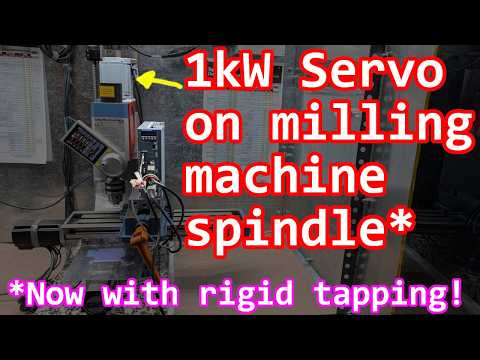
1kW AC servo as milling machine spindle motor #1000

Replies: 7 comments 24 replies

|
Hi @nickshl |

|
@terjeio, I have question about feedrate when linear and rotational axis mixed together. For example, to cut M3 thread with 15 mm down motion I used this command(starting point from 0):
Which is move 15 mm down along with 10800/360 = 30 rotations(M3 has pitch 0.5mm which two rotation per 1 mm). Looks like F in this case mean degree per minute, when I set F to 2 * 360 * 60 = 43200, it gives about 2 revolution per second. However, "The NIST RS274NGC Interpreter - Version 3" says:
It looks like F should be set in mm per minute for Z axis movement and A axis rotation should be synchronized to finish at the same time with Z. Am I missing something? |


|
Got it - "Rotary axis feed rate fix" in Web Builder changes feed rate from deg/min to mm/min for combined motion and it done that way to preserve backward compatibility since someone may rely on this bug. Question: why it done at build time rather than another setting in NVM? Is there a way for pendant to figure out if this fix applied? |

It just happened that way?
I have added RF to NEWOPT in the patch below. It will be there in the next commit too. |
@terjeio have you given a thought on this? Waiting for your remarks/comments. I have already tested rigid tapping rigorously using axis mode as explained by @nickshl. To make this machine fully compatible to the G-code, we need to somehow bind it with a gcode and the best way I feel is to call a macro say "tap.macro" just like we call "tc.macro" upon sending T2M6. We will play with all the variables related to speed, pitch, etc in the macro file. You are the best judge whether we should go with G84 (Fanuc and Haas) or G33.1 (linuxcnc). |
Kind of, it is giving me a headache from how to do it safely.
Call a G65 macro?
For non-grbl gcodes the primary go to spec is linuxcnc. Here is a patch that calls P331.macro on G33.1 if |
|
Thanks for quick actions @terjeio ! I could not get parser matter and exit handling via event. However, I will try your solution and learn from it. Right now I am using a G65 macro for rigid tapping which consumes one of my Axis (B). So I am not using Spindle Sync feature at all. I just switch to position control mode of servo drive when I start tapping and then I give the standard motion commands only which doesn't require spindle sync. E.g. G01 Z-10 B3600 F200 will make rigid tapping of 1mm pitch where B is in degrees. As both are axis, they have to move in sync only independent of they are accelerating, decelerating or moving at constant speed. For Power failure tap removal macro, my plan is:
What according to you best NVS parameters I can use for above storage? Thanks again for great help! |
Ok. FYI the patch currently only allow A and then when assigned as a stepper spindle. The patched gcode.c has to be modified to pass B values to the macro.
G33.1 needs a spindle sync capable spindle and there is a check for that. If the spindle is a stepper spindle then it should pass.
A new boolean, or a flag, is needed. An existing flag (unassigned or unused) could used now provided that it is settable from the macro, not sure if any are due to validation rules. If not a hidden(?) setting has to be added, either to the core or by a plugin, providing the access. If a flag in an existing value, like this, is to be used it should be reserved. |

|
Ok. But as per my experience, servo motors are not really performing good in stepper spindle mode. Especially acceleration and deceleration are felt harsh and makes noise. So, If I am getting it right, Stepper spindle can be tightly controlled using B axis command. I would like if the spindle run on 0-10V analog voltage mode and when G33.1 code is sent, it executes G331.macro which includes code for output a relay which changes servo mode from AVI to position control mode. I can connect any axis A or B which is spare with me, in that case as the commands will be given by macro file only. Thanks for your work, I will check it out with my machine. |
|
I "fixed" communication issues: Now, why do I used quotas when I said "fixed"? Because while I don't have any communication issues, I cant know for sure if it won't happen at some point because grblHAL uses plain protocol over UART and CNC machines is noisy environment. There even closed issue for that: Add a g-code checksum #440. While this issue wasn't resolved, but it pointed to ability to make a plugin for that. And I I made such plugin(Who am I lying to? Claude did it). At this point it works on both ends: grblHAL controller and pendant. It encapsulates all traffic into packets(SOH, seq, type, length, data and CRC), it checks CRC and acks/naks received packets in both directions and it do retransmission(up to 4 times) if packet nacked or ack wasn't received. As a bonus this plugin allow to change port, baud rate and encapsulation(Plain/Packetized) via controller settings(ioSender show it in "Aux ports" for some reason). I plan to work on it for a little bit and then I would like to add it as official plugin to grbHAL(and into WebBuilder of course). @terjeio, is it possible if I'll send you all files for this plugin? Also, what maximum line length grblHAL can receive or send? Is it defined by LINE_BUFFER_SIZE which 256 bytes(without null-terminator)? What length is and what realistically needed(I assume longest line from the controller is full status report)? |


I understand. This is simple plugin and it highly unlikely it will ever change unless grblHAL API will be changed in the future. I would like to include it to grblHAL as official plugin, so I would like you to crate repo Plugin_mpg_transport in grblHAL GitHub and include it as mpg_transport module to all drivers. It would keep all grblHAL related code in one place. If you against it, I could create repo in my account. |
|
I have added support for third party plugins for two main reasons, grblHAL can be extended and I do not have to take over support for code that I did not write. So please publish the code if you want to to be included in the Web Builder. Your readme is rather long winded, IMO split out the technical details in another document and leave a short description of what it does, limitations, settings and dependencies (one free UART port, compatible pendant). And add links to pendants that supports the protocol/transport if not already there? The readme is linked to via the FYI in the next commit I have added support for a few $-commands when the pendant is not in control (with the keypad plugin disabled), currently I understand you have a problem with handling large outputs from $-commands, one option for handling those could be to redirect the output to the RAM filing system and chunk it while reading it back. There is commented out/untested code available that could make it an option. |

You don't have to support code that you did not write. You still involved in case anything changed - at very least to pull plugin out of WebBuilder. Is WebBuilder pull code from 3rd party plugins automatically when those updated? Then I see a huge security risk - there at least should be another pair of eyes(or AI request) to check if update does what it claims to do and there is no any malicious code. Another question is what happens if plugin author deletes it? Or author account got deleted? Plugin will be lost and if people used it - they are screwed. What I see as a solution: either absorb plugins in grblHAL account, or, even better, create additional grblHAL-plugins account(organization?) and absorb plugins there as forks. And if anything happens with original repo, fork will become independent repo. If anything changed and plugin become obsolete - you pull it out of WebBuilder as you do now. Then plugin author can update it and you can sync fork after changes review. Also anyone else can improve or fix outdated plugin via pull request to original author repo or directly to fork repo. For example, if original author isn't interested to fix plugin, someone else can do that.
Here: https://github.com/nickshl/grblHAL_mpg_transport
Not really a problem, and only with $$ command that dump all settings at once. Plugin send 128 bytes max(can be lowered in settings) and wait for ack - it increase latency. If there will be a lot of data dumped at once(like $$ do), there some chance it will overflow the buffer. In this case plugin will drop those bytes, will send next message with seq + 2(that how other side can figure out there is a gap in data) and increase tx_qdrop counter which can be seen by $ MPG command. The simplest solution is just to increase buffer size to fit all $$ output. Buffer size can be set via MPG_TRANSPORT_TX_QUEUE_SIZE define(in case you may consider to add it as "advanced setting" into WebBuilder) and it is set to 2KB by default(if not defined) Another solution - MPG/DRO can read settings one by one using $ N command. For example, my pendant at this point requests all settings using $$ after it got control the first time, but parses only 10, 13, 22, 110-115, 30, 31, 32, and 376.
I uploaded latest version that support this transport: https://github.com/nickshl/SmartPendant |
I run a script to update the Web Builder.
Updates will fail and the last version is used for compilation if I do not delete it from the Web Builder.
You can create an account and maintain that for the community?
It is not my plan to review updates to plugins, the author should ensure that it works as intended.
What I change in the next commit is that this can be done even when the pendant is not in control. BTW your plugin is now added to the Web Builder as an option in Plugins MPG & DRO mode dropdown. If you want a different name for it tell me. |
Here we go: https://github.com/orgs/grblHAL-Plugins I set you as an owner too :) It maybe make sense to create repository for anyone who want add plugin into grblHAL and grant permissions for this repo to upload and maintain plugin. |
|
@terjeio, for some reason button "Generate and download firmware" doesn't work if "CRC ensured transport" is selected. It definitely worked yesterday... |
|
A bad copy/paste - fixed now. |


Uh oh!
There was an error while loading. Please reload this page.
Uh oh!
There was an error while loading. Please reload this page.
Turns out AC servo has position mode with Step/Dir control and Speed mode with RPM control via 0-10V(actually -10...+10V for direction control). And the best part: those servo has combined Position/Speed mode with switch between by digital input. So: we can connect Step/Dir to axis A, 0-10V connect to speed control and spindle enable signal use to switch between modes. When spindle enabled - spindle speed controls via M commands. When spindle is off we can control position using G1 and A axis, which makes rigid tapping possible.
This is how I did it on my Sieg X2:
All reactions