Flashing the Firmware
NaviCore targets the WCB v3.2 board (ESP32‑S3). There are several ways to get firmware onto a board: the in‑browser flasher (easiest), the ESP Flasher Companion desktop app, the Arduino IDE, or the build scripts / CI.
The config tool can flash a connected board directly over USB, pulling the latest compiled binaries from the repo's firmware/ folder.
- Open
config_tool/index.htmlin Chrome or Edge (Web Serial is required — Firefox/Safari won't work). - Plug the board in over USB.
- Go to Config → Firmware.
- The Firmware tab has four actions in two groups.
esptool flash — writes over Web Serial; you'll be prompted to enter bootloader mode (hold BOOT, tap RST, release BOOT):
-
⬆ Update Firmware — routine update. Writes the bootloader, partition table, and app, and resets the OTA boot selector (
otadata) toota_0, but never touches NVS or the LittleFS/config.jsonstore, so your saved configuration is preserved. -
⚠ Full Wipe & Flash — initial programming or recovery. Writes the same image and additionally erases NVS (
0x9000, the legacy/migration store). It does not erase the LittleFS config partition, so the current/config.jsonsurvives — to clear a bad config use Restore Defaults (RESET_DEFAULTS) instead. Use Full Wipe the first time you program a new board, or to recover from a bricked/corrupt board.
Over‑the‑air (OTA) — no BOOT/RST; streams the app into the board's inactive OTA slot live, then reboots into it (see Over-the-air updates below):
-
⚡ Update over USB (OTA) — updates the board you're directly connected to over the live serial session (
?OTALOCAL). Direct‑USB only. -
📡 Update over WCB (OTA) — updates a remote NaviCore through your USB‑tethered relay WCB, forwarded over ESP‑NOW (
?OTA). Via‑WCB only.
Both esptool modes write bootloader + partition table + app and reset the OTA boot selector (otadata @ 0xE000) to ota_0; the only difference is that Full Wipe additionally erases NVS (0x9000). Neither mode touches the LittleFS config partition. The flasher reuses the port you're already connected on (no second port picker) and reconnects to the board automatically once it reboots — no need to re‑select the port afterward.
The page fetches binaries from main by default. (Developers can target another branch by setting localStorage.rc_fw_branch = '<branch>' in DevTools.)
⚠️ The esptool flash (Update Firmware / Full Wipe & Flash) needs a direct USB connection — those two buttons are disabled while Via WCB is active. The OTA buttons mirror the transport instead: Update over USB (OTA) is enabled only on a direct‑USB link, and Update over WCB (OTA) is enabled only while Via WCB is active — it's the one firmware path that reaches a board through the bridge.
The two OTA buttons skip esptool entirely — no BOOT/RST, no bootloader mode. They fetch the same app image the esptool flash uses, stream it into the board's inactive OTA slot, verify it (SHA), flip the boot selector, and reboot into the new image. Only the app is updated this way; the bootloader and partition table are not (run an esptool flash if either of those changed).
- ⚡ Update over USB (OTA) — for the board you're directly connected to. The image streams over the live serial session, so there's no port re‑pick and the tool reconnects across the reboot automatically. The first update erases the ~2 MB inactive slot before streaming, which can block the board for up to ~40 s. Requires a direct USB connection.
- 📡 Update over WCB (OTA) — for a remote NaviCore you can't reach over USB. Your USB‑tethered relay WCB forwards the image over ESP‑NOW to the target, which writes its inactive slot, verifies, ACKs, and reboots on its own. The relay WCB does not reboot — only the remote NaviCore does — so there's no USB reconnect. Enabled only while Via WCB is active. See Remote Management over WCB.
A small desktop app (greghulette/ESP-Flasher-Companion) that flashes the WCB‑family boards — WCB, NaviCore, and the SBUS Controller — over USB from a single window. Each board row has its own port, a Build + Flash, a Restore Bootloader, and an Identify button, with a shared flash log.
Why it matters for NaviCore: Build + Flash writes the custom short‑WDT bootloader and the partition table (plus OTA data and the app) — not just the app — the same bootloader/partition pairing the WCB hardware needs. Restore Bootloader re‑installs just that bootloader if a stock one ever overwrites it. It flashes with --after watchdog-reset so the ESP32‑S3 doesn't bounce straight back into download mode after writing.
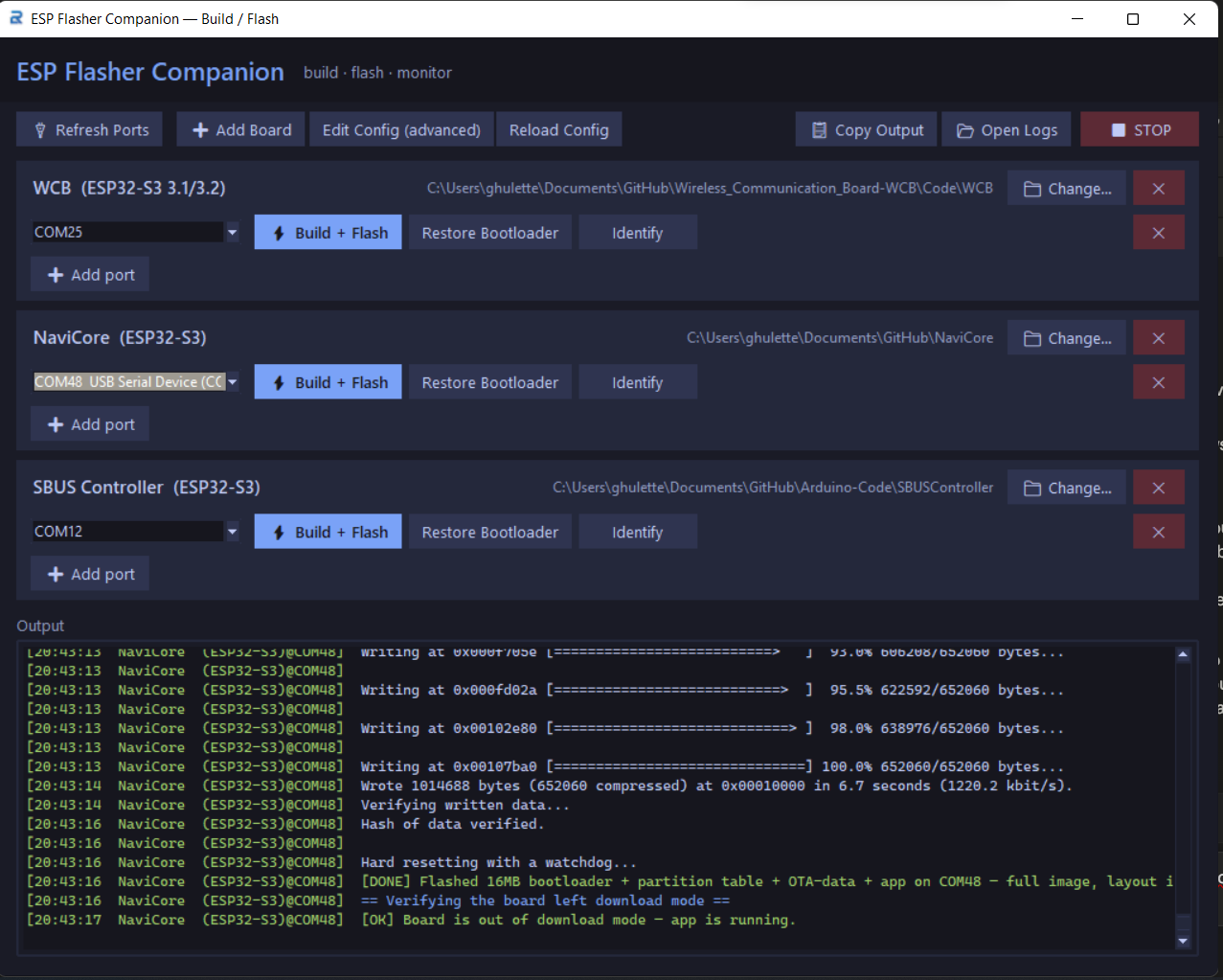
- Open
NaviCore.inoin the Arduino IDE. - Tools → Board → ESP32S3 Dev Module (or your usual WCB v3.2 board definition).
-
Tools → USB Mode → Hardware CDC and JTAG (
USBMode=hwcdc) — the WCB v3.2's OTG USB‑C port is wired to the ESP32‑S3's native USB pins. Without this,Serialroutes to the UART bridge instead and the OTG port stays silent (web‑flashed builds then look "dead"). This is the IDE default, but set it explicitly. -
Tools → USB CDC On Boot → Enabled (so
Serialis native USB‑CDC; the firmware relies on this for the SBUS‑out UART allocation). - Tools → Flash Size → 16 MB (128 Mb) — required by the custom partition table below.
-
Tools → Partition Scheme → Custom — uses the
partitions.csvin the sketch folder (PartitionScheme=custom). It's the stockmin_spiffslayout (ota_0/ota_1app slots + a 128 KBspiffsconfig LittleFS) plus a 12 MBclipsLittleFS at0x400000for the record/replay clip library. Build with a stock scheme (or 4 MB flash) and theclipspartition is missing — record/replay clips then fall back to RAM‑only. - Tools → PSRAM → OPI PSRAM — required. The firmware allocates its ~210 KB runtime configuration in external PSRAM at boot; if PSRAM is disabled (or set to QSPI) the allocation fails and the board halts with a solid red status LED. The WCB v3.2's ESP32‑S3‑WROOM‑1 N16R8 module has 8 MB of octal PSRAM, hence "OPI".
-
Sketch → Upload, or Export Compiled Binary to produce the
.binfiles.
Install via Library Manager (versions pinned to match CI — ArduinoJson must be v7; v6's DynamicJsonDocument allocation behavior breaks SET_CONFIG parsing):
- ArduinoJson (Benoit Blanchon) — 7.4.3
- EspSoftwareSerial — 8.1.0 (for S3/S4)
- Adafruit NeoPixel — 1.15.4
- PololuMaestro
Local libraries (drop into your sketchbook libraries/ folder — CI installs these straight from GitHub):
-
WCB_Client + WCBStream (from the
greghulette/WCBClientrepo) -
WcbCmd (from the
greghulette/WcbCmdrepo) — the shared device‑command translators (Maestro / MP3 / WLED / HCR). The firmware#includesWcbCmd.h, so a build without it won't compile.
The exact library set + versions live in
.github/workflows/build-firmware.yml— that workflow is the source of truth, so check there if a build ever disagrees with this list.
-
CI (default): every push triggers
.github/workflows/build-firmware.yml, which compilesNaviCore.inofor ESP32‑S3, reads the version fromfw_version.h, and commits the three.binfiles back intofirmware/(tagged[skip ci]). Once that lands onmain, the in‑browser flasher can use it. -
Local: run
tools/build-firmware.ps1(Windows) ortools/build-firmware.sh(Linux/macOS/WSL). Both wraparduino-cliwith the correct FQBN + partition scheme and drop versioned bins intofirmware/. Prereqs:arduino-cli, theesp32core, and the library set from the CI workflow.
CI commits three per‑build files each release, matched by suffix (the version prefix changes every build) — but the in‑browser flasher writes only the app and partition table from that set; at 0x0 it flashes a fixed‑name custom bootloader instead:
| File | Flash address | Purpose |
|---|---|---|
…_ESP32S3.bin |
0x10000 |
Application image (ota_0) |
WCB_S3_custom_bootloader_16MB_wdt3s.bin |
0x0 |
Second‑stage bootloader (custom short‑WDT 16 MB) |
…_ESP32S3_part.bin |
0x8000 |
Partition table |
⚠️ At0x0the flasher writes the fixed‑nameWCB_S3_custom_bootloader_16MB_wdt3s.bin, not the per‑build…_ESP32S3_boot.bin. That tagged boot bin is the stock ESP32‑S3 bootloader and is deliberately ignored — flashing it at0x0by hand installs the wrong bootloader. The custom one has a short watchdog timeout (cold‑boot auto‑retry) matched to the firmware's in‑app boot guard, the same bootloader Option 2's Restore Bootloader reinstalls.
NVS lives at 0x9000; OTA data at 0xE000; the saved config now lives in the LittleFS data (spiffs) partition. Update Firmware leaves all of them alone; Full Wipe & Flash erases NVS and OTA data only — the LittleFS config partition is untouched by either mode.
The version lives in fw_version.h at the repo root:
#define FW_VERSION_BASE  "v0.2.0"         // bump by hand for releases
#define FW_VERSION_DTG   "011009QJUN26"   // auto-stamped by the pre-commit hook
#define FW_VERSION FW_VERSION_BASE "_" FW_VERSION_DTG-
FW_VERSION_BASE— semver; edit by hand when cutting a release (v0.2.0 → v0.2.1 → v0.3.0 → v1.0.0). -
FW_VERSION_DTG— a Date‑Time‑Group stamped automatically bytools/git-hooks/pre-commiton every commit. Don't edit by hand.
The build embeds both into the .bin filename, and the firmware reports FW_VERSION in its boot banner and in the PONG reply — so the file on disk, the running version, and the source header always match. The config tool shows the connected board's version in its footer and on the Firmware tab.