✅ Automatic interface detection – the plugin tests all HID interfaces of your Logitech G923 and automatically selects the one that accepts LED commands. Works with both PlayStation/PC and Xbox/PC versions of the wheel.
✅ Native SimHub integration – LED behavior is fully configurable through the standard SimHub RPM LED settings. The plugin automatically uses the RPM LED configuration defined in SimHub.
✅ Real-time RPM LEDs – LEDs react instantly to engine RPM data provided by SimHub.
✅ Zero configuration – simply install the required files, close Logitech G HUB, and launch SimHub.
✅ Game agnostic – works with every title that provides RPM data to SimHub, including Assetto Corsa, Assetto Corsa Competizione, iRacing, BeamNG.drive, Forza Motorsport, Euro Truck Simulator 2, and many others.
Watch the plugin in action on YouTube:
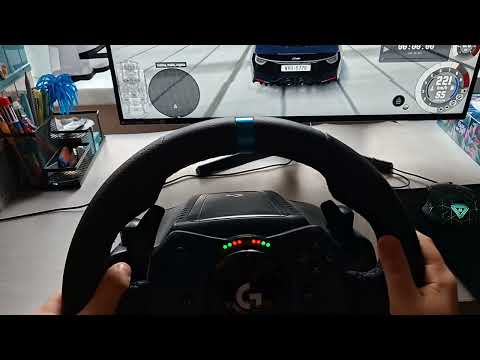
The video demonstrates plugin installation, SimHub configuration, and RPM LED operation on the Logitech G923 wheel.
Required files:
- G923LedPlugin.dll
- HidSharp.dll
Default location:
C:\Program Files (x86)\SimHub\
Copy the following files into the SimHub installation folder:
G923LedPlugin.dllHidSharp.dll
- Connect your Logitech G923 wheel to your PC.
- Start Logitech G HUB once and wait for wheel calibration to complete.
- Close G HUB completely (right-click the tray icon → Quit).
lghub.exe, lghub_agent.exe, or related Logitech processes remain running in Task Manager.
Run SimHub normally. If you encounter permission-related issues, try running it as Administrator.
- Open Settings → Plugins
- Find G923 LED Plugin
- Make sure the plugin is enabled
The LEDs will activate automatically when telemetry data is received from a supported game.
The plugin reads RPM data directly from SimHub and controls the five RPM LEDs built into the Logitech G923 wheel.
Unlike earlier versions, LED behavior is no longer hardcoded. The plugin now follows the RPM LED configuration configured in SimHub, including:
- RPM activation thresholds
- Progressive LED lighting
- Shift indicator settings
- Blinking behavior
- LED timing and animation settings
This allows you to customize the LEDs using SimHub's familiar interface without modifying or recompiling the plugin.
All LED settings are configured directly within SimHub:
**Settings → Car settings → Redline and shift lights
The plugin automatically synchronizes with your SimHub RPM LED configuration.

No source-code modifications are required.
- Verify that SimHub is receiving RPM telemetry from the game.
- Ensure the plugin is enabled in SimHub.
- Make sure
HidSharp.dllis present in the SimHub folder. - Completely close Logitech G HUB before starting SimHub.
- Run SimHub as Administrator.
- Reconnect the wheel.
- Try a different USB port (USB 2.0 ports are often the most reliable).
The plugin depends on RPM data supplied by SimHub.
Check whether the RPM gauge in SimHub updates while the game is running. Some games require additional telemetry, shared memory, or UDP settings to be enabled.
- Re-copy
HidSharp.dllinto the SimHub folder. - Reinstall the Logitech G923 drivers.
- Disconnect and reconnect the wheel.
This project is licensed under the MIT License.
You are free to use, modify, and distribute the software under the terms of the license.
- SimHub – the excellent sim racing dashboard and telemetry platform.
- HidSharp – .NET HID communication library.
- Logitech – for the G923 racing wheel.
For bug reports, feature requests, or suggestions, please open an issue on GitHub.
Pull requests are welcome.
Happy racing! 🏁