Keybindings Reference
Complete quick reference guide for all HalpTask shortcuts, Vim motions, and Leader key (<space>) popup combinations.
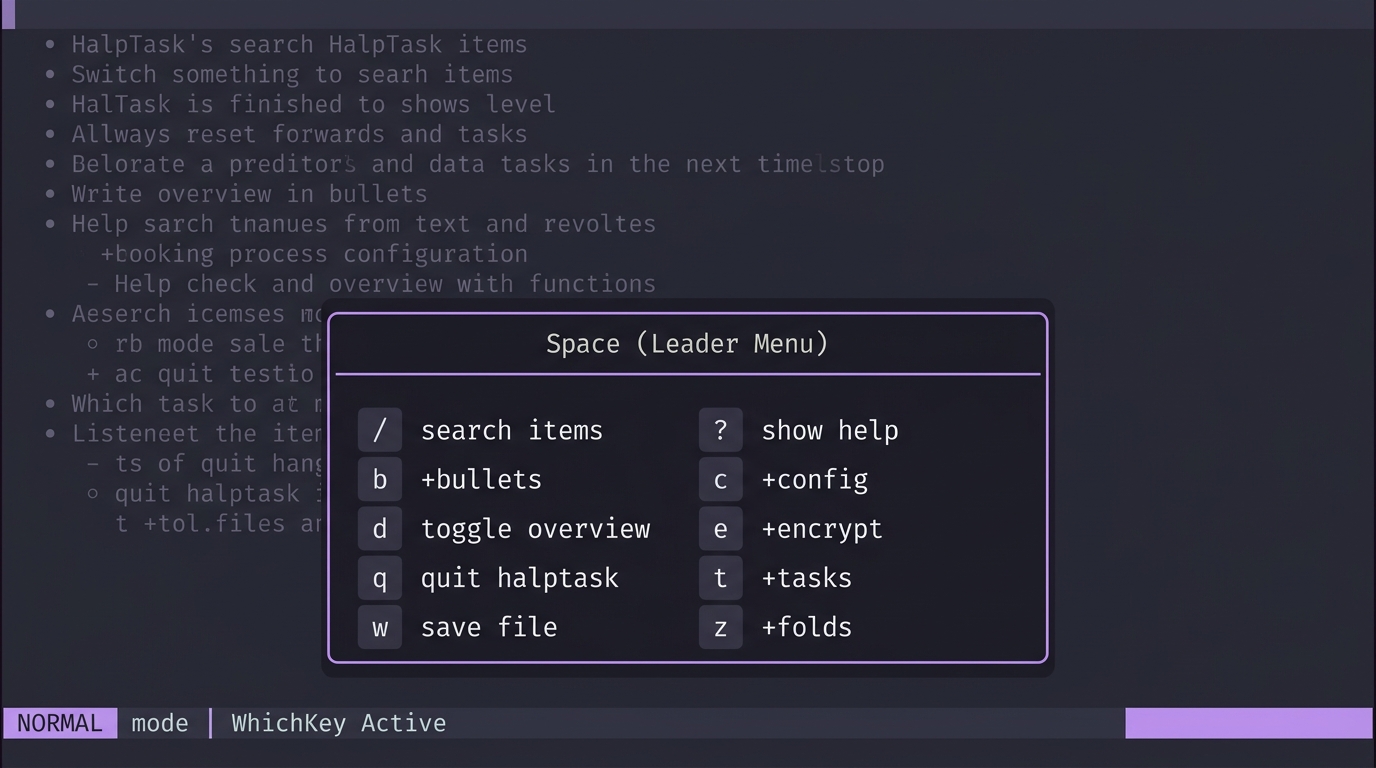
Pressing <space> triggers the interactive WhichKey popup window.
| Shortcut | Action | Category | Description |
|---|---|---|---|
<space> b n |
New bullet below | Bullets | Creates a new bullet point directly below selection |
<space> b N |
New bullet above | Bullets | Creates a new bullet point directly above selection |
<space> b c |
Add child bullet | Bullets | Creates a sub-bullet as a child of current selection |
<space> b e |
Edit bullet text | Bullets | Edits current bullet point text in insert mode |
<space> b d |
Delete bullet | Bullets | Deletes selection and its entire subtree |
<space> b i |
Indent bullet | Bullets | Demotes bullet to child of preceding sibling (Tab) |
<space> b o |
Unindent bullet | Bullets | Promotes bullet up one level (Shift+Tab) |
<space> b j |
Move down | Bullets | Swaps position with next sibling |
<space> b k |
Move up | Bullets | Swaps position with previous sibling |
<space> b t |
Toggle task | Bullets | Converts bullet to task or cycles status |
<space> b D |
Toggle default type | Bullets | Switches default creation mode (bullet <-> task) |
| Shortcut | Visual Status | Action | Description |
|---|---|---|---|
<space> t t |
[ ] / •
|
Toggle task | Converts between bullet • and task [ ]
|
<space> t c |
[ ]➔[~]➔[x]
|
Cycle status | Cycles status: Todo ➔ In Progress ➔ Done ➔ Todo |
<space> t s |
[ ] |
Mark Todo | Sets status to Todo (Gray empty box) |
<space> t p |
[~] |
Mark In Progress | Sets status to In Progress (Orange ~) |
<space> t d |
[x] |
Mark Done | Sets status to Done (Green X, strikethrough) |
<space> t f |
🎯 |
Current Focus | Toggles current focus task status and displays Focus Banner |
<space> t a |
🏷️ |
Manage tags | Opens interactive Tag / Label Manager modal |
<space> n / <space> t n
|
📝 |
Task Notes | Opens interactive Task Markdown Note modal |
<space> t h |
👁️ |
Filter completed | Toggles hiding/showing completed [x] tasks |
<space> t D |
⚙️ |
Toggle default | Switches default creation mode (bullet <-> task) |
| Shortcut | Action | Category | Description |
|---|---|---|---|
Esc / q
|
Exit Focus Mode | Focus | Instantly exits focus mode and clears top Focus Banner |
<space> f o |
Toggle / Exit Focus Mode | Focus | Toggles current focus task status and displays top Focus Banner |
<space> f f |
Toggle / Exit Focus Mode | Focus | Toggles current focus task status and displays top Focus Banner |
<space> f c |
Clear Focus | Focus | Clears current focus task and removes top Focus Banner |
| Shortcut | Action | Description |
|---|---|---|
<space> z c |
Close fold | Collapses sub-bullets of selected node |
<space> z o |
Open fold | Expands sub-bullets of selected node |
<space> z a |
Toggle fold | Toggles fold state of selected node |
<space> z z |
Zoom / Hoist | Hoists focused subtree or returns to full view |
<space> z M |
Close all folds | Folds every nested node across entire document |
<space> z R |
Open all folds | Unfolds every node across entire document |
<space> z M |
Close all folds | Folds every nested node across entire document |
<space> z R |
Open all folds | Unfolds every node across entire document |
| Shortcut | Action | Category | Description |
|---|---|---|---|
<space> a a |
Archive selected item | Archive | Archives the selected bullet/task and its entire subtree |
<space> a c |
Archive completed tasks | Archive | Archives all completed [x] tasks across the entire tree |
<space> a v / <space> a r
|
View / restore archive | Archive | Opens interactive Archive View modal to search, restore, or delete archived items |
| Shortcut | Command | Description |
|---|---|---|
<space> c c |
Config Dashboard | Opens interactive, keyboard-navigable configuration modal |
<space> c a |
Toggle Auto-Save | Turns background auto-save on/off |
<space> c d |
Toggle Default Item | Switches default node creation type (bullet <-> task) |
<space> c D |
Toggle Dashboard | Toggles side overview stats panel |
<space> c t |
Cycle Theme | Cycles visual color palette (default, tokyonight, catppuccin, dracula, nord) |
<space> c w |
Toggle WhichKey | Shows or hides Leader WhichKey popup menu |
<space> c e |
Edit Config File | Launches $EDITOR on ~/.config/halptask/config.yaml with auto-reload |
| Shortcut | Action | Description |
|---|---|---|
<space> d |
Toggle Dashboard | Toggles side stats dashboard panel |
<space> e e |
Toggle Encryption | Toggles AES-256-GCM encryption on file save |
<space> e p |
Set Passphrase | Sets or changes file encryption passphrase |
<space> g i |
Jump to ID | Opens prompt to jump directly to any task/bullet by permanent ID |
<space> w / ww
|
Save File | Saves current document to disk |
<space> s |
Save File | Saves current document to disk |
<space> / |
Search | Opens interactive search input bar |
<space> ? |
Help Modal | Displays on-screen keymap cheat sheet |
<space> U |
Check Update | Checks for and prompts to install software updates |
<space> q |
Quit | Saves file and exits HalpTask |
Single and double-character Vim motions available directly in Normal Mode:
| Key | Action | Description |
|---|---|---|
j or ↓
|
Move down | Moves selection cursor down |
k or ↑
|
Move up | Moves selection cursor up |
h or ←
|
Parent / Close fold | Closes fold or jumps to parent node |
l or →
|
Child / Open fold | Opens fold or jumps to first child node |
gg |
Jump top | Jumps cursor to top of document |
G |
Jump bottom | Jumps cursor to bottom of document |
gi |
Jump to ID | Opens prompt to jump directly to any task/bullet by permanent ID |
ff |
Zoom / Hoist | Hoists focused subtree or returns to full view |
| Key | Action | Description |
|---|---|---|
oo |
New below | Creates new bullet below and enters insert mode |
oc |
Add child | Creates new child bullet (subtask) and enters insert mode |
O |
New above | Creates new bullet above and enters insert mode |
i / a / e
|
Edit text | Edits text of selected bullet |
c |
Clear line | Clears text & enters insert mode |
dd / x
|
Delete bullet | Deletes selected bullet and all its sub-bullets |
Tab or >
|
Indent | Demotes bullet to child of preceding sibling |
Shift+Tab or <
|
Unindent | Promotes bullet to sibling of parent |
J |
Move down | Swaps position with next sibling |
K |
Move up | Swaps position with previous sibling |
t |
Cycle task | 1-Key task conversion & status cycle (• ➔ [ ] ➔ [~] ➔ [x]) |
fo / tf
|
Toggle Focus | Toggles current focus task status and shows Focus Banner |
T |
Manage tags | Opens Tag & Label Manager modal |
fc |
Filter completed | Toggles hiding/showing completed [x] tasks |
da |
Delete completed | Purges all completed [x] tasks from document |
u |
Undo | Undoes last tree mutation |
Ctrl+r |
Redo | Redoes last tree mutation |
/ |
Search | Opens search filter bar |
Enter |
Toggle fold | Toggles fold state of selected node |