Home
(1) To enable WebSocket communication from VBA, please import the one standard module starting with "BiDi_" and the two class modules starting with "BiDi" into the SeleniumVBA file you wish to use.

(2) Add the following description to the main routine of your standard module. That is all. Introduction has become significantly easier from ver. 7.2.
Dim driver As WebDriver: Set driver = New WebDriver
With driver

  ' Start
  .StartChrome

  ' Browser startup settings (for both Chrome and Edge)
  Dim caps As WebCapabilities: Set caps = .CreateCapabilities
  caps.EnableBiDiMode ' WebDriver BiDi becomes enabled

  ' Open
  .OpenBrowser caps

  ' Perform WebSocket communication to use WebDriver BiDi
  Dim bidi As New BiDiCommandWrapper
  bidi.ConnectTo .GetWebSocketUrl

  ' Typing "bidi." will display BiDi-specific methods
  bidi.
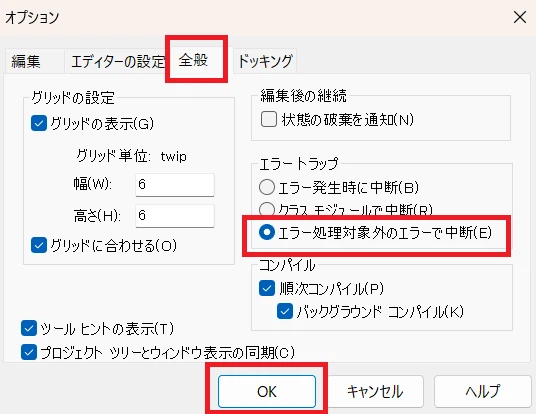
(3) Set the VBE error trapping to "Break on Unhandled Errors."
In this article, I will introduce particularly powerful and practical major APIs from the VBA class BiDiCommandWrapper, which fuses the WebDriver BiDi protocol and CDP (Chrome DevTools Protocol).
This page reflects the v4.1 API and runtime behavior.
| Category | API Name | Overview (Detailed Version) |
|---|---|---|
| Navigation | ExecuteNavigateAndGetStatus |
Navigates and, by default, returns the actual correlated HTTP status of the main document. Missing HTTP-status correlation or navigation failure is surfaced as an error; requireHttpStatus:=False performs navigation without status capture and returns an empty string. |
ExecuteTraverseHistory |
Moves backward or forward through browsing history by a signed delta. After the BiDi command returns, the wrapper performs bounded URL/SPA synchronization without replaying an ambiguous state-changing traversal. | |
| Element Operation | ExecuteClickByXPath |
Scrolls into the display area, focuses, and clicks. It automatically waits for communication to stabilize after the action, enabling extremely stable operation. |
ExecuteInputValueByXPath |
Performs guarded text input for modern controlled inputs. The default path inserts text character by character after focus/target validation; optional native WebDriver BiDi key actions are also available. | |
ExecuteSelectValueByXPath |
Operates both standard <select> elements and custom dropdowns exposing visible role="option" items. Standard selects support Value or display-text selection; custom options are resolved strictly by visible text. |
|
ExecuteSetFileSelectionViaDialog |
Handles file-selection flows where clicking a visible trigger opens a native file chooser and the underlying input[type=file] may be short-lived. It captures input.fileDialogOpened, applies the selected file(s) with BiDi input.setFiles, and then performs SPA synchronization. A completion signal is strongly recommended once site-specific completion evidence is known; without one, the operation can run in ungated discovery mode so the Discovery Log can reveal suitable completion evidence. |
|
ExecuteRegisterAutoClickerByXPath |
Uses WebDriver BiDi script.addPreloadScript to station a "silent observer" inside the browser. It clicks elements as soon as they appear without waiting for VBA communication. This is useful for high-speed SPA redirects or transient pop-ups. |
|
| Download | ExecuteDownloadByXPath |
Clicks one download trigger exactly once and waits for the correlated WebDriver BiDi download transaction to reach the browser-reported terminal state complete or canceled. It correlates browsingContext.downloadWillBegin with the matching browsingContext.downloadEnd and does not replay an ambiguous trigger. |
SetDownloadFolder |
Sets a global download destination for the current browser session through browser.setDownloadBehavior. The destination folder must already exist. |
|
SetDownloadDenied |
Denies browser downloads through browser.setDownloadBehavior. A denied download is still observable through ExecuteDownloadByXPath as terminal status canceled. |
|
ClearDownloadBehavior |
Clears the wrapper-owned global download behavior override and restores the browser/default download policy. Shutdown also performs best-effort cleanup when an override remains active. | |
| Information Retrieval | ExecuteGetTextByXPath |
Returns normalized textContent from the first element matching the XPath. Consecutive whitespace is collapsed and leading/trailing whitespace is removed. |
ExecuteGetAttributeByXPath |
Returns an element attribute. A missing attribute is returned as Null, while an existing empty attribute is returned as an empty string. |
|
ExecuteGetPropertyByXPath |
Returns a scalar DOM property such as value, checked, or selectedIndex. Strings, Booleans, numbers, and Null are supported. |
|
ExecuteGetOuterHtmlByXPath |
Returns the complete outerHTML of the first element matching the XPath, which is useful for diagnostics and structural inspection. |
|
| Special/Hierarchical | GetIframeContextIdByUrl |
Identifies iframe by URL. By passing the obtained ID to other methods, you can operate directly inside the frame without using SwitchTo. |
ExecuteFindWindowContextId |
Finds an already-created popup, new tab, or window by a partial URL or title and returns its contextId. It waits internally for the target context, so an external fixed delay is normally unnecessary. |
|
ExecuteOpenNewContextByXPath |
Resolves and clicks one trigger exactly once, captures the newly created top-level browsing context through browsingContext.contextCreated, correlates it with the owner context, and returns detailed tab/window metadata. |
|
SetMainContextId |
Explicitly pins a surviving top-level browsing context as the wrapper's main context. Child contexts and unknown context IDs are rejected. | |
GetMainContextId |
Returns the currently pinned main browsing context. If that pinned context has been destroyed, the wrapper reports the lost-main-context state rather than silently switching to another window. | |
ExecuteGetTitleByContextId |
Reads document.title from an explicitly specified browsing context without changing the wrapper's pinned main context. |
|
ExecuteCloseContext |
Closes the specified browsing context. Closing the pinned main context also clears the wrapper's current main-context binding. | |
ExecuteShadowClick |
Recursively searches and penetrates hidden Shadow DOM using an array of CSS selectors. This enables operation of modern sites with Web Components structures. | |
| SPA Synchronization | ArmContentSignal |
Opens a one-shot completion gate when the subtree of an existing element is rewritten. This prevents the SPA wait from ending before delayed rendering begins. |
ArmNetworkSignal |
Opens a one-shot completion gate when a matching API response arrives. This is useful when a specific response provides reliable evidence that an operation has completed. | |
ArmVisibilitySignal |
Opens a one-shot completion gate when a new or hidden element becomes visible. This is useful for result panels, dialogs, and dynamically inserted controls. | |
| Management/Optimization | AddIdleIgnoreSelector |
Excludes DOM mutations inside elements matching a CSS selector from SPA-idle detection. This is useful for clocks, animations, and other continuously updated regions that are unrelated to operation completion. |
AddIdleIgnoreNetworkPattern |
Excludes matching network requests from SPA-idle detection. Because the requests are not blocked, telemetry and high-frequency background traffic can be ignored without changing page behavior. | |
ExecuteEnableResourceBlocking |
Blocks the loading of images, ads, etc. Minimizes network load and dramatically improves execution speed. | |
ExecuteWebExtensionInstall |
Installs a browser extension dynamically through WebDriver BiDi webExtension.install, with protocol-response validation. |
|
AllowUiPump |
Controls guarded Office DoEvents during connection and command-correlation waits. Default: False. Set to True only when UI responsiveness is required during long synchronous waits and VBA re-entry is acceptable. |
|
| AI Collaboration | StartDiscoveryLog |
Records browser communication, errors, DOM changes, and SPA signal activity in detail. Outputs "AI-Ready" logs that LLMs such as Gemini or ChatGPT can use to diagnose causes and propose suitable wait conditions. |
StopAndSaveDiscoveryLog |
Drains queued events, stops Discovery Log recording, and saves the result as a UTF-8 file without a BOM. The specified output file is overwritten if it already exists. |
ExecuteNavigateAndGetStatus(targetUrl, [waitNetworkIdle], [minStableMs], [maxTimeoutMs], [contextId], [requireHttpStatus])
Navigates to the specified URL. With requireHttpStatus:=True (Default), the wrapper temporarily observes network.responseStarted, correlates it with the navigation, and returns the actual HTTP status of the main document as a String. HTTP responses such as "404" are returned normally; navigation failures and cases where a real correlated HTTP status cannot be obtained raise an error instead of fabricating "500".
When waitNetworkIdle:=True, the wrapper also performs its bounded SPA synchronization after the navigation. When requireHttpStatus:=False, HTTP-status capture is skipped; the navigation and optional settlement still run, and the method returns an empty string.
- targetUrl (String): Destination URL.
- waitNetworkIdle (Boolean): Whether to perform post-navigation SPA synchronization (Default: True).
- minStableMs (Long): Required quiet period after network and DOM activity stop (Default: 500 ms).
- maxTimeoutMs (Long): Maximum time allowed for the post-navigation synchronization (Default: 10000 ms; sanitized up to 600000 ms).
- contextId (String): Optional target tab or frame context.
-
requireHttpStatus (Boolean): Whether a real correlated main-document HTTP status is required (Default: True). If False, the method returns
"".
Dim status As String

status = bidi.ExecuteNavigateAndGetStatus("https://example.com/dashboard")

If status = "200" Then
    Debug.Print "Navigation and SPA rendering successful"
Else
    Debug.Print "HTTP status: " & status
End If
v4.1 note: This method no longer uses synthetic
"200"/"500"results. A protocol/navigation failure is raised as an error, while an actual HTTP error response such as404is returned as its real status.
Moves backward or forward through the current browsing context's session history by calling the WebDriver BiDi browsingContext.traverseHistory command.
-
delta (Long): Number of history entries to move. Use a negative value to go back and a positive value to go forward.
0is invalid. - waitNetworkIdle (Boolean): Whether to perform SPA synchronization after the traversal (Default: True).
- minStableMs (Long): Required quiet period after network and DOM activity stop.
- maxTimeoutMs (Long): Maximum time allowed for the post-traversal synchronization.
- contextId (String): Optional target tab or frame context.
' Move back one history entry
bidi.ExecuteTraverseHistory -1

' Move forward one history entry
bidi.ExecuteTraverseHistory 1
The BiDi specification allows browsingContext.traverseHistory to return before the destination is fully restored. For this reason, the wrapper follows the command with bounded URL and SPA synchronization.
History traversal is state-changing. If a transport timeout, disconnection, or context-loss error makes the result ambiguous, the wrapper does not resend the command, recover it against another context, or retarget it to the current main context. This prevents an unintended second Back or Forward operation. When the restored page has a known completion condition, verifying a destination-specific element is still recommended.
Ensures execution in the order of "Auto-scroll to view" → "Focus" → "Click". Because it automatically performs synchronous waiting until any asynchronous communication triggered by the operation ends, extremely stable continuous operation is possible.
- xpath (String): XPath to identify the target element.
- searchTimeoutMs (Long): Maximum wait time for the element to appear (milliseconds).
- waitNetworkIdle (Boolean): Whether to wait for communication updates after clicking.
' Reliable click including scroll and communication wait
bidi.ExecuteClickByXPath "//button[@id='submit-order']"
ExecuteInputValueByXPath(xpath, valueToSet, [searchTimeoutMs], [waitNetworkIdle], [minStableMs], [maxTimeoutMs], [contextId], [useKeyEvents], [useNativeKeys])
Inputs text while protecting against stale or replaced input targets. The default useKeyEvents:=True path focuses the control and inserts the requested text character by character, allowing controlled inputs to observe progressive changes instead of relying on a single .value overwrite.
If useNativeKeys:=True, the method uses WebDriver BiDi input.performActions for native key input. If useKeyEvents:=False, it uses the historical JavaScript execCommand/fallback input path. useNativeKeys takes precedence when both options are specified.
' Default guarded character-by-character input
bidi.ExecuteInputValueByXPath "//input[@id='username']", "vba_user"

' Optional native WebDriver BiDi key actions
bidi.ExecuteInputValueByXPath _
    "//input[@id='username']", _
    "vba_user", _
    useNativeKeys:=True
ExecuteSelectValueByXPath(xpath, valueOrText, [selectByText], [searchTimeoutMs], [waitNetworkIdle], [maxTimeoutMs], [contextId])
Operates both standard HTML <select> elements and custom dropdown controls.
For a standard <select>, the method can select by internal Value or by displayed text and dispatches the required change/input events. For a non-select dropdown, it opens the control and resolves a unique visible role="option" whose normalized text exactly matches valueOrText; ambiguous visible matches are rejected instead of guessed.
' Standard <select>: select by displayed text
bidi.ExecuteSelectValueByXPath _
    "//select[@name='calselect']", _
    "2026年03月", _
    True

' Custom dropdown: open the control and choose a unique visible role=option
bidi.ExecuteSelectValueByXPath _
    "//*[@id='country-dropdown']", _
    "Japan"
ExecuteSetFileSelectionViaDialog(triggerXPath, filePaths, [searchTimeoutMs], [fileDialogTimeoutMs], [minStableMs], [maxTimeoutMs], [contextId])
Handles file-selection flows where the HTML input[type=file] is created only after the user-facing attachment button is clicked and may exist only for a very short time. Instead of requiring VBA to locate that transient input directly, this method follows the browser's file-dialog flow.
Internally, the operation proceeds as follows:
- Resolves
triggerXPathand clicks the trigger using a trusted WebDriver BiDi pointer action. - Suppresses the Chromium native file chooser with the narrowly scoped CDP command
Page.setInterceptFileChooserDialog(enabled=true, cancel=false). - Observes the WebDriver BiDi
input.fileDialogOpenedevent. - Obtains
event.element.sharedIdfrom the event and applies the file path(s) using BiDiinput.setFiles. - Releases the native-picker interception and performs the final SPA synchronization.
Important: The name FileSelection is intentional.
input.setFileschanges the selected files of the HTML file input; it does not by itself mean that the web application's upload or subsequent processing has completed.Once a reliable application-level completion condition is known, arming
ArmNetworkSignal,ArmContentSignal, and/orArmVisibilitySignalis strongly recommended. However, an arm is deliberately not required before calling this method.With no active completion signal, the method performs an ungated idle-only synchronization. When Discovery Log recording is enabled, this first run acts as a discovery pass: its DOM and network activity can be used to identify a suitable completion signal for the next run. This follows the project's log-driven observe → arm → re-measure tuning cycle.
- triggerXPath (String): XPath of the visible button or element that opens the file chooser.
- filePaths (Variant): File path or file paths to select. When multiple files are supplied, the target file input must support multiple selection.
- searchTimeoutMs (Long): Maximum time to find the trigger element (Default: 10000 ms).
-
fileDialogTimeoutMs (Long): Maximum time to wait for
input.fileDialogOpenedafter the trigger is clicked (Default: 10000 ms). - minStableMs (Long): Required quiet period after the armed completion signal(s) have been satisfied.
- maxTimeoutMs (Long): Maximum time allowed for the final SPA synchronization.
- contextId (String): Optional target tab, popup, or iframe context. The completion signal must be armed for the same context.
Dim attachPath As String
attachPath = "C:\temp\report.pdf"

' Optional but recommended once the site's completion evidence is known.
' Replace the URL pattern with one appropriate for the target site.
bidi.ArmNetworkSignal "/api/upload"

' Click the attachment button, capture the file-dialog event,
' select the file, and then perform SPA synchronization.
bidi.ExecuteSetFileSelectionViaDialog _
    "//button[@id='attach-file']", _
    attachPath
When the correct completion condition is not yet known, the method can also be run without an arm while Discovery Log recording is enabled:
bidi.StartDiscoveryLog

bidi.ExecuteSetFileSelectionViaDialog _
    "//button[@id='attach-file']", _
    attachPath

bidi.StopAndSaveDiscoveryLog "C:\temp\discovery_log.txt"
Inspect the resulting DOM and network activity, choose a concrete completion signal, arm it, and then run the same operation again. An ungated STABLE result is diagnostic rather than proof that application-level processing completed, because both "the application finished" and "the application ignored the change" can end in a quiet state.
Use ExecuteSetFilesByXPath when the input[type=file] itself can be located reliably. Use ExecuteSetFileSelectionViaDialog when the normal user flow begins by clicking a visible attachment control and the actual file input is transient or otherwise difficult to address directly.
The trigger click and input.setFiles are state-changing operations and are not blindly replayed after an ambiguous result. If file selection succeeds but the final completion wait fails, the raised error indicates that application work may already have started, so the entire file-selection operation should not simply be retried.
Registers a persistent JavaScript-based MutationObserver through WebDriver BiDi script.addPreloadScript. The script is installed for newly created documents and frames before ordinary VBA-side element lookup begins, allowing transient controls to be handled without waiting for an additional VBA round-trip.
' Example: Handle a "Save Successful" popup that might appear after any action
bidi.ExecuteRegisterAutoClickerByXPath "//button[text()='Dismiss']"

' Proceed with standard automation without worrying about the popup timing
bidi.ExecuteClickByXPath "//input[@id='save-records']"Triggers one browser download and waits for that specific transaction to reach a terminal state using WebDriver BiDi events.
Unlike filesystem polling, this method does not repeatedly check whether a file has appeared on disk or whether a temporary download file has disappeared. Instead, it observes the browser's own download lifecycle:
Trigger click
    ↓
browsingContext.downloadWillBegin
    ↓
Accept and correlate this download
    ↓
browsingContext.downloadEnd
    ↓
status = complete / canceled
The trigger is resolved before the download arm is opened. The wrapper then drains already queued events, arms the owner browsing context, and performs the trigger click exactly once. If the click result is ambiguous because of a transport or protocol failure, the trigger is not replayed, because a second click could start a duplicate download.
The wait has two stages:
-
Start wait: waits for one correlatable
browsingContext.downloadWillBeginfrom the owner context. -
Completion wait: after the accepted start, waits for the matching
browsingContext.downloadEnd.
The same public timeoutMs value is used for both stages, but the completion timer starts again after the download start is accepted. Therefore, timeoutMs:=30000 means up to 30 seconds to observe the start and then up to another 30 seconds to observe the matching terminal event.
- triggerXPath (String): XPath of the visible element that starts the download.
- searchTimeoutMs (Long): Maximum time to locate the trigger element (Default: 10000 ms).
- timeoutMs (Long): Maximum time for each download wait stage (Default: 30000 ms).
- contextId (String): Optional owner tab, popup, or iframe browsing context.
Dim result As Dictionary

Set result = bidi.ExecuteDownloadByXPath( _
                "//button[@id='download-report']", _
                searchTimeoutMs:=5000, _
                timeoutMs:=30000)

Debug.Print "Status: " & result("status")
Debug.Print "Suggested filename: " & result("suggestedFilename")
Debug.Print "Correlation: " & result("correlationMode")
Debug.Print "Browser-reported path: " & result("filePath")
The returned Dictionary contains:
| Key | Meaning |
|---|---|
status |
Browser-reported terminal status: complete or canceled. |
filePath |
Browser-reported filepath from downloadEnd, when supplied by the browser. |
suggestedFilename |
Filename suggested when the download began. |
url |
Download URL reported by the browser. |
context |
Browsing context accepted as the owner of the transaction. |
correlationMode |
Correlation mode used by the wrapper. |
downloadId |
Download identifier when supplied and used by the browser. |
navigationId |
Navigation identifier used by the fallback correlation path. |
asyncEventsDroppedSinceArm |
Number of bounded-FIFO event drops observed since the download arm was opened. |
The wrapper prefers the browser-provided download identifier when it is available. If it is not available, the transaction can be correlated by the owner browsing context plus navigation identifier.
Preferred:
download ID

Fallback:
context + navigation
A downloadEnd event is accepted only when it matches the identity captured from the accepted downloadWillBegin. Events from another browsing context do not satisfy the operation.
This matters in current Chromium-based testing because a browser may omit the download field while still providing a usable navigation identifier. The returned correlationMode and Discovery Log make the correlation path visible instead of hiding that implementation detail.
complete and canceled are treated as browser-authoritative terminal outcomes. A canceled result is returned normally in result("status"); the wrapper does not infer why the browser canceled the download.
filePath is browser-reported information. ExecuteDownloadByXPath does not treat that value as proof that the file currently exists on disk, has a particular size or hash, or will never be renamed by another process. Perform a separate filesystem check when business logic requires those guarantees.
The method distinguishes the following observation failures:
-
DownloadStartTimeout: no correlatable owner-context
downloadWillBeginwas accepted withintimeoutMs. -
DownloadCompletionTimeout: a start was accepted, but no matching
downloadEndwas accepted withintimeoutMsafter that start. - MultipleDownloadsStarted: more than one download started in the owner context while the exactly-one operation was active.
For timeout diagnostics, the error text includes the number of asynchronous events dropped since arm and the event-queue depth at the timeout observation point. Queue depth is a mechanical diagnostic only; a value of zero does not prove that no relevant event was ever delayed or lost elsewhere.
If a second owner-context download starts, the operation becomes ambiguous immediately. The wrapper does not silently return success for the first download, does not begin tracking both transactions, and does not replay the trigger.
Sets the global browser download destination for the current browser session using WebDriver BiDi browser.setDownloadBehavior.
The folder must already exist. The wrapper resolves and validates the path at the public API boundary before applying the browser-side setting.
Dim downloadFolder As String
Dim fso As New FileSystemObject

downloadFolder = driver.ResolvePath(".\downloads", False)
If Not fso.FolderExists(downloadFolder) Then fso.CreateFolder downloadFolder

bidi.SetDownloadFolder downloadFolder
The setting is browser-side state and can outlive a particular WebSocket wrapper connection if it is not cleared.
Globally denies downloads for the current browser session.
bidi.SetDownloadDenied

Dim deniedResult As Dictionary
Set deniedResult = bidi.ExecuteDownloadByXPath( _
                        "//button[@id='download-report']")

Debug.Print deniedResult("status")   ' canceled
A resulting canceled status is treated as the browser's terminal report. The wrapper does not infer whether a cancellation was caused by this setting, browser policy, user action, security software, or another reason.
Clears the wrapper-owned global download behavior override and restores the browser/default download policy.
bidi.ClearDownloadBehaviorBecause browser.setDownloadBehavior is browser-side state, explicitly clearing it is recommended when the override is no longer needed. BiDiCommandWrapper.Shutdown also performs a best-effort clear before disconnecting when this wrapper has changed the download behavior.
The current v4.1 API intentionally exposes only the global behavior used by the validated implementation. More narrowly scoped userContexts behavior is not exposed by these convenience methods.
The following read-only methods locate the first element matching the XPath and return information from that element. They do not trigger post-action SPA synchronization because they do not change browser state.
All four methods accept:
- xpath (String): XPath used to identify the first matching element.
-
searchTimeoutMs (Long): Maximum time to wait for the element (Default: 10000 ms). Specify
0for a single immediate lookup. - contextId (String): Optional target tab or iframe context.
If the target element is not found within the search timeout, an error is raised instead of returning an ambiguous empty value.
Returns normalized textContent from the element. Consecutive spaces, line breaks, tabs, and non-breaking spaces are collapsed into a single space, and leading/trailing whitespace is removed.
An existing element with no text returns an empty string.
Dim providerName As String

providerName = bidi.ExecuteGetTextByXPath( _
    "//h2[@class='provider-name']")

Debug.Print providerNameReturns the result of the DOM method getAttribute(attributeName).
The return type is Variant so that the method can distinguish between:
-
Null: The attribute does not exist. -
"": The attribute exists but its value is empty. - A string value: The attribute exists and contains that value.
Dim hrefValue As Variant

hrefValue = bidi.ExecuteGetAttributeByXPath( _
    "//a[@id='provider-details']", _
    "href")

If IsNull(hrefValue) Then
    Debug.Print "The href attribute does not exist."
Else
    Debug.Print CStr(hrefValue)
End If
Because this method reads the HTML attribute, values such as href may remain relative. Use ExecuteGetPropertyByXPath when the resolved DOM property is required.
Returns a scalar DOM property from the element. Supported result types are String, Boolean, numeric values, and Null.
This is useful for live state that may differ from the original HTML attribute, such as an input's current value, a checkbox's checked state, or a select element's selectedIndex.
Dim currentValue As Variant
Dim isChecked As Variant

currentValue = bidi.ExecuteGetPropertyByXPath( _
    "//input[@id='search-box']", _
    "value")

isChecked = bidi.ExecuteGetPropertyByXPath( _
    "//input[@id='include-closed']", _
    "checked")
An undefined property, or a property whose value is an object or function, raises an error rather than returning an unsupported representation.
Returns the complete outerHTML of the element, including the element's own start tag, attributes, descendants, and end tag.
Dim cardHtml As String

cardHtml = bidi.ExecuteGetOuterHtmlByXPath( _
    "//article[@data-provider-id='123']")

Debug.Print cardHtml
This method is useful for diagnostics, saving a structural snapshot, and examining dynamically generated markup.
Penetrates and clicks through Shadow DOM (encapsulated internal structures) that cannot be reached by normal XPath searches. You pass an array of CSS selectors required to reach the target as an argument.
' Follow the Shadow Hosts in order to specify the final button
Dim path(2) As String

path(0) = "settings-ui"      ' 1st host
path(1) = "settings-main"    ' 2nd host
path(2) = "#confirm-button"  ' Final target

bidi.ExecuteShadowClick pathIdentifies an iframe by a part of its URL and obtains an operation ID (contextId). By passing this ID to the contextId argument of any other method, you can operate directly within that frame.
Dim conID As String
conID = bidi.GetIframeContextIdByUrl("login_frame")

' Click an element inside the frame by specifying the ID
bidi.ExecuteClickByXPath "//button[@id='submit']", , , , , conIDFinds a popup, new tab, or separate top-level window and returns its contextId. The target can be identified by a partial URL or by a partial document title.
-
matchType (
BiDiMatchBy): UseMatchByUrlto search by URL orMatchByTitleto search by document title. - matchValue (String): Substring expected in the target URL or title.
- timeoutMs (Long): Maximum time to search for the target context (Default: 5000 ms).
-
waitForComplete (Boolean): When
True, the method also waits until the target document reachesdocument.readyState = "complete"(Default:True).
The method repeatedly obtains the current browsing-context tree until a matching top-level context appears. Therefore, an external fixed delay such as Sleep is normally unnecessary before calling it.
Dim popupContextId As String

' Open the popup from the current context
bidi.ExecuteClickByXPath "//button[@id='open-popup']"

' Obtain the popup Context ID by title
popupContextId = bidi.ExecuteFindWindowContextId( _
                        MatchByTitle, _
                        "Popup Test")

' Operate elements inside the popup
bidi.ExecuteInputValueByXPath _
        "//input[@id='popup-input']", _
        "popup-ok", _
        contextId:=popupContextId

bidi.ExecuteClickByXPath _
        "//button[@id='popup-button']", _
        contextId:=popupContextId

' Close only the popup
bidi.ExecuteCloseContext popupContextId
Use MatchByUrl instead of MatchByTitle when the popup is more reliably identified by its URL. For SPA popups, document.readyState = "complete" does not necessarily mean that all asynchronous rendering has finished, so a target-element or SPA-specific wait may still be required after obtaining the Context ID.
Captures the new top-level browsing context caused by one specific trigger click. This is different from ExecuteFindWindowContextId, which searches the current context tree by URL or title after a popup or window already exists.
The operation is intentionally transaction-like:
- Resolves
triggerXPathbefore opening the capture boundary. - Snapshots the current top-level browsing contexts and records the owner context.
- Arms observation for
browsingContext.contextCreated. - Performs one trusted click on the trigger.
- Accepts a newly created top-level context when it can be correlated with the owner.
- Returns the captured context metadata without automatically changing the wrapper's pinned main context.
When originalOpener is present in the BiDi event, it must match the armed owner context. A context opened by an unrelated page is ignored. When originalOpener is unavailable, the wrapper falls back to a baseline-difference strategy and accepts only a top-level context that did not exist before the trigger.
Dim opened As Dictionary
Dim newContextId As String

Set opened = bidi.ExecuteOpenNewContextByXPath( _
                 "//*[@id='open-window']", _
                 searchTimeoutMs:=5000, _
                 timeoutMs:=10000)

newContextId = CStr(opened("context"))

Debug.Print "Context: " & newContextId
Debug.Print "Kind: " & CStr(opened("kind"))
Debug.Print "Correlation: " & CStr(opened("correlation"))
Debug.Print "Original opener: " & CStr(opened("originalOpener"))- triggerXPath (String): XPath of the element that opens the new tab or window.
- searchTimeoutMs (Long): Maximum time to resolve the trigger element (Default: 10000 ms).
- timeoutMs (Long): Maximum time to capture the new top-level context after the trigger is clicked (Default: 10000 ms).
- ownerContextId (String): Optional context that owns the trigger. When omitted, the wrapper resolves the current target context.
The returned Dictionary contains:
| Key | Meaning |
|---|---|
context |
Captured top-level browsing context ID. |
url |
URL reported by the contextCreated event. |
originalOpener |
Browser-reported opener context ID, when available. |
clientWindow |
Browser-reported client-window ID of the captured context, when available. |
ownerContext |
Context ID that owned the trigger. |
ownerClientWindow |
Client-window ID of the owner, when available. |
correlation |
Correlation mode: originalOpener or baseline-diff. |
candidateCount |
Number of matching new top-level candidates observed for the single trigger. |
foreignIgnored |
Number of new contexts ignored because their opener did not match the owner. |
kind |
tab, window, or unknown. When both client-window IDs are available, equal IDs mean tab; different IDs mean window. |
The method follows an exactly-one-trigger / exactly-one-new-context contract. It does not replay the trigger after an ambiguous failure. If multiple matching top-level contexts appear, lifecycle events are lost after the arm boundary, or the captured context is destroyed before capture completes, the wrapper raises an error instead of guessing which context should be returned.
Opening or capturing another top-level context does not silently make it the wrapper's main context. Use SetMainContextId when subsequent calls that omit contextId should operate against a different top-level context.
Dim originalContext As String
Dim opened As Dictionary
Dim newWindowContext As String

originalContext = bidi.GetMainContextId()

Set opened = bidi.ExecuteOpenNewContextByXPath( _
                 "//*[@id='open-window']")

newWindowContext = CStr(opened("context"))

' Operate explicitly without changing the main context.
Debug.Print bidi.ExecuteGetTitleByContextId(newWindowContext)

' Pin the new window only when that is intentionally desired.
bidi.SetMainContextId newWindowContext
Debug.Print "Pinned main: " & bidi.GetMainContextId()

' Restore the original owner before closing the new window.
bidi.SetMainContextId originalContext
bidi.ExecuteCloseContext newWindowContext
SetMainContextId validates the current browsing-context tree and accepts only an existing top-level context. An iframe/child context cannot be pinned as the main context.
The wrapper also tracks destruction of the pinned main context. If that context disappears, GetMainContextId reports the lost-main-context condition and requires an explicit SetMainContextId to a surviving top-level context rather than silently choosing another tab or window. This avoids accidental retargeting when multiple top-level contexts exist.
Returns the document.title of the explicitly specified browsing context. It is useful for inspecting a captured tab or window without changing the wrapper's main-context pin.
Debug.Print bidi.ExecuteGetTitleByContextId(newContextId)Closes the specified browsing context through browsingContext.close.
bidi.ExecuteCloseContext newContextIdIf the closed context is the currently pinned main context, the wrapper clears that binding. When other top-level contexts remain, explicitly select the intended survivor with SetMainContextId.
Choosing between the two window APIs: Use
ExecuteFindWindowContextIdwhen you need to locate an existing top-level context by URL or title. UseExecuteOpenNewContextByXPathwhen one known click is expected to create exactly one new tab or window and you want that creation to be correlated with the triggering context.
Ordinary SPA synchronization waits until network activity and DOM changes become quiet. However, some sites temporarily appear quiet before delayed rendering begins. This interval is called the settle-to-render gap.
The following three methods add explicit completion evidence to the next SPA synchronization wait.
| API | Completion Evidence | Trigger Type |
|---|---|---|
ArmContentSignal(xpath, [includeAttributes], [contextId]) |
An existing element's subtree is rewritten | Edge |
ArmNetworkSignal(pattern, [contextId]) |
A matching API response arrives | Event |
ArmVisibilitySignal(xpath, [contextId]) |
A new or hidden element becomes visible | Level, latched |
When a signal is detected, the DOM-quiet timer is reset. The wrapper then observes a complete minStableMs quiet period after the signal. This prevents the wait from ending during the settle-to-render gap without requiring a larger fixed wait threshold.
Signals are one-shot. They are consumed when the next SPA-idle wait ends, regardless of whether the operation succeeds or times out. No separate signal timeout is added; the operation's existing maxTimeoutMs remains the single deadline.
Monitors the subtree of an existing element and opens the completion gate when that subtree is rewritten. By default, child-list and character-data changes count; set includeAttributes:=True when attribute changes should also satisfy the signal. contextId can explicitly bind the signal to a tab or frame.
This is suitable for existing tables, lists, grids, or result containers whose contents are replaced after an operation.
' Evidence: the existing table body is rewritten
bidi.ArmContentSignal "//*[@id='table-body']"

' The signal applies to this click's synchronization wait
bidi.ExecuteClickByXPath yearTabXPath
The target element must already exist when the signal is armed. A missing target or invalid XPath raises an error immediately instead of silently degrading to an ungated wait.
Opens the completion gate when a matching API response is received through the WebDriver BiDi network.responseCompleted event. contextId can explicitly bind the signal to the intended tab or frame.
The pattern uses the same notation as AddIdleIgnoreNetworkPattern. Matching is performed before Discovery Log or recorder filtering, so a filtered response can still be used as completion evidence.
' Evidence: the API response responsible for loading the results has arrived
bidi.ArmNetworkSignal "rpcids=BVAT3"

bidi.ExecuteClickByXPath searchButtonXPath
This method is useful when a specific API response provides clearer completion evidence than general network-idle detection.
Opens the completion gate when an element matching the XPath becomes visible. contextId can explicitly bind the signal to the intended tab or frame.
This is suitable for result panels, completion messages, dialogs, buttons, and other controls that appear after an asynchronous operation.
' Evidence: the results panel becomes visible
bidi.ArmVisibilitySignal "//*[@id='search-results']"

bidi.ExecuteClickByXPath searchButtonXPath
The target must not already be visible when the signal is armed. An already-visible target or invalid XPath raises an error immediately, preventing old page state from being treated as evidence for the next operation.
Multiple signal types can be armed together. They are combined with AND semantics, meaning that all armed signals must be detected before the SPA synchronization wait can complete.
' Require both the API response and the resulting visible panel
bidi.ArmNetworkSignal "GetShoppingResults"
bidi.ArmVisibilitySignal "//*[@id='flight-results']"

bidi.ExecuteClickByXPath searchButtonXPath
This is useful when both server-side completion and browser-side rendering must be confirmed.
Clears all currently armed signals.
bidi.DisarmSignalSignal activity is recorded in the diagnostic timeline.
[SPA-SIGNAL-ARM]
[SPA-SIGNAL-HIT]
[SPA-SIGNAL-ARM-FAIL]
[SPA-SIGNAL-LOST]
[SPA-SIGNAL-DISARM]
The [SPA-WAIT-BEGIN] and [SPA-WAIT-END] lines also include signal status.
signal=net:hit,dom:miss
The quietAtHit= value shows how much apparent quiet time was discarded when the signal reset the DOM-quiet timer. These records help determine whether the selected signal is appropriate for the target SPA operation.
During SPA synchronization, continuously changing DOM regions or recurring background requests can prevent the page from being judged idle even after the main operation has completed.
The Ignore functions remove such noise from SPA-idle detection without stopping the underlying page activity.
- Ignore: The DOM mutation or network request still occurs, but it is excluded from SPA-idle detection.
- Block: The matching network request itself is stopped at the browser level.
When it is unclear whether a request is required by the page, Ignore is the safer first choice. Block should be used only for resources that have been confirmed unnecessary.
Excludes DOM mutations inside elements matching the specified CSS selector from SPA-idle detection.
This is suitable for clocks, animations, carousels, live status displays, and other regions that continue to update independently of the operation being automated.
- cssSelector (String): CSS selector identifying a DOM region to exclude from SPA-idle monitoring.
' Ignore a clock that updates continuously
bidi.AddIdleIgnoreSelector ".live-clock"

' Ignore an animation region unrelated to operation completion
bidi.AddIdleIgnoreSelector "#animation-container"
This setting does not stop DOM updates. The target region continues to change normally, but those mutations no longer reset the SPA quiet timer.
Excludes network requests whose URLs contain the specified pattern from SPA-idle detection.
This is suitable for telemetry, analytics, periodic status checks, and other background traffic that is unrelated to completion of the current browser operation.
- urlPattern (String): URL substring to exclude from SPA-idle monitoring.
' Ignore telemetry traffic during SPA synchronization
bidi.AddIdleIgnoreNetworkPattern "generate_204"
bidi.AddIdleIgnoreNetworkPattern "/log?"

' Ignore a periodic heartbeat endpoint
bidi.AddIdleIgnoreNetworkPattern "/heartbeat"
The matching request is not blocked. Communication between the browser and server continues normally, while only its effect on SPA-idle detection is removed.
ArmNetworkSignal matching occurs before the Ignore filter is applied. Therefore, the same response can be ignored during ordinary idle detection while still being used as explicit completion evidence for a specific operation.
' Ignore this response during ordinary SPA-idle detection
bidi.AddIdleIgnoreNetworkPattern "GetShoppingResults"

' Use the same response as explicit completion evidence for the next operation
bidi.ArmNetworkSignal "GetShoppingResults"
bidi.ExecuteClickByXPath searchButtonXPathBlocks images, ads, tracking communications, etc., at the browser level. By eliminating unnecessary communication, execution speed is dramatically improved.
' Accelerate by blocking images and ad domains
Dim blockList

blockList = Array( _
    "*.png", _
    "*.jpg", _
    "*google-analytics.com*", _
    "*doubleclick*" _
)

bidi.ExecuteEnableResourceBlocking blockListInstalls a Chrome extension from the specified path into the current browser session. This allows for dynamic integration of ad blockers, security enhancements, or specific business auxiliary tools within the automation process.
- extensionPath (String): File path to the extension.
' Settings to enable Chrome extensions
caps.AddArguments "--remote-debugging-pipe"
caps.AddArguments "--enable-unsafe-extension-debugging"

' Dynamically install a Chrome extension
bidi.ExecuteWebExtensionInstall _
    Environ("LOCALAPPDATA") & _
    "\Google\Chrome\User Data\Default\Extensions\" & _
"aapbdbdomjkkjkaonfhkkikfgjllcleb\2.0.16_0"Controls whether guarded Office DoEvents calls are allowed while the communicator is waiting for a connection or for a matching command response.
The v4.1 default is False, preserving non-reentrant command-correlation behavior. With the default setting, a long synchronous command can leave Excel temporarily unresponsive while VBA owns the correlation wait. The browser-side operation timeout can be configured up to 600000 ms, and the communicator's command-correlation ceiling is 605000 ms (600 seconds plus a 5-second response margin).
Set AllowUiPump = True only when keeping the Office UI responsive during long command waits is more important than preserving the non-reentrant wait model. Enabling it allows worksheet events, ActiveX handlers, OnTime, and other VBA callbacks to run while a command is in progress; nested operations may therefore be rejected by the wrapper/communicator re-entry guards.
' Default: non-pumping correlation waits
Debug.Print bidi.AllowUiPump   ' False

' Opt in when UI responsiveness is required during long waits
bidi.AllowUiPump = True
This setting applies to guarded connection/command waits. Short Discovery Log recording through RecordEventsForSeconds retains its own UI-yield behavior.
Records events occurring inside the browser in an "AI-decipherable format." By feeding the saved logs to Gemini or ChatGPT, you can achieve "AI-Ready" debugging where error causes and suitable synchronization conditions can be analyzed.
The Discovery Log records network responses, DOM changes, suppressed background noise, SPA stability margins, and signal activity. This makes it easier to determine:
- Which API responses should be monitored with
ArmNetworkSignal - Which containers should be monitored with
ArmContentSignal - Which elements are suitable for
ArmVisibilitySignal - Which background communications should be ignored
- Which resources may be safely blocked
- Whether the current wait thresholds are appropriate
' Start log recording (excluding noisy image/CSS logs)
bidi.StartDiscoveryLog excludeImagesAndCss:=True

' (Execute operations...)
Recording continues until StopAndSaveDiscoveryLog is called.
Stops Discovery Log recording and saves the captured timeline to the specified file. Before recording is disabled, the method drains queued events so that events already received by the communicator are not omitted from the saved log.
-
filePath (String): Optional output path (Default:
.\discovery_log.txt). Relative paths are resolved against the document/project location. If the file already exists, it is overwritten.
The log is saved as UTF-8 without a byte-order mark (BOM) and includes the analysis request, configuration details, signal diagnostics, suppressed-noise summary, and the recorded timeline.
' Stop recording and save the AI-ready log
bidi.StopAndSaveDiscoveryLog "C:\temp\discovery_log.txt"
The saved file can then be provided to an AI to support diagnosis and wait-condition design. In other words, the Discovery Log is not merely an execution log. It is a diagnostic tool for discovering what should be waited for when automating unknown third-party SPA sites.
Based on experiments with the following code, I confirmed that WebDriver BiDi can be enabled and events can be detected even from an already launched instance of Edge.
'=================================================
' Automatically operate a browser in a logged-in state via remote debugging.
' Start from an already launched state via a shortcut.
'=================================================
' Set the shortcut target as follows:
' "C:\Program Files (x86)\Microsoft\Edge\Application\msedge.exe" --remote-debugging-port=9222 --user-data-dir="C:\EdgeDebugProfile"
'=================================================

Dim caps As SeleniumVBA.WebCapabilities

Set driver = SeleniumVBA.New_WebDriver
driver.StartEdge

Set caps = driver.CreateCapabilities(initializeFromSettingsFile:=False)
caps.SetDebuggerAddress "localhost:9222"

' Enable BiDi (Required to be True for this program)
caps.EnableBiDiMode

driver.OpenBrowser caps

' (Continued...)In the BiDiCommandWrapper class, we adopt a strategy of "delegating to JavaScript" via script.callFunction rather than firing repetitive, native BiDi commands.
This approach compensates for VBA’s single-threaded nature and minimizes communication overhead. Below are the three primary advantages of offloading processing to JavaScript.
The greatest challenge in VBA automation is the "Excel is not responding" state caused by synchronous communication latency.
A typical sequence—Find Element → Get Coordinates → Scroll → Click—requires at least four round-trips if executed using individual BiDi commands.
By wrapping this logic into a single JavaScript snippet and sending it via script.callFunction, the entire process is completed internally by the browser. VBA only needs to send one command and wait for a single response, significantly reducing round-trips and the risk of UI stalls.
In v4.1, command-correlation waits intentionally do not pump Office messages by default (AllowUiPump=False). This avoids unexpected VBA re-entry. For unusually long synchronous commands, callers can explicitly set bidi.AllowUiPump = True when UI responsiveness is required and re-entry is acceptable.
The raw data returned by WebDriver BiDi often consists of deeply nested and complex JSON structures. Parsing these in VBA is CPU-intensive and leads to overly complicated code.
To avoid this, we let the JavaScript side process the data and return a simplified string, such as:
JSON.stringify({status: 'ok', value: isVisible})Consequently, the VBA side only needs to handle a simple string—often using basic regular expressions—making the overall processing remarkably lightweight.
The current WebDriver BiDi specification is still evolving and lacks high-level features that are essential for stable automation, such as "Is the element visible to the user?" (Visibility) or "Has network activity ceased?" (Network Idle).
Advanced monitoring—such as using MutationObserver to track DOM changes or hooking into fetch/XHR to monitor traffic—can only be performed by JavaScript within the browser context.
We utilize BiDi primarily as a "high-speed tunnel" to inject JavaScript, allowing the browser’s native capabilities to handle the complex logic.
By offloading suitable logic to JavaScript, SeleniumVBA reduces communication bottlenecks and complex VBA-side parsing while retaining explicit control over synchronization, timeouts, and Office UI pumping. This provides a robust browser-control model for the VBA environment without relying on fixed delays.