Home
(1) The class modules (two class modules starting with "BiDi") containing the WinHttp API functions required to use WebSocket communication from VBA and usability wrappers. Import these into the SeleniumVBA file you wish to operate.
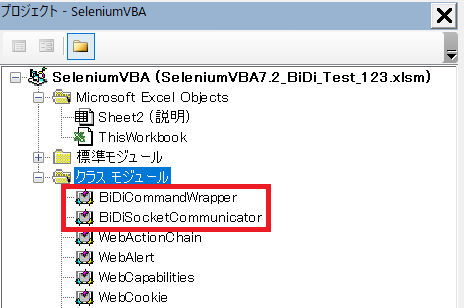
(2) Add the following description to the main routine of your standard module. That is all. Introduction has become significantly easier from ver. 7.2.
Dim driver As WebDriver: Set driver = New WebDriver
  With driver

  ' Start
  .StartChrome

  ' Browser startup settings (for both Chrome and Edge)
  Dim caps As WebCapabilities: Set caps = .CreateCapabilities
  caps.EnableBiDiMode 'WebDriver BiDi becomes enabled

  ' Open
  .OpenBrowser caps
  ' Perform WebSocket communication to use WebDriver BiDi
   Dim bidi As New BiDiCommandWrapper: bidi.ConnectTo .GetWebSocketUrl
  'Typing "bidi." will display BiDi-specific methods
   bidi.
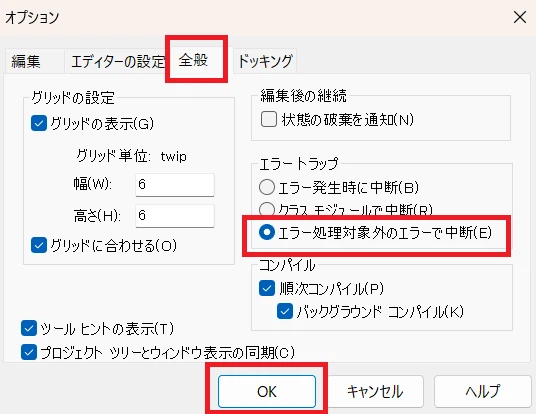
(3) Set the VBE error trapping to "Break on Unhandled Errors."
In this article, I will introduce particularly powerful and practical major methods from the VBA class BiDiCommandWrapper, which fuses the WebDriver BiDi protocol and CDP (Chrome DevTools Protocol).
| Category | Method Name | Overview (Detailed Version) |
|---|---|---|
| Navigation | ExecuteNavigateAndGetStatus |
Checks HTTP status after URL transition. An SPA synchronization engine waits until communication (Net) and rendering (DOM) stop, suppressing errors immediately after transition. |
| Element Operation | ExecuteClickByXPath |
Scrolls into the display area, focuses, and clicks. It automatically waits for communication to stabilize after the action, enabling extremely stable operation. |
ExecuteInputValueByXPath |
Simulates input using execCommand. This ensures state updates in React, etc., solving the problem where values are not reflected. |
|
ExecuteSelectValueByXPath |
Dropdown operation. Allows selection by display text as well as Value. It forcibly triggers events after selection to ensure display changes are triggered. | |
| Special/Hierarchical | GetIframeContextIdByUrl |
Identifies iframe by URL. By passing the obtained ID to other methods, you can operate directly inside the frame without using SwitchTo. |
ExecuteShadowClick |
Recursively searches and penetrates hidden Shadow DOM using an array of CSS selectors. Conquers modern sites with Web Components structures. | |
ExecuteClickAndHandleAlertByXPath |
Asynchronously executes clicks that trigger alerts. Avoids Excel freezing while automatically handling the alert and continuing control. | |
| Management/Optimization | ExecuteEnableResourceBlocking |
Blocks the loading of images, ads, etc. Minimizes network load and dramatically improves execution speed. |
ExecuteWebExtensionInstall |
Installs Chrome extensions instantly. Allows dynamic integration of ad blockers or custom tools to extend browser functionality via program. | |
| AI Collaboration | StartDiscoveryLog |
Records internal browser communication, errors, and DOM changes in detail. Outputs "AI-Ready" logs that LLMs like Gemini can use to diagnose causes instantly. |
Navigates to the specified URL and returns success/failure (e.g., 200: Success, 500: Failure) based on the HTTP status code. The internal SPA synchronization engine, which waits until both "network communication" and "DOM changes" stop, dramatically suppresses element-not-found errors immediately after navigation.
- targetUrl (String): Destination URL.
- waitNetworkIdle (Boolean): Whether to wait until communication and DOM are completely stationary (Default: True).
- contextId (String): Used to specify a target tab or frame.
Dim status As Long
status = bidi.ExecuteNavigateAndGetStatus("[https://example.com/dashboard](https://example.com/dashboard)")
If status = 200 Then Debug.Print "Transition and SPA rendering successful"Ensures execution in the order of "Auto-scroll to view" → "Focus" → "Click". Because it automatically performs synchronous waiting until any asynchronous communication triggered by the operation ends, extremely stable continuous operation is possible.
- path (String): XPath to identify the target element.
- searchTimeoutMs (Long): Maximum wait time for the element to appear (milliseconds).
- waitNetworkIdle (Boolean): Whether to wait for communication updates after clicking.
' Reliable click including scroll and communication wait
bidi.ExecuteClickByXPath "//button[@id='submit-order']"By internally utilizing JavaScript's execCommand('insertText'), it generates events equivalent to a human typing on a keyboard. This solves the issue where frameworks like React or Vue do not recognize simple .value overwrites (internal state is not updated).
' Input that ensures validation in React, etc. is triggered
bidi.ExecuteInputValueByXPath "//input[@id='username']", "vba_user"Operates a dropdown (select element). Items can be selected not only by the internal Value but also by the text visible on the screen. It automatically triggers necessary events after selection.
' Select item by displayed text (March 2026)
bidi.ExecuteSelectValueByXPath "//select[@name='calselect']", "2026年03月", TruePenetrates and clicks through Shadow DOM (encapsulated internal structures) that cannot be reached by normal XPath searches. You pass an array of CSS selectors required to reach the target as an argument.
' Follow the Shadow Hosts in order to specify the final button
Dim path(2) As String
path(0) = "settings-ui"      ' 1st host
path(1) = "settings-main"    ' 2nd host
path(2) = "#confirm-button"  ' Final target

bidi.ExecuteShadowClick pathIdentifies an iframe by a part of its URL and obtains an operation ID (contextId). By passing this ID to the contextId argument of any other method, you can operate directly within that frame.
Dim conID As String: conID = bidi.GetIframeContextIdByUrl("login_frame")

' Click an element inside the frame by specifying the ID
bidi.ExecuteClickByXPath "//button[@id='submit']", , , , , conIDUtilizes WebDriver BiDi's asynchronous execution to separate "clicking" and "alert control." This prevents VBA from freezing with an hourglass cursor the moment an alert appears, allowing for immediate OK/Cancel processing.
' Click a button that triggers an alert and immediately close it with "OK"
bidi.ExecuteClickAndHandleAlertByXPath "//button[@id='delete-btn']", Accept:=TrueBlocks images, ads, tracking communications, etc., at the browser level. By eliminating unnecessary communication, execution speed is dramatically improved.
' Accelerate by blocking images and ad domains
Dim blockList: blockList = Array("*.png", "*.jpg", "*google-analytics.com*", "*doubleclick*")
bidi.ExecuteEnableResourceBlocking blockListInstalls a Chrome extension from the specified path into the current browser session. This allows for dynamic integration of ad blockers, security enhancements, or specific business auxiliary tools within the automation process.
- extensionPath (String): File path to the extension.
' Settings to enable Chrome extensions
caps.AddArguments "--remote-debugging-pipe"
caps.AddArguments "--enable-unsafe-extension-debugging"

' Dynamically load Chrome extension and start scraping in a clean environment
bidi.ExecuteWebExtensionInstall Environ("LOCALAPPDATA") & "\Google\Chrome\User Data\Default\Extensions\aapbdbdomjkkjkaonfhkkikfgjllcleb\2.0.16_0"Records events occurring inside the browser in an "AI-decipherable format." By feeding the saved logs to Gemini or ChatGPT, you can achieve "AI-Ready" debugging where error causes are automatically diagnosed.
' Start log recording (excluding noisy image/CSS logs)
bidi.StartDiscoveryLog excludeImagesAndCss:=True

' (Execute operations...)

' Save the log. Passing this to AI completes the debugging.
bidi.StopAndSaveDiscoveryLog "C:\temp\discovery_log.txt"Based on experiments with the following code, I confirmed that WebDriver BiDi can be enabled and events can be detected even from an already launched instance of Edge.
'=================================================
' Automatically operate a browser in a logged-in state via remote debugging.
' Start from an already launched state via a shortcut.
'=================================================
' Set the shortcut target as follows:
' "C:\Program Files (x86)\Microsoft\Edge\Application\msedge.exe" --remote-debugging-port=9222 --user-data-dir="C:\EdgeDebugProfile"
'=================================================
 Dim caps As SeleniumVBA.WebCapabilities

 Set driver = SeleniumVBA.New_WebDriver
 driver.StartEdge

 Set caps = driver.CreateCapabilities(initializeFromSettingsFile:=False)
 caps.SetDebuggerAddress "localhost:9222"

 'Enable BiDi (Required to be True for this program)
 caps.EnableBiDiMode

 driver.OpenBrowser caps

' (Continued...)