Repository navigation
Releases: harshdvaid24/muon
Release list
Muon 0.3.7

Muon 0.3.7: Needle toggle
- Settings › Needle (experimental). Needle 3, a 29 MB tool-calling model, can decide simple requests in about 50 ms instead of ~1.2 s on-device. Off by default: on seventeen everyday requests the on-device model was right 16 times at a median 1.9 s; Needle-first was right 8 times at a median 0.6 s (wrong calls came at 90%+ confidence). When on, it acts only at 90%+ confidence and never on tools that move or delete files; otherwise the request goes to the on-device model with a note saying why. The footer names who answered. Server:
scripts/needle-serve.py(works around the engine wheel missing from Hugging Face for cactus-needle 3.0.5). MUON_NO_CACHE=1on the command line skips the intent cache, for fair comparisons.
Everything in 0.3.6 applies.
Muon 0.3.6
Muon 0.3.6: the assistant window
- "start claude code for kathak" opens a VS Code window for that project that is just the assistant: Claude Code (or Codex, Gemini CLI, Aider) fills the window, no side bars, tabs, status bar or start page, newest
claudefrom your login shell. Muon writes<project>/.muon/<name>.code-workspace(git-excluded locally) with a terminal profile that runs the assistant and seeds VS Code's remembered layout for it. If that window is already open, it is brought to the front; close it and ask again for a fresh session. No automatic-tasks setting needed any more.
Everything in 0.3.5 applies.
Muon 0.3.5
Muon 0.3.5: start your coding assistant inside VS Code
- "start claude code for kathak" now opens a new VS Code window for that project with Claude Code (or Codex, Gemini CLI, Aider) already running in the integrated terminal. Muon writes a small workspace file under
<project>/.muon/(git-excluded locally) whose task starts the assistant when the window opens; nothing is typed into any window. Turn on VS Code's Task: Allow Automatic Tasks setting once. Without thecodecommand line tool, a Terminal window is used instead.
Everything in 0.3.4 applies.
Muon 0.3.4
Muon 0.3.4: exact figures, start your coding assistant by project name
- Exact figures from documents. "find the largest transaction", "smallest payment", "how much did I spend in total" on a statement or invoice: Muon computes the answer from the text (running balances and total rows excluded), shows it first, and lets the model only explain what the document is. Small models no longer misread tables.
- Dense documents no longer fail. Text that overflows the on-device window (tables, numbers) is retried in smaller parts automatically instead of "Exceeded model context window size".
- Start your coding assistant by project name. "start claude code for kathak", "start agent for kathak app", "open codex in weather-app": the project opens in VS Code and a Terminal window in that folder starts the interactive assistant. Only claude, codex, gemini and aider can be started; you drive the session.
Everything in 0.3.3 applies.
Muon 0.3.3
Muon 0.3.3: Open With › Muon
- Finder › right-click a file › Open With › Muon. The palette opens with the file attached; type what you want done with it: give me a brief, analyse it, what is the total, fix grammar. Works for folders too, and from Terminal:
open -a Muon report.pdf. Muon is never the default app for anything.
Everything in 0.3.2 applies: name a file to have it read, analyse/brief requests, the paperclip button, faster medium documents.
Muon 0.3.2
Muon 0.3.2: name a file, get an analysis
- A file name is enough. "check sampleStatement.pdf from downloads, analyse it and give me a brief" now finds the file (in the folder you name, else Downloads, Documents, Desktop, then every allowed folder; case-insensitive; a few levels deep), reads it and answers. Before, the model just opened it. "open x.pdf from downloads" still opens it.
- Analyse, review, brief. New writing rules: analyse this, review this document and give me a brief, give me a brief, quick summary of this. Analysis answers with a short brief, key facts and figures, and anything unusual.
- Attach button. A paperclip next to the mic opens the file picker (same as ⌘O or dropping a file).
- Faster on medium documents. A few pages are processed on-device in parts instead of waiting for LM Studio to load a model; when the local model is already loaded it still gets the whole text. Over-long paragraphs (PDF tables) are split safely and partial analyses are merged.
Everything in 0.3.1 applies.
Muon 0.3.1
Muon 0.3.1: fixes from the demo re-recording
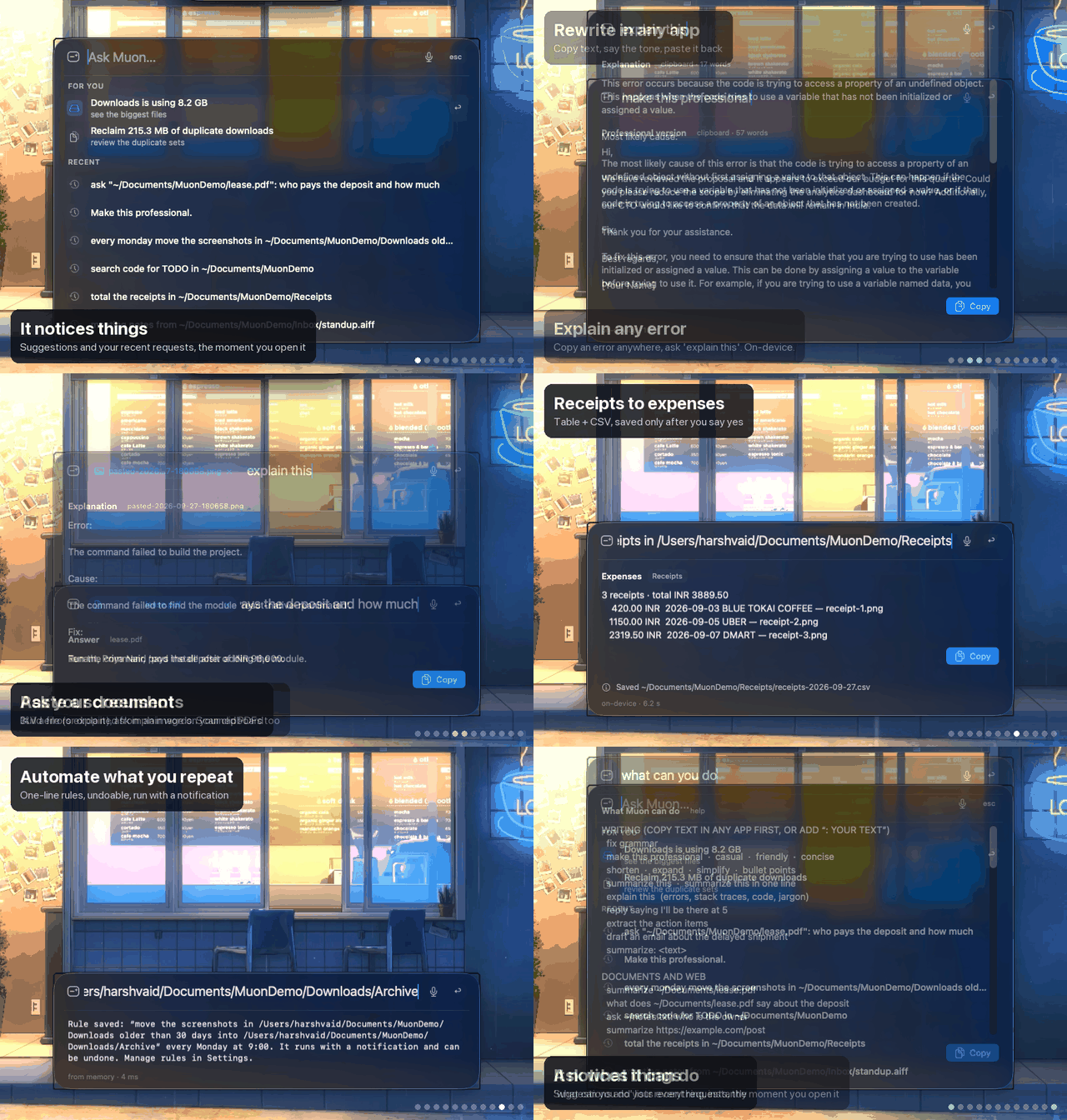
- Edit shortcuts in the palette. ⌘A, ⌘C, ⌘X, ⌘Z now work in the field, and ⌘V pastes text (or attaches a copied file or image). A menu bar app has no Edit menu unless it builds one; Muon now does.
- Image answers were empty. The local vision model spent its whole budget on hidden reasoning; the vision call now turns reasoning off like the text calls do.
- Recent requests read better. Home shows as
~, pasted images as (pasted image). - New demo. Twelve scenes on the current build: a spoken request, pasted PDF and screenshot, recent requests, the in-app catalog. README and site updated to match.
Everything in 0.3.0 applies: voice, attachments, image paste, recent requests, what can you do.
Muon 0.3.0
Muon 0.3.0: talk, drop, paste, recall
- Voice. Press
⌘⇧M(or click the mic, or the menu bar's Talk to Muon), say what you need and pause. Live on-device transcription (SpeechAnalyzer) fills the field and the request runs. Spoken requests get spoken replies; both are in Settings › Voice, along with Start listening when the palette opens. Nothing is recorded, nothing leaves the Mac. - Attach anything. Drop a file or folder on the palette, press
⌘O, or⌘Va copied file or image. A chip shows it; ask in plain words: explain this, who is the tenant, what did they decide, total the receipts. An empty request summarizes a document, describes an image, transcribes a recording. - Image paste.
⌘Vwith an image on the clipboard attaches it (kept under~/Library/Application Support/Muon/Pasted, newest 20). - Recent requests. The empty palette lists your recent requests under the suggestions, most used first.
↑↓move through both,⇥edits,↩runs. With text in the field,↑↓cycle recent requests like a shell. - What can you do.
help,what can you do,list commandsshow the full catalog inside the app, instantly, no model. New installs get a What can I ask? row. - Plain-text answers. Code fences and inline backticks are stripped from on-device explanations.
- Paths with spaces work in writing requests too (quoted or not).
Requirements unchanged: macOS 26 on Apple Silicon with Apple Intelligence, Node.js 20+. Microphone access is asked for on first use of voice.
Full catalog and install steps: README.
Muon 0.2.0
Muon 0.2.0: the everyday AI, on-device
Muon is a menu bar app for macOS 26. Press ⇧⌥Space and ask. This release turns Muon from a file and disk helper into an everyday assistant: the things people open a chatbot for, and the things they do by hand, done on your Mac with Apple's on-device model. Nothing leaves your Mac unless you ask for a web page.
Highlights
- Writing help on any text. Copy text in any app, then
fix grammar,make this professional(or casual, friendly, polite, confident, concise, clear, simple),shorten,expand,simplify,bullet points,summarize this,explain this,reply saying I'll be there at 5,extract the action items,draft an email about …. Every result has Copy and Paste. Paste puts the text into the app you came from. About one second, on-device. - Documents and scanned PDFs.
summarize ~/Documents/lease.pdf,what does ~/Documents/lease.pdf say about the deposit,ask ~/notes.txt: who is the owner. PDF, .docx, .txt, .md, .csv, .json and images. PDFs with only scanned pages are read with on-device OCR. Web pages too:summarize https://…, one read-only fetch, only when asked. - Screenshot intelligence.
read the latest screenshot,copy text from ~/Desktop/shot.png,explain the error in this screenshot(OCR plus explanation, no LM Studio needed),describe ~/Desktop/a.png: which app is this,compare ~/Desktop/actual.png with ~/Designs/expected.png,rename my screenshotsby content. An opt-in setting names every new screenshot as it lands. Undoable. - Voice to meeting notes.
transcribe ~/Downloads/call.m4a,meeting notes from ~/Downloads/standup.mp4: summary, decisions and action items. On-device SpeechAnalyzer. Audio and video files. - Receipts to expenses.
total the receipts in ~/Documents/Receipts: merchant, date, total and currency per receipt, the sum, and a CSV saved after one confirmation. - Crash explanations.
why did my app crash,why did Safari crash: reads crash reports from the last 48 hours (~/Library/Logs/DiagnosticReports, read-only) and explains the crashed thread and likely cause. - Developer chores.
what changed,commit this,push(git status, diff, commit with your message, push; never force, never amend),clean the metro caches,pair my watch 192.168.1.20:41234 code 123456,connect 192.168.1.20:41234,install ~/Downloads/app.apk on my phone,build a signed apk for weather-app. Plus the existing run-on-device, simulators, GitHub Actions and code search. - For you, rules and undo. The empty palette suggests what is worth doing: old screenshots to archive, Downloads size, duplicate space to reclaim, recent crashes to explain, and clipboard triage (an error on the clipboard offers an explanation, a URL or long text offers a summary). Computed at most once a day when you open the palette, never in the background. A cleanup you have run three times is offered as a weekly rule, or ask
every monday move the screenshots in ~/Downloads older than 30 days into ~/Downloads/Archive.undoreverses the last automated move or rename. - Optional Laya.
pip install "laya[serve]"thenLAYA_PORT=8765 laya-serveadds ~150 ms typed routing hints and language detection, so you can type requests in 100+ languages. Turn it on in Settings › Laya. - Tool server. New MCP tools in
mac-tools:readWebPagewriteTextFilegitStatusgitDiffgitCommitgitPushcleanDevCachesadbPairadbConnectinstallAppbuildAndroidRelease. New CLI flag:Muon --suggestprints the For you rows.
Fixes
- LM Studio reasoning. Multi-step and long-text requests are far faster: Qwen's hidden reasoning is now switched off via
reasoning_effort.
Install
Download
- Download
Muon.zipfrom this release and moveMuon.appto Applications. - Open it. Muon is ad-hoc signed, so macOS blocks it the first time: open System Settings › Privacy & Security and click Open Anyway (or run
xattr -dr com.apple.quarantine /Applications/Muon.app). - Press
⇧⌥Space. Check your setup any time with/Applications/Muon.app/Contents/MacOS/Muon --diagnose.
Homebrew
brew install --cask harshdvaid24/tap/muonRequirements: macOS 26 on Apple Silicon with Apple Intelligence on, and Node.js 20+ (brew install node). Optional: LM Studio with qwen/qwen3.5-9b@4bit (or the 4B fallback) for multi-step planning, image understanding and very long text. Everything else works without it.
Known limitations
- The app is ad-hoc signed. First launch needs System Settings › Privacy & Security › Open Anyway.
- The on-device tier needs Apple Intelligence. Without it, everything routes to LM Studio.
- Image understanding and very long text need LM Studio.
- Run-on-device supports React Native. For native Xcode projects, Muon opens the workspace so you can press Run.
- Android runs need an emulator created in Android Studio, or a connected phone.
- The multi-step planner with the 4B model can take 30 to 60 s on a busy Mac.
- CI tests the tool server. The macOS 26 app is built locally.
Full catalog of requests, the safety model and the tiers: README.
Muon 0.1.0
Muon is a local AI agent for your Mac. Press ⇧⌥Space and say what you need — it finds, cleans up, opens, builds and answers, on-device, with zero idle load.
Highlights
- Free up disk space — largest files and duplicate finder, build folders skipped
- Clean up safely — "move the screenshots in ~/Downloads into ~/Downloads/Archive": exact files listed, one confirmation, Trash never delete
- Sweep code — search across projects with clickable results
- Build & run React Native apps on the iOS Simulator or Android, as background jobs with notifications
- GitHub Actions — list, check and trigger workflows (releases get a system dialog)
- Drive any app through its menus; open/quit apps; find memory hogs; quick web answers
- Learns your commands: repeats are answered from local memory in milliseconds
- Private by design — no shell, allowed folders only, every change approved, audit log
Install
- Download Muon.zip below and move
Muon.appto Applications. - Open it. Muon isn't notarized yet: if macOS blocks it, go to System Settings › Privacy & Security › Open Anyway.
- Press ⇧⌥Space. Run
/Applications/Muon.app/Contents/MacOS/Muon --diagnoseto check your setup.
Or: brew install --cask harshdvaid24/tap/muon
Requires macOS 26 on Apple Silicon with Apple Intelligence on, and Node.js 20+ (brew install node). LM Studio is optional (multi-step planning).
SHA-256 28b5c0cb8596851f9384a0aa5bc2f154b32fafa1dfff371f0acc4036668a1c10