Repository navigation
Releases: harsheetamorey/mediaindex
Release list
MediaIndex 1.1.0

MediaIndex 1.1.0: iPhone photos and videos, dates and places, a map, look-alikes, and a Windows app.
New
- iPhone photos and videos: HEIC photos,
.movvideos (portrait video now upright), and Live Photos shown as one item with a LIVE badge and ▶ Live playback. - When and where: dates and places are read from your photos' and videos' camera data. Places are named on your computer from a built-in city list; nothing is looked up online.
- Ask understands "beach photos from 2024", "photos from last December", "everything from Goa", "how many dogs in 2024?"
- Search has Taken from … to … and in: country › region › town filters.
- Browse by date: years, then months, under the search box.
- Map of places: an offline world map with a dot for each place; click one to see what you took there.
- Find look-alikes: burst shots and copies grouped together, with the sharpest one marked ★ keep. One click puts the others into a selection to review. Nothing is ever deleted.
- Ask: searches also show matching video moments, which play right there. "Save these as Goa trip" puts an answer's photos into a selection.
- Faster first look: thumbnails, dates and places appear within seconds of adding a folder (60 photos: 1.5 s). Search indexing continues in the background.
- ⌘K (Ctrl+K) or / jumps to the search box.
- Windows app (new, see below).
Install
Mac (Apple silicon, macOS 13+): download MediaIndex-1.1.0-macos-arm64.zip, unzip it, and drag MediaIndex to Applications. The first time, right-click → Open → Open (on macOS 15: System Settings → Privacy & Security → Open Anyway). It isn't signed by Apple.
Windows 10/11 (x64): download MediaIndex-1.1.0-windows-x64.zip, unzip it, and run MediaIndex\MediaIndex.exe. The first time, Windows may say "Windows protected your PC": click More info → Run anyway. It runs on the CPU, so indexing is slower than on a Mac. This is the first Windows release. It is built and start-checked on GitHub's Windows machines but hasn't been tried on many real PCs yet, so please report problems in issue #7.
On both, the AI models download once on first launch (1.6 GB, plus 2.7 GB if you include photo editing). After that everything works offline. FFmpeg is included.
Upgrading from 1.0.0: your library is kept, and the dates and places of photos you already added are read in the background the first time 1.1.0 starts.
Known limits
- Neither app is signed (Apple / Microsoft), hence the first-launch steps above.
- Seasons in Ask ("last summer") follow the northern hemisphere.
- Place names come from the nearest town with 15,000+ people, so small villages get the nearest such town.
- Look-alikes and best-shot suggestions are similarity and sharpness measures, not judgements. Review before deleting anything.
Licences of every model, program and bundled data (GeoNames, Natural Earth): NOTICE.md and THIRD_PARTY_DATA.md.
MediaIndex 1.0.0
The first release of MediaIndex: chat with your photos, search them and edit them, all on your Mac.
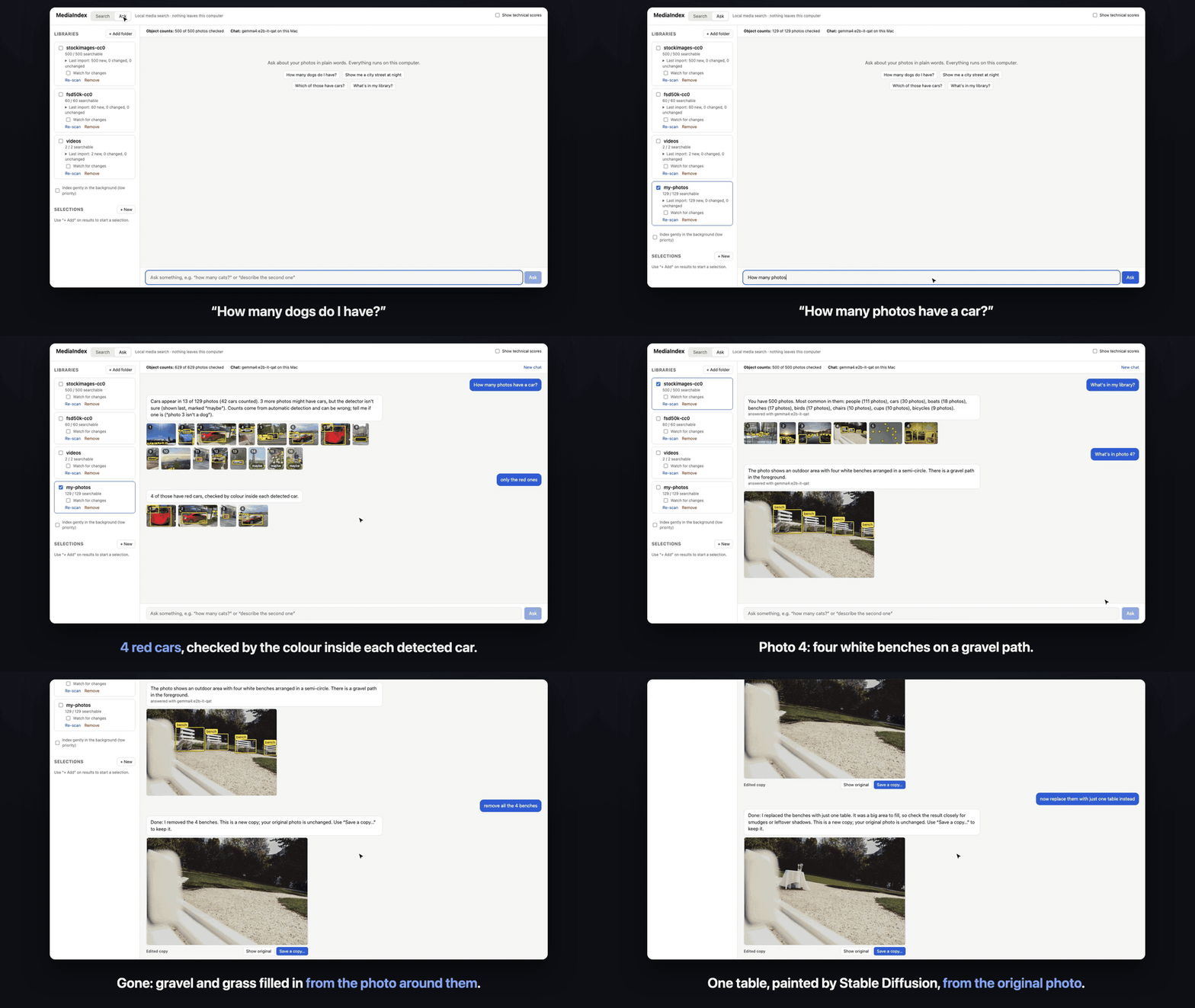
Install
- Download MediaIndex-1.0.0-macos-arm64.zip below, unzip it, and drag MediaIndex to Applications.
- The first time, right-click MediaIndex → Open → Open. The app isn't signed by Apple yet. On macOS 15, if there's no Open button, go to System Settings → Privacy & Security and click Open Anyway.
- Choose whether to include photo editing. The AI models download once (1.6 GB, plus 2.7 GB for editing), then everything works offline.
- Click + Add folder and pick a folder of photos.
Needs an Apple silicon Mac (M1 or later) and macOS 13+. FFmpeg is included. For free-form chat and photo descriptions in Ask, optionally install Ollama and run ollama pull gemma4:e2b-it-qat.
Try asking
- "how many dogs do I have?"
- "show me red cars"
- "remove the benches from photo 4"
- "now replace them with one table instead"
What runs on your Mac
EmbeddingGemma 2 (search) · RT-DETR v2 (counting) · Gemma 4 E2B via Ollama (optional chat) · SAM + LaMa (remove) · Stable Diffusion 1.5 inpainting + LCM-LoRA (replace, make images)
Known limits
- Apple silicon only; not signed or notarized.
- On an 8 GB Mac, the first edit after launch can take a few minutes while the models load. Later edits are much faster. 16 GB helps.
- Indexing 10,000 photos takes about 5–6 hours on an 8 GB M1.
- Sound search is rough.
Licences of every model and bundled program: NOTICE.md.