Sub Pipe
In the last tutorial, we introduced pipelines.
Now we will go into more detail about what exactly makes up a pipeline. In particular, all arguments to each transform function are actually pipelines. For example:
if( ($("hi") | $("hello")) == 4 )
can go multiple levels into a nested object, all within a single if statement. For convenience, PipeScript also includes : as a pipe symbol with high prescedence (the pipe will be taken before algebra is done) which can allow you to simplify your script a bit by dropping the internal parentheses:
if( $("hi"):$("hello") == 4 )
Internally, PipeScript treats each argument as a separate pipeline, whose input is connected to the parent's input.
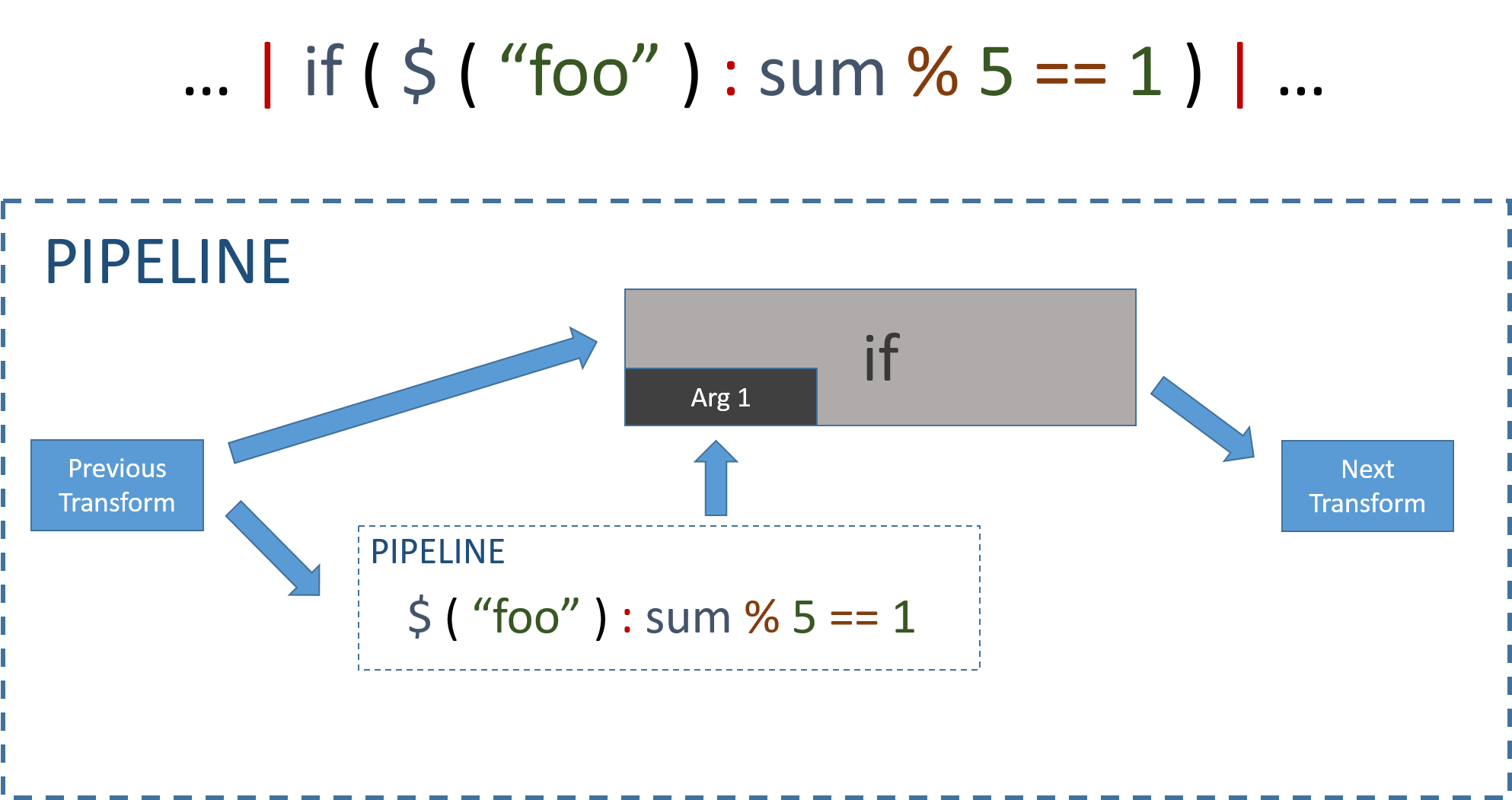
In order for the parent to always get SOME result in its argument, sub-pipelines cannot include transforms that are not One-To-One (for each datapoint that they get as input, they output one datapoint). This means that you cannot nest if transforms. Whether a specific transform is one to one is listed in its documentation.
When transforms are being set up, they get considerable power over what to do with their arguments. This is exploited to create the reduce transform.
The reduce transform actually takes control of its second argument, such that it can allow splitting a pipeline by a given condition.
Let's see an example:
[
{
    "t": 1,
    "d": {
          "steps": 14,
          "activity": "walking",
        }
},
{
    "t": 2,
    "d": {
          "steps": 10,
          "activity": "running",
        }
},
{
    "t": 3,
    "d": {
          "steps": 12,
          "activity": "walking",
        }
},{
    "t": 4,
    "d": {
          "steps": 5,
          "activity": "running",
        }
},]
We found the total number of steps for "running" in the Pipeline tutorial. We can now extend that to find the number of steps for each activity!
Remember that the code was:
if $("activity") == "running" | $("steps") | sum | if last
With the reduce function, we can do the following:
reduce $("activity") { $("steps") | sum } | if last
which will return:
[{
    "t": 4,
    "d": {
          "walking": 26,
          "running": 15,
        }
},]
Note that here we used { }. In PipeScript, parentheses/brackets mean the same thing. We could equally well have written any of the following:
reduce( $("activity") , $("steps"):sum ) | if last
reduce $("activity")  $("steps"):sum  | if last
I chose to use {} to make it clear that the pipeline within was actually being used in a different way, and I suggest that you use the same notation to avoid confusion.
The split function is particularly useful for aggregation over time. PipeScript includes transforms that return things like the weekday.
To get the results of a pipeline per weekday:
reduce weekday { ... } | if last
which would return
[{
	"t": ...,
	"d": {
		"Monday": ...,
		"Tuesday": ...,
		"Wednesday": ...,
		"Thursday": ...,
		"Friday": ...,
		"Saturday": ...,
		"Sunday": ...
	}
}]
This allows you to quickly generate pretty graphs.