


Addon für den LMO.
Note
Systemvorraussetzung:
Lauffähiger (Liga Manager Online (LMO-klassisch)
PHP: >7.4
Mit diesem Addon erstellst Du aus Ligadateien des LMO, aus mehreren Spielzeiten, eine History Tabelle.
Die vier Verzeichnisse des Downloads in den root Ordner des LMO kopieren.
Es werden dabei keine Dateien des LMO's geändert, sondern nur neue hinzugefügt.
Nach dem kopieren per FTP in der Administration des LMOs unter (1.rot)Optionen (2.grün)Addons (3.blau)history die notwendigen Angaben machen, um die csv-Dateien zu erstellen (siehe Bild 01).
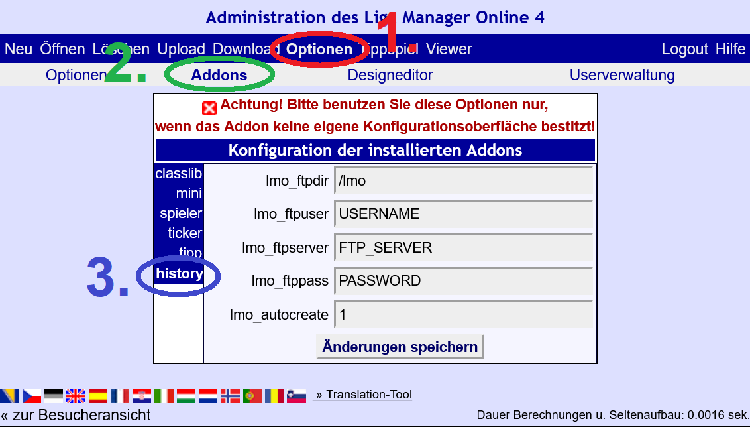
lmo_ftpdir- den FTP-Pfad zum LMO Ordner angebenlmo_ftpuser- den FTP Benutzername eintragenlmo_ftpserver- Name des FTP Servers angebenlmo_ftppass- zum Schluss noch das Passwort für den FTP Benutzer eintragenlmo_autocreate- lass vorerst die '1' dort stehen
Aufrufen des Scripts mit <iframe> oder include(). Es kann der komplette Archivordner, oder bestimmte Unterordner im Archivordner, verwendet werden.
Außerdem können konkrete Ligen benannt werden, die in die Auswertung einfliessen.
Beim Aufruf, per <iframe> oder include(), wird im Ordner output die gleiche Ordnerstruktur wie im Ligenverzeichnis erstellt.
Anschließend werden die Ordner mit CSV Dateien der gescannten Ligen gefüllt.
URL-Parameter:
-
his_liga//Dateiname der aktuellen Liga -
his_ligen//Ligen die zur Berechnung der ewigen Tabelle genutzt werden sollen, außer die aktuelle Liga. //nur im Notfall nutzen -
his_folder//Ordner mit dem Ligenarchiv -
his_sort//Sortiervorgabe der ewigen Tabelle- 0 //Standartsortierung nach Punkten
- 1 //Sortierung nach Spielen
- 2 //Sortierung nach Siegen
- 3 //Sortierung nach Unentschieden
- 4 //Sortierung nach Niederlagen
- 5 //Sortierung nach +Toren
- 6 //Sortierung nach Diff. +Tore/-Tore
- 7 //Sortierung nach Ø Punkte pro Spiel
- 8 //Sortierung nach Diff. +Punkte/-Punkte
- 9 //Sortierung nach +Punkte
- 10 //Sortierung nach Meisterschaften
- 11 //Sortierung nach Abstiegen
- 12 //Sortierung nach Spielzeiten
-
his_template- Template, dass benutzt werden soll -
his_headline- Überschrift die in der Tabelle erscheinen soll
<iframe src="<url_to_lmo>/addon/history/lmo-history.php?his_liga=xyz.l98&his_folder=archiv/bundesliga"></iframe>
<iframe src="<url_to_lmo>/addon/history/lmo-history.php?his_liga=xyz.l98&his_ligen=abc.l98,def.l98,ghi.l98,jkl.l98"></iframe><?php
require_once("PfadZumLMO/init.php"); //bearbeite PfadZumLMO
$his_liga = "xyz.l98"; //die erste LMO Ligadatei
$his_folder = "archiv/bundesliga"; //der Pfad zu den l98 Dateien aus den alten Spielzeiten
$his_headline = "ÜBERSCHRIFT_DER_HISTORY_TABELLE"; //die Überschrift die in der Tabbele stehen soll
// wird $his_headline nicht angegeben wird "History Tabelle" als Default Wert ausgegeben
include (PATH_TO_ADDONDIR."/history/lmo-history.php");
?><?php
require_once("PfadZumLMO/init.php");
$his_liga = "xyz.l98";
$his_ligen = "abc.l98,def.l98,ghi.l98,jkl.l98";
include (PATH_TO_ADDONDIR."/history/lmo-history.php");
?>Optional kann noch das zu nutzende Template mitgegeben werden
his_template=mytemplate<?php
...
$his_template='mytemplate'
...
?>Beispielseite für die Einbindung per ìnclude()
Der Code dieser PHP-Beispielseite lautet
<?php
require_once("./history/init.php");
$his_liga = "1l_2024-25.l98";
$his_folder = "national/1Bundesliga";
$his_template = "history_all";
$his_headline = ".: Ewige Tabelle der 1. Fussball Bundesliga 1963/64 - 2024/25 :.";
include (PATH_TO_ADDONDIR."/history/lmo-history.php");
?>
Beispielseite für die Einbindung per <iframe>
Der Code dieser HTML-Beispielseite lautet
<center>
<iframe width=1012 height=600 align=center src="http://lmo8.bplaced.net/history/addon/history/lmo-history.php?his_liga=1l_2024-25.l98&his_template=history_all&his_headline=.: Ewige Tabelle der 1. Fussball Bundesliga 1963/64 - 2024/25 :.&his_folder=national/1Bundesliga"></iframe>
</center>Addon for the LMO.
With this addon you can create a history table from LMO league files from several seasons.
Note
System requirements:
Running (Liga Manager Online (LMO-classic)
PHP: >7.4
Copy the four directories of the download into the root folder of the LMO.
No files of the LMO will be changed, only new ones will be added.
After copying via FTP, make the necessary entries in the administration of the LMO under (1.red)Options (2.green)Add-ons (3.blue)history to create the csv files (see Fig. 01).
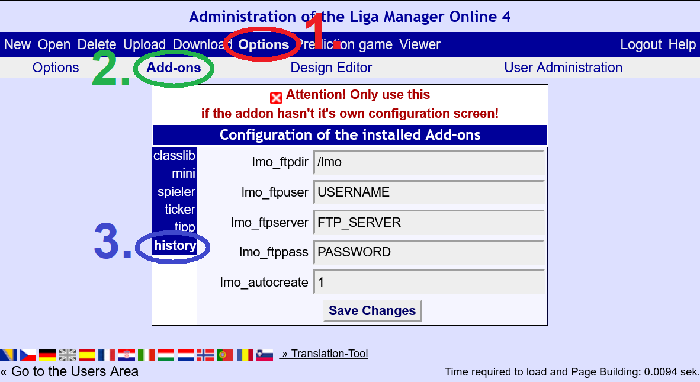
lmo_ftpdir- enter the FTP path to the LMO folderlmo_ftpuser- enter the FTP user namelmo_ftpserver- enter the name of the FTP serverlmo_ftppass- finally enter the password for the FTP userlmo_autocreate- leave the ‘1’ there for the time being
Call the script with <iframe> or include(). The complete archive folder or certain subfolders in the archive folder can be used.
In addition, specific leagues can be named which are included in the evaluation.
When called via <iframe> or include(), the same folder structure is created in the output folder as in the leagues directory.
The folders are then filled with CSV files of the scanned leagues.
URL parameter:
-
his_liga//filename of the current league -
his_ligen//Leagues to be used to calculate the perpetual table, except the current league //only use in an emergency -
his_folder//Folder with the league archive -
his_sort//Sort default of the perpetual table- 0 //Sorting by points (default)
- 1 //Sorted by victories
- 2 //Sorted by draw
- 3 //Sorted by defeats
- 4 //Sorting by games
- 5 //Sorting by +goals
- 6 //Sorting by diff. +goals/goals
- 7 //Sorting by average points per game
- 8 //Sorting by diff. +points/points
- 9 //Sorting by +points
- 10 //Sorting by championships
- 11 //Sorting by relegations
- 12 //Sorting by seasons
-
his_template- Template that should be used -
his_headline- Headline that should appear in the table
<iframe src=‘<url_to_lmo>/addon/history/lmo-history.php?his_liga=xyz.l98&his_folder=archiv/bundesliga’></iframe>
<iframe src=‘<url_to_lmo>/addon/history/lmo-history.php?his_liga=xyz.l98&his_ligen=abc.l98,def.l98,ghi.l98,jkl.l98’></iframe><?php
require_once(‘PathToLMO/init.php’); //edit PathToLMO
$his_liga = ‘xyz.l98’; //the first LMO league file
$his_folder = ‘archiv/bundesliga’; //the path to the l98 files from the old seasons
$his_headline = ‘HEADLINE_OF_THE_HISTORY_TABLE’; //the headline that should be in the table
// if $his_headline is not specified, ‘History table’ is output as the default value
include (PATH_TO_ADDONDIR.‘/history/lmo-history.php’);
?><?php
require_once(‘PathToLMO/init.php’);
$his_liga = ‘xyz.l98’;
$his_ligen = ‘abc.l98,def.l98,ghi.l98,jkl.l98’;
include (PATH_TO_ADDONDIR.‘/history/lmo-history.php’);
?>Optionally, the template to be used can also be specified
his_template=mytemplate<?php
...
$his_template=‘mytemplate’
...
?>Example page for integration via ìnclude()
The code of this PHP-example page is
<?php
require_once(‘./history/init.php’);
$his_liga = ‘1l_2024-25.l98’;
$his_folder = ‘national/1Bundesliga’;
$his_template = ‘history_all’;
$his_headline = ‘: Perpetual table of the 1st Bundesliga 1963/64 - 2024/25 :.’;
include (PATH_TO_ADDONDIR.‘/history/lmo-history.php’);
?>
Example page for integration via <iframe>
The code of this HTML-example page is
<center>
<iframe width=1012 height=600 align=center src=‘http://lmo8.bplaced.net/history/addon/history/lmo-history.php?his_liga=1l_2024-25.l98&his_template=history_all&his_headline=.: Perpetual table of the 1st Bundesliga 1963/64 - 2024/25 :.&his_folder=national/1Bundesliga’></iframe>
</centre>