I am working on HERE map premium edition 3.18
I create a here map in a Fragment, but when the activity that contains the fragment is opened the map it doesn't display.
I followed instruction from official documentation :
This is the Fragment layout
    <?xml version="1.0" encoding="utf-8"?>
    <LinearLayout
        xmlns:android="http://schemas.android.com/apk/res/android"
        xmlns:tools="http://schemas.android.com/tools"
        android:layout_width="fill_parent"
        android:layout_height="fill_parent"
        android:orientation="vertical"
        tools:context=".Fragments.FoliosVisita">

        <TextView
            android:id="@+id/map_title"
            android:layout_width="wrap_content"
            android:layout_height="wrap_content"
            android:text="Hello Map"
            />

        <!-- Map Fragment embedded with the map object -->
        <fragment
            class="com.here.android.mpa.mapping.AndroidXMapFragment"
            android:id="@+id/mapfragment"
            android:layout_width="match_parent"
            android:layout_height="match_parent"/>

    </LinearLayout>
The MapFragmentView constructor:
package com.cuervo.siga.Utils;

    import com.here.android.mpa.common.GeoCoordinate;
    import com.here.android.mpa.common.OnEngineInitListener;
    import com.here.android.mpa.mapping.Map;
    import com.here.android.mpa.mapping.AndroidXMapFragment;
    import androidx.appcompat.app.AppCompatActivity;
    import android.app.AlertDialog;
    import android.content.Context;
    import android.content.DialogInterface;
    import android.widget.Toast;
    import com.cuervo.siga.R;
    import java.io.File;


    public class MapFragmentView  {
        private AndroidXMapFragment m_mapFragment;
        private AppCompatActivity m_activity;
        private Map m_map;


        public MapFragmentView(AppCompatActivity activity, AndroidXMapFragment mapFragment){

            //super(activity);
            //Toast.makeText(getContext(), getString(R.string.failed_auth), Toast.LENGTH_SHORT).show();

            m_activity = activity;

            this.m_mapFragment = mapFragment;

            initMapFragment();
        }

        private AndroidXMapFragment getMapFragment(){

            return (AndroidXMapFragment) m_activity.getSupportFragmentManager().findFragmentById(R.id.mapfragment);
        }

        private void initMapFragment(){

            // Locate the mapFragment UI element

            this.m_mapFragment = getMapFragment();

            String path = new File(m_activity.getExternalFilesDir(null), ".here-map-data")
                    .getAbsolutePath();

            //This method will throw IllegalArgumentException if provide path is not writable
            com.here.android.mpa.common.MapSettings.setDiskCacheRootPath(path);

            if(this.m_mapFragment != null){

                // Initialize the AndroidXMapFragment, results will be given via the called back.
                this.m_mapFragment.init(new OnEngineInitListener() {

                    @Override
                    public void onEngineInitializationCompleted(OnEngineInitListener.Error error) {

                        if(error == OnEngineInitListener.Error.NONE){
                            /*
                             * If no error returned from map fragment initialization, the map will be
                             * rendered on screen at this moment.Further actions on map can be provided
                             * by calling Map APIs.
                             */
                            m_map = m_mapFragment.getMap();

                            /*
                             * Map center can be set to a desired location at this point.
                             * It also can be set to the current location ,which needs to be delivered by the PositioningManager.
                             * Please refer to the user guide for how to get the real-time location.
                             */

                            m_map.setCenter(new GeoCoordinate(20.6719563,-103.4165015, 0.0), Map.Animation.NONE);

                            m_map.setZoomLevel((m_map.getMaxZoomLevel() + m_map.getMinZoomLevel()) / 2);
                        } else {
                            System.out.println("ERROR: Cannot initialize Map Fragment");

                            new AlertDialog.Builder(m_activity).setMessage(
                                    "Error : " + error.name() + "\n\n" + error.getDetails())
                                    .setTitle(R.string.engine_init_error)
                                    .setNegativeButton(android.R.string.cancel,
                                            new DialogInterface.OnClickListener() {
                                                @Override
                                                public void onClick(
                                                        DialogInterface dialog,
                                                        int which) {
                                                    m_activity.finish();
                                                }
                                            }).create().show();
                        }
                    }
                });
            }
        }
    }
Here is the Fragment class
package com.cuervo.siga.Fragments;

    import android.Manifest;
    import android.content.Context;
    import android.content.pm.PackageManager;
    import android.os.Build;
    import android.os.Bundle;
    import android.view.LayoutInflater;
    import android.view.View;
    import android.view.ViewGroup;
    import com.cuervo.siga.R;
    import androidx.annotation.NonNull;
    import androidx.annotation.Nullable;
    import androidx.appcompat.app.AppCompatActivity;
    import androidx.core.app.ActivityCompat;
    import androidx.fragment.app.Fragment;
    import com.here.android.mpa.mapping.AndroidXMapFragment;
    import com.cuervo.siga.Utils.MapFragmentView;


    public class FoliosVisita extends Fragment {

        private final static int REQUEST_CODE_ASK_PERMISSIONS = 1;
        private static final String[_] RUNTIME_PERMISSIONS = {
                Manifest.permission.ACCESS_FINE_LOCATION,
                Manifest.permission.WRITE_EXTERNAL_STORAGE,
                Manifest.permission.INTERNET,
                Manifest.permission.ACCESS_WIFI_STATE,
                Manifest.permission.ACCESS_NETWORK_STATE
        };

        AndroidXMapFragment mapFragment;
        MapFragmentView fragmentMap;

        public FoliosVisita() {
            // Required empty public constructor
        }


        @Override
        public final void onCreate(Bundle savedInstanceState) {

            super.onCreate(savedInstanceState);

        }

        @Override
        public View onCreateView(LayoutInflater inflater, ViewGroup container,
                                 Bundle savedInstanceState) {
            // Inflate the layout for this fragment
            View fragmentview = inflater.inflate(R.layout.fragment_folios_visita, container, false);

            setupMapFragmentView();

            return fragmentview;
        }

        private void setupMapFragmentView() {
            // All permission requests are being handled. Create map fragment view. Please note
            // the HERE Mobile SDK requires all permissions defined above to operate properly.
            mapFragment = (AndroidXMapFragment) getChildFragmentManager().findFragmentById(R.id.mapfragment);

            fragmentMap = new MapFragmentView((AppCompatActivity) getActivity(), mapFragment);
        }

        /*
        @Override
        public void onViewCreated(@NonNull View view, @Nullable Bundle savedInstanceState) {

            super.onViewCreated (view, savedInstanceState);

            if (hasPermissions(getActivity (), RUNTIME_PERMISSIONS)) {
                setupMapFragmentView();
            } else {
                ActivityCompat.requestPermissions(getActivity (), RUNTIME_PERMISSIONS, REQUEST_CODE_ASK_PERMISSIONS);
            }
        }
         */
        private static boolean hasPermissions(Context context, String... permissions) {
            if (android.os.Build.VERSION.SDK_INT >= Build.VERSION_CODES.M && permissions != null) {
                for (String permission : permissions) {
                    if (ActivityCompat.checkSelfPermission(context, permission)
                            != PackageManager.PERMISSION_GRANTED) {
                        return false;
                    }
                }
            }
            return true;
        }


        @Override
        public void onRequestPermissionsResult(int requestCode, @NonNull String[_] permissions,
                                               @NonNull int[_] grantResults) {
            switch (requestCode) {
                case REQUEST_CODE_ASK_PERMISSIONS: {
                    for (int index = 0; index < permissions.length; index++) {
                        if (grantResults[index] != PackageManager.PERMISSION_GRANTED) {

                            if (!ActivityCompat
                                    .shouldShowRequestPermissionRationale(getActivity (), permissions[index])) {
    //                            Toast.makeText(this, "Required permission " + permissions[index]
    //                                            + " not granted. "
    //                                            + "Please go to settings and turn on for sample app",
    //                                    Toast.LENGTH_LONG).show();

                            } else {
    //                            Toast.makeText(this, "Required permission " + permissions[index]
    //                                    + " not granted", Toast.LENGTH_LONG).show();
                            }
                        }
                    }

                    setupMapFragmentView();
                    break;
                }
                default:
                    super.onRequestPermissionsResult(requestCode, permissions, grantResults);
            }
        }

    }
Here is the Layout Activity that contains the fragment
    <?xml version="1.0" encoding="utf-8"?>
    <LinearLayout xmlns:android="http://schemas.android.com/apk/res/android"
        xmlns:app="http://schemas.android.com/apk/res-auto"
        xmlns:tools="http://schemas.android.com/tools"
        android:layout_width="match_parent"
        android:layout_height="match_parent"
        tools:context=".Activities.ActivityIndexSiga"
        android:orientation="vertical"

        >

        <fragment
            android:layout_width="match_parent"
            android:layout_height="wrap_content"
            android:id="@+id/menu"
            android:name="com.cuervo.siga.Fragments.Menu"
            tools:layout="@layout/fragment_menu">

        </fragment>
        <RelativeLayout
            android:layout_width="match_parent"
            android:layout_height="match_parent"
            android:gravity="center"
            android:id="@+id/indexsiga"
            />

    </LinearLayout>
And this is the Activity that launch the fragment
    package com.cuervo.siga.Activities;

    import androidx.appcompat.app.AppCompatActivity;
    import androidx.fragment.app.Fragment;
    import androidx.fragment.app.FragmentManager;
    import androidx.fragment.app.FragmentTransaction;
    import android.os.Bundle;
    import com.cuervo.siga.Fragments.FoliosVisita;
    import com.cuervo.siga.R;

    public class ActivityIndexSiga extends AppCompatActivity {

        private Fragment[_] misFragmentos;

        @Override
        protected void onCreate(Bundle savedInstanceState) {
            super.onCreate(savedInstanceState);

            setContentView(R.layout.activity_index_siga);

            FragmentManager miManejador = getSupportFragmentManager();

            FragmentTransaction miTransaccion = miManejador.beginTransaction();

            misFragmentos = new Fragment[1];

            misFragmentos[0] = new FoliosVisita();

            Bundle dato = new Bundle();

            miTransaccion.replace(R.id.indexsiga, misFragmentos[0]);

            miTransaccion.commit();

        }

    }
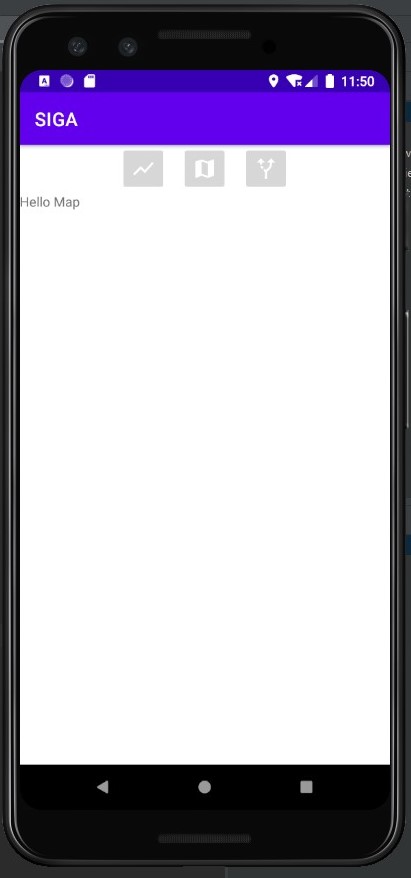
As you can see in the emulator's image the map it doesn't display.
The application is supposed to display the map when the fragment is loaded but only show the textview in layout.
Currently I select manually the fragment to display but at the end the user can select a bottom from the top menu and the fragment will be changed.


I am working on HERE map premium edition 3.18
I create a here map in a Fragment, but when the activity that contains the fragment is opened the map it doesn't display.
I followed instruction from official documentation :
This is the Fragment layout
The MapFragmentView constructor:
Here is the Fragment class
Here is the Layout Activity that contains the fragment
And this is the Activity that launch the fragment
As you can see in the emulator's image the map it doesn't display.
The application is supposed to display the map when the fragment is loaded but only show the textview in layout.
Currently I select manually the fragment to display but at the end the user can select a bottom from the top menu and the fragment will be changed.