A fast, keyboard-driven audio player for musicians and anyone who works with large collections of audio files.
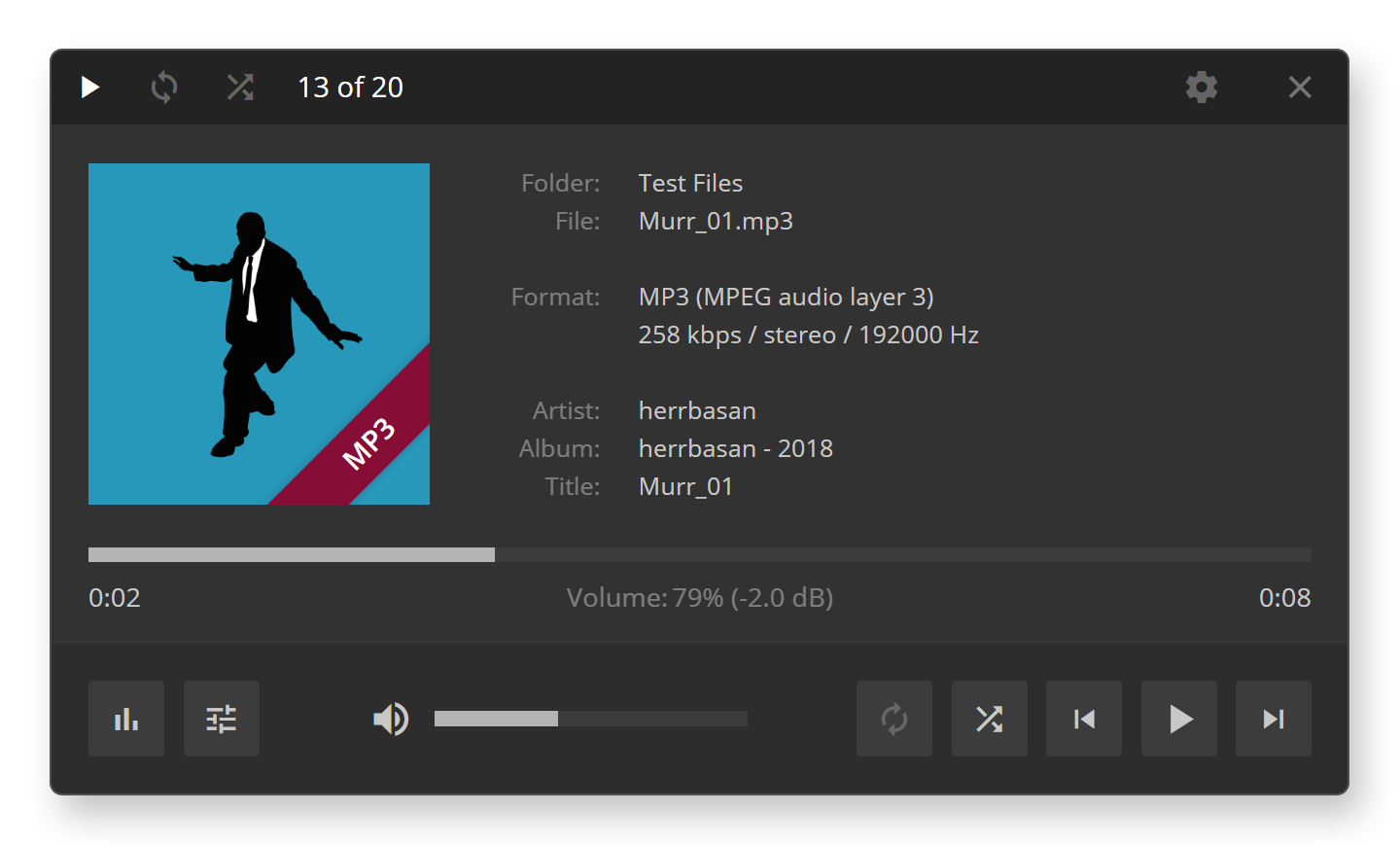
Back in the System 7 days, there was a Mac app called SoundApp by Norman Franke. It was a simple, lightweight audio player that musicians loved — you could throw any audio file at it, navigate with the keyboard, and it just worked. No library to manage, no playlists to curate. Just you and your files.
I used it constantly. I also ran a website about psychoacoustic compression (MP3 was exotic back then), and SoundApp got full marks in my player reviews.
Years later, I found myself missing that workflow. Modern players had become bloated media centers. I wanted something fast and simple again — something I could use while making music. So I built my own. First in Adobe AIR, then in Electron. Almost a decade of daily use has shaped every detail.
This is that app. I finally decided to share it.
Speed, everywhere. Double-click an audio file and it plays instantly. Drop a folder with thousands of files and the playlist builds in moments. Skip through tracks as fast as you can press the arrow keys — playback starts immediately, every time.
No library, no database. SoundApp works directly with your filesystem. Open a file, and it automatically adds everything in that folder to the playlist. Open a folder, and it scans recursively. This isn't a media library — it's a tool for exploring what you have.
The shuffle workflow. Drop a massive folder of samples, stems, or reference tracks. Hit R to shuffle. Skip through with the arrow keys until something catches your ear. This is how I find inspiration — fast, random, unplanned.
Gapless looping. Press L and the current track loops seamlessly — no gap, no click. I use this constantly: find a loop, let it run, jam over it.
Multi-track preview. Press M to open the mixer with all the files from the current folder. Perfect for checking stems or bounces from your DAW. Solo individual tracks, mute others, hear them in context — without launching a full session.
Format icons you can read. SoundApp registers as a handler for audio formats and gives each one a distinct color: green for FLAC, red for MP3, gray for PCM, orange for AAC, purple for OGG, yellow for tracker modules. You can see what's what at a glance in your file manager.
I built this for myself — a musician who needs to quickly audition files while working. But it's useful for anyone who works with audio: producers, sound designers, podcast editors, sample collectors, or just music lovers with large collections who are tired of waiting for their player to load.
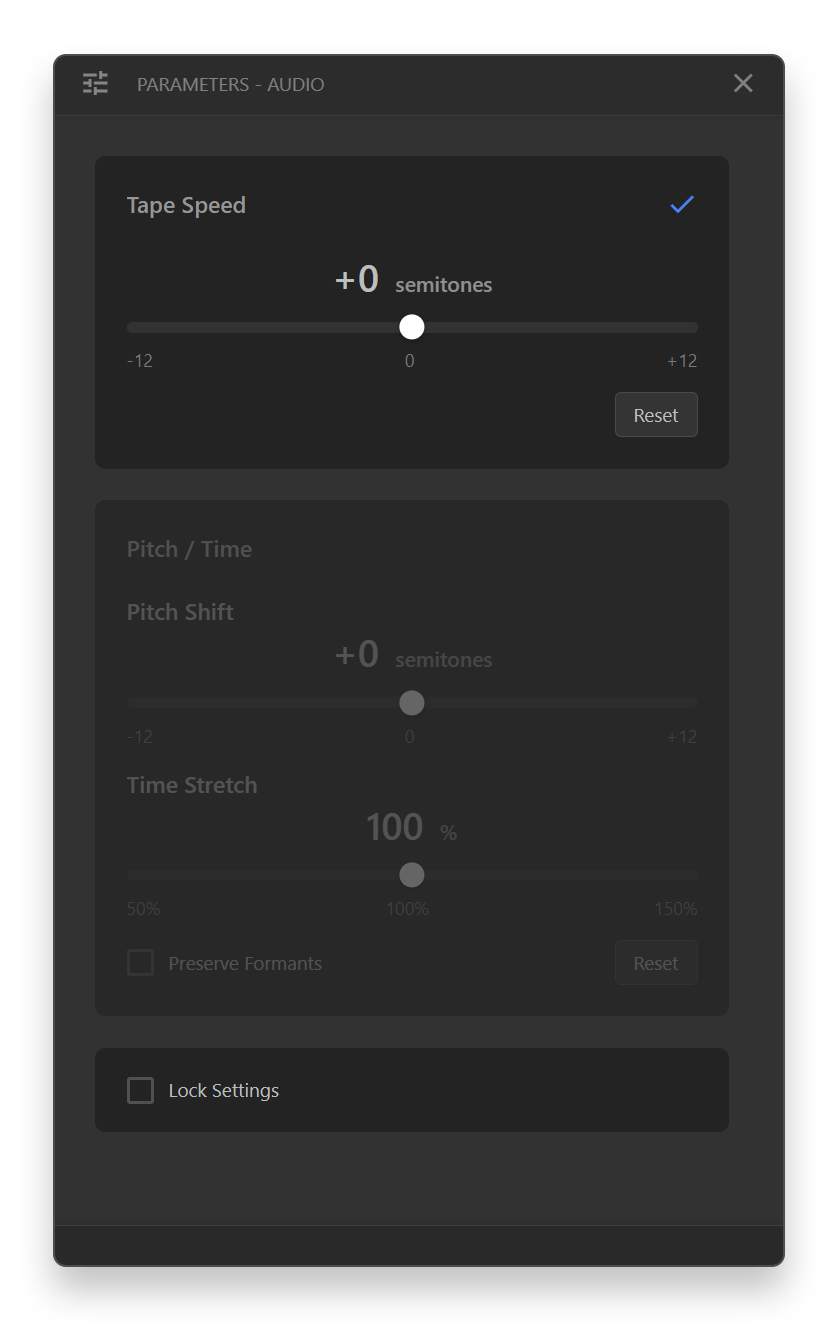
Press P to open the Parameters window. It adapts to whatever you're playing — audio, MIDI, or tracker — and shows only the controls you need.
Audio files: The Tape Speed slider changes pitch and tempo together — like a varispeed deck. Use it to drop a song into a key you can sing comfortably, or slow it down to figure out a part. If you need pitch and tempo independent, enable Pitch/Time mode. The Rubber Band Library handles the processing — it actually sounds good, even slowed down.
MIDI files: Same idea — transpose to your vocal range, adjust tempo to a comfortable speed, or enable the metronome to practice along. Switch SoundFonts if you want different sounds. I use this to run through standards or play along with backing tracks.
Tracker modules: Adjust pitch and tempo, then use the channel mixer to solo or mute individual channels. You can also tweak the stereo separation — sometimes those old MOD files are too narrow.
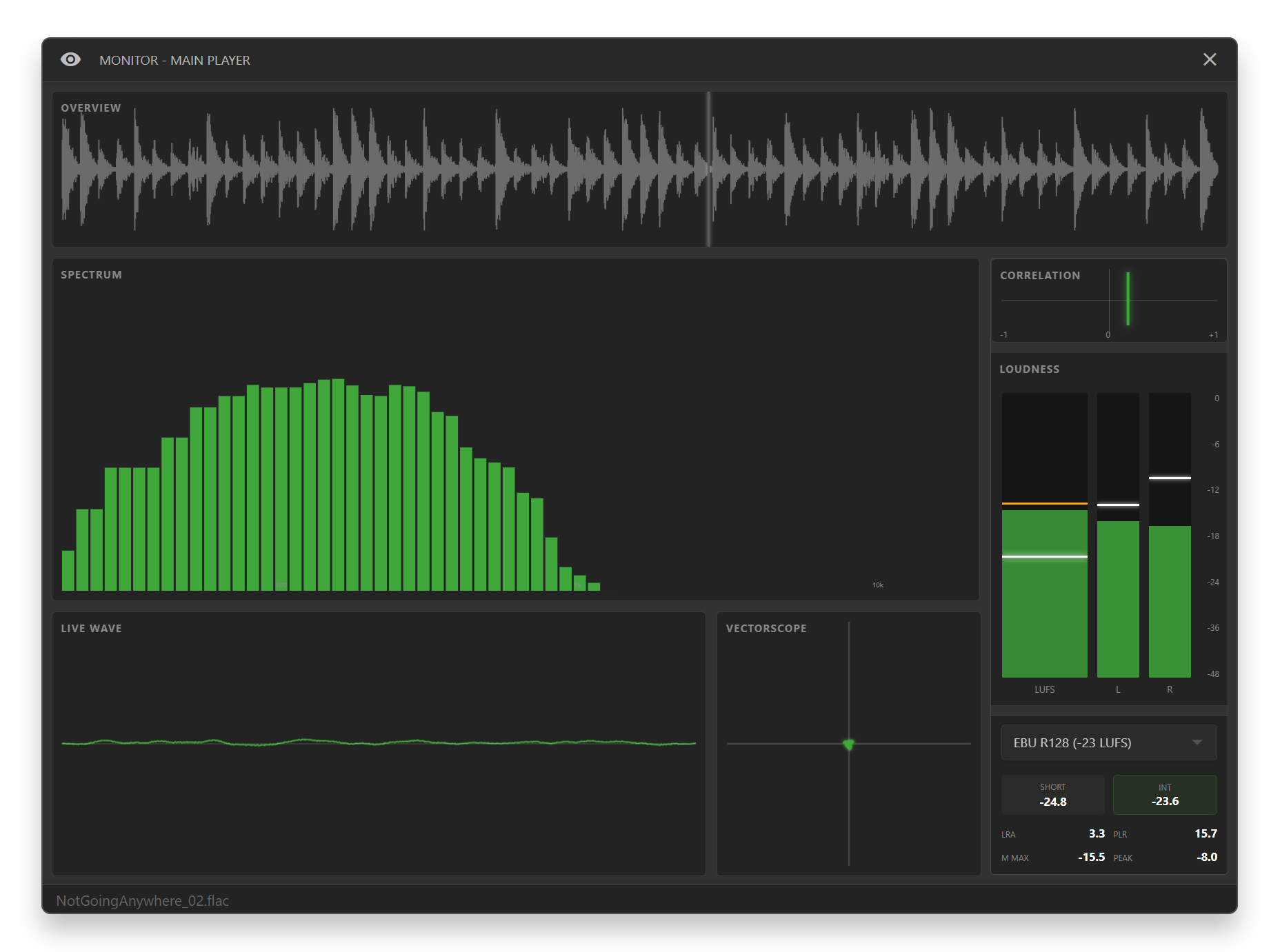
Click the meters in the main window to open the full Monitoring window. I wanted proper visual feedback without opening my DAW.
Waveform overview shows the entire file with a playhead — you always know where you are. The spectrum analyzer below it shows frequency content in real time.
Loudness metering follows EBU R128: Short-term and Integrated LUFS, Loudness Range, and Peak-to-Loudness Ratio. Pick your target — Streaming (-14), Broadcast (-23), CD/Club (-9), or Podcast (-18). The meter turns green when you hit it.
Vectorscope shows your stereo image and phase correlation. The L/R level meters on the side have smooth ballistics you can actually read.
A note on accuracy: I'm not a sound engineer. The loudness metering is based on my understanding of the EBU R128 spec — possibly flawed, definitely coded with help from LLMs — and my own math. If you know this stuff and something looks off, please tell me. Feedback is not just welcome, it's needed.
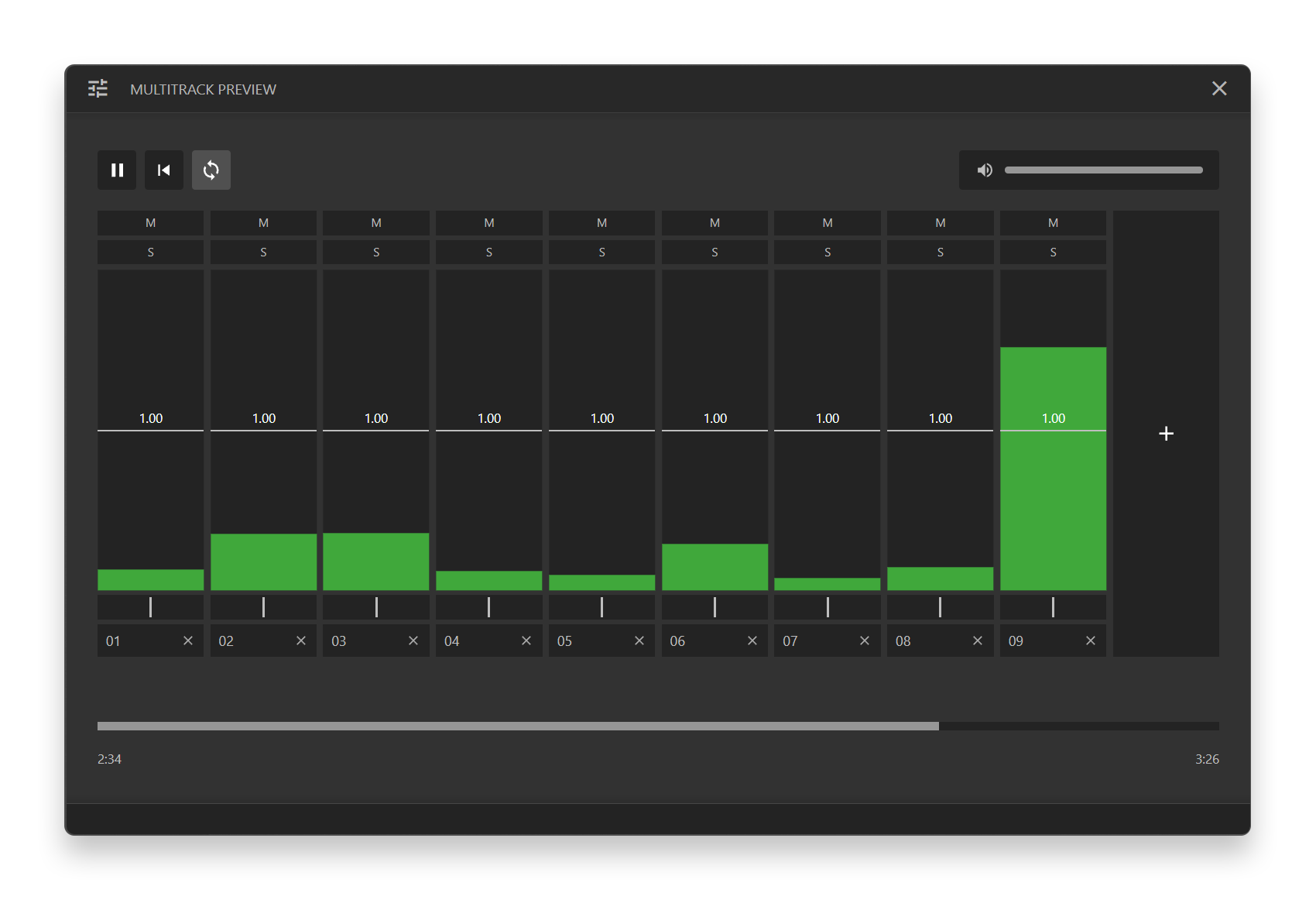
The multi-track mixer lets you play up to 20 audio files simultaneously, perfectly synced. Drop a folder of stems onto the "Multitrack Preview" zone, or press M to open the mixer with files from the current folder.
- Solo any track with
F1–F10or1–0 - Hold
Shiftfor exclusive solo (mutes all others) - Seek with arrow keys, adjust master volume with up/down
I used to open my DAW just to check a bounce. Now I don't.
SoundApp is built for keyboard use. You can do almost everything without touching the mouse.
| Key | Action |
|---|---|
Space |
Play / Pause |
L |
Toggle gapless loop |
R |
Shuffle playlist |
← / → |
Previous / Next track |
Ctrl+← / Ctrl+→ |
Skip 10 seconds |
↑ / ↓ |
Volume up / down |
+ / - |
Speed up / down (±24 semitones) |
P |
Open Parameters (Pitch/Time/MIDI/Tracker) |
M |
Open mixer with current folder |
I |
Show file in folder |
H |
Help |
S |
Settings |
C |
Toggle controls bar |
X |
Toggle dark/light theme |
Esc |
Exit |
Pretty much everything. MP3, FLAC, WAV, AIFF, OGG, M4A, AAC, WMA, APE, WavPack, and anything else FFmpeg can decode.
Tracker modules too. MOD, XM, IT, S3M, and 70+ tracker formats via libopenmpt — with proper playback, not just "technically works."
MIDI support. Full General MIDI playback using FluidSynth and high-quality SoundFonts.
Download the latest release from the Releases page. Run the installer and you're ready to go. SoundApp will offer to register as the default handler for audio formats.
SoundApp is designed for dark mode. There's a light mode (X to toggle), but it's not as polished. I work in the dark.
SoundApp is built for keyboard-first use, so the interface is deliberately minimal. Press C to toggle the controls bar at the bottom of the window. It shows play/pause, loop, shuffle, prev/next, quick access to settings and help, plus a volume slider.
The controls bar is shown by default, but can be hidden with C. You can also adjust volume with the mouse wheel.
For architecture, format details, and contributor information, see docs/ARCHITECTURE.md.
Startup Polish — No more window flash:
- Fixed Window Position Flash — Window now opens directly at saved position instead of appearing at screen center then jumping
- Instant Window Display — Window shows immediately while initialization happens in the background (no ~900ms delay)
- Volume Boost — 200% volume applies +6dB gain boost as intended
Performance & Volume Fixes — Quick startup and proper gain boost:
- Instant Window Display — Fixed ~900ms delay before window appeared. The player window now shows immediately while initialization happens in the background
- Volume Boost Fixed — 200% volume now actually applies +6dB gain boost (was capped at 100% / 0dB). Quiet tracks can now be amplified as intended
Complete Audio Architecture Rework — A ground-up refactor of the audio engine and state management:
- Three-Process Architecture — Separated Main (state/lifecycle), Engine (audio playback), and Player (UI) processes for better stability and performance
- Ground Truth State — Centralized state in the main process that survives engine disposal, ensuring consistent behavior across window lifecycle changes
- Idle Disposal (0% CPU Mode) — Engine automatically disposes after 5-10 seconds of paused playback, reducing background CPU to zero. Restores instantly when needed
- State Client Architecture — Unified state management system with proper state machines for audio transitions, window lifecycle, and idle disposal
- Rubberband Pipeline Fixes — Fixed position rush, memory leaks, and race conditions in pitch/time shifting. Added proper warmup handling and position tracking
- Performance Optimizations — Reduced CPU usage through Electron background throttling, optimized IPC traffic, and MessagePort for high-frequency VU data
- Enhanced Mixer — Improved FFmpeg streaming in packaged mode, better multi-track synchronization
- Volume Boost Display — Volume now shows 0-200% range with dB values (100% = 0 dB, 200% = +6 dB)
Parameters Window — Unified controls window (P key) for advanced playback features, automatically adapting to the current file type:
- Audio Files: Tape Speed (coupled pitch/tempo) or Pitch/Time (independent pitch shifting and time stretching via Rubber Band Library)
- MIDI Files: Transpose, tempo control, metronome, and SoundFont selection
- Tracker Modules: Pitch/tempo control, channel mixer with solo/mute, and stereo separation
High-Quality Pitch Shifting & Time Stretching — Independent pitch and time control with Rubber Band Library integration. Shift pitch without changing speed, or change speed without affecting pitch.
Full MIDI Support — Plays General MIDI files with FluidSynth and high-quality SoundFonts. Includes tempo control, pitch shifting, and a metronome that syncs to MIDI tempo changes.
Multi-Track Mixer Improvements — Enhanced synchronization and performance for stem preview workflows.
A few things I'd like to add eventually:
- Playlist window — for when you actually want to see what's queued
- Markers — save positions within a file for A/B comparison
- Quick tag editor — fix metadata without leaving the app
To Norman Franke, who made the original SoundApp. I never forgot how good simple software can be.
To the FFmpeg project — the engine that makes universal format support possible. SoundApp wouldn't exist without it.
To libopenmpt — for bringing tracker music to life with accurate, high-quality playback of MOD, XM, IT, S3M, and dozens of other formats.
To FluidSynth and js-synthesizer — for making MIDI playback possible in the browser with real SoundFont support.
To the Rubber Band Library — for world-class pitch shifting and time stretching that actually sounds good.
MIT