
Kyo-so (Kyoso / 協奏) is an MCP-native, ACP-powered multi-agent review gate for AI coding workflows.
The Japanese word 協奏 translates to concerto in English: multiple independent players performing one coordinated piece.
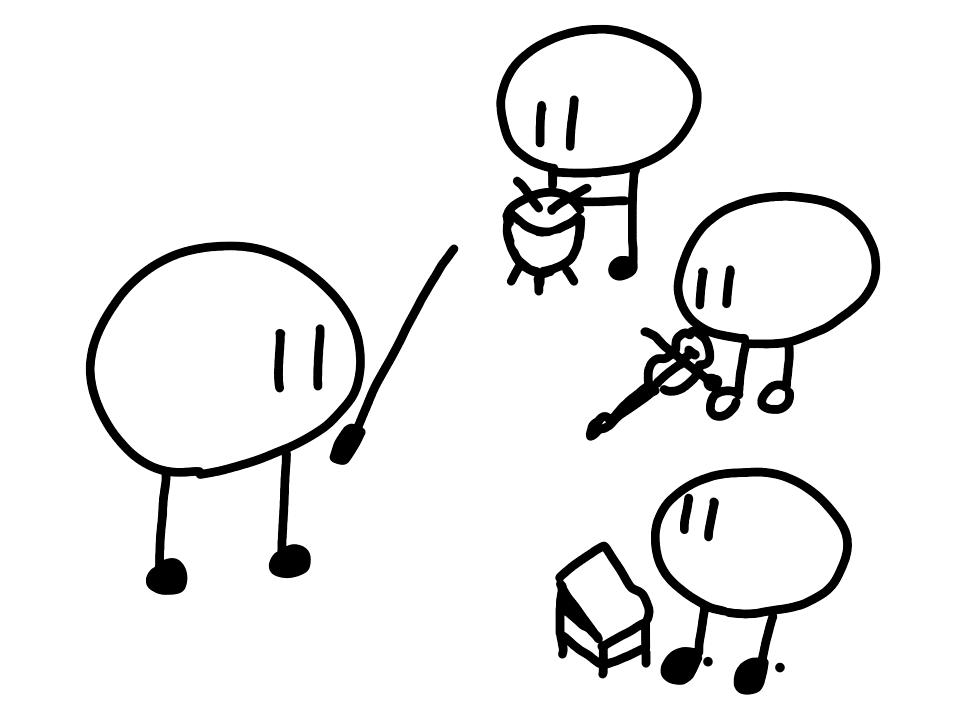
It coordinates Codex and Claude reviewers for:
- implementation plan review
- security review with CISA Secure by Design gates
- diff review after implementation
Kyoso does not apply code changes.
All three review tools run the same pipeline: scan for secrets, snapshot the workspace read-only, run the reviewer ensemble in parallel over ACP, then aggregate findings, apply gates, and decide.
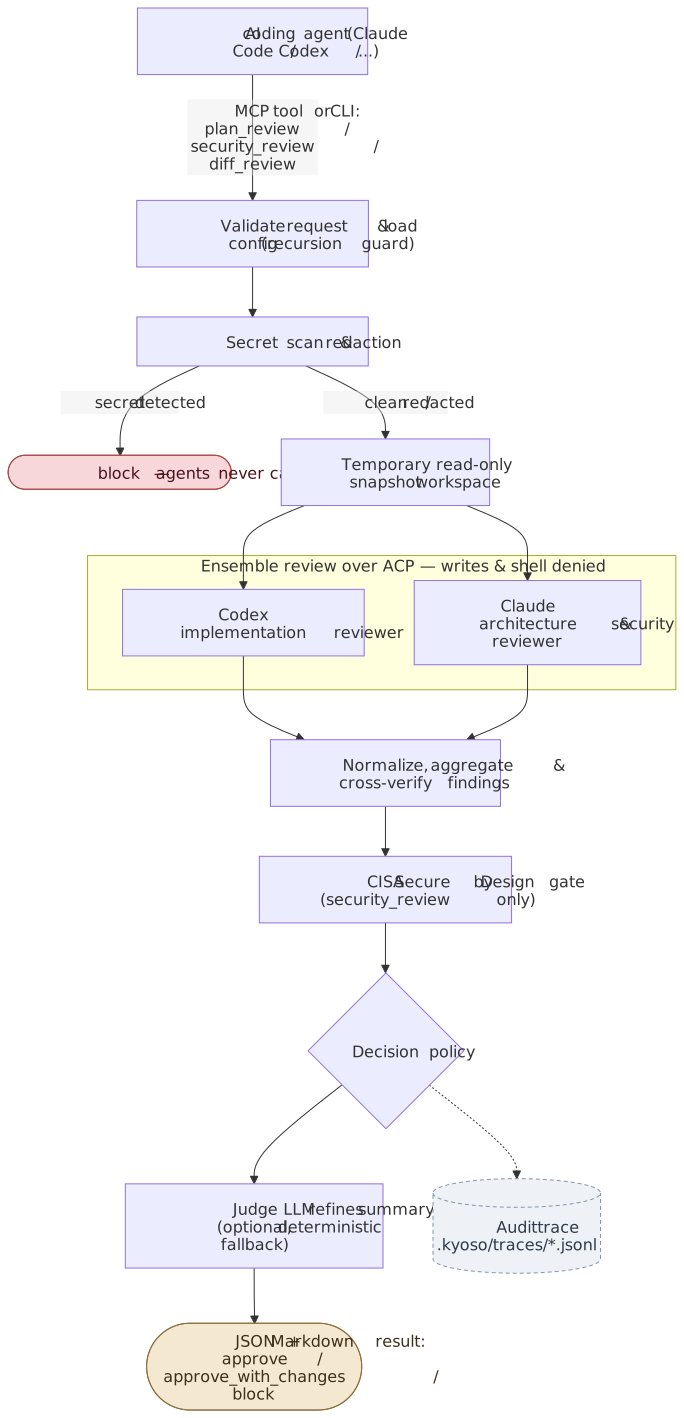
With a single backend enabled, one agent runs as combined_reviewer instead of the two-role ensemble. The Mermaid sources for this diagram live in docs/assets/.
No global install is required. Run Kyoso through npx or bunx.
Kyoso can run when only Claude or only Codex is available. Disable the missing backend in kyoso.toml using examples/claude-only.toml or examples/codex-only.toml.
In single-agent mode, the remaining backend runs once as combined_reviewer and covers both implementation and architecture/security focus areas. JSON output includes reviewMode: "single_agent" and agentsUsed; Markdown output states that cross-model verification was not performed and marks disagreements as N/A.
This mode does not provide independent cross-model validation and may retain self-review bias. It still provides a separate read-only review process, temporary snapshots, adversarial review prompts, secret scanning, and deterministic gates.
- Prepare Claude authentication.
claude setup-tokenSet CLAUDE_CODE_OAUTH_TOKEN from that command, or set ANTHROPIC_API_KEY for direct API billing.
- Register MCP and install the review skill.
npx @kyo-so/cli setup claude-code --write
bunx @kyo-so/cli setup claude-code --write- Verify the setup.
npx @kyo-so/cli doctor
bunx @kyo-so/cli doctor- Ask for a review from Claude Code.
Use Kyoso plan_review on this plan before implementation.
- Prepare Codex authentication.
codex login- Register MCP and install the review skill.
npx @kyo-so/cli setup codex --write
bunx @kyo-so/cli setup codex --write- Verify the setup.
npx @kyo-so/cli doctor
bunx @kyo-so/cli doctor- Ask for a review from Codex.
Use Kyoso diff_review on the current diff. I need a second opinion before merging.
Manual setup examples are kept in examples/codex-config.toml and examples/claude-code-mcp.json.
npx @kyo-so/cli mcp
bunx @kyo-so/cli mcp
Naming note: the npm package is @kyo-so/cli (matching the product name Kyo-so), while the installed CLI command is the shorter kyoso.
For local development:
nix develop
safe-chain bun install
safe-chain bun run typecheck
safe-chain bun test
safe-chain bun run build
safe-chain bun run pack:verify
Requires Node.js 20 or newer when running the packaged CLI.
The Nix dev shell pins Node.js 24 and the nixpkgs-provided Bun version. After reviewing .envrc, you can also run direnv allow once and let it load the shell automatically. CI remains pinned to Bun 1.3.14; the current nixpkgs Bun version may differ slightly, but flake.lock keeps local shells reproducible.
The test suite includes credential-free MCP stdio and ACP subprocess integration coverage. pack:verify additionally starts the packed dist/bin/kyoso.js MCP server and checks the published bundle's protocol handshake.
Known distribution risk: @modelcontextprotocol/server has no stable release yet; Kyoso currently pins a prerelease API, so MCP SDK API changes may require a follow-up release. Run manual real-agent dogfooding before releases that bump @modelcontextprotocol/server, @agentclientprotocol/sdk, or pinned ACP adapters.
npx @kyo-so/cli and bunx @kyo-so/cli are the normal execution paths. The examples below abbreviate that prefix as kyoso.
kyoso plan --goal "Review this OAuth callback plan" --plan plan.md
kyoso security --goal "Review this auth diff" --diff changes.patch
kyoso diff --base main --head HEAD
kyoso doctor
kyoso init
kyoso setup codex
kyoso setup claude-codeReview an implementation plan with selected code:
kyoso plan \
  --goal "Review the OAuth callback implementation plan" \
  --plan plan.md \
  --file src/auth/callback.ts
Read the result from the top down: Decision is the deterministic gate outcome, Findings are the required changes, and Tests to Add are the regression checks Kyoso expects before approval.
Run a CISA Secure by Design security review against a patch:
kyoso security \
  --goal "Review auth changes for tenant isolation and secure defaults" \
  --diff changes.patch \
  --json
In JSON output, cisaSecureByDesign shows the four gate dimensions. A fail in customer security outcomes blocks the review; warning-level dimensions usually produce approve_with_changes.
Register Kyoso with Codex or Claude Code as an MCP server, then call plan_review from the client:
# See examples/codex-config.toml
[mcp_servers.kyoso]
command = "npx"
args = ["-y", "@kyo-so/cli", "mcp", "--network", "model_only"]
Example client request:
Use Kyoso plan_review on this plan and the selected auth files. I need a second opinion before implementing.
npx @kyo-so/cli mcp --network model_only
bunx @kyo-so/cli mcp --network model_only
When --network is omitted, Kyoso uses model_only. This means Kyoso expects only model-provider traffic from backend agents. It is a policy-level constraint, not OS-level network isolation.
Kyoso exposes exactly these MCP tools:
plan_reviewsecurity_reviewdiff_review
MCP stdout is reserved for protocol messages. Logs go to stderr or local audit traces.
The bundled kyoso-review skill is intentionally narrow. It should trigger only when you explicitly ask for Kyoso, multi-agent review, plan review, security review, CISA Secure by Design review, or diff review.
npx @kyo-so/cli setup codex --write and bunx @kyo-so/cli setup codex --write copy it to .agents/skills/kyoso-review/ by default. Add --global to copy it to ~/.agents/skills/kyoso-review/.
npx @kyo-so/cli setup claude-code --write and bunx @kyo-so/cli setup claude-code --write copy it to .claude/skills/kyoso-review/ by default. Add --global to copy it to ~/.claude/skills/kyoso-review/.
Kyoso MVP uses a disposable temporary snapshot and policy-level write denial. It is not a full OS sandbox. Do not run Kyoso against untrusted repositories unless you understand the risk.
Secret detection is best-effort. If Kyoso detects a likely secret in the request, selected files, or diff, it redacts the value and blocks before backend agents run by default.
Kyoso does not store provider credentials. Child agent environment variables are allowlisted.
Repository content, plans, diffs, and selected files are treated as untrusted data in backend prompts. Kyoso wraps them in <untrusted-content> tags and tells agents not to follow instructions found inside. Final decisions are derived from schema-constrained findings; agents cannot write files or run commands, and the judge cannot change the deterministic decision.
Finding titles are normalized to concise English for aggregation; evidence, recommendations, and summaries can remain in the user's language.
Codex uses the local codex login when available. No API key is required for the default subscription-backed path.
Claude supports two auth paths:
ANTHROPIC_API_KEY: direct Anthropic API billingCLAUDE_CODE_OAUTH_TOKEN: subscription auth fromclaude setup-token
If both Claude credentials are set, Kyoso forwards only CLAUDE_CODE_OAUTH_TOKEN to the Claude child agent by default. Set agents.claude.auth.preferApiKey: true to forward only ANTHROPIC_API_KEY.
Default child-agent env allowlist:
| Agent | Provider env |
|---|---|
| Codex | CODEX_API_KEY, OPENAI_API_KEY, CODEX_HOME, CODEX_ACCESS_TOKEN |
| Claude | ANTHROPIC_API_KEY, CLAUDE_CODE_OAUTH_TOKEN, ANTHROPIC_MODEL, ANTHROPIC_BASE_URL, CLAUDE_CONFIG_DIR, CLAUDE_CODE_USE_BEDROCK, CLAUDE_CODE_USE_VERTEX, CLAUDE_CODE_USE_FOUNDRY |
Kyoso also forwards minimal runtime env needed to launch subprocesses: PATH, HOME, TMPDIR, TEMP, TMP, LANG, LC_ALL, SHELL, USER, USERNAME, and SystemRoot.
Omit agents.<name>.model or agents.<name>.effort to use each agent's own default. Codex uses the local Codex config, such as ~/.codex/config.toml; Claude uses the adapter default.
For available model names, see the Claude models overview and the Codex models list.
[agents.codex]
model = "gpt-5.5"
effort = "medium"

[agents.claude]
model = "claude-sonnet-5"
effort = "high"
Kyoso maps model pins to adapter-supported configuration:
- Claude: sets
ANTHROPIC_MODELwhen not already set inagents.claude.envor a whitelisted parent env. - Codex: sets
CODEX_CONFIG={"model":"..."}whenCODEX_CONFIGis not already set. To combine other Codex session config with a model pin, setagents.codex.env.CODEX_CONFIGdirectly.
Effort works differently: Kyoso does not set an env var for it. Instead, it sends an ACP session/set_config_option request to the backend agent once per session, before the first prompt: configId: "effort" for Claude, configId: "reasoning_effort" for Codex. Valid values depend on the backend agent version and the selected model (for example, Claude only exposes effort levels for models that support them). Kyoso does not validate effort values itself; if the backend agent rejects the request or does not support it, Kyoso logs it to stderr and continues the review.
Audit traces are written to:
.kyoso/traces/<yyyy-mm-dd>/<traceId>.jsonl
Raw agent output and raw file contents are disabled by default.
Keep .kyoso/traces/ out of Git. kyoso init adds .kyoso/ to .gitignore, and this repository does the same. If audit.includeRawAgentOutput is enabled, traces may persist sensitive review output; delete old traces regularly according to your local retention policy.
Kyoso loads config in this order:
- built-in defaults
- user global TOML:
$XDG_CONFIG_HOME/kyoso/config.toml, or~/.config/kyoso/config.toml - project TOML:
<cwd>/kyoso.toml - CLI flags such as
--network
Project kyoso.toml is declarative and does not require trust approval. It can set safe project-scoped keys such as tool toggles, agent enabled / model / effort / role / timeoutMs, workspace byte limits and additive workspace.deny, verification settings, advisory judge settings, and tightening-only security/network settings.
Global TOML is for user-owned settings that can launch commands or forward environment variables:
[agents.codex]
command = "bunx"
args = ["@agentclientprotocol/codex-acp"]

[agents.codex.env]
CODEX_CONFIG = '{"model":"gpt-5.5"}'
kyoso.config.ts is deprecated but still supported for compatibility. It is loaded only after trust-on-first-use approval; trusted hashes are stored in ~/.kyoso/trusted-configs.json. If both kyoso.toml and kyoso.config.ts exist, Kyoso uses TOML and ignores the TypeScript config.
Default agent timeouts are Codex 120 seconds and Claude 300 seconds. MCP clients should allow at least 360 seconds for tool calls. If verification.enabled is true, allow at least 480 seconds because Kyoso may run an additional cross-agent verification round.
Optional finding verification is disabled by default:
[verification]
enabled = false
maxFindings = 5
timeoutMs = 90000
# global config only; project kyoso.toml cannot set this
allowDemotion = false
When enabled, Kyoso asks the agent that did not report each high/critical single-source finding to try to refute it. Phase 1 is annotate-only: verification can update finding confidence and notes, but it does not change severity or the final decision. allowDemotion is reserved for a future opt-in phase and is currently a no-op.
Judge LLMs are optional. Set OPENAI_API_KEY or CODEX_API_KEY to use the OpenAI judge, or ANTHROPIC_API_KEY to use the Anthropic judge. Optional overrides:
OPENAI_BASE_URL: OpenAI-compatible API base URLKYOSO_OPENAI_JUDGE_MODEL: OpenAI judge model, defaultgpt-5.4-miniKYOSO_ANTHROPIC_JUDGE_MODEL: Anthropic judge model, defaultclaude-haiku-4-5
Judge defaults intentionally use lightweight models. For a stronger judge, set KYOSO_ANTHROPIC_JUDGE_MODEL to a Sonnet-class model such as claude-sonnet-5.
Subscription-only setup:
- Codex: use local
codexlogin - Claude: run
claude setup-token, then setCLAUDE_CODE_OAUTH_TOKEN - Judge: set no API keys, so Kyoso uses
deterministic_fallback - To avoid OpenAI judge calls when
OPENAI_API_KEYis present, setjudge.provider = "none"
Team admins should also check organization Usage credits. If credits are enabled, billing behavior beyond subscription limits is controlled outside Kyoso.
- MCP timeout: set client tool timeouts to at least 360 seconds, or at least 480 seconds when
verification.enabledis true. Kyoso defaults are Codex 120 seconds, Claude 300 seconds, and verification 90 seconds. - Fresh npm release: minimum-package-age protection in tools such as safe-chain may briefly block
npx @kyo-so/cliresolution after publish. - Deprecated TypeScript config: untrusted
kyoso.config.tsis skipped unless you pass--trust-config; preferkyoso.toml.
KYOSO_TEST_FAKE_AGENTS=1: test-only fake ACP agents; do not set in production.KYOSO_KEEP_TEMP=1: keep temporary snapshots for local debugging.
Kyoso is licensed under the GNU Affero General Public License v3.0 or later (AGPL-3.0-or-later).
Kyoso is intended to be used as a separate CLI or MCP server process. Embedding, importing, or linking Kyoso into another program may have different license implications.
Copyright (C) 2026 Hokuto TAKEMIYA (hokupod).