
What AI runs here, and what it costs.




Documentation · Quickstart · Privacy · CLI
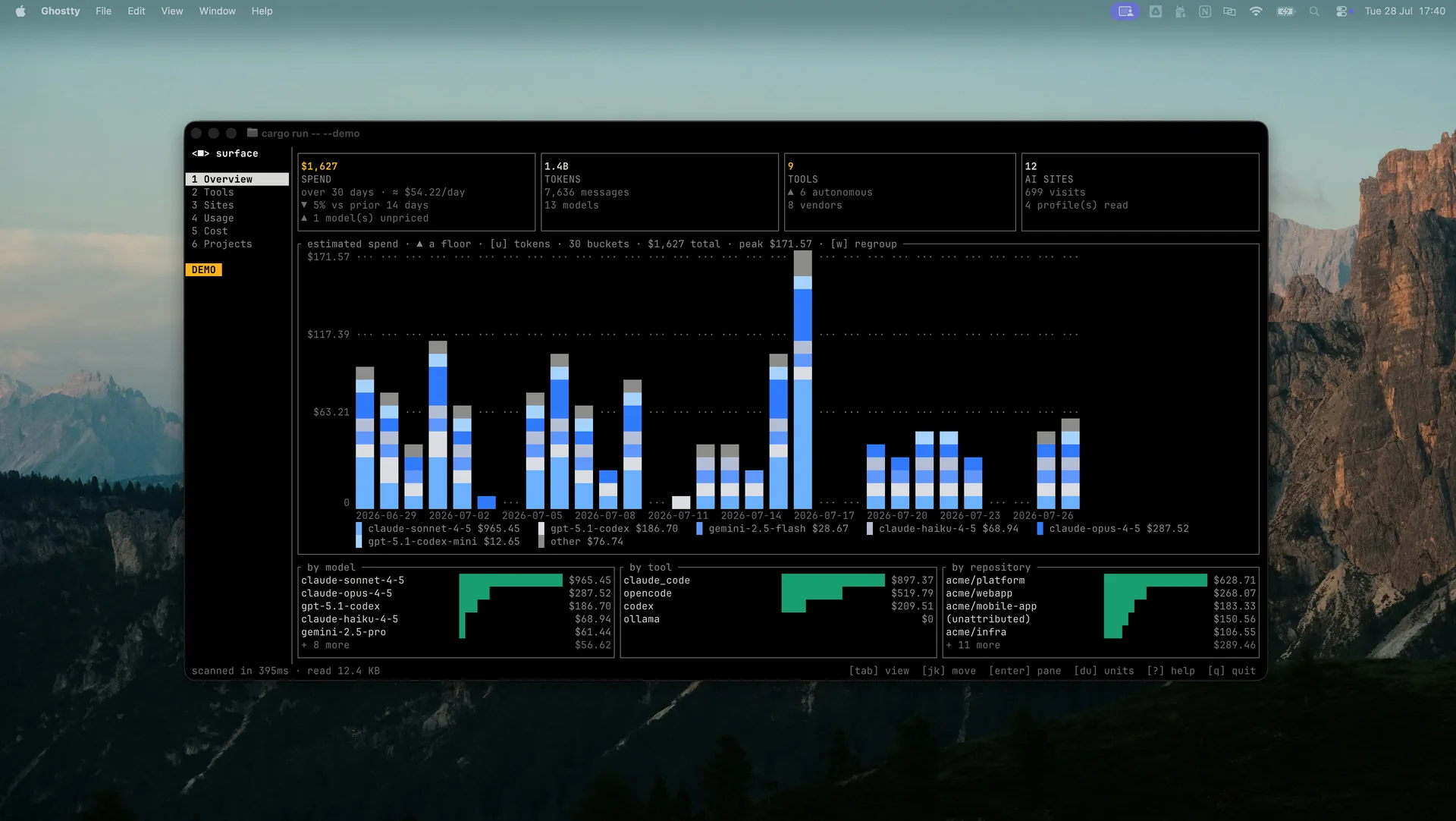
A single binary that scans your own machine and tells you four things: which AI tools are installed, which AI sites you use, how many tokens those tools have spent, and what that came to in dollars. No account, no daemon, no telemetry — it reads files that are already on your disk and shows you what is in them.
# macOS and Linux
curl -fsSL https://raw.githubusercontent.com/holistic-ai/surface/main/install.sh | sh
# Windows, PowerShell
irm https://raw.githubusercontent.com/holistic-ai/surface/main/install.ps1 | iex#Windows, cmd.exe — irm and iex are PowerShell only
powershell -NoProfile -ExecutionPolicy Bypass -Command "irm https://raw.githubusercontent.com/holistic-ai/surface/main/install.ps1 | iex"# Cargo, on any of the three
cargo install surface-cli # the crate is surface-cli; the binary is surfaceThe installer detects your platform, verifies the download against the release's
SHA256SUMS, and puts one binary on your PATH — no sudo, no profile edits. It
is install.sh, 127 lines, worth reading before you pipe it to a
shell. Prebuilt archives for all six targets are on
Releases, each carrying a
build provenance attestation you can check with gh attestation verify;
installation
covers doing it by hand, and cargo install needs a C toolchain for the bundled
SQLite.
surface              # scan, then open the dashboard
surface --json       # scan, print JSON, exit
surface --offline    # never touch the network
surface --check      # show resolved paths and settings, then exit
surface --demo       # the dashboard on mock data, scanning nothing
tab cycles views, 1–6 jump, j/k move, w regroups the charts by day,
week or month, ? for help, q to quit.
Configuration is optional: surface.example.toml
documents every setting and its default, and surface --check prints where it is
looked for.
| Where it looks | What it records | |
|---|---|---|
| Tools | PATH, config directories, editor extensions, running processes, installed apps |
Which of 18 AI tools are present, and which can execute code on your machine |
| Sites | Browser history for 10 browsers (Chromium and Firefox families) | Visit counts for 30 known AI domains — domain, count, last-seen date, nothing else |
| Usage | Transcripts Claude Code, Codex and OpenCode already write | Tokens per day, tool and model, attributed to the git repo the work happened in |
| Cost | LiteLLM's public price table | The above, priced — plus a subscription comparison if you configure one |
The first run reads every transcript, which on a large corpus takes a while. Every run after it reads only the bytes that were appended — typically under a second.
Can act means the tool can execute code or take actions on this machine on a model's behalf — the one judgement surface makes. Tokens means it also writes a transcript surface can read, so it contributes usage and cost rows; the other fifteen are detected but contribute no numbers, because they write nothing readable.
| Tool | Vendor | Kind | Can act | Tokens | |
|---|---|---|---|---|---|
 |
Claude Code | Anthropic | coding agent | ✅ | ✅ |
 |
Claude Desktop | Anthropic | assistant | ||
 |
Codex CLI | OpenAI | coding agent | ✅ | ✅ |
 |
ChatGPT Desktop | OpenAI | assistant | ||
 |
OpenCode | SST | coding agent | ✅ | ✅ |
 |
OpenClaw | OpenClaw | autonomous agent | ✅ | |
 |
Cursor | Anysphere | editor | ✅ | |
 |
Windsurf | Codeium | editor | ✅ | |
 |
GitHub Copilot | GitHub | extension | ||
 |
Aider | Aider | coding agent | ✅ | |
 |
Goose | Block | autonomous agent | ✅ | |
 |
Hermes Agent | Nous Research | autonomous agent | ✅ | |
 |
Gemini CLI | coding agent | ✅ | ||
 |
Amp | Sourcegraph | coding agent | ✅ | |
 |
Cline | Cline | extension | ✅ | |
 |
Continue | Continue | extension | ✅ | |
 |
Ollama | Ollama | local runtime | ||
 |
LM Studio | LM Studio | local runtime |
Each logo is that tool's own mark, set on a uniform chip so the column reads as
one set and stays legible in GitHub's light and dark themes. They are checked in
under docs/assets/tools/ rather than hotlinked, so the
README needs no third-party request; every file's origin is recorded in
SOURCES.md. Each mark remains the trademark of
its owner, used here only to identify the tool surface detects.
Alongside the tools: 30 AI domains across 10 browsers, and 3 token sources. The full tables, including the exact executable, config path, app name and process each tool is detected by, are in Coverage. Every table is best-effort and expected to go stale — a tool absent from it is simply not reported, and nothing is silently misattributed.
| Binary | 2.06 MB, static, no runtime dependencies |
| Warm scan | ~400 ms — 6 ms tools, 330 ms browser history, 50 ms transcripts |
| Cold scan | ~19 s once, reading 900 MB of transcripts; ~50 ms thereafter |
| Dependencies | 12 direct, 99 in the tree |
| Tests | 246, no fixture files and no network |
| Platforms | macOS, Linux, Windows — x86-64 and arm64 |
| MSRV | 1.88 (set by ratatui's proc-macro chain, tested in CI) |
| Privilege | Runs unprivileged. Never elevates, never prompts |
| Network | One optional request, for model prices. --offline skips it |
Measured on an M-series Mac with 8 AI tools installed and 900 MB of transcripts.
The browser scan dominates a warm run because a domain LIKE filter cannot use
an index; the transcript read is 50 ms warm because it reads only appended bytes.
- Nothing is transmitted. No server, no account, no telemetry. The only
outbound request is the price table, and
--offlineskips it. - No message content, at any setting. Transcripts are parsed for token counts and model names only.
- No URLs, paths, query strings or page titles from browser history. The AI-domain filter runs inside SQLite, so the rest of your browsing is never loaded at all — there is a test that fails if a conversation id reaches a result.
- No paths in the ledger. A working directory becomes a git remote slug
(
owner/name) during the scan and the path is discarded, along with branch names and session ids. This matters because the ledger is written to disk. - Read-only and unprivileged. Never elevates, never writes outside its own state directory, opens browser databases read-only and immutable.
What it cannot see is reported rather than hidden: Safari's history needs Full Disk Access, so it shows up as an unreadable browser instead of quietly counting as zero AI usage. Full detail in privacy.
- Unpriced is not free. A model missing from the price table shows as
▲ unpriced, never$0.00, and a total above unpriced models is marked≥because it is a floor. - Local models are free, and shown as
localrather than$0.00, because the two mean different things. - These are API list rates. Put what you actually pay in
[cost.subscriptions]and the Cost view compares the two. Without that, surface does not guess your plan — it reads no account state. - Cache reads are billed at cache rates and reasoning tokens at output rates, which is how the providers that distinguish them do it.
git clone https://github.com/holistic-ai/surface
cd surface
cargo run                        # scan this machine, open the dashboard
Four commands, all of which CI runs. Get them passing before opening a pull request:
cargo fmt --all
cargo clippy --workspace --all-targets -- -D warnings
cargo test                       # 246 tests, no fixtures and no network
cargo run -- --json --offline    # the scan must degrade, never fail
Needs Rust 1.88 or newer. Nothing else — no task runner, no code generation, no
submodules. Tests live beside the code they exercise and point
SURFACE_STATE_DIR at a temp directory, so a test run never touches your real
profile.
One dependency needs a C toolchain: SQLite, compiled from source by
rusqlite's bundled feature. Browser history and OpenCode's token store both
need it, so it is on by default — but it is opt-out:
cargo build --no-default-features # pure Rust, no C compiler neededThat build is 1.20 MB instead of 2.06 MB and drops the Sites view and OpenCode token counts, keeping tool detection plus Claude Code and Codex usage — and it says so rather than showing empty views. Released binaries have the feature on, so installing one never compiles C.
Docs are Material for MkDocs with the rustdoc reference folded in by
scripts/rustdoc_hook.py:
uv venv && uv pip install -r docs/requirements.txt
uv run mkdocs serve                  # http://127.0.0.1:8000/surface/
Contributor detail — what each CI job checks, the three classes of test, why the
release profile omits panic = "abort" — is in
building from source.
Warning
surface is in development. It is below 1.0, so minor releases may contain
breaking changes. Those are always listed under Breaking changes in
CHANGELOG.md — see
Stability for what
is covered and what is not. Pin an exact version if you script against surface
today.
CONTRIBUTING.md has the checks CI runs and what makes a
change easy to accept; adding a tool, domain or browser is the most common
contribution and mostly means editing a table. Vulnerabilities go through
SECURITY.md rather than the issue tracker. Maintainers cutting a
release want RELEASING.md.

Apache License 2.0 — see LICENSE.