The problem
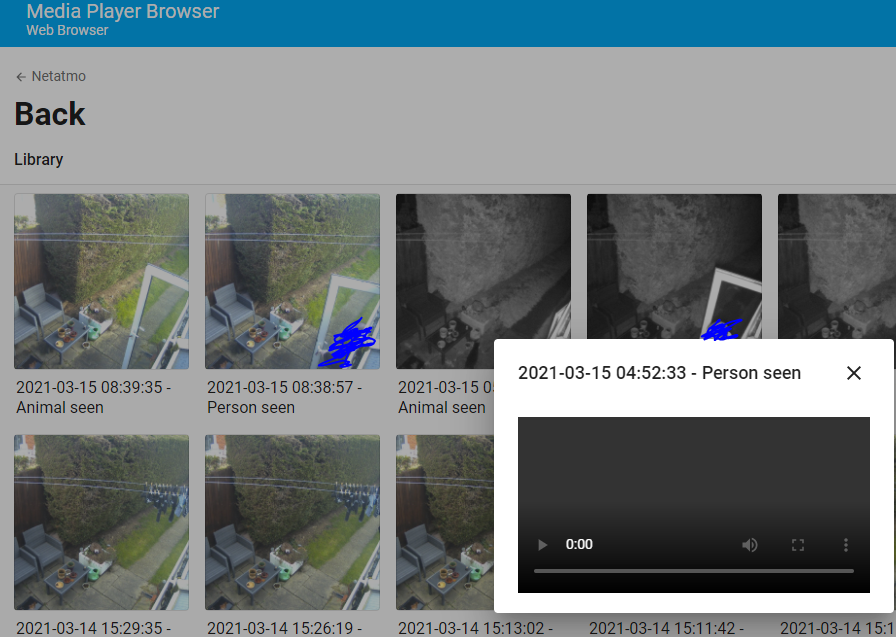
I've never been able to play the video files from my two Netatmo Presence cameras by clicking on the thumbnails that are displayed in the Media Browser, the player window pops up but then doesn't actually play. I have tried this in Firefox, Chrome and Edge on Windows and Android. If I manually copy one of the saved MKV files to the HA local media folder it will then play fine.
For info the cameras are on a different subnet to my HA server but have tested with whitelisting connections in both directions to/from the cameras and the server and to a test client PC.
Nothing appears in either the Netatmo or Media Source debug logs
What is version of Home Assistant Core has the issue?
core-2021.3.4
What was the last working version of Home Assistant Core?
No response
What type of installation are you running?
Home Assistant OS
Integration causing the issue
Netatmo
Link to integration documentation on our website
https://www.home-assistant.io/integrations/netatmo/
Example YAML snippet
# Put your YAML below this line
Anything in the logs that might be useful for us?
# Put your logs below this line

The problem
I've never been able to play the video files from my two Netatmo Presence cameras by clicking on the thumbnails that are displayed in the Media Browser, the player window pops up but then doesn't actually play. I have tried this in Firefox, Chrome and Edge on Windows and Android. If I manually copy one of the saved MKV files to the HA local media folder it will then play fine.
For info the cameras are on a different subnet to my HA server but have tested with whitelisting connections in both directions to/from the cameras and the server and to a test client PC.
Nothing appears in either the Netatmo or Media Source debug logs
What is version of Home Assistant Core has the issue?
core-2021.3.4
What was the last working version of Home Assistant Core?
No response
What type of installation are you running?
Home Assistant OS
Integration causing the issue
Netatmo
Link to integration documentation on our website
https://www.home-assistant.io/integrations/netatmo/
Example YAML snippet
# Put your YAML below this lineAnything in the logs that might be useful for us?
# Put your logs below this line