Checklist
Describe the issue you are experiencing
Afer updating from 0b3 to 0b4, every Dashboard/Tab has an extra 24px added to the tab display resulting in a vertical scroll bar appearing.
Refreshing the browser (Opera & Google Chrome) using the refresh icon clears this problem.
On adding a new Dashboard, setting the tab to Sidebar and adding 2 HA Button cards, one left, the other right, the vertical scroll bar appears again.
Moving to any other Dashboard/Tab thereafter retains the scroll bar until the browser refresh icon is clicked.
Describe the behavior you expected
Same display for all Dashboards/Tabs as in 2023.3.6
Steps to reproduce the issue
Afer updating from 0b3 to 0b4, every Dashboard/Tab has an extra 24px added to the tab display resulting in a vertical scroll bar appearing.
Refreshing the browser (Opera & Google Chrome) using the refresh icon clears this problem.
On adding a new Dashboard, setting the tab to Sidebar and adding 2 HA Button cards, one left, the other right, the vertical scroll bar appears again.
Moving to any other Dashboard/Tab thereafter retains the scroll bar until the browser refresh icon is clicked.
What version of Home Assistant Core has the issue?
2023.4.0b0 - 0b4
What was the last working version of Home Assistant Core?
2023.3.6
In which browser are you experiencing the issue with?
Opera & Google Chrome
Which operating system are you using to run this browser?
Linux latest.
State of relevant entities
No response
Problem-relevant frontend configuration
No response
Javascript errors shown in your browser console/inspector
No response
Additional information
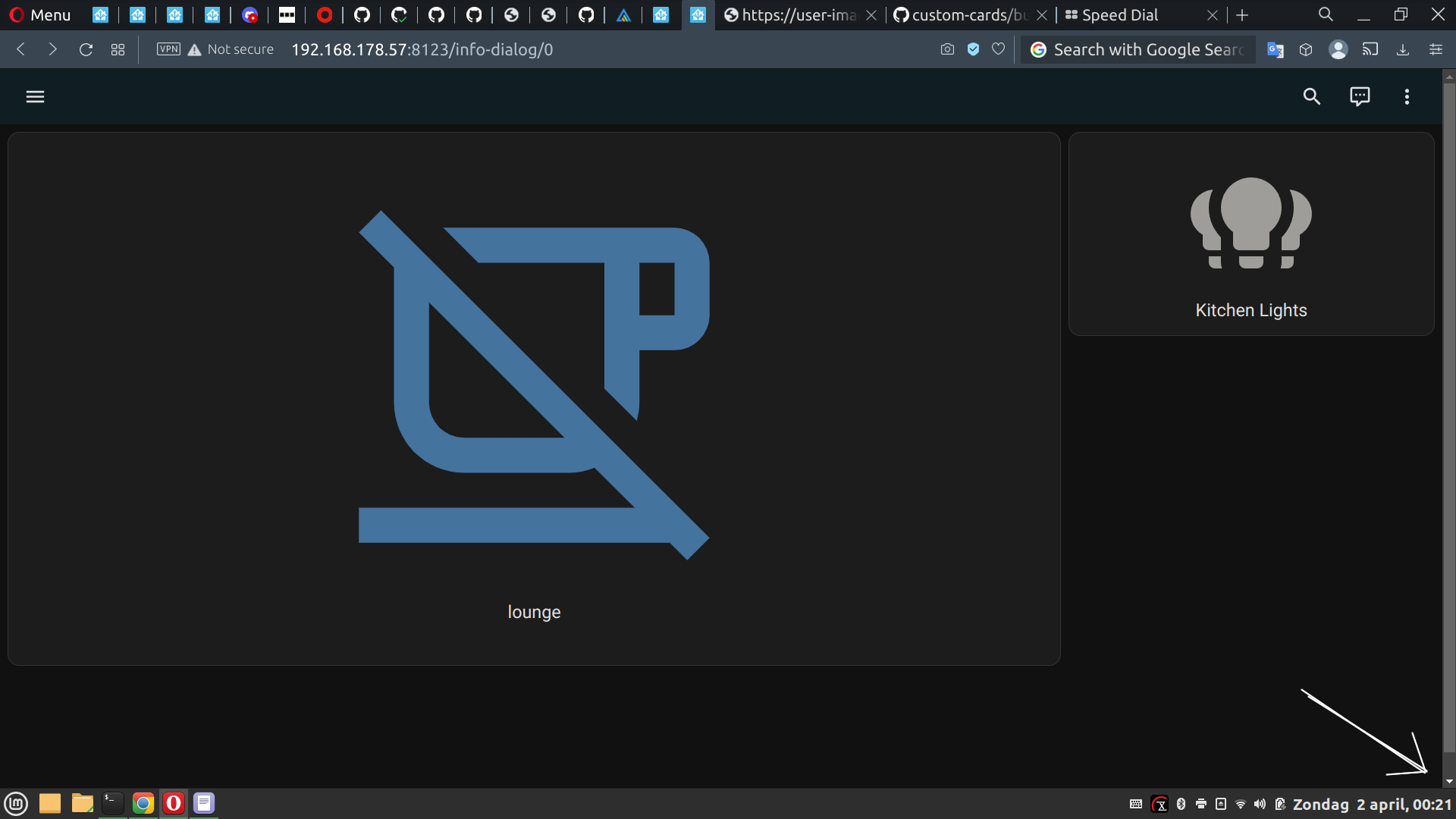
views:
- theme: Backend-selected
title: Home
type: sidebar
badges: []
cards:
- show_name: true
show_icon: true
type: button
tap_action:
action: toggle
entity: switch.lounge
view_layout:
position: sidebar
- show_name: true
show_icon: true
type: button
tap_action:
action: toggle
entity: light.kitchen_lights
Checklist
Describe the issue you are experiencing
Afer updating from 0b3 to 0b4, every Dashboard/Tab has an extra 24px added to the tab display resulting in a vertical scroll bar appearing.
Refreshing the browser (Opera & Google Chrome) using the refresh icon clears this problem.
On adding a new Dashboard, setting the tab to Sidebar and adding 2 HA Button cards, one left, the other right, the vertical scroll bar appears again.
Moving to any other Dashboard/Tab thereafter retains the scroll bar until the browser refresh icon is clicked.
Describe the behavior you expected
Same display for all Dashboards/Tabs as in 2023.3.6
Steps to reproduce the issue
Afer updating from 0b3 to 0b4, every Dashboard/Tab has an extra 24px added to the tab display resulting in a vertical scroll bar appearing.
Refreshing the browser (Opera & Google Chrome) using the refresh icon clears this problem.
On adding a new Dashboard, setting the tab to Sidebar and adding 2 HA Button cards, one left, the other right, the vertical scroll bar appears again.
Moving to any other Dashboard/Tab thereafter retains the scroll bar until the browser refresh icon is clicked.
What version of Home Assistant Core has the issue?
2023.4.0b0 - 0b4
What was the last working version of Home Assistant Core?
2023.3.6
In which browser are you experiencing the issue with?
Opera & Google Chrome
Which operating system are you using to run this browser?
Linux latest.
State of relevant entities
No response
Problem-relevant frontend configuration
No response
Javascript errors shown in your browser console/inspector
No response
Additional information
views:
title: Home
type: sidebar
badges: []
cards:
show_icon: true
type: button
tap_action:
action: toggle
entity: switch.lounge
view_layout:
position: sidebar
show_icon: true
type: button
tap_action:
action: toggle
entity: light.kitchen_lights