Is your feature request related to a problem? Please describe.
Currently to do simple things in Shortcuts like activate a scene, you need to either use JSON (not user friendly) or place the Dictionary action inside your shortcut (easier but less obvious). And after using the "Call Service" action and selecting scene.turn_on service there's still no way to actually see all your available scenes; you'd need to either remember the entity ID or go looking through the HA app for it. Not totally user-friendly IMO.
Describe the solution you'd like
I just remembered an older idea I had in #314. I closed that issue last year during the 2.0 beta when Shortcuts creation was moved outside of the Home Assistant iOS app and done completely in the iOS 13 Shortcuts app. But after giving this another thought, I think a tweaked version of that idea could still work and be extremely useful.
Basically with this idea, there'd be an "Activate Scene" action and then you simply tap the variable to see all your scenes and pick from the list. The existing "Call Service" action already retrieves all the services from your Home Assistant instance, this would be doing the same thing except just showing scenes. The user flow would be very similar to the "Control Home" action of the default Home app:
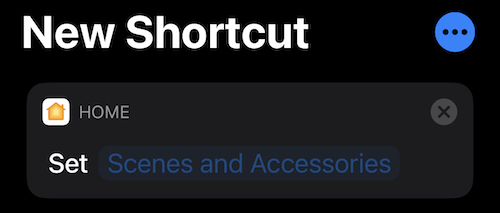
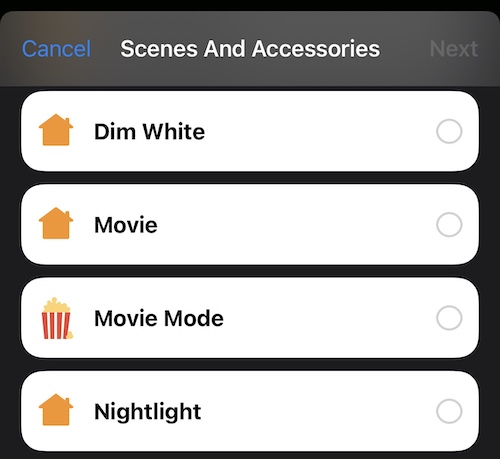
There'd be two other actions "Trigger automation" and "Run script" that would work the same way. I think that would handle probably like 90% of use cases in a super easy and user-friendly way. The "Call Service" action would still exist for the lesser-used or more advanced stuff not handled by those three actions.
Is your feature request related to a problem? Please describe.
Currently to do simple things in Shortcuts like activate a scene, you need to either use JSON (not user friendly) or place the Dictionary action inside your shortcut (easier but less obvious). And after using the "Call Service" action and selecting
scene.turn_onservice there's still no way to actually see all your available scenes; you'd need to either remember the entity ID or go looking through the HA app for it. Not totally user-friendly IMO.Describe the solution you'd like
I just remembered an older idea I had in #314. I closed that issue last year during the 2.0 beta when Shortcuts creation was moved outside of the Home Assistant iOS app and done completely in the iOS 13 Shortcuts app. But after giving this another thought, I think a tweaked version of that idea could still work and be extremely useful.
Basically with this idea, there'd be an "Activate Scene" action and then you simply tap the variable to see all your scenes and pick from the list. The existing "Call Service" action already retrieves all the services from your Home Assistant instance, this would be doing the same thing except just showing scenes. The user flow would be very similar to the "Control Home" action of the default Home app:
There'd be two other actions "Trigger automation" and "Run script" that would work the same way. I think that would handle probably like 90% of use cases in a super easy and user-friendly way. The "Call Service" action would still exist for the lesser-used or more advanced stuff not handled by those three actions.