Describe the issue you are experiencing
Easy bug to be described and reproduced, at least.
The issue is simple: without internet the first setup cannot be completed.
A total offline setup (apart for downloading the VM image) would be really useful for the parts of the world where internet is not always available yet one would like to have their home automated and managed. Obviously everything has to rely only on LAN services and not cloud ones. I imagine a cabin in the woods with some gardening stuff that can be automated but without an internet connection.
Following a deeper description of the problem and which are the components affected.
Following the docs for a VM installation I downloaded the vmdk file since I'm running VMware. I am pretty sure this happens with Virtualbox or KVM as well so no big deal with the installation media. I setup the VM as instructed and spun up in a limited environment (three VMs, one is a router-firewall distribution as pfSense or OPNsense and the other is a client machine with a browser).
If the virtual NIC on the WAN side of the firewall is connected then the Home Assistant OS installation works and arrives to the "create new user page" as showed in the first part of the onboarding guide. No big deal here.
If the virtual NIC is disconnected the entire installation hangs and doesn't show the first part of the initial wizard which is expected since the wizard is contained inside the Docker image that cannot be pulled from the internet.
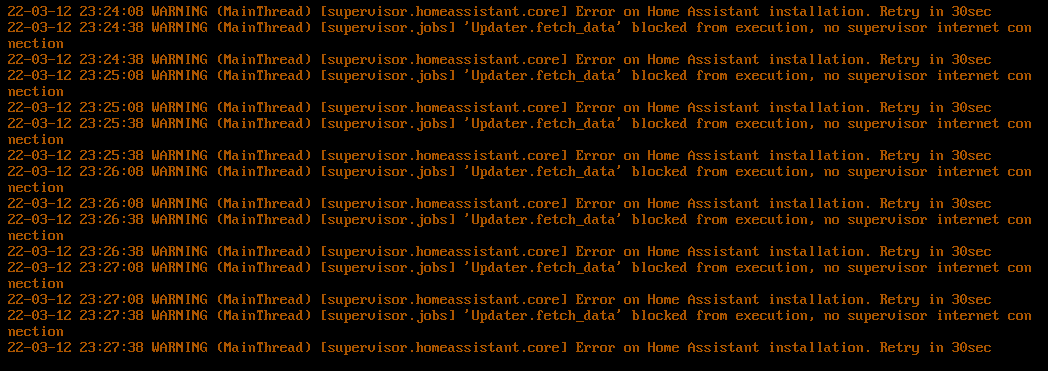
The logs available in the ha supervisor logs command of the VM console keep raising this exception.
I wonder if it would be possible to ship the image available at the time of creation of the VM disk and letting that deal with the initial setup.
What is the used version of the Supervisor?
NOT AVAILABLE
What type of installation are you running?
Home Assistant OS
Which operating system are you running on?
Home Assistant Operating System
What is the version of your installed operating system?
7.4
What version of Home Assistant Core is installed?
NOT AVAILABLE
Steps to reproduce the issue
- Create three VMs
- Firewall appliance like pfSense or OPNsense with two NICs
- Client VM to use the browser and test the configuration
- Home Assistant OS
- Connect the firewall to the internet with the WAN NIC and to a LAN with the other
- Connect the other two VMs to the LAN interface
- Configure the firewall to NAT exactly as a home router would do
- Power on the Home Assistant OS VM
Anything in the Supervisor logs that might be useful for us?
Logs accessible from (ha supervisor logs) keep showing "[supervisor.jobs] 'Updater.fetch_data' blocked from execution, no supervisor internet connection".
Additional information
Describe the issue you are experiencing
Easy bug to be described and reproduced, at least.
The issue is simple: without internet the first setup cannot be completed.
A total offline setup (apart for downloading the VM image) would be really useful for the parts of the world where internet is not always available yet one would like to have their home automated and managed. Obviously everything has to rely only on LAN services and not cloud ones. I imagine a cabin in the woods with some gardening stuff that can be automated but without an internet connection.
Following a deeper description of the problem and which are the components affected.
Following the docs for a VM installation I downloaded the vmdk file since I'm running VMware. I am pretty sure this happens with Virtualbox or KVM as well so no big deal with the installation media. I setup the VM as instructed and spun up in a limited environment (three VMs, one is a router-firewall distribution as pfSense or OPNsense and the other is a client machine with a browser).
If the virtual NIC on the WAN side of the firewall is connected then the Home Assistant OS installation works and arrives to the "create new user page" as showed in the first part of the onboarding guide. No big deal here.
If the virtual NIC is disconnected the entire installation hangs and doesn't show the first part of the initial wizard which is expected since the wizard is contained inside the Docker image that cannot be pulled from the internet.
The logs available in the ha supervisor logs command of the VM console keep raising this exception.
I wonder if it would be possible to ship the image available at the time of creation of the VM disk and letting that deal with the initial setup.
What is the used version of the Supervisor?
NOT AVAILABLE
What type of installation are you running?
Home Assistant OS
Which operating system are you running on?
Home Assistant Operating System
What is the version of your installed operating system?
7.4
What version of Home Assistant Core is installed?
NOT AVAILABLE
Steps to reproduce the issue
Anything in the Supervisor logs that might be useful for us?
Additional information