
First public release. Play a backing track in sync with your MuseScore score — starting from any measure you click.
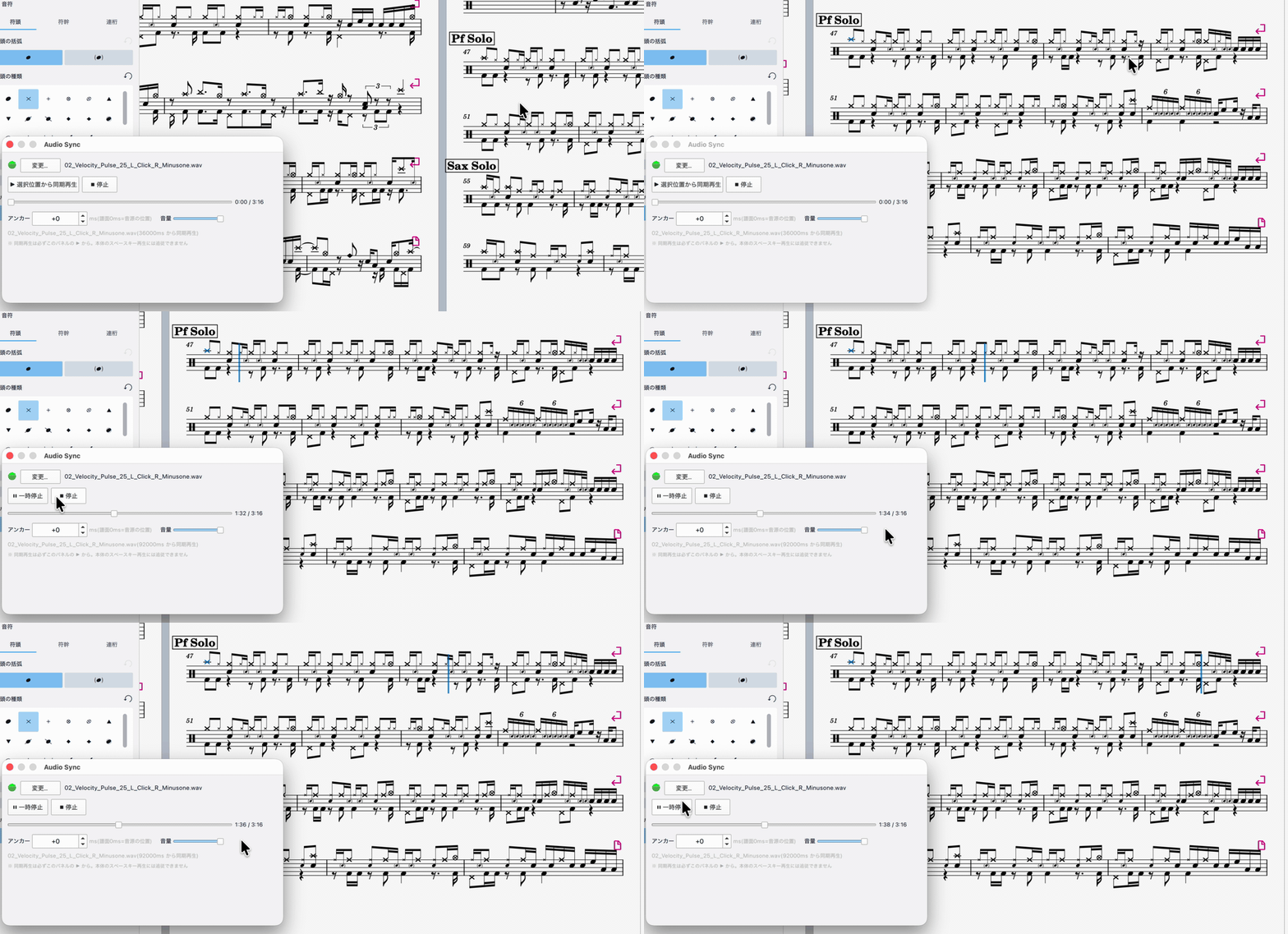
Existing plugins can only start both from the beginning with a fixed offset. Starting from the middle is what makes this one different: the plugin computes the play time of your selection from the score's tempo map and seeks the audio there before firing both together.
macOS only. MuseScore Studio 4.6 or later.
Windows and Linux are not supported yet.
Downloads
| File | What it is |
|---|---|
audio-sync-helper-0.3.0.zip |
The helper app (signed and notarized by Apple — no right-click-to-open needed) |
AudioSync.qml |
The MuseScore plugin |
You need both. MuseScore 4 plugins cannot play audio (QtMultimedia is not bundled), so the plugin talks to the helper app over 127.0.0.1:9873.
Install
- Unzip
audio-sync-helper-0.3.0.zipand moveaudio-sync-helper.appto your Applications folder, then launch it (a waveform icon appears in the menu bar) - Put
AudioSync.qmlin~/Documents/MuseScore4/Plugins/ - Launch MuseScore, enable Audio Sync under [Home] → [Plugins]
Usage
- Run Audio Sync from the plugins menu
- Choose the audio file to sync (remembered per score)
- If the audio has a count-in or leading silence, adjust the anchor — where 0 ms of the score sits in the audio
- Click any note and press ▶ to play both from there
Your audio needs a constant tempo matching the score (DAW mockups, click-track recordings). To check your setup, export the score itself to MP3 and use that — any drift is immediately audible.
Notes
- Always start synced playback from the plugin's ▶ button. The plugin cannot detect playback started with the space bar or MuseScore's own transport
- When updating, update both the helper and the plugin, and restart MuseScore. MuseScore caches plugin QML, so without a restart the old plugin keeps running and the two versions disagree
- The helper listens on
127.0.0.1only and rejects requests that do not come from the plugin, so web pages you have open cannot drive it. See the README for details
Licensed under GPL-3.0.
日本語
MuseScore の譜面と外部音源を任意の小節から同期再生する macOS 向けツールの初回公開版です。
動作環境: macOS 専用 / MuseScore Studio 4.6 以降
audio-sync-helper-0.3.0.zip(ヘルパーアプリ。Apple の公証済みなので右クリックで開く操作は不要)と AudioSync.qml(プラグイン)の両方が必要です。プラグインだけでは音を鳴らせません。
インストールは、zip を展開して .app を起動し、AudioSync.qml を ~/Documents/MuseScore4/Plugins/ に置いて MuseScore の [ホーム] → [プラグイン] で有効化するだけです。
更新するときは、ヘルパーとプラグインを両方入れ替えて MuseScore を再起動してください。 MuseScore はプラグインをキャッシュするため、再起動しないと古いプラグインが動き続けてバージョンが食い違います。
詳細は README.ja.md を参照してください。