0.2.0 - 2026-06-11

sync-ai-clis 0.2.0
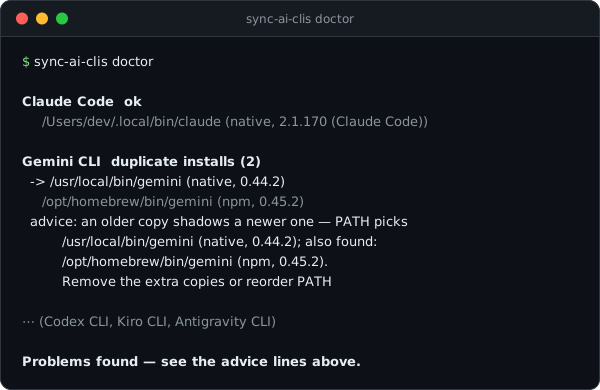
New: sync-ai-clis doctor
Your AI CLIs can break in ways an update never fixes. The classic case: the same tool installed twice through different channels — once with brew, once with npm — and PATH quietly picking the older copy. doctor finds exactly that.
It scans every PATH entry and each tool's known install directory, then reports:
- duplicate installs — every copy with its install source and version, which copy PATH actually picks, and a warning when an older copy shadows a newer one
- broken installs — the binary exists but
--versionfails - not on PATH — installed, but your shell can't see it
doctor changes nothing. It only reads. Exit code 0 when everything is clean, 1 when something needs attention, and --json gives scripts the same diagnosis.
$ sync-ai-clis doctor

Gemini CLI  duplicate installs (2)
  -> /usr/local/bin/gemini (native, 0.44.2)
     /opt/homebrew/bin/gemini (npm, 0.45.2)
  advice: an older copy shadows a newer one — PATH picks /usr/local/bin/gemini (native, 0.44.2); ...
Changed
--jsonnow also works after subcommands:sync-ai-clis doctor --json.
sync-ai-clis 0.2.0 (한국어)
새 기능: sync-ai-clis doctor
AI CLI는 업데이트만으로는 안 고쳐지는 식으로 망가질 때가 있습니다. 대표적인 게 같은 도구를 brew로 한 번, npm으로 한 번 설치해서 PATH가 조용히 구버전을 먼저 잡는 경우입니다. doctor는 바로 그걸 찾아냅니다.
PATH의 모든 항목과 도구마다 알려진 설치 경로를 훑은 뒤 이렇게 알려줍니다:
- 중복 설치 — 복사본마다 설치 출처와 버전, PATH가 실제로 잡는 쪽, 그리고 구버전이 신버전을 가리고 있으면 경고
- 깨진 설치 — 바이너리는 있는데
--version이 실패 - PATH 미반영 — 설치는 됐는데 셸이 못 찾음
doctor는 아무것도 바꾸지 않습니다. 읽기만 합니다. 문제가 없으면 종료 코드 0, 손볼 게 있으면 1을 돌려주고, --json을 붙이면 같은 진단을 스크립트에서 쓸 수 있습니다.
변경
--json을 서브커맨드 뒤에 붙여도 됩니다:sync-ai-clis doctor --json