Releases: hyeonbungi/sync-ai-clis
0.4.2 - 2026-06-20

sync-ai-clis 0.4.2
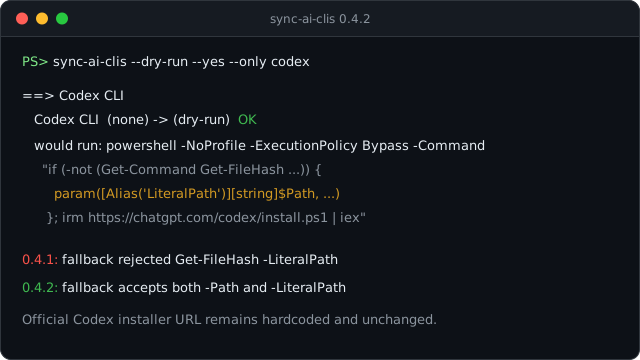
This patch release completes the Windows Get-FileHash fallback added in 0.4.1.
Fixed
- Codex installs now work when its official installer calls
Get-FileHash -LiteralPath. The 0.4.1 fallback handled-Path, which was enough for Claude Code, but Codex verifies its downloaded archive with-LiteralPath. - The installer URL is still unchanged. sync-ai-clis continues to run the hardcoded official Codex endpoint at
https://chatgpt.com/codex/install.ps1; only the local compatibility shim changed. - The fallback still activates only when PowerShell cannot find
Get-FileHash. Normal Windows PowerShell environments keep using the built-in cmdlet.
If Codex failed on Windows with parameter name 'LiteralPath' after upgrading to 0.4.1, install or upgrade to sync-ai-clis 0.4.2 and rerun the same sync command.
sync-ai-clis 0.4.2 (한국어)
이번 패치는 0.4.1에서 넣은 Windows Get-FileHash fallback을 Codex 설치 스크립트에 맞게 보완합니다.
수정
- Codex 설치 스크립트가
Get-FileHash -LiteralPath를 호출해도 동작합니다. 0.4.1 fallback은-Path호출만 처리했습니다. Claude Code에는 충분했지만, Codex는 내려받은 archive를 검증할 때-LiteralPath를 사용해서 다시 실패할 수 있었습니다. - 설치 URL은 그대로입니다. sync-ai-clis는 계속
https://chatgpt.com/codex/install.ps1공식 엔드포인트만 실행합니다. 바뀐 건 로컬 호환 fallback뿐입니다. - fallback은 여전히
Get-FileHash가 없을 때만 켜집니다. 정상적인 Windows PowerShell 환경에서는 기본 cmdlet을 그대로 씁니다.
Windows에서 Codex 설치가 parameter name 'LiteralPath' 오류로 멈췄다면 sync-ai-clis 0.4.2로 올린 뒤 같은 명령을 다시 실행하면 됩니다.
0.4.1 - 2026-06-20
sync-ai-clis 0.4.1
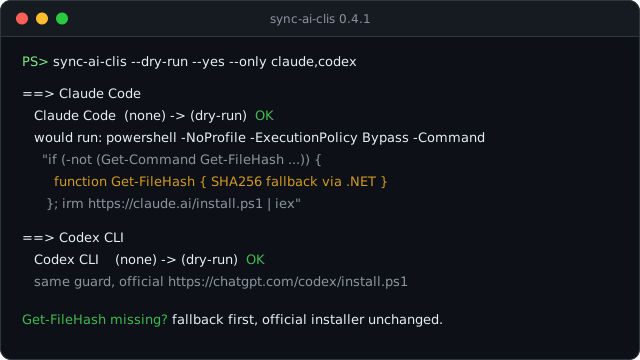
This patch release fixes a Windows installer failure that could stop native installs before the upstream tool installer even got to run.
Fixed
- Windows
install.ps1runs now get a localGet-FileHashfallback. Claude Code and Codex both verify downloaded binaries withGet-FileHash; on some Windows 11 PowerShell environments, that command is not available in the installer session, so installs failed withCommandNotFoundException. - The official installer URLs are unchanged. sync-ai-clis still runs the same hardcoded official HTTPS endpoints for Claude Code, Codex, Kiro, and Antigravity. The only addition is a local SHA256 fallback function, defined before
irm ... | iexand used only when PowerShell cannot findGet-FileHash. - The fix is shared across every Windows native installer. The failure was reproduced with Claude Code and Codex, but Kiro and Antigravity use the same PowerShell installer shape, so they get the same guard.
- Windows validation is less fragile. Shell scripts are pinned to LF checkouts, and the docs baseline check now tolerates CRLF where it only needs to compare one-line markers.
If Windows native installs previously failed with 'Get-FileHash' is not recognized, install or upgrade to sync-ai-clis 0.4.1 and rerun the same sync command. No config changes are needed.
sync-ai-clis 0.4.1 (한국어)
이번 패치는 Windows에서 네이티브 설치가 시작도 못 하고 멈추던 문제를 고칩니다.
수정
- Windows
install.ps1실행 전에Get-FileHashfallback을 준비합니다. Claude Code와 Codex 설치 스크립트는 내려받은 실행 파일을 검증할 때Get-FileHash를 씁니다. 그런데 일부 Windows 11 PowerShell 환경에서는 설치 세션 안에서 이 명령이 잡히지 않아CommandNotFoundException으로 설치가 실패했습니다. - 공식 설치 URL은 그대로입니다. sync-ai-clis는 여전히 Claude Code, Codex, Kiro, Antigravity의 하드코딩된 공식 HTTPS 엔드포인트만 실행합니다. 달라진 건 하나뿐입니다.
irm ... | iex를 실행하기 전에, PowerShell이Get-FileHash를 못 찾을 때만 쓸 로컬 SHA256 fallback 함수를 정의합니다. - Windows 네이티브 설치기 전체에 같은 방어를 적용했습니다. 실제 실패는 Claude Code와 Codex에서 확인했지만, Kiro와 Antigravity도 같은 형태의 PowerShell 설치기를 쓰므로 같은 안전장치를 넣었습니다.
- Windows 검증도 덜 깨지게 손봤습니다. 셸 스크립트는 LF checkout으로 고정했고, 문서 베이스라인 검사는 한 줄 표지를 비교할 때 CRLF를 허용하도록 바꿨습니다.
Windows에서 'Get-FileHash' is not recognized 오류로 설치가 멈췄다면 sync-ai-clis 0.4.1로 올린 뒤 같은 명령을 다시 실행하면 됩니다. 설정은 바꿀 필요 없습니다.
0.4.0 - 2026-06-17
sync-ai-clis 0.4.0
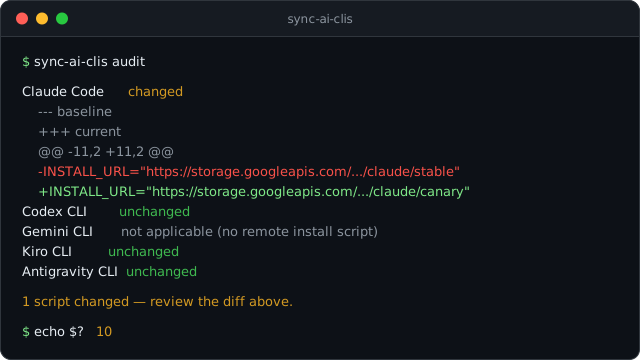
This release adds audit — a read-only way to notice when a remote install script has changed since you last trusted it.
Added
sync-ai-clis auditfetches each tool's remote install script — thecurl|bash/irm|iexones for Claude Code, Codex, Kiro, and Antigravity — and compares it against the last baseline you accepted. If a script changed, it prints a unified diff so you can see exactly what moved before you run it again. Gemini installs through npm, so it has no script to audit and showsnot applicable.- It never writes on its own. Plain
auditonly reads and compares;audit --acceptis the one command that records the current scripts as your new trusted baseline. The first run reports everything asunregisteredand points you to--accept. - It signals through the exit code:
10when any script changed,1when a script could not be fetched,0when everything matches.--jsonemits[{id, display, status, url, diff}], and--only/--exceptnarrow the set. - Baselines are kept under your data directory as the full script text, so the comparison is exact and works offline once a script has been fetched.
audit is the fourth pillar of the trust model (SPEC §5.5). The whole point of sync-ai-clis is to run official curl | bash installers for you; audit lets you watch those scripts so a silent upstream change does not slip past unnoticed. The URLs it checks are the same hardcoded official endpoints the installer already uses — nothing user-supplied.
sync-ai-clis 0.4.0 (한국어)
이번 릴리스는 audit을 더합니다. 원격 설치 스크립트가 지난번 받아들인 내용과 달라졌는지 읽기 전용으로 짚어 내는 명령입니다.
추가
- **
sync-ai-clis audit**은 도구마다 원격 설치 스크립트를 내려받습니다. Claude Code·Codex·Kiro·Antigravity의curl|bash·irm|iex스크립트를 마지막으로 받아들인 기준과 견줘, 달라진 부분이 있으면 unified diff로 그대로 펼쳐 보입니다. 다시 실행하기 전에 무엇이 바뀌었는지 눈으로 확인하면 됩니다. Gemini는 npm으로 설치해 점검할 스크립트가 없으므로not applicable로 표시됩니다. - 스스로 손대지 않습니다. 그냥
audit은 읽고 비교만 할 뿐, 기준을 새로 잡는 길은audit --accept하나입니다. 처음 실행하면 전부unregistered로 떠서,--accept로 기준을 잡으라고 안내합니다. - 결과는 종료코드로 드러납니다. 하나라도 바뀌면
10, 받아 오지 못하면1, 전부 같으면0입니다.--json은[{id, display, status, url, diff}]를 내보내고,--only·--except로 대상을 좁힙니다. - 기준은 데이터 디렉터리에 스크립트 전문을 그대로 저장합니다. 한 번 받아 두면 그다음부터는 비교가 정확하고 오프라인에서도 됩니다.
audit은 신뢰 모델(SPEC §5.5)의 네 번째 기둥입니다. sync-ai-clis는 공식 curl | bash 설치 스크립트를 대신 실행하는 도구인데, audit은 그 스크립트를 지켜보는 눈이 됩니다. 위에서 조용히 바뀐 내용이 모르고 지나가지 않도록 말이죠. 점검하는 URL은 설치할 때 쓰는 그 하드코딩된 공식 엔드포인트와 같습니다. 사용자가 넣는 값은 없습니다.
0.3.0 - 2026-06-16
sync-ai-clis 0.3.0
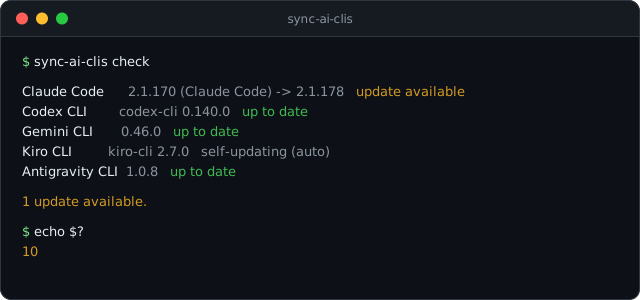
This release adds check — a read-only way to ask "is anything behind?" without touching a thing.
Added
sync-ai-clis checkreports, per tool, whether an update is available — and nothing else. It reads the installed--versionand the latest published version (the npm registry for Claude Code, Codex, and Gemini; Antigravity's official release manifest), compares them, and prints one line each:up to date,update available,unknown,not installed, orself-updating.- It signals through the exit code, so it drops straight into automation:
0when everything is current,10when at least one tool is behind,1when a check could not be completed. That makes it a clean CI gate, a cron trigger, or — paired with a cron job that writes the result to a file — a shell-prompt badge. --jsonemits[{id, display, installed, current, latest, status, note}]for scripts, and--only/--exceptnarrow it to the tools you care about.- Kiro shows as self-updating because it keeps itself current in the background, so a "behind" check would not mean much for it.
check never installs or updates anything — it only reads versions. As with the rest of sync-ai-clis, the version sources are hardcoded official endpoints, and config [channels] overrides do not change what check looks at: a tool's latest release is the same no matter how you installed it.
sync-ai-clis 0.3.0 (한국어)
이번 릴리스는 check를 더합니다. 아무것도 건드리지 않고 "뒤처진 게 있나?"만 읽어서 알려주는 명령입니다.
추가
- **
sync-ai-clis check**는 도구마다 업데이트가 있는지만 알려줍니다. 설치된--version과 최신 버전(Claude Code·Codex·Gemini는 npm 레지스트리, Antigravity는 공식 릴리스 매니페스트)을 읽어 비교한 뒤, 한 줄씩up to date·update available·unknown·not installed·self-updating으로 보여 줍니다. - 종료코드로 결과를 알려서 자동화에 바로 끼울 수 있습니다. 전부 최신이면
0, 하나라도 뒤처지면10, 확인을 못 하면1. CI 게이트나 cron 알림으로 쓰기 좋고, cron이 결과를 파일에 적어 두면 셸 프롬프트 배지로도 씁니다. - **
--json**은[{id, display, installed, current, latest, status, note}]를 내보내고,--only·--except로 원하는 도구만 추립니다. - Kiro는 self-updating으로 표시됩니다. 백그라운드에서 알아서 최신을 유지하기 때문에 뒤처졌는지 따지는 게 큰 의미가 없습니다.
check는 설치도 업데이트도 하지 않고 버전만 읽습니다. 다른 기능과 마찬가지로 버전을 읽는 곳은 하드코딩된 공식 엔드포인트이고, config [channels] 설정도 check가 보는 대상을 바꾸지 않습니다. 어떤 채널로 설치했든 그 도구의 최신 릴리스는 똑같으니까요.
0.2.2 - 2026-06-12
sync-ai-clis 0.2.2
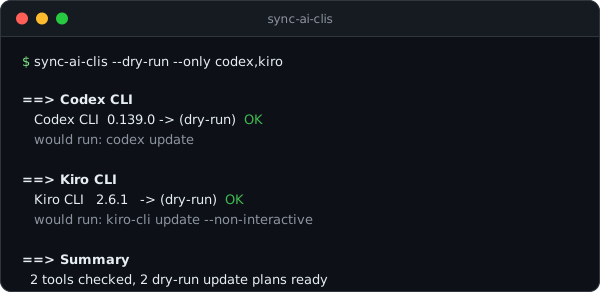
This is a small correctness release for command selection. It closes the deferred decisions around Codex and Kiro, and makes two config/CLI details behave the way the SPEC already described them.
Fixed
- Tool filters work after subcommands.
--onlyand--exceptnow behave like global flags, sosync-ai-clis doctor --only gemini --jsonis valid and diagnoses only Gemini. - Config channel overrides actually drive update planning. A
[channels]entry such asgemini = "npm"now changes the update command for an already-installed tool. Typos in tool IDs or channel names fail fast with exit code 2 instead of being ignored. Missing-tool installs anddoctorstill use the real detected state. - Codex native updates use the official updater. Native Codex installs now run
codex update; the standalone installer remains the install path and broken-install recovery path. - Kiro command decisions are no longer placeholders. Windows 11 installs use the official PowerShell installer, and native updates run
kiro-cli update --non-interactive. - PATH-refresh checks know more real install locations. Codex and Kiro now have confirmed install directories for post-install rechecks. Gemini stays intentionally dynamic because npm and Homebrew prefixes depend on the user's package-manager setup.
Nothing in this release changes the trust model: installer URLs are still hardcoded official HTTPS constants, and --dry-run still prints the exact command sync-ai-clis would execute.
sync-ai-clis 0.2.2 (한국어)
명령 선택을 더 정확하게 다듬은 작은 수정 릴리스입니다. 미뤄 두었던 Codex와 Kiro 관련 결정을 닫았고, SPEC에 적혀 있던 CLI/config 동작도 실제 동작과 맞췄습니다.
고침
- 서브커맨드 뒤에서도 도구 필터가 동작합니다.
--only와--except가 전역 플래그가 되어, 이제sync-ai-clis doctor --only gemini --json처럼 써도 Gemini만 진단합니다. - config의 채널 오버라이드가 실제 업데이트 계획에 반영됩니다.
[channels]에gemini = "npm"처럼 적으면 이미 설치된 도구의 업데이트 명령이 그 채널로 바뀝니다. 도구 id나 채널명을 잘못 쓰면 조용히 무시하지 않고 exit 2로 바로 실패합니다. 새 설치와doctor진단은 여전히 실제 감지 상태를 기준으로 봅니다. - Codex 네이티브 설치는 공식 updater로 업데이트합니다. 이제 native Codex는
codex update를 실행합니다. standalone 설치기는 새 설치와 깨진 설치 복구 경로로 남겨 두었습니다. - Kiro 명령도 placeholder가 아닙니다. Windows 11 설치는 공식 PowerShell installer를 쓰고, native update는
kiro-cli update --non-interactive로 실행합니다. - PATH 갱신 전 재확인 경로가 늘었습니다. Codex와 Kiro의 실제 설치 위치를 반영해, 설치 직후 현재 셸의 PATH가 갱신되지 않았을 때도 더 정확히 재확인합니다. Gemini는 npm과 Homebrew prefix가 사용자 환경마다 달라 고정 경로를 두지 않습니다.
신뢰 모델은 그대로입니다. 설치 URL은 여전히 레지스트리에 하드코딩된 공식 HTTPS만 쓰고, --dry-run은 sync-ai-clis가 실제로 실행할 명령을 그대로 보여줍니다.
0.2.1 - 2026-06-11
sync-ai-clis 0.2.1
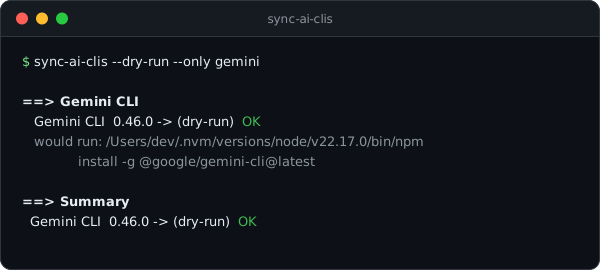
Two fixes for how updates pick their channel. Both were found in the wild by doctor on its first day.
Fixed
- npm updates stay in their prefix. With nvm (or any multi-Node setup), a bare
npm install -gruns whichever npm happens to be active and installs into that npm's prefix — a second copy, not an update. sync-ai-clis now resolves the npm that owns the existing install and runs that one, by absolute path.--dry-runshows the exact invocation, as always. - brew formulas that bundle npm packages are brew again. The
gemini-cliformula ships its npm package inside the Cellar, which made the channel detector read it as an npm install and update it with npm. Cellar and Caskroom paths now take precedence, so these tools update withbrew upgradeas they should. npm globals installed through a brew-managed Node still count as npm.
Together those two were a duplicate factory: a brew-installed gemini misread as npm, plus an nvm-active shell, produced a second gemini that shadowed the first. doctor catches the symptom; 0.2.1 removes the cause.
sync-ai-clis 0.2.1 (한국어)
업데이트가 채널을 고르는 방식의 결함 두 가지를 고쳤습니다. 둘 다 출시 첫날 doctor가 실사용 환경에서 찾아낸 문제입니다.
고침
- npm 업데이트가 자기 prefix를 지킵니다. nvm처럼 node가 여러 개인 환경에서 그냥
npm install -g를 실행하면 그 순간 활성화된 npm이 잡혀 자기 prefix에 설치합니다 — 업데이트가 아니라 두 번째 사본이 생기는 거죠. 이제 기존 설치를 소유한 npm을 찾아 절대경로로 실행합니다.--dry-run은 언제나처럼 실제 호출을 그대로 보여줍니다. - npm 패키지를 동봉한 brew formula를 다시 brew로 인식합니다.
gemini-cli의 formula는 npm 패키지를 Cellar 안에 담고 있어서 채널 감지가 npm 설치로 읽고 npm으로 업데이트했습니다. 이제 Cellar·Caskroom 경로가 우선이라 이런 도구는 원래대로brew upgrade로 업데이트됩니다. brew node를 거친 npm 글로벌은 여전히 npm으로 인식합니다.
이 둘이 겹치면 중복 설치 제조기가 됩니다. brew로 깐 gemini를 npm으로 오인한 상태에서 nvm이 활성화된 셸이면, nvm prefix에 두 번째 gemini가 생겨 첫 번째를 가립니다. doctor는 증상을 잡고, 0.2.1은 원인을 없앱니다.
0.2.0 - 2026-06-11
sync-ai-clis 0.2.0
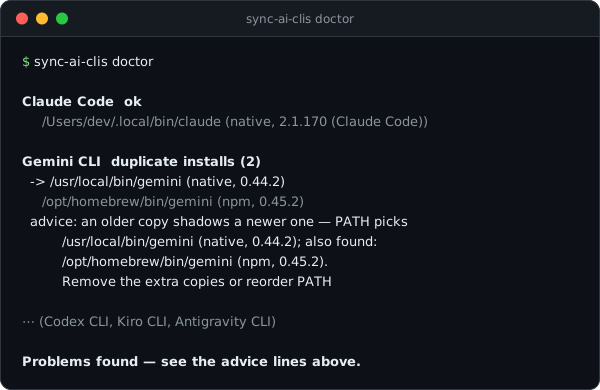
New: sync-ai-clis doctor
Your AI CLIs can break in ways an update never fixes. The classic case: the same tool installed twice through different channels — once with brew, once with npm — and PATH quietly picking the older copy. doctor finds exactly that.
It scans every PATH entry and each tool's known install directory, then reports:
- duplicate installs — every copy with its install source and version, which copy PATH actually picks, and a warning when an older copy shadows a newer one
- broken installs — the binary exists but
--versionfails - not on PATH — installed, but your shell can't see it
doctor changes nothing. It only reads. Exit code 0 when everything is clean, 1 when something needs attention, and --json gives scripts the same diagnosis.
$ sync-ai-clis doctor

Gemini CLI  duplicate installs (2)
  -> /usr/local/bin/gemini (native, 0.44.2)
     /opt/homebrew/bin/gemini (npm, 0.45.2)
  advice: an older copy shadows a newer one — PATH picks /usr/local/bin/gemini (native, 0.44.2); ...
Changed
--jsonnow also works after subcommands:sync-ai-clis doctor --json.
sync-ai-clis 0.2.0 (한국어)
새 기능: sync-ai-clis doctor
AI CLI는 업데이트만으로는 안 고쳐지는 식으로 망가질 때가 있습니다. 대표적인 게 같은 도구를 brew로 한 번, npm으로 한 번 설치해서 PATH가 조용히 구버전을 먼저 잡는 경우입니다. doctor는 바로 그걸 찾아냅니다.
PATH의 모든 항목과 도구마다 알려진 설치 경로를 훑은 뒤 이렇게 알려줍니다:
- 중복 설치 — 복사본마다 설치 출처와 버전, PATH가 실제로 잡는 쪽, 그리고 구버전이 신버전을 가리고 있으면 경고
- 깨진 설치 — 바이너리는 있는데
--version이 실패 - PATH 미반영 — 설치는 됐는데 셸이 못 찾음
doctor는 아무것도 바꾸지 않습니다. 읽기만 합니다. 문제가 없으면 종료 코드 0, 손볼 게 있으면 1을 돌려주고, --json을 붙이면 같은 진단을 스크립트에서 쓸 수 있습니다.
변경
--json을 서브커맨드 뒤에 붙여도 됩니다:sync-ai-clis doctor --json
0.1.3 - 2026-06-11
Release Notes
Documentation
- README refresh in both languages, now shipped to the crates.io and npm landing pages (they render the README bundled at publish time): live channel badges, a terminal demo of
--dry-run, tighter prose, and a simpler tagline.
Fixed
- The WinGet publish workflow passes the release tag explicitly; it previously resolved to the default branch and could not find the release.
Install sync-ai-clis 0.1.3
Install prebuilt binaries via shell script
curl --proto '=https' --tlsv1.2 -LsSf https://github.com/hyeonbungi/sync-ai-clis/releases/download/v0.1.3/sync-ai-clis-installer.sh | shInstall prebuilt binaries via powershell script
powershell -ExecutionPolicy Bypass -c "irm https://github.com/hyeonbungi/sync-ai-clis/releases/download/v0.1.3/sync-ai-clis-installer.ps1 | iex"Install prebuilt binaries via Homebrew
brew install hyeonbungi/tap/sync-ai-clisInstall prebuilt binaries into your npm project
npm install sync-ai-clis@0.1.3Download sync-ai-clis 0.1.3
| File | Platform | Checksum |
|---|---|---|
| sync-ai-clis-aarch64-apple-darwin.tar.gz | Apple Silicon macOS | checksum |
| sync-ai-clis-x86_64-apple-darwin.tar.gz | Intel macOS | checksum |
| sync-ai-clis-x86_64-pc-windows-msvc.zip | x64 Windows | checksum |
| sync-ai-clis-x86_64-pc-windows-msvc.msi | x64 Windows | checksum |
| sync-ai-clis-aarch64-unknown-linux-gnu.tar.gz | ARM64 Linux | checksum |
| sync-ai-clis-x86_64-unknown-linux-gnu.tar.gz | x64 Linux | checksum |
0.1.2 - 2026-06-11
Release Notes
Changed
--dry-runnow renders the pending result version as(dry-run)instead of(none)— nothing was executed, so the version is pending, not gone (first real-user feedback).- Updates that end on the same version are now marked
already current, making idempotent update runs explicit. --jsonoutput is unchanged: it keeps raw values (afterstaysnullunder--dry-run).
Install sync-ai-clis 0.1.2
Install prebuilt binaries via shell script
curl --proto '=https' --tlsv1.2 -LsSf https://github.com/hyeonbungi/sync-ai-clis/releases/download/v0.1.2/sync-ai-clis-installer.sh | shInstall prebuilt binaries via powershell script
powershell -ExecutionPolicy Bypass -c "irm https://github.com/hyeonbungi/sync-ai-clis/releases/download/v0.1.2/sync-ai-clis-installer.ps1 | iex"Install prebuilt binaries via Homebrew
brew install hyeonbungi/tap/sync-ai-clisInstall prebuilt binaries into your npm project
npm install sync-ai-clis@0.1.2Download sync-ai-clis 0.1.2
| File | Platform | Checksum |
|---|---|---|
| sync-ai-clis-aarch64-apple-darwin.tar.gz | Apple Silicon macOS | checksum |
| sync-ai-clis-x86_64-apple-darwin.tar.gz | Intel macOS | checksum |
| sync-ai-clis-x86_64-pc-windows-msvc.zip | x64 Windows | checksum |
| sync-ai-clis-x86_64-pc-windows-msvc.msi | x64 Windows | checksum |
| sync-ai-clis-aarch64-unknown-linux-gnu.tar.gz | ARM64 Linux | checksum |
| sync-ai-clis-x86_64-unknown-linux-gnu.tar.gz | x64 Linux | checksum |
0.1.1 - 2026-06-11
Release Notes
Fixed
- Linux and macOS release archives are now
.tar.gzinstead of.tar.xz, so the npm wrapper and the shell installer work on minimal environments withoutxzinstalled (e.g. slim container images, bare CI runners).
Install sync-ai-clis 0.1.1
Install prebuilt binaries via shell script
curl --proto '=https' --tlsv1.2 -LsSf https://github.com/hyeonbungi/sync-ai-clis/releases/download/v0.1.1/sync-ai-clis-installer.sh | shInstall prebuilt binaries via powershell script
powershell -ExecutionPolicy Bypass -c "irm https://github.com/hyeonbungi/sync-ai-clis/releases/download/v0.1.1/sync-ai-clis-installer.ps1 | iex"Install prebuilt binaries via Homebrew
brew install hyeonbungi/tap/sync-ai-clisInstall prebuilt binaries into your npm project
npm install sync-ai-clis@0.1.1Download sync-ai-clis 0.1.1
| File | Platform | Checksum |
|---|---|---|
| sync-ai-clis-aarch64-apple-darwin.tar.gz | Apple Silicon macOS | checksum |
| sync-ai-clis-x86_64-apple-darwin.tar.gz | Intel macOS | checksum |
| sync-ai-clis-x86_64-pc-windows-msvc.zip | x64 Windows | checksum |
| sync-ai-clis-x86_64-pc-windows-msvc.msi | x64 Windows | checksum |
| sync-ai-clis-aarch64-unknown-linux-gnu.tar.gz | ARM64 Linux | checksum |
| sync-ai-clis-x86_64-unknown-linux-gnu.tar.gz | x64 Linux | checksum |