0.3.0 - 2026-06-16

sync-ai-clis 0.3.0
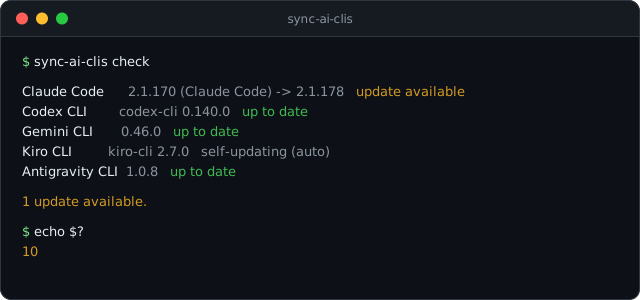
This release adds check — a read-only way to ask "is anything behind?" without touching a thing.
Added
sync-ai-clis checkreports, per tool, whether an update is available — and nothing else. It reads the installed--versionand the latest published version (the npm registry for Claude Code, Codex, and Gemini; Antigravity's official release manifest), compares them, and prints one line each:up to date,update available,unknown,not installed, orself-updating.- It signals through the exit code, so it drops straight into automation:
0when everything is current,10when at least one tool is behind,1when a check could not be completed. That makes it a clean CI gate, a cron trigger, or — paired with a cron job that writes the result to a file — a shell-prompt badge. --jsonemits[{id, display, installed, current, latest, status, note}]for scripts, and--only/--exceptnarrow it to the tools you care about.- Kiro shows as self-updating because it keeps itself current in the background, so a "behind" check would not mean much for it.
check never installs or updates anything — it only reads versions. As with the rest of sync-ai-clis, the version sources are hardcoded official endpoints, and config [channels] overrides do not change what check looks at: a tool's latest release is the same no matter how you installed it.
sync-ai-clis 0.3.0 (한국어)
이번 릴리스는 check를 더합니다. 아무것도 건드리지 않고 "뒤처진 게 있나?"만 읽어서 알려주는 명령입니다.
추가
- **
sync-ai-clis check**는 도구마다 업데이트가 있는지만 알려줍니다. 설치된--version과 최신 버전(Claude Code·Codex·Gemini는 npm 레지스트리, Antigravity는 공식 릴리스 매니페스트)을 읽어 비교한 뒤, 한 줄씩up to date·update available·unknown·not installed·self-updating으로 보여 줍니다. - 종료코드로 결과를 알려서 자동화에 바로 끼울 수 있습니다. 전부 최신이면
0, 하나라도 뒤처지면10, 확인을 못 하면1. CI 게이트나 cron 알림으로 쓰기 좋고, cron이 결과를 파일에 적어 두면 셸 프롬프트 배지로도 씁니다. - **
--json**은[{id, display, installed, current, latest, status, note}]를 내보내고,--only·--except로 원하는 도구만 추립니다. - Kiro는 self-updating으로 표시됩니다. 백그라운드에서 알아서 최신을 유지하기 때문에 뒤처졌는지 따지는 게 큰 의미가 없습니다.
check는 설치도 업데이트도 하지 않고 버전만 읽습니다. 다른 기능과 마찬가지로 버전을 읽는 곳은 하드코딩된 공식 엔드포인트이고, config [channels] 설정도 check가 보는 대상을 바꾸지 않습니다. 어떤 채널로 설치했든 그 도구의 최신 릴리스는 똑같으니까요.