0.4.1 - 2026-06-20

sync-ai-clis 0.4.1
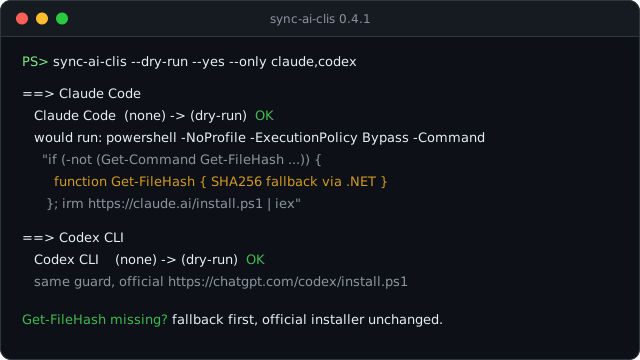
This patch release fixes a Windows installer failure that could stop native installs before the upstream tool installer even got to run.
Fixed
- Windows
install.ps1runs now get a localGet-FileHashfallback. Claude Code and Codex both verify downloaded binaries withGet-FileHash; on some Windows 11 PowerShell environments, that command is not available in the installer session, so installs failed withCommandNotFoundException. - The official installer URLs are unchanged. sync-ai-clis still runs the same hardcoded official HTTPS endpoints for Claude Code, Codex, Kiro, and Antigravity. The only addition is a local SHA256 fallback function, defined before
irm ... | iexand used only when PowerShell cannot findGet-FileHash. - The fix is shared across every Windows native installer. The failure was reproduced with Claude Code and Codex, but Kiro and Antigravity use the same PowerShell installer shape, so they get the same guard.
- Windows validation is less fragile. Shell scripts are pinned to LF checkouts, and the docs baseline check now tolerates CRLF where it only needs to compare one-line markers.
If Windows native installs previously failed with 'Get-FileHash' is not recognized, install or upgrade to sync-ai-clis 0.4.1 and rerun the same sync command. No config changes are needed.
sync-ai-clis 0.4.1 (한국어)
이번 패치는 Windows에서 네이티브 설치가 시작도 못 하고 멈추던 문제를 고칩니다.
수정
- Windows
install.ps1실행 전에Get-FileHashfallback을 준비합니다. Claude Code와 Codex 설치 스크립트는 내려받은 실행 파일을 검증할 때Get-FileHash를 씁니다. 그런데 일부 Windows 11 PowerShell 환경에서는 설치 세션 안에서 이 명령이 잡히지 않아CommandNotFoundException으로 설치가 실패했습니다. - 공식 설치 URL은 그대로입니다. sync-ai-clis는 여전히 Claude Code, Codex, Kiro, Antigravity의 하드코딩된 공식 HTTPS 엔드포인트만 실행합니다. 달라진 건 하나뿐입니다.
irm ... | iex를 실행하기 전에, PowerShell이Get-FileHash를 못 찾을 때만 쓸 로컬 SHA256 fallback 함수를 정의합니다. - Windows 네이티브 설치기 전체에 같은 방어를 적용했습니다. 실제 실패는 Claude Code와 Codex에서 확인했지만, Kiro와 Antigravity도 같은 형태의 PowerShell 설치기를 쓰므로 같은 안전장치를 넣었습니다.
- Windows 검증도 덜 깨지게 손봤습니다. 셸 스크립트는 LF checkout으로 고정했고, 문서 베이스라인 검사는 한 줄 표지를 비교할 때 CRLF를 허용하도록 바꿨습니다.
Windows에서 'Get-FileHash' is not recognized 오류로 설치가 멈췄다면 sync-ai-clis 0.4.1로 올린 뒤 같은 명령을 다시 실행하면 됩니다. 설정은 바꿀 필요 없습니다.