
sync-ai-clis 0.4.2
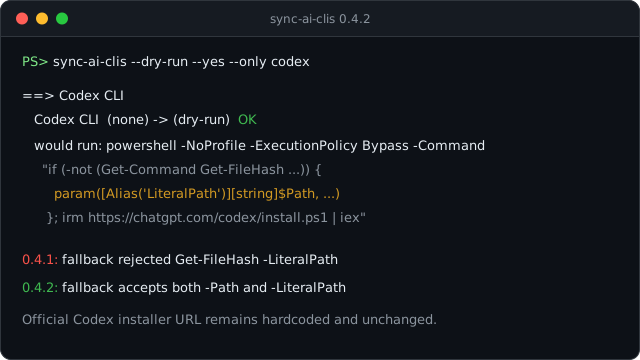
This patch release completes the Windows Get-FileHash fallback added in 0.4.1.
Fixed
- Codex installs now work when its official installer calls
Get-FileHash -LiteralPath. The 0.4.1 fallback handled-Path, which was enough for Claude Code, but Codex verifies its downloaded archive with-LiteralPath. - The installer URL is still unchanged. sync-ai-clis continues to run the hardcoded official Codex endpoint at
https://chatgpt.com/codex/install.ps1; only the local compatibility shim changed. - The fallback still activates only when PowerShell cannot find
Get-FileHash. Normal Windows PowerShell environments keep using the built-in cmdlet.
If Codex failed on Windows with parameter name 'LiteralPath' after upgrading to 0.4.1, install or upgrade to sync-ai-clis 0.4.2 and rerun the same sync command.
sync-ai-clis 0.4.2 (한국어)
이번 패치는 0.4.1에서 넣은 Windows Get-FileHash fallback을 Codex 설치 스크립트에 맞게 보완합니다.
수정
- Codex 설치 스크립트가
Get-FileHash -LiteralPath를 호출해도 동작합니다. 0.4.1 fallback은-Path호출만 처리했습니다. Claude Code에는 충분했지만, Codex는 내려받은 archive를 검증할 때-LiteralPath를 사용해서 다시 실패할 수 있었습니다. - 설치 URL은 그대로입니다. sync-ai-clis는 계속
https://chatgpt.com/codex/install.ps1공식 엔드포인트만 실행합니다. 바뀐 건 로컬 호환 fallback뿐입니다. - fallback은 여전히
Get-FileHash가 없을 때만 켜집니다. 정상적인 Windows PowerShell 환경에서는 기본 cmdlet을 그대로 씁니다.
Windows에서 Codex 설치가 parameter name 'LiteralPath' 오류로 멈췄다면 sync-ai-clis 0.4.2로 올린 뒤 같은 명령을 다시 실행하면 됩니다.