Repository navigation
StockAI v0.1.0

🎉 StockAI v0.1.0 — First Public Release
AI-powered stock sentiment analysis, right on your desktop.
Paste a ticker. Get deep, LLM-driven insights in seconds — no cloud subscription required.
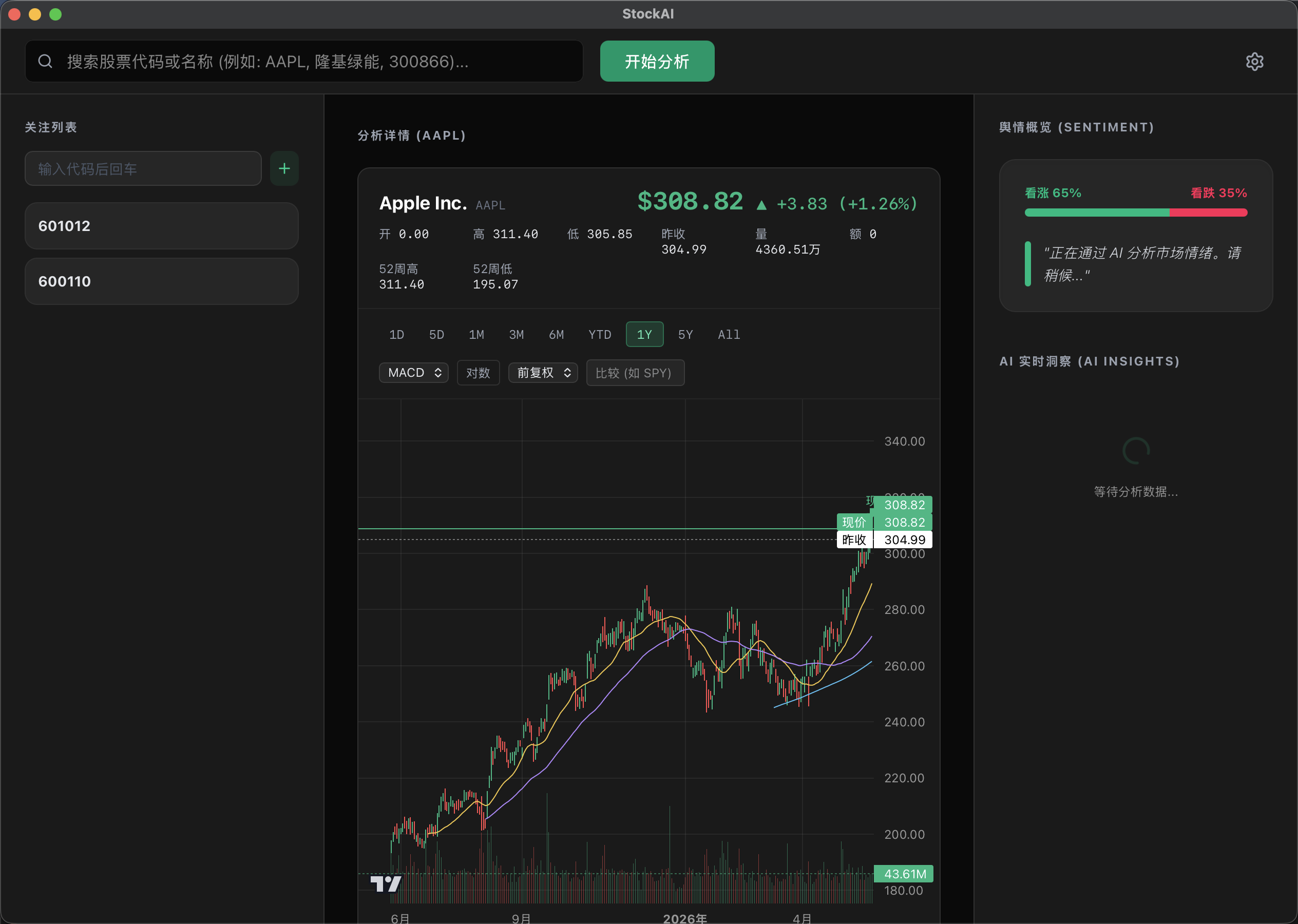
✨ What is StockAI?
StockAI is a native desktop app that combines real-time news scraping with large language model analysis to give you actionable sentiment signals for any stock. It runs fully on your machine — bring your own OpenAI-compatible API key, or use a local Ollama model for complete privacy.
Think of it as a Bloomberg terminal assistant that works with both GPT-4o and your locally-running Qwen/Llama/Mistral model.
🚀 Highlights in v0.1.0
🔍 Real-Time News Intelligence
- Automatically scrapes the latest news for any stock ticker from multiple sources (Google News, Yahoo Finance)
- Extracts full article content — not just headlines — for deeper context
- Powered by Playwright headless browser for reliable, JavaScript-rendered page scraping
🤖 Dual AI Provider Support
| Provider | Use Case |
|---|---|
| OpenAI / any OpenAI-compatible API | Cloud-based analysis with GPT-4o, Claude-via-proxy, DeepSeek, etc. |
| Ollama (local) | 100% private, offline analysis with Qwen 3.5 27B, Llama 3, Mistral, etc. |
Switching providers auto-fills the correct endpoint URL — zero manual configuration.
📊 Interactive Dashboard
- Clean, modern dark UI built with React + Tailwind CSS
- Step-by-step progress visualization:
Scraping → Extracting → Analyzing → Done - Structured analysis output with sentiment score, key risks, opportunities, and summary
⚙️ Persistent Settings
- API key, base URL, model name — all saved locally via Tauri Plugin Store
- Settings survive app restarts; switching between providers remembers your config
🏗️ Architecture
Frontend (React/Vite)
    ↓ Tauri IPC (invoke)
Tauri Core (Rust) — reads config, spawns sidecar
    ↓ CLI args + stdout
Sidecar (Bun) — Playwright scraping + AI analysis
Three isolated layers with strict unidirectional dependencies. The Rust layer is a thin, tested orchestrator; the Bun sidecar handles all I/O-heavy work.
📦 Installation
macOS (Apple Silicon)
- Download
StockAI_0.1.0_aarch64.dmg - Open the
.dmgand drag StockAI to your Applications folder - If Gatekeeper blocks it: Right-click the app → Open → Open anyway
(This is expected for unsigned builds — the app contains no network backdoors)
Windows
- Download
StockAI_0.1.0_x64_en-US.msi(recommended) or the.exeinstaller - Run the installer and follow the prompts
- If SmartScreen warns you, click "More info" → "Run anyway"
Linux (Ubuntu / Debian)
- Download
StockAI_0.1.0_amd64.deb - Install with:
sudo dpkg -i StockAI_0.1.0_amd64.deb
- Launch from your app menu or run
stockaiin the terminal
Note: Linux builds require the WebKitGTK runtime (usually pre-installed on GNOME-based distros).
⚡ Quick Start
- Open StockAI and click the ⚙️ Settings icon
- Choose your AI provider:
- OpenAI: Enter your API key and (optionally) a custom base URL
- Ollama: Make sure Ollama is running locally (
ollama serve) and select your model
- Go back to the main screen, type a stock ticker (e.g.
AAPL,TSLA,NVDA) - Click Analyze and watch the pipeline execute in real time
🛠️ Tech Stack
| Layer | Technology |
|---|---|
| UI | React 18 + TypeScript + Vite + Tailwind CSS |
| Desktop shell | Tauri v2 (Rust) |
| Scraping | Bun + Playwright (headless Chromium) |
| AI inference | OpenAI SDK (works with any OpenAI-compatible endpoint) |
| Local AI | Ollama (default: qwen3.5:27b) |
| Packaging | Tauri bundler → DMG, MSI/EXE, DEB |
| CI/CD | GitHub Actions (matrix: macOS ARM, Windows, Ubuntu 24.04) |
🗺️ Roadmap
- Multi-stock watchlist — analyze a portfolio in one click
- Historical trend charts — sentiment over time, powered by cached results
- Custom prompt templates — tailor the analysis style to your needs
- Export to PDF/Markdown — shareable analysis reports
- Intel Mac support — once a signing workflow is in place
- Streaming output — see AI tokens as they arrive
🤝 Contributing
PRs and issues are very welcome! See CONTRIBUTING guidelines or just open an issue.
If StockAI saves you research time, consider giving it a ⭐ — it helps the project grow!