This fork runs StackChan firmware on the XiaoZhi protocol path and uses
agora-server as the bridge to Agora. Before flashing firmware or expecting the
Agent to start, check these conditions first.
-
Start from the firmware directory:
cd firmware python3 ./fetch_repos.py -
Use ESP-IDF 5.5.x for ESP32-S3. This project has been verified with ESP-IDF 5.5.3/5.5.x; ESP-IDF 6.x changes component layout and is not the target path.
-
Create local firmware config in
firmware/.env. This file is ignored by git. Do not put secrets into.env.example.STACKCHAN_XIAOZHI_OTA_URL=http://<your-computer-lan-ip>:8000/xiaozhi/ota/ STACKCHAN_XIAOZHI_WS_URL=ws://<your-computer-lan-ip>:8000/ws STACKCHAN_WIFI_SSID=<your-wifi-ssid> STACKCHAN_WIFI_PASSWORD=<your-wifi-password>
Use the computer's LAN IP, not
localhost, because the device connects from the Wi-Fi network. -
Build and flash:
idf.py build
idf.py -p /dev/cu.usbmodem1101 flash
If firmware code or assets change, flash again. The flash command writes the app image and the generated
assetspartition.
-
Create server config in
agora-server/server/.env.local. This file is ignored by git.AGORA_APP_ID=<your-agora-app-id> AGORA_APP_CERTIFICATE=<your-agora-app-certificate> AGORA_CUSTOMER_ID=<optional-restful-api-customer-id> AGORA_CUSTOMER_SECRET=<optional-restful-api-customer-secret> AGENT_GREETING= PORT=8000
AGORA_APP_IDandAGORA_APP_CERTIFICATEare required. SetAGORA_CUSTOMER_IDandAGORA_CUSTOMER_SECRETwhen Agora's control API rejects Token007 auth with401 Invalid token. -
Start the bridge:
cd agora-server/server uv sync uv run uvicorn stackchan_server.main:app --host 0.0.0.0 --port 8000 -
Verify the server:
curl http://127.0.0.1:8000/healthz
curl http://127.0.0.1:8000/xiaozhi/healthz
-
The device is connected when server logs show:
OTA request device=... -> ws_url=ws://<host>:8000/ws WS connect device=... session ...: hello from device=... -
The live Agent starts only when all of these are true:
- the server is running on the LAN IP used by firmware;
- the device has an active
/wssession; XZ_AUTO_VOICE=1or unset, since auto voice is enabled by default;- Agora credentials are valid;
- the host can reach Agora RTC/control services from the current network.
On first live Agent start, the Agora Python SDK may download and extract the native RTC SDK. Wait for that to finish before judging startup.
If the logs show:
AUTO-VOICE: start failed
[agora] connection failure err=8
[agora] connect timed out
VoiceBridge: media connect failed
the FastAPI server and XiaoZhi WebSocket are up, but the live Agora media connection did not start. Treat this as an Agent/network/Agora credential path problem, not as a firmware flash failure.
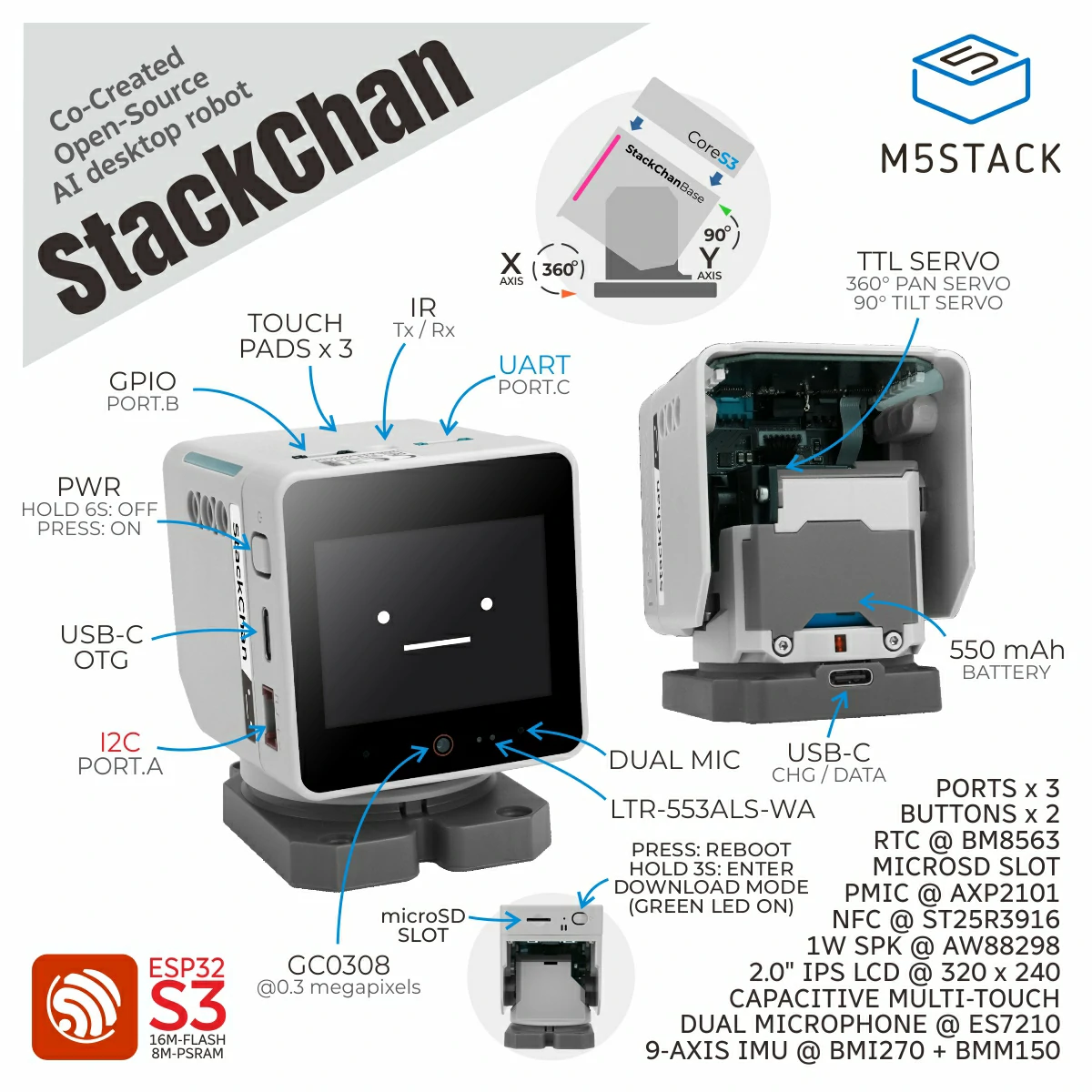
Here are StackChan related open-source resources, including source code of the StackChan firmware, remote controller firmware, mobile app (iOS and Android), and server.
Update of this repo could be a little late than the released firmware and mobile app.

StackChan is a super kawaii AI desktop robot co-created by M5Stack and the user community. It uses the M5Stack flagship IoT development kit CoreS3 as its main controller, powered by an ESP32-S3 SoC featuring a 240 MHz dual-core processor, with 16MB Flash and 8MB PSRAM onboard, and supporting Wi-Fi and BLE. The main unit also integrates a 2.0-inch capacitive touch display with a high-strength glass cover, a 0.3 MP camera, a proximity & ambient light sensor, a 9-axis IMU (accelerometer + gyroscope + magnetometer), a microSD card slot, a 1W speaker, dual microphones, and power/reset buttons.
The robot body, connected to the main unit, includes a USB-C interface for power and data, a 550 mAh battery, two feedback servos (360-degree continuous rotation on the horizontal axis and 90-degree movement on the vertical axis), two rows totaling 12 RGB LEDs, infrared transmitter and receiver, a three-zone touch panel, and a full-featured NFC module.
The factory firmware is feature-rich, including an AI Agent, lively and expressive animations, ESP-NOW wireless remote control, and online app downloads. It can connect to a mobile app for video viewing, remote avatar control, and more, and also supports online updates (OTA). The product also supports programming via Arduino, UiFlow2, and other methods, and can connect to various expansion units in the M5Stack ecosystem, making it easy to implement a wide range of custom functions.
⚠️ Do not forcibly rotate any movable parts connected to the motors by hand when you are unsure whether the motors are powered and under control, as this may cause hardware damage.
-
Purchase link: M5Stack Official Store | 淘宝 Taobao
-
Board support package: https://github.com/m5stack/StackChan-BSP
Thank you to the contributors of the StackChan community, especially:
 |
 |
|---|---|
| @stack_chan | @mongonta555 |
| Shinya Ishikawa | Takao Akaki |