iBlocker quantum safe SSH connection
iBlocker quantum safe SSH connection

 IP: 172.25.1.1
+------------------+                +----------------------+
|      Client      |                |        Server        |
|  +------------+  |                |  +----------------+  |
|  |   Image    |  |    Port 2022   |  |      Image     |  |
|  |  Motionq   +--------------------->+    Motionqs    |  |
|  |   v2.0.14  |  |                |  |     v2.0.7     |  |
|  +------------+  |                |  +-------+--------+  |
| camera port 8082 |                |          |           |
+------- | --------+                |  Port 22 v           |
         |                          |  +-------+--------+  |
         |                          |  |                |  |
         |                          |  | sshd on Server |  |
         |                          |  |                |  |
         | SSH Quantum Tunnel       |  +----------------+  |
         +-------------------------------->  port 3x10y    |
                                    +----------------------+
USB Camera live streaming from 172.25.1.1:808X would be available via https://Server_IP:3x10y
The user could select the algorithm and generate the SSH Key as below:
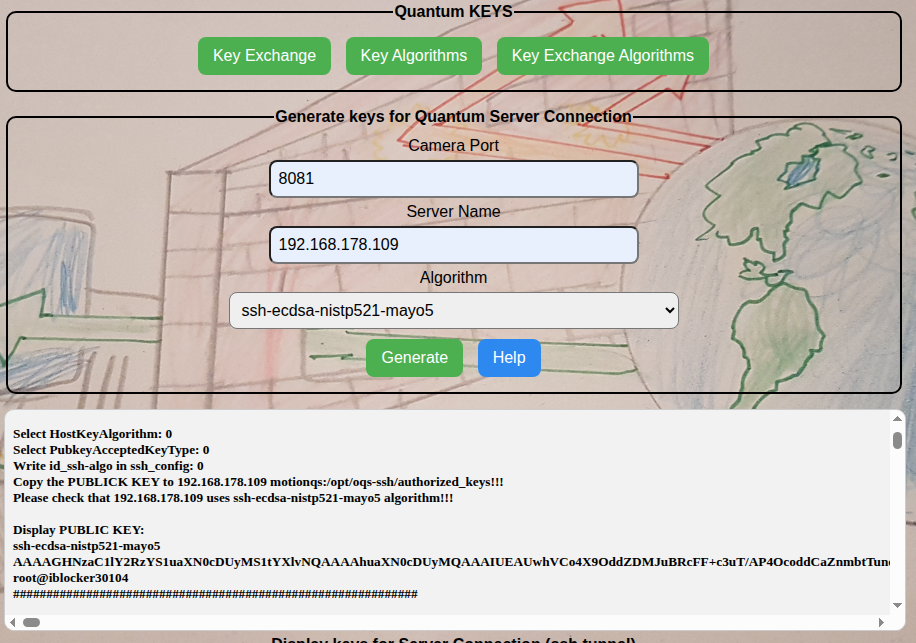
A similar command is normally launched automatically to create the ssh Quantum-Safe tunnel:
/opt/oqs-ssh/bin/ssh -f -N -o ServerAliveInterval=60 -o HostKeyAlgorithms=ssh-ecdsa-nistp384-mldsa-65 -o PubkeyAcceptedKeyTypes=ssh-ecdsa-nistp384-mldsa-65 -o ServerAliveCountMax=10 -o ExitOnForwardFailure=yes -gnNT -R 30104:localhost:8082 user@hSERVER_NAME -p 2022 -o StrictHostKeyChecking=no -i /home/motionq/.ssh/id_ssh-ecdsa-nistp384-mldsa-65 -o LogLevel=DEBUG3
The key generated by client should be copied on Server as below:
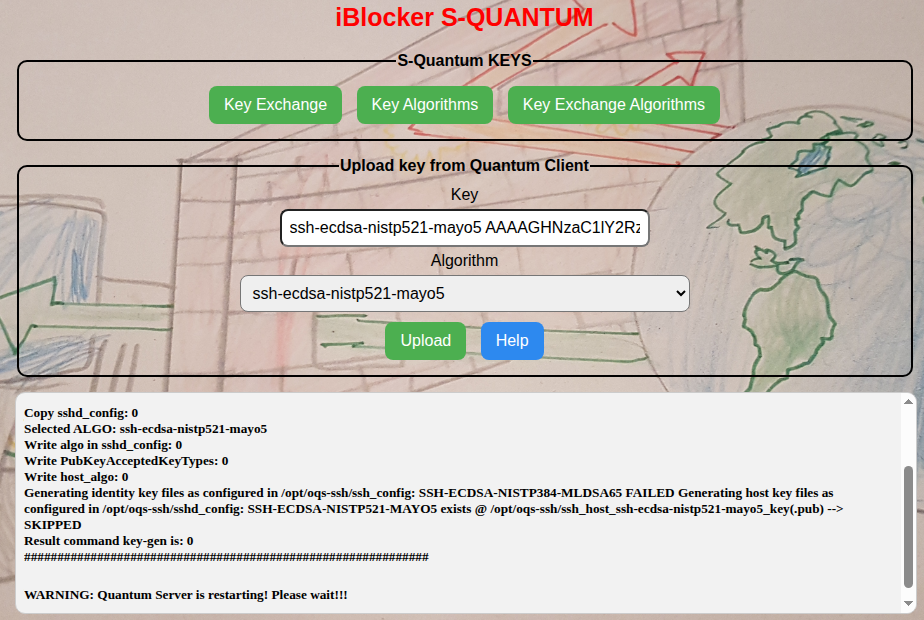
Note: in case client hostname=30104 the port used automatically by the Server end-point would be 30105.
The sshd_config inside server container is automatically configured via above interface. sshd_config example:
-------------//----------------
# Key-exchange algorithms
KexAlgorithms mlkem768nistp256-sha256

# Host key algorithms, these determine the generated host keys
HostKeyAlgorithms_algo

# Those determine the accepted public keys for public key authentication
PubkeyAcceptedKeyTypes_algo

# The port sshd is listening on
Port 2022

# The host keys used for host authentication
# Uncomment line to enable corresponding algorithm
# be sure the algorithm has been enabled in liboqs

HostKey /opt/oqs-ssh/ssh_host_host_algo_key
###############################################################################
#-- Settings for CLASSICAL SSH ------------------------------------------------
###############################################################################
#AddressFamily any
ListenAddress 0.0.0.0
#ListenAddress ::

# The default is to check both .ssh/authorized_keys and .ssh/authorized_keys2
# but this is overridden so installations will only check .ssh/authorized_keys
AuthorizedKeysFile	/opt/oqs-ssh/authorized_keys


AllowTcpForwarding yes
GatewayPorts yes
-------------//----------------
Then the SSH Quantum Safe Tunnel is created.
-------------------------- OLD --------------------------------------------
Below lines are un-commented in sshd_config:
AllowTcpForwarding yes
GatewayPorts yes
ListenAddress 0.0.0.0
ListenAddress ::
SERVER has container iblocker/motionqs:v1.0.3 installed, which contains OpenSSH_9.7-2024-08_p1, Open Quantum Safe 2024-08, OpenSSL 3.3.3 11 Feb 2025 (sshd -V), and ssh daemon is started as below:
/opt/oqs-ssh/sbin/sshd -D -e -f /opt/oqs-ssh/sshd_config -o HostKeyAlgorithms=ssh-ecdsa-nistp384-mldsa65 -o PubkeyAcceptedKeyTypes=ssh-ecdsa-nistp384-mldsa65 -p 2022 -o LogLevel=DEBUG3
Client has container iblocker/motionq:v0.0.1 installed, which contains OpenSSH_9.7-2025-05_p1, Open Quantum Safe 2025-05, OpenSSL 3.3.3 11 Feb 2025 (ssh -V).
SSH Keys are created as below:
-
login to container:
docker exec -it motion bashand make sure that/opt/oqs-ssh/ssh_configcontains below lines (in casessh-ecdsa-nistp384-mldsa65is used):-
un-comment or add the line
IdentityFile ~/.ssh/id_ssh-ecdsa-nistp384-mldsa65 -
add
ssh-ecdsa-nistp384-mldsa65toHostkeyAlgorithmsandPubkeyAcceptedKeyTypes(comma-separated) -
add
curve25519-sha256@libssh.orgtoKexAlgorithms(comma-separated) -
Run
rc-service oqs-sshd restart -
Run
/opt/oqs-ssh/scripts/key-gen.sh- that will create the SSH-key and SSH-key.pub in/home/motionq/.sshand in/opt/oqs-ssh. Keys are created based on “active identity key files: id_rsa, id_ed25519 etc” from/opt/oqs/ssh_configand generates keys for each:
-
ls -ltr /home/motionq/.ssh/
-rw-r--r--    1 motionq  motionq       2849 Jul  5 15:13 id_ssh-ecdsa-nistp384-mldsa65.pub
-rw-------    1 motionq  motionq      11390 Jul  5 15:13 id_ssh-ecdsa-nistp384-mldsa65


ls -ltr /opt/oqs-ssh/
-rw-r--r--    1 root     root          2841 Jul  4 13:54 ssh_host_ssh-ecdsa-nistp384-mldsa65_key.pub
-rw-------    1 root     root         11382 Jul  4 13:54 ssh_host_ssh-ecdsa-nistp384-mldsa65_key
Key /home/motionq/.ssh/id_ssh-ecdsa-nistp384-mldsa65.pub should be copied in advance to server's container, in /opt/oqs-ssh/authorized_keys
Test the SSH connection:
ssh -o HostKeyAlgorithms=ssh-ecdsa-nistp384-mldsa65 -o PubkeyAcceptedKeyTypes=ssh-ecdsa-nistp384-mldsa65 your_user@your_server -p 2022 -i /home/motionq/.ssh/id_ssh-ecdsa-nistp384-mldsa65 -o LogLevel=DEBUG3
Create the tunnel (video from iBlocker:8081 would be tunneled to your server):
/opt/oqs-ssh/bin/ssh -f -N -o ServerAliveInterval=60 -o HostKeyAlgorithms=ssh-ecdsa-nistp384-mldsa65 -o PubkeyAcceptedKeyTypes=ssh-ecdsa-nistp384-mldsa65 -o ServerAliveCountMax=10 -o ExitOnForwardFailure=yes -gnNT -R 8081:localhost:8081 motionq@your_server -p 2022 -i /home/motionq/.ssh/id_ssh-ecdsa-nistp384-mldsa65 -o LogLevel=DEBUG3
Then the user could commmit his own image containing his credentials.
-------------------------------// OLD APPROACH //-------------------------------------
+------------------+                +----------------------+
|      Client      |                |    iBlocker Host     |
|  +------------+  |                |  +----------------+  |
|  |            |  |                |  |                |  |
|  |   Docker   +--------------------->+     Docker     |  |
|  |    .46     |  |       Port 2222|  |      .33, oqs  |  |
|  +------------+  |                |  +-------+--------+  |
|                  |                |          |           |
+------------------+                |  Port 22 v           |
                                    |  +-------+--------+  |
                                    |  |                |  |
                                    |  |  sshd on Host  |  |
                                    |  |  .33, iblocker |  |
                                    |  +----------------+  |
                                    |                      |
                                    +----------------------+
Docker container on target host- 192.168.178.33:
docker run -dit --network host --name oqs-ssh --restart unless-stopped openquantumsafe/openssh
The --network host option will attach the container directly to your host's network, sharing its IP. The sshd in the container is now accessible from the outside using the host's IP address and the specified port (2222 per default).
If you want to seriously use this image to connect to a machine, it is strongly advised to change the default password of the oqs user. This can be done in the running container with docker exec -it oqs-ssh passwd oqs
Or you build the image yourself with a different default password from the sources on Github - https://github.com/open-quantum-safe/oqs-demos
Because we want to be able to connect to our host that does not run OQS-SSH, we first need to enable classical SSH capabilities for the client on the host system.
After running the image, run a shell with docker exec -it oqs-ssh /bin/bash
Run
vi /opt/oqs-ssh/ssh_config
and uncomment the line # IdentityFile ~/.ssh/id_ed25519
add ssh-ed25519 to HostkeyAlgorithms and PubkeyAcceptedKeyTypes (comma-separated)
add curve25519-sha256@libssh.org to KexAlgorithms (comma-separated)
Save and exit your editor
Run rc-service oqs-sshd restart
Run /opt/oqs-ssh/scripts/key-gen.sh
Run ssh iblocker@localhost -p 22 with your host's username to test your setup
docker run -it openquantumsafe/openssh ssh oqs@192.168.178.33 -p 2222 - quantum-ssh connection from 192.168.178.46 to .33 (container to container). pass is test1234
Then ssh iblocker@192.168.178.33 -p 22