
Replies: 13 comments

|
Thanks for the thoughtful request — both ideas are now on the roadmap (ROADMAP.md → "Next (under consideration)"). End-of-month scheduling — planned as an extension of the existing calendar schedule kinds (weekdays / nth-weekday / day-of-month): new Meter-reading task type — also agreed that the current types don't fit. The plan is a dedicated No timeline promise yet, but both are well-scoped. In the meantime: v2.17.0 just shipped with a few things that might already help your monthly-routine use case — multiple lead-time reminders (e.g. 14/3/0 days before due), a completion window (block completing too early), and completion photos (handy as a record of the meter display until the dedicated type exists). |
|
Follow-up: both features are now implemented on End-of-month scheduling — the Day of month calendar schedule gained:
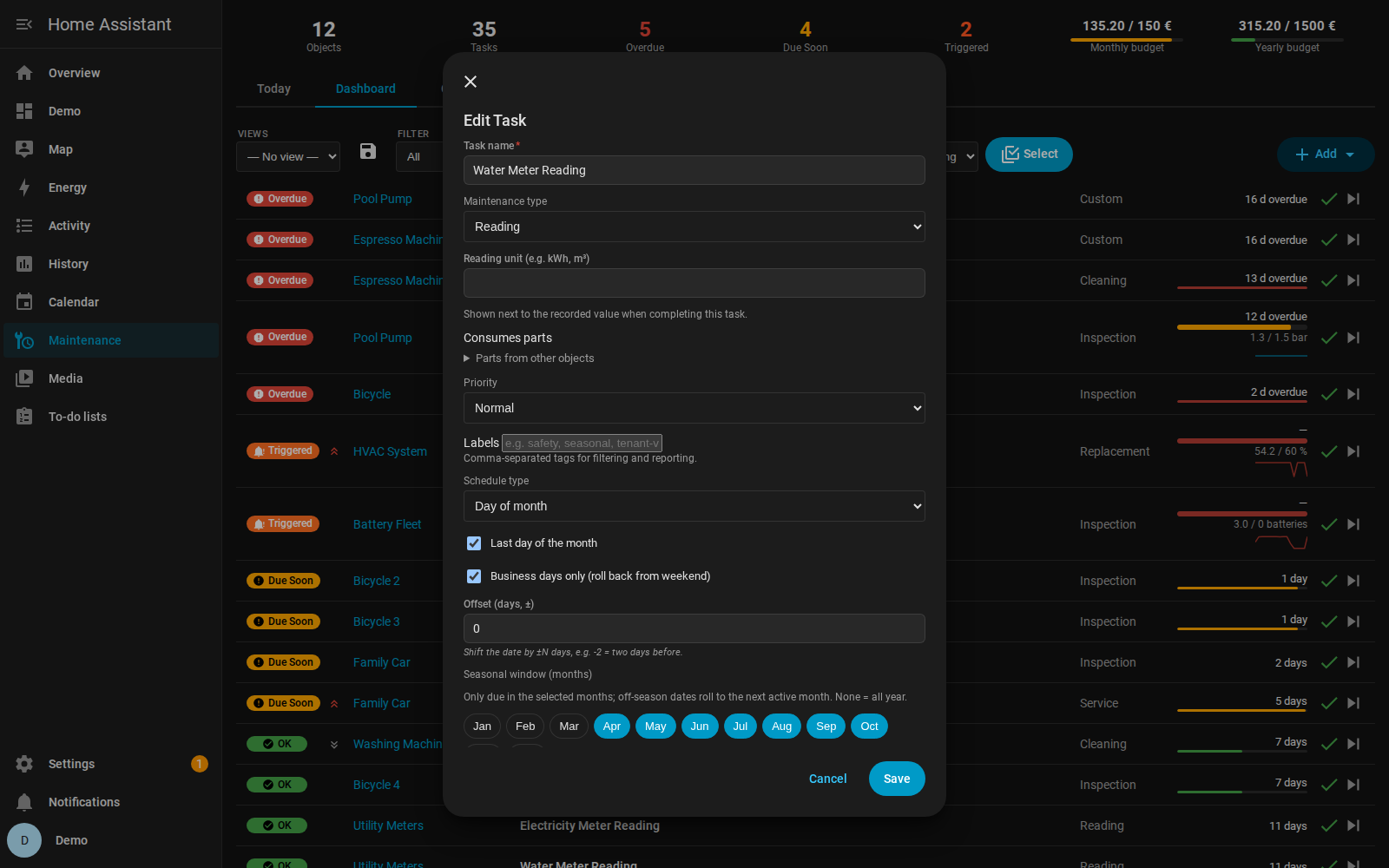
Your exact example works as: Day of month → Last day ✓ → Business days only ✓ → Offset: −2 = "two days before the last working day of the month". The offset is applied to each computed occurrence, so month-boundary crossings (e.g. "2 days after the last day") land correctly in the next month. Meter-reading task type — implemented as a slightly generalized Reading task type (for recording any value: meter readings, level checks, control readings). It behaves like the other types (schedules, reminders, history, QR) and pairs well with two existing features for your use case:
Here's how it looks in the task dialog (from the refreshed docs):
Structured value capture (storing the reading as a number with trend history) is a possible future extension on top of this type — tracked on the roadmap. Thanks again for the request — it shaped the design directly. I'll drop a note here when v2.18.0 is tagged. |
|
v2.18.0 is released with everything discussed here: the Reading task type, end-of-month scheduling (last day / last business day / ±N-day offset) — and as a bonus, business day now automatically honours HA's Workday integration when you have one configured (public holidays for your country/region, custom working weekdays, add/remove overrides). Update via HACS. Enjoy, and thanks again for the request! |
|
The meter-reading half is now complete in v2.20.0 — the Reading task type does the actual recording now:
With end-of-month scheduling (v2.18) + this, everything from the original request is shipped. Thanks again for the idea — it shaped two releases! |

|
Regarding recurring date patterns, it might be helpful to extend the nth day pattern to include days of the week but also time based. My use case is a reminder that I want to trigger every 6 months but on the 2nd Saturday of that 6th month. Is that currently possible or would that be a feature change? Thanks for your time, really enjoying the extension. |
|
@arsherlock13 Good news — "every 6 months on the 2nd Saturday" is already possible today, no feature change needed. The trick is combining three existing pieces:
All three are configurable in the task dialog (the seasonal window is in the recurrence extras). Glad you're enjoying the integration! |
|
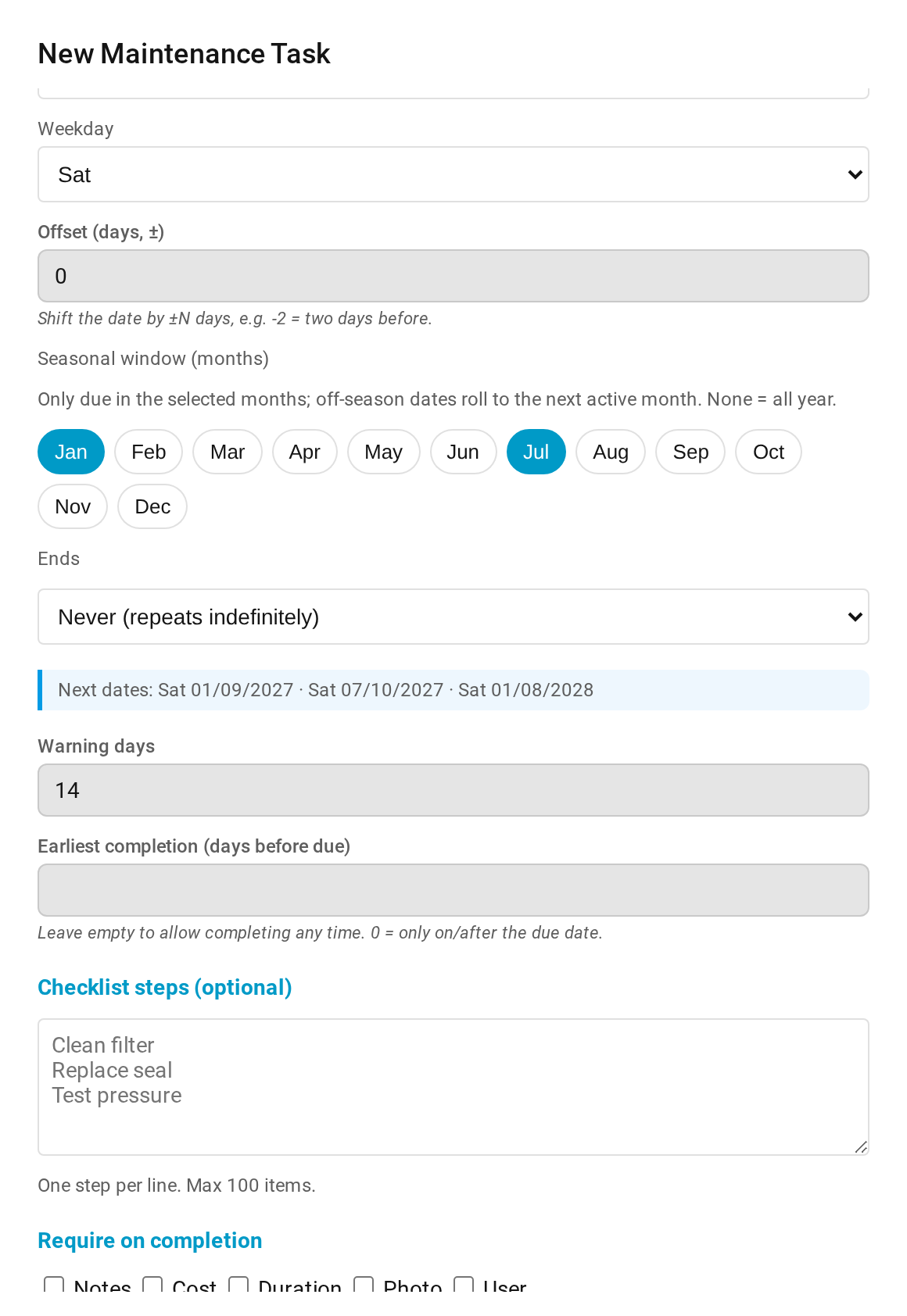
@arsherlock13 Follow-up — your question inspired a feature, and testing that feature caught a bug in my own recipe. Both are in v2.34.0, released today: 📅 Live schedule preview. While editing a task's schedule, the dialog now shows the next three concrete dates your current settings produce — updating live as you change fields, weekday included. For your setup it reads: 🐛 And an honest correction: while building the preview, its test exposed that the recipe I posted above didn't fully work on the released code — the seasonal window rolled the due date to the 1st of the active month instead of the 2nd Saturday. That's fixed in the same release: the seasonal roll now preserves calendar patterns, so 2nd Saturday + window Jan/Jul + schedule time 10:00 lands exactly on the 2nd Saturday at 10:00. If you had already set it up, it will just start behaving correctly after the update — nothing to reconfigure. Thanks for the nudge — questions like yours are where the good features come from. Here is what it looks like with exactly your configuration (2nd Saturday, window Jan + Jul):
|
|
Very cool thank you!
Andrew Sherlock
***@***.***
847-373-3939
…On Sun, Jul 19, 2026 at 2:41 AM iluebbe ***@***.***> wrote:
@arsherlock13 <https://github.com/arsherlock13> Follow-up — your question
inspired a feature, and testing that feature caught a bug in my own recipe.
Both are in *v2.34.0
<https://github.com/iluebbe/maintenance_supporter/releases/tag/v2.34.0>*,
released today:
*📅 Live schedule preview.* While editing a task's schedule, the dialog
now shows the *next three concrete dates* your current settings produce —
updating live as you change fields, weekday included. For your setup it
reads: Sat 01/09/2027 · Sat 07/10/2027 · Sat 01/08/2028. No more guessing
whether a recurrence pattern does what you meant — you see it before
saving. The dates come from the actual scheduling engine (the preview can't
lie).
*🐛 And an honest correction:* while building the preview, its test
exposed that the recipe I posted above didn't fully work on the released
code — the seasonal window rolled the due date to the *1st* of the active
month instead of the 2nd Saturday. That's fixed in the same release: the
seasonal roll now preserves calendar patterns, so *2nd Saturday + window
Jan/Jul + schedule time 10:00* lands exactly on the 2nd Saturday at
10:00. If you had already set it up, it will just start behaving correctly
after the update — nothing to reconfigure.
Thanks for the nudge — questions like yours are where the good features
come from.
—
Reply to this email directly, view it on GitHub
<#83?email_source=notifications&email_token=AKFZQQ64TB7SMR5PILN3BF35FR3UNA5CNFSNUABIM5UWIORPF5TWS5BNNB2WEL2ENFZWG5LTONUW63SDN5WW2ZLOOQXTCNZWHA3DKNBTUZZGKYLTN5XKO3LFNZ2GS33OUVSXMZLOOSWGM33PORSXEX3DNRUWG2Y#discussioncomment-17686543>,
or unsubscribe
<https://github.com/notifications/unsubscribe-auth/AKFZQQ5UBJDP5ZBUMEADAG35FR3UNAVCNFSNUABIKJSXA33TNF2G64TZHM4TQNBTGI4TSOJYHNCGS43DOVZXG2LPNY5TCMBTG4ZTAOBQUF3AE>
.
Triage notifications, keep track of coding agent tasks and review pull
requests on the go with GitHub Mobile for iOS
<https://github.com/notifications/mobile/ios/AKFZQQ5SXHJ77PIKE5AEJJT5FR3UNA5CNFSNUABIM5UWIORPF5TWS5BNNB2WEL2ENFZWG5LTONUW63SDN5WW2ZLOOQXTCNZWHA3DKNBTUZZGKYLTN5XKO3LFNZ2GS33OUVSXMZLOOSVGM33PORSXEX3JN5ZQ>
and Android
<https://github.com/notifications/mobile/android/AKFZQQ3RXJGKD7XCADBCAWT5FR3UNA5CNFSNUABIM5UWIORPF5TWS5BNNB2WEL2ENFZWG5LTONUW63SDN5WW2ZLOOQXTCNZWHA3DKNBTUZZGKYLTN5XKO3LFNZ2GS33OUVSXMZLOOSXGM33PORSXEX3BNZSHE33JMQ>.
Download it today!
You are receiving this because you were mentioned.Message ID:
<iluebbe/maintenance_supporter/repo-discussions/83/comments/17686543@
github.com>
|

|
Thanks for this awesome integration, it is exactly what I was looking for. I was wondering if there was a way that you could add a filter in the calendar card to filter by object similar to what you do on the maintenance supporter card. Thanks! |
|
@jackgithome Thanks for the kind words — and good news: this shipped in v2.40.0, released today. The calendar card now has an object filter dropdown right next to the user filter (it appears automatically once you have 2+ objects). You can also pre-select one object in YAML — by name, no IDs needed: type: custom:maintenance-supporter-calendar-card
object_filter: "Pool Pump" # pre-select one object (name or entry_id)
show_object_filter: true # default true; false hides the dropdownUpdate via HACS + one hard refresh (Ctrl+Shift+F5) and it's there. Enjoy! |
|
Hi, I very much appreciate the update. I noticed you can only filter by 1
object. Is it possible to filter by multiple objects like you allow in the
maintenance support card?
Thanks!
…On Sat, Jul 25, 2026 at 3:08 PM iluebbe ***@***.***> wrote:
@jackgithome <https://github.com/jackgithome> Thanks for the kind words —
and good news: this shipped in *v2.40.0*, released today.
The calendar card now has an *object filter dropdown* right next to the
user filter (it appears automatically once you have 2+ objects). You can
also pre-select one object in YAML — by name, no IDs needed:
type: custom:maintenance-supporter-calendar-cardobject_filter: "Pool Pump" # pre-select one object (name or entry_id)show_object_filter: true # default true; false hides the dropdown
Update via HACS + one hard refresh (Ctrl+Shift+F5) and it's there. Enjoy!
—
Reply to this email directly, view it on GitHub
<#83?email_source=notifications&email_token=ASPR4VYZMBPXVG2BDTTIFID5GUATLA5CNFSNUABIM5UWIORPF5TWS5BNNB2WEL2ENFZWG5LTONUW63SDN5WW2ZLOOQXTCNZXHAYTOMJSUZZGKYLTN5XKO3LFNZ2GS33OUVSXMZLOOSWGM33PORSXEX3DNRUWG2Y#discussioncomment-17781712>,
or unsubscribe
<https://github.com/notifications/unsubscribe-auth/ASPR4V4DNFEBMKDY7WDS5NT5GUATLAVCNFSNUABIKJSXA33TNF2G64TZHM4TQNBTGI4TSOJYHNCGS43DOVZXG2LPNY5TCMBTG4ZTAOBQUF3AE>
.
Triage notifications, keep track of coding agent tasks and review pull
requests on the go with GitHub Mobile for iOS
<https://github.com/notifications/mobile/ios/ASPR4V73JBCH6SGSBH6JE6L5GUATLA5CNFSNUABIM5UWIORPF5TWS5BNNB2WEL2ENFZWG5LTONUW63SDN5WW2ZLOOQXTCNZXHAYTOMJSUZZGKYLTN5XKO3LFNZ2GS33OUVSXMZLOOSVGM33PORSXEX3JN5ZQ>
and Android
<https://github.com/notifications/mobile/android/ASPR4V3ON3M2KUPXQNT34KD5GUATLA5CNFSNUABIM5UWIORPF5TWS5BNNB2WEL2ENFZWG5LTONUW63SDN5WW2ZLOOQXTCNZXHAYTOMJSUZZGKYLTN5XKO3LFNZ2GS33OUVSXMZLOOSXGM33PORSXEX3BNZSHE33JMQ>.
Download it today!
You are receiving this because you were mentioned.Message ID:
<iluebbe/maintenance_supporter/repo-discussions/83/comments/17781712@
github.com>
|
|
@jackgithome Good instinct — the parity with the task card was the missing piece, and it lands in the next release: type: custom:maintenance-supporter-calendar-card
object_filter:
- "Pool Pump"
- "Family Car"Two or more entries restrict the card to exactly those objects — and the dropdown then narrows within that set instead of offering the whole house, which is what a themed wall dashboard wants. A single value keeps behaving exactly as it does today, so your existing YAML is untouched. Names or entry_ids both work, and a list that matches nothing falls back to all objects rather than a blank card. |
|
Awesome, thanks for the update. I created my car maintenance dashboard
that shows all the maintenance on my cars and reminds me as I enter the
home. This is the final thing I needed. Thanks again!
…On Fri, Jul 31, 2026 at 8:26 AM iluebbe ***@***.***> wrote:
@jackgithome <https://github.com/jackgithome> Good instinct — the parity
with the task card was the missing piece, and it lands in the next release:
object_filter now also takes a *list*.
type: custom:maintenance-supporter-calendar-cardobject_filter:
- "Pool Pump"
- "Family Car"
Two or more entries restrict the card to exactly those objects — and the
dropdown then narrows *within* that set instead of offering the whole
house, which is what a themed wall dashboard wants. A single value keeps
behaving exactly as it does today, so your existing YAML is untouched.
Names or entry_ids both work, and a list that matches nothing falls back to
all objects rather than a blank card.
—
Reply to this email directly, view it on GitHub
<#83?email_source=notifications&email_token=ASPR4V6SUX4VFVDVNXPG5CD5HSF6PA5CNFSNUABIM5UWIORPF5TWS5BNNB2WEL2ENFZWG5LTONUW63SDN5WW2ZLOOQXTCNZYGUZTOMJWUZZGKYLTN5XKO3LFNZ2GS33OUVSXMZLOOSWGM33PORSXEX3DNRUWG2Y#discussioncomment-17853716>,
or unsubscribe
<https://github.com/notifications/unsubscribe-auth/ASPR4V3D64RO7QN22ER54Y35HSF6PAVCNFSNUABIKJSXA33TNF2G64TZHM4TQNBTGI4TSOJYHNCGS43DOVZXG2LPNY5TCMBTG4ZTAOBQUF3AE>
.
Triage notifications, keep track of coding agent tasks and review pull
requests on the go with GitHub Mobile for iOS
<https://github.com/notifications/mobile/ios/ASPR4VZ2CXIZC2R5DHCTZUD5HSF6PA5CNFSNUABIM5UWIORPF5TWS5BNNB2WEL2ENFZWG5LTONUW63SDN5WW2ZLOOQXTCNZYGUZTOMJWUZZGKYLTN5XKO3LFNZ2GS33OUVSXMZLOOSVGM33PORSXEX3JN5ZQ>
and Android
<https://github.com/notifications/mobile/android/ASPR4VZQO3D5YHNNEEXLSDT5HSF6PA5CNFSNUABIM5UWIORPF5TWS5BNNB2WEL2ENFZWG5LTONUW63SDN5WW2ZLOOQXTCNZYGUZTOMJWUZZGKYLTN5XKO3LFNZ2GS33OUVSXMZLOOSXGM33PORSXEX3BNZSHE33JMQ>.
Download it today!
You are receiving this because you were mentioned.Message ID:
<iluebbe/maintenance_supporter/repo-discussions/83/comments/17853716@
github.com>
|


Uh oh!
There was an error while loading. Please reload this page.
Hi,
first of all, thank you for this integration. I started using it for home maintenance tasks and I have two improvement ideas that could make scheduling a bit more flexible.
More end-of-month scheduling options
It would be useful to have scheduling options such as:
last day of the month
last working/business day of the month
a global offset in days, for example +/- N days
With such an offset it would be possible to configure cases like “the day before the last day of the month” or “two days before the last working day of the month” without creating separate special cases in the UI.
This would be especially useful for tasks that are tied to monthly routines, reporting periods, billing cycles, or meter readings.
Dedicated task type for meter readings
It could also be useful to add a task type for “meter reading” / “record meter value”.
At the moment, the existing task types do not feel like a perfect fit for this use case. Meter readings are not really cleaning, inspection, replacement, calibration, or service. They are more about recording a value at a regular interval.
Possible example: meter reading
A dedicated task type could make these tasks clearer in the UI and maybe later allow additional fields, such as the recorded value, unit, or previous value comparison.
Thanks for considering it.
All reactions