This is being resumed from the issue mentioned here.
The issue that I'm reporting is that when you save the state, then modify your Ink source file, and then attempt to reload that state, your game will crash. This is due to the way that Ink assigns locations to choices and gathers in an incremental manner. Adding or removing a choice or gather will put it out of sync with your old save state. This would make it very difficult to update older lines of game script without breaking everyone's save file.
I initially thought this was an issue with just the HTML version due to the way that using it as an embedded system in something like Unity most likely has you entering at label points instead of restoring the state. However, I'm not sure that's the case, since it looks like visit counts are also tracked in the same manner.
This error report is based on my ability to reliably recreate the error described using the steps below. My assessment of the cause is from browsing the story variable using the javascript console. If I am way off base in any of my assumptions, please let me know and I will close the issue.
Please forgive the flood of images. Using them made it a lot clearer than copying and pasting the console output.
To replicate the issue, first start with a really simple ink story.
Begin the test.
* Initial choice.
    Choice text.
- -> END
The javascript and HTML with save/loading I'm using is from here. The javascript places the value of inkjs.Story(storyContent) into inkgame.story, which I will be using to track the values. I'm able to see the issue using the original "export to web" files using the storyContent variable as well.
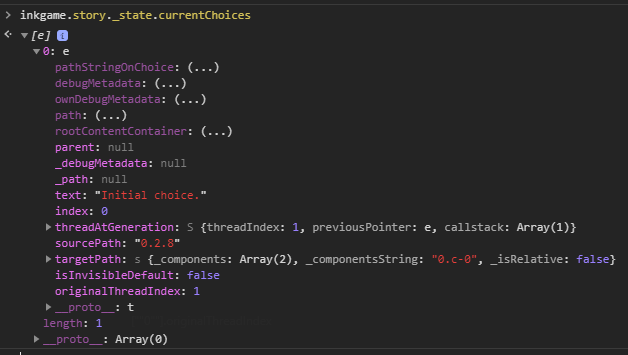
If you begin the story and then output the data of inkgame.story._currentChoices to the console, you'll get this.
If you select the choice and then output the data of inkgame.story._state.outputStream to the onsole, you'll see this.
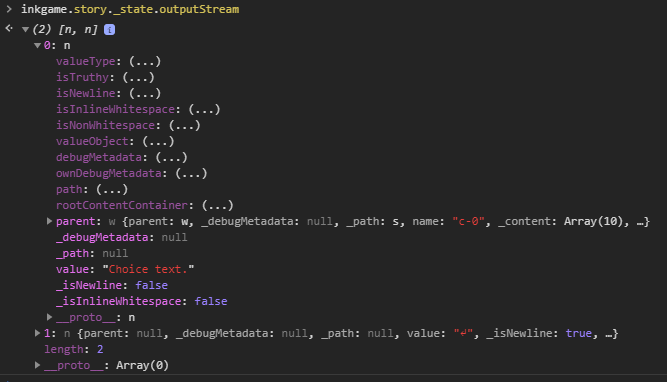
Notice how in both instances, the choice is marked as c-0. I believe that 0 is the root, so 0.c-0 is the first choice.
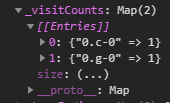
The inkgame.story.visitCounts also tracks it this way. 0.g-0 must be the divert to -> END.
Now, if we change the test script to this instead and then re-run the same tests, we get different values, as expected. For the test, choose "Initial choice" again.
Begin the test.
* Failure test.
    Fail.
* Initial choice.
    Choice text.
- -> END
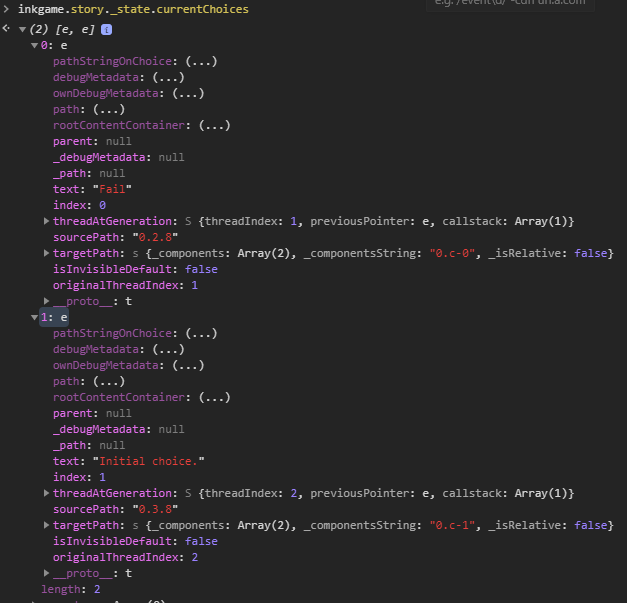
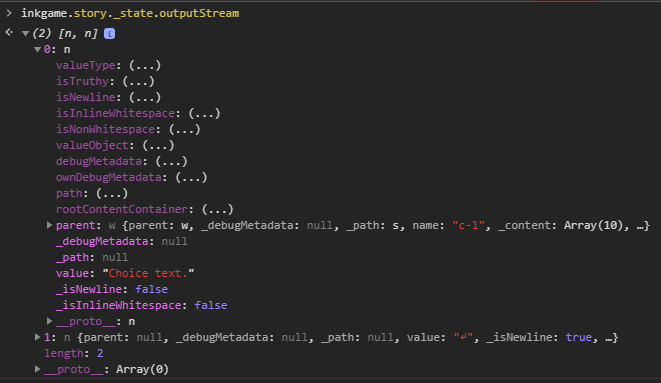
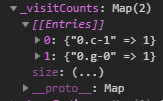
As you can see, "Failure test" has become c-0 and "Initial test" has become c-1.
Look what happens when we change the first line to: - Begin the test
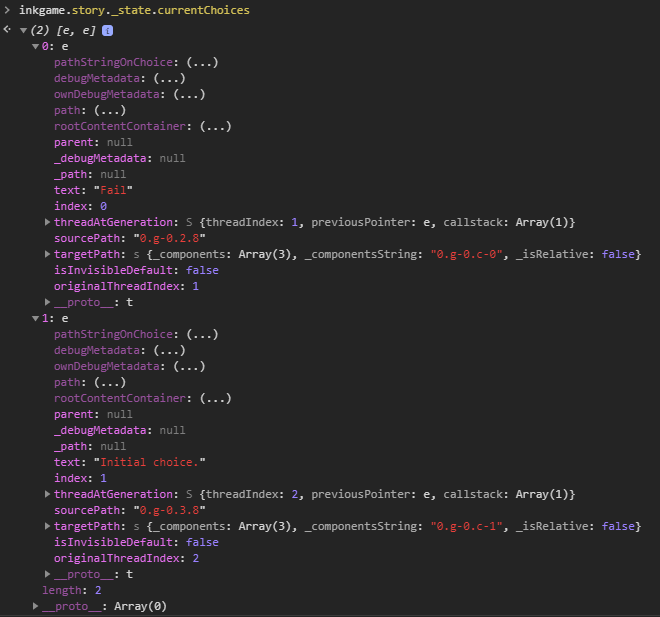
The choices are now under a gather, and so they're 0.g-0.c-0 and 0.g-0.c-1.
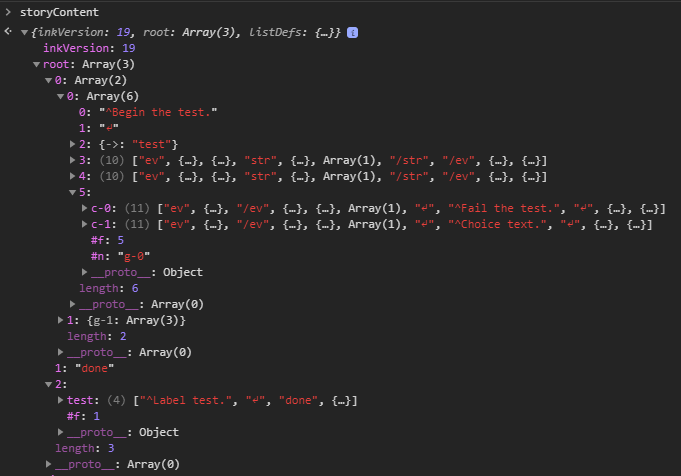
And for even more clarity, you can see the same indentifiers in the storyContent variable that you load into inkjs.Story().
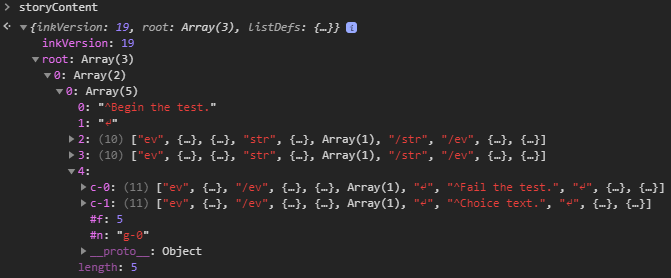
This is a major problem when you're saving the state and then reloading it after making changes. Adding or removing a single choice or gather breaks your saved game.
Entering a story via a label seems to be safe, since it associates the all its data with the label name and not an index like the above examples. (I used a label named test in this example.)
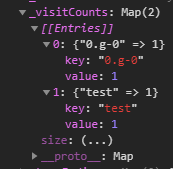
I guess the only issue that would remain if you relied upon labels would be that * choice counts would not be tracked correctly, so hidden choices might not be hidden? I'm not sure on that.
Anyway, I think that's enough wall of text and images. I'm sure you get the idea by now.
(Tagging @joningold to resume the conversation.)
This is being resumed from the issue mentioned here.
The issue that I'm reporting is that when you save the state, then modify your Ink source file, and then attempt to reload that state, your game will crash. This is due to the way that Ink assigns locations to choices and gathers in an incremental manner. Adding or removing a choice or gather will put it out of sync with your old save state. This would make it very difficult to update older lines of game script without breaking everyone's save file.
I initially thought this was an issue with just the HTML version due to the way that using it as an embedded system in something like Unity most likely has you entering at label points instead of restoring the state. However, I'm not sure that's the case, since it looks like visit counts are also tracked in the same manner.
This error report is based on my ability to reliably recreate the error described using the steps below. My assessment of the cause is from browsing the
storyvariable using the javascript console. If I am way off base in any of my assumptions, please let me know and I will close the issue.Please forgive the flood of images. Using them made it a lot clearer than copying and pasting the console output.
To replicate the issue, first start with a really simple ink story.
The javascript and HTML with save/loading I'm using is from here. The javascript places the value of
inkjs.Story(storyContent)intoinkgame.story, which I will be using to track the values. I'm able to see the issue using the original "export to web" files using thestoryContentvariable as well.If you begin the story and then output the data of
inkgame.story._currentChoicesto the console, you'll get this.If you select the choice and then output the data of
inkgame.story._state.outputStreamto the onsole, you'll see this.Notice how in both instances, the choice is marked as
c-0. I believe that0is the root, so0.c-0is the first choice.The
inkgame.story.visitCountsalso tracks it this way.0.g-0must be the divert to-> END.Now, if we change the test script to this instead and then re-run the same tests, we get different values, as expected. For the test, choose "Initial choice" again.
As you can see, "Failure test" has become
c-0and "Initial test" has becomec-1.Look what happens when we change the first line to:
- Begin the testThe choices are now under a gather, and so they're
0.g-0.c-0and0.g-0.c-1.And for even more clarity, you can see the same indentifiers in the
storyContentvariable that you load intoinkjs.Story().This is a major problem when you're saving the state and then reloading it after making changes. Adding or removing a single choice or gather breaks your saved game.
Entering a story via a label seems to be safe, since it associates the all its data with the label name and not an index like the above examples. (I used a label named
testin this example.)I guess the only issue that would remain if you relied upon labels would be that
*choice counts would not be tracked correctly, so hidden choices might not be hidden? I'm not sure on that.Anyway, I think that's enough wall of text and images. I'm sure you get the idea by now.
(Tagging @joningold to resume the conversation.)