
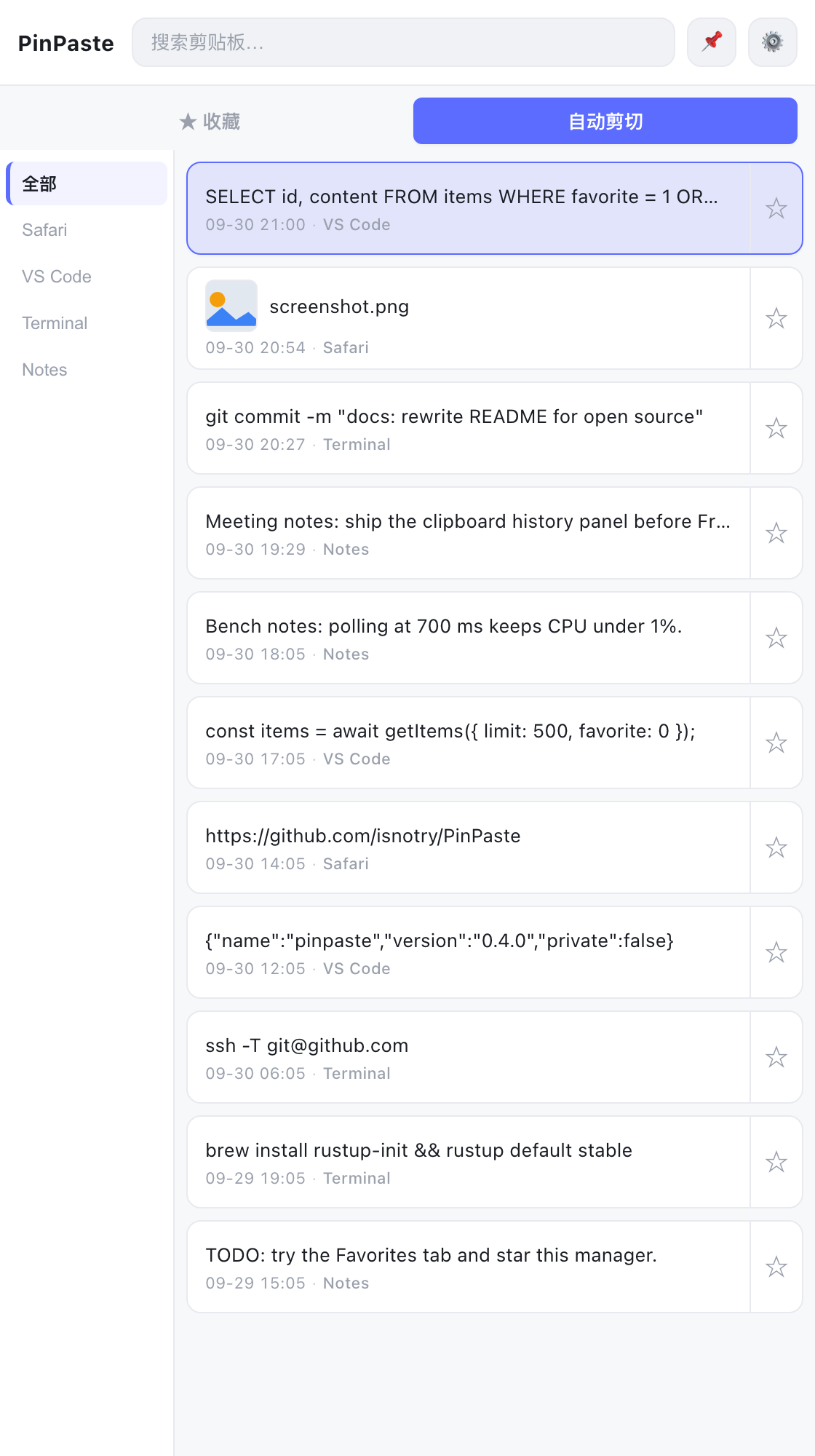
PinPaste 的第一个公开版本 —— 一款 macOS 原生剪贴板历史工具:后台常驻记录你复制过的文本与图片,⌘ + ⇧ + V 一按呼出,Enter 直接贴回光标处。数据只存本机 SQLite,不联网、无账号。
版本序列从 v0.1.0 起算;开发期打过的迭代标签(旧 v0.1.0 ~ v0.4.0)已从仓库清理。
下载
| 文件 | 适用 | 大小 | SHA-256 |
|---|---|---|---|
pinpaste_0.1.0_aarch64.dmg |
Apple Silicon Mac | 6.5 MB (6,819,995 B) | 9cb7419973a8fca3374bbfeb9433510d961868ce0075f89e001d80a4ccb50f27 |
安装
- 打开 dmg,把 PinPaste 拖进
Applications - 首次启动若被 Gatekeeper 拦下:系统设置 → 隐私与安全性 → 仍要打开(或在 Finder 里右键 App 选「打开」)
- 第一次用「粘贴」时,macOS 会弹窗请求辅助功能权限 —— 允许后才能在别的应用里模拟 ⌘ + V
安装包未做 Apple 开发者签名(无证书),内容与本仓库源码完全一致,可自行
npm run tauri build复现。
功能
- 自动记录 —— 700 ms 轮询剪贴板,文本与图片都存,同内容不重复入库
- 粘贴回光标处 —— 选中条目按 Enter,写回剪贴板后模拟一次 ⌘ + V
- 来源标记 —— 自动带上复制时的前台 App(Safari、VS Code…),可按来源筛选
- 收藏与分组 —— 星标收藏永不自动清理,可归入带颜色的分组
- 即时搜索 —— 空格分词 AND 匹配,大小写不敏感
- 图片历史 —— PNG 存盘、列表缩略图、点击看大图
- 窗口置顶 —— 📌 一键钉在最前,状态持久化
- 自动清理 —— 1 / 7 / 30 天清理未收藏旧条目,可关闭;超过 1000 条从最旧的未收藏项开始丢
- 菜单栏常驻 —— 全局快捷键呼出 / 隐藏,失焦自动隐藏
- 中英双语界面 —— 跟随系统语言自动切换
快捷键:⌘ + ⇧ + V 全局呼出 · ↑ ↓ 移动 · Enter 粘贴 · Backspace 删除 · Esc 关闭 / 隐藏 · 双击复制 · 右键编辑
源码构建
npm install
npm run tauri dev     # 开发运行
npm run tauri build   # 打包 dmg
环境要求 Node.js 22+、Rust stable、Xcode Command Line Tools。
English · First public release of PinPaste, a native macOS clipboard history app: it records every text and image you copy into a local SQLite file, pops up with ⌘ + ⇧ + V, and pastes straight back at the cursor with Enter. No server, no account, no network.
Versioning starts at v0.1.0; the internal iteration tags used during development (old v0.1.0 – v0.4.0) have been removed from the repository.
Download pinpaste_0.1.0_aarch64.dmg (Apple Silicon, macOS 11+, 6.5 MB, SHA-256 9cb7419973a8fca3374bbfeb9433510d961868ce0075f89e001d80a4ccb50f27). Open the dmg and drag PinPaste into Applications. The build is not signed with an Apple Developer certificate, so on first launch go to System Settings → Privacy & Security → Open Anyway (or right-click the app and choose Open). The first time you use paste, macOS will ask for Accessibility permission — that is what allows simulating ⌘ + V in other apps.
Features — automatic capture of text & images every 700 ms · paste back at the cursor · source app tagging and filtering · favorites with colored groups · instant multi-word search · image history with thumbnails · always-on-top · auto-clean (1/7/30 days) with a 1000-item cap, favorites exempt · menu-bar residency with a global hotkey · Chinese/English UI.
Hotkeys — ⌘ + ⇧ + V toggle window · ↑ ↓ move · Enter paste · Backspace delete · Esc close/hide · double-click to copy · right-click to edit.
Licensed under MIT — © 2026 isnotry.