Releases: istarwyh/yourbuddy
Release list
YourBuddy 0.3.15

YourBuddy 0.3.15
English
YourBuddy 0.3.15 makes creator publishing available from the built-in Content Creation preset.
- Oil Creator now bundles the maintained video-publisher, video-to-article, and WeChat Official Account publisher Skills instead of requiring separate Skill installation.
- The new
oil_prepare_publishtool prepares drafts for enabled Xiaohongshu, Douyin, Bilibili, and WeChat Channels accounts and can upload an existing article to the WeChat Official Account draft box. - Video drafts remain open in Ego Browser for review. The WeChat API flow creates a draft only; final publication or group-send remains a user action.
- Ego Browser discovery resolves the installed executable directly, improving launches when the desktop environment has a restricted
PATH. - Product snapshots now retain the video publisher's generated runtime modules and use portable path and mode hashing. The 0.3.13 and 0.3.14 tags produced no public artifacts; 0.3.15 is their corrected successor.
- Video publishing still requires Ego Lite with logged-in creator accounts. WeChat Official Account drafts require AppID, AppSecret, and an API IP allowlist. Real account publication was not exercised before tagging.
Install the Apple Silicon DMG from this release, or use Settings → General → Application lifecycle → Check for updates from an earlier YourBuddy installation. Existing YourBuddy data is retained and no migration is required. macOS 11 or later on Apple Silicon is supported. The application is not yet signed or notarized with an Apple Developer identity; first launch may require the documented macOS override.
中文
YourBuddy 0.3.15 在内置的“内容创作”Preset 中提供创作者发布能力。
- Oil Creator 内置维护中的视频发布、视频转文章和微信公众号发布 Skills,不再要求用户单独安装这些 Skills。
- 新增
oil_prepare_publish工具,可为已启用的小红书、抖音、B站和视频号账号准备草稿,也可把已有文章上传到微信公众号草稿箱。 - 视频草稿会保留在 Ego Browser 中供用户检查;微信公众号 API 流程只创建草稿,最终发表或群发仍由用户操作。
- Ego Browser 探测会直接解析已安装的可执行文件,减少桌面环境
PATH受限导致的启动失败。 - 产品快照现会保留视频发布器生成的运行时模块,并使用可移植的路径与权限哈希。0.3.13 和 0.3.14 Tag 均未产生公开产物;0.3.15 是其修正版。
- 视频发布仍需安装 Ego Lite 并登录创作者账号;微信公众号草稿需要 AppID、AppSecret 与 API IP 白名单。Tag 前未使用真实账号执行发布。
请从本 Release 安装 Apple Silicon DMG,或在旧版 YourBuddy 中使用设置 → 通用设置 → 应用生命周期 → 检查更新。现有 YourBuddy 数据会保留,无需迁移。支持 Apple Silicon 上的 macOS 11 及以上版本。当前应用尚未使用 Apple Developer 身份完成代码签名与公证,首次启动可能需要按文档执行 macOS 放行操作。
Verification / 验证资料
YourBuddy 0.3.12
YourBuddy 0.3.12
English
YourBuddy 0.3.12 repairs Harbor Historical Session evaluation in the default Host execution mode.
- Harbor Evolution is updated to 0.9.8 as a matched Plugin and Python Adapter pair.
- Host command translation preserves paths already resolved into a Trial directory instead of adding the Trial root twice.
- Historical Session Observation can read its frozen input, verify its Digest, and write the Trial Artifact.
- Failed Jobs remain immutable evidence. Start a new Historical Job after upgrading; the release does not weaken Adapter, Renderer, Judge, Artifact, or Criterion requirements.
- The release retains DSH 0.1.5-rc.2, Oil Creator, the 内容创作 Agent Preset, existing data, and all other product integrations from 0.3.11.
Install the Apple Silicon DMG from this release, or use Settings → General → Application lifecycle → Check for updates from an earlier YourBuddy installation. Existing YourBuddy data is retained and no migration is required. macOS 11 or later on Apple Silicon is supported. The application is not yet signed or notarized with an Apple Developer identity; first launch may require the documented macOS override.
中文
YourBuddy 0.3.12 修复默认 Host 执行模式中的 Harbor Historical Session 评测。
- Harbor Evolution 升级为 0.9.8,并保持 Plugin 与 Python Adapter 配对一致。
- Host 命令转换会保留已经解析到 Trial 目录的路径,不会重复添加 Trial Root。
- Historical Session Observation 可以读取冻结输入、校验 Digest 并写入 Trial Artifact。
- 失败的 Job 继续作为不可变证据。升级后请启动新的 Historical Job;本版本不会削弱 Adapter、Renderer、Judge、Artifact 或 Criterion 要求。
- 本版本保留 DSH 0.1.5-rc.2、Oil Creator、内容创作 Agent Preset、现有数据与 0.3.11 的其他产品集成。
请从本 Release 安装 Apple Silicon DMG,或在旧版 YourBuddy 中使用设置 → 通用设置 → 应用生命周期 → 检查更新。现有 YourBuddy 数据会保留,无需迁移。支持 Apple Silicon 上的 macOS 11 及以上版本。当前应用尚未使用 Apple Developer 身份完成代码签名与公证,首次启动可能需要按文档执行 macOS 放行操作。
Verification / 验证资料
YourBuddy 0.3.11
YourBuddy 0.3.11
English
YourBuddy 0.3.11 adds a local content-production workbench and a dedicated 内容创作 Agent Preset.
- Oil Creator organizes each video or article as an ordinary local project folder containing scripts, recordings, subtitles, covers, articles, and publication material.
- The new 内容创作 Preset keeps the complete Standard toolset and native Codex delegation while guiding planning, production, packaging, and human review.
- The left Sidebar adds a Library view for content projects while preserving the YourBuddy name, Logo, and desktop window controls.
- Core project-library and script workflows work locally. Optional recording, subtitle, cover, article, publishing, and metrics integrations remain separately configured.
- The release uses the latest eligible DSH release,
0.1.5-rc.2, and freezes the reviewed Oil Creator source, compatibility patch, dependency graph, and offline Store.
Install the Apple Silicon DMG from this release, or use Settings → General → Application lifecycle → Check for updates from an earlier YourBuddy installation. Existing YourBuddy data is retained and no migration is required. macOS 11 or later on Apple Silicon is supported. The application is not yet signed or notarized with an Apple Developer identity; first launch may require the documented macOS override.
中文
YourBuddy 0.3.11 新增本地内容生产工作台与专用的内容创作 Agent Preset。
- Oil Creator 把每个视频或图文项目组织为普通本地文件夹,其中可以保存脚本、录屏、字幕、封面、文章与发布材料。
- 新增的内容创作 Preset 保留完整 Standard 工具集与原生 Codex 委派,并引导选题、生产、打包与人工检查。
- 左侧 Sidebar 新增内容项目 Library 视图,同时保留 YourBuddy 名称、Logo 与桌面窗口控件。
- 核心片库与脚本工作流可以在本地使用;录制、字幕、封面、图文、发布与数据功能仍按需单独配置。
- 本版本使用最新可用的 DSH Release
0.1.5-rc.2,并冻结经过检查的 Oil Creator 源码、兼容补丁、依赖图与离线 Store。
请从本 Release 安装 Apple Silicon DMG,或在旧版 YourBuddy 中使用设置 → 通用设置 → 应用生命周期 → 检查更新。现有 YourBuddy 数据会保留,无需迁移。支持 Apple Silicon 上的 macOS 11 及以上版本。当前应用尚未使用 Apple Developer 身份完成代码签名与公证,首次启动可能需要按文档执行 macOS 放行操作。
Verification / 验证资料
YourBuddy 0.3.9
YourBuddy 0.3.9
English
YourBuddy 0.3.9 restores the desktop workbench and GPT Auth paths that could appear unavailable after the 0.3.8 runtime refresh.
- Better Sidebar now fills the primary desktop workbench whenever a Session is open, even when its previous bottom-panel state was collapsed. The resizable conversation remains in the auxiliary right column, and narrow windows retain the drawer presentation.
- GPT Auth status requests are registered on the Web carrier again, eliminating the
Cannot read properties of undefined (reading 'get')load failure. The packaged release smoke verifies the status channel and resolves GPT-5.6 Sol through the bundled Codex model catalog without sending a model request. - macOS window controls now occupy the expanded sidebar header, with a compact startup and collapsed-sidebar fallback instead of a permanently empty top rail.
- Existing YourBuddy data remains in place; no migration is required.
Install the Apple Silicon DMG from this release, or use Settings → General → Application lifecycle → Check for updates from an earlier YourBuddy installation. macOS 11 or later on Apple Silicon is supported. The application is not yet signed or notarized with an Apple Developer identity; first launch may require the documented macOS override.
中文
YourBuddy 0.3.9 修复了 0.3.8 运行时刷新后可能不可用的桌面工作区与 GPT Auth 路径。
- 打开会话后,Better Sidebar 会始终填满桌面主工作区,即使此前底部面板处于折叠状态;可调整宽度的对话区继续位于右侧辅助栏,窄窗口仍使用抽屉展示。
- GPT Auth 状态请求重新注册到 Web Carrier,消除
Cannot read properties of undefined (reading 'get')加载失败。打包发布 Smoke 会验证状态通道,并通过内置 Codex 模型目录解析 GPT-5.6 Sol,全程不发送真实模型请求。 - macOS 窗口控制按钮移入展开后的侧边栏标题区;启动阶段和侧边栏折叠时使用紧凑回退,不再永久占用空白顶栏。
- 现有 YourBuddy 数据会保留,无需迁移。
请从本 Release 安装 Apple Silicon DMG,或在旧版 YourBuddy 中使用设置 → 通用设置 → 应用生命周期 → 检查更新。支持 Apple Silicon 上的 macOS 11 及以上版本。当前应用尚未使用 Apple Developer 身份完成代码签名与公证,首次启动可能需要按文档执行 macOS 放行操作。
Verification / 验证资料
- Tagged verification record / Tag 内验证记录
- Downloadable verification bundle / 可下载验证资料包 — SHA-256
d1ea414355bc85edaee249525f7e54c13dba10c6fdff1ee341f99a489f13208a.
YourBuddy 0.3.8
YourBuddy 0.3.8
English
YourBuddy 0.3.8 synchronizes the desktop runtime with DeepSeek Harness 0.1.5-rc.2 and refreshes the bundled workbench plugins without changing the existing YourBuddy data directory.
- The bundled DeepSeek Harness source and package graph are pinned to the official
dsh-v0.1.5-rc.2release. - Better Sidebar 0.19.1 keeps the primary YourBuddy workbench layout while using the DSH native right sidebar for the conversation. Its width, narrow-window drawer, bottom workbench, terminal, media preview, and desktop external-link behavior remain available.
- Plugin Marketplace 0.3.3 enables one-click installation only after an npm package links to the selected GitHub repository and declares
dsh.bundle.patch; missing, ambiguous, and registry-error states direct users to the repository instructions instead. - Harbor Evolution 0.9.7, Context Doctor 0.7.2, and the refreshed product plugin set are included with peer versions aligned to the bundled DSH release.
- Desktop proxy routing, additional certificate authorities, native system helpers, and release smoke checks follow the current DSH runtime.
Install the Apple Silicon DMG from this release, or use Settings → General → Application lifecycle → Check for updates from an earlier YourBuddy installation. Existing YourBuddy data is retained and no migration is required. macOS 11 or later on Apple Silicon is supported. The application is not yet signed or notarized with an Apple Developer identity; first launch may require the documented macOS override.
中文
YourBuddy 0.3.8 将桌面运行时同步到 DeepSeek Harness 0.1.5-rc.2,并刷新内置工作区插件,不改变现有 YourBuddy 数据目录。
- 内置 DeepSeek Harness 源码与依赖图固定到官方
dsh-v0.1.5-rc.2Release。 - Better Sidebar 0.19.1 保留 YourBuddy 主工作区布局,并使用 DSH 原生右侧边栏承载对话区;宽度调整、窄窗口抽屉、底部工作区、终端、媒体预览和桌面外链行为继续可用。
- Plugin Marketplace 0.3.3 仅在 npm Package 关联所选 GitHub 仓库并声明
dsh.bundle.patch后开放一键安装;缺失、歧义或注册表错误状态会引导用户改用仓库说明。 - 内置 Harbor Evolution 0.9.7、Context Doctor 0.7.2 与刷新后的产品插件集合,Peer 版本均与内置 DSH Release 对齐。
- 桌面代理路由、附加证书机构、原生系统辅助能力与 Release Smoke 已适配当前 DSH 运行时。
请从本 Release 安装 Apple Silicon DMG,或在旧版 YourBuddy 中使用设置 → 通用设置 → 应用生命周期 → 检查更新。现有 YourBuddy 数据会保留,无需迁移。支持 Apple Silicon 上的 macOS 11 及以上版本。当前应用尚未使用 Apple Developer 身份完成代码签名与公证,首次启动可能需要按文档执行 macOS 放行操作。
Verification / 验证资料
- Tagged verification record / Tag 内验证记录
- The downloadable verification bundle is attached after public artifact verification. / 可下载验证资料包会在公开产物核验后附加。
YourBuddy 0.3.10
YourBuddy 0.3.10
English
YourBuddy 0.3.10 restores Better Sidebar file opening and makes its embedded Browser render ordinary URLs by default.
- File-tree clicks and Open in new tab now target the Session and workspace that own the Files tab, so native Sidebar presentation no longer drops the open request.
- Explorer reveal and Changes-tab file actions use the same explicit Session scope.
- The embedded Browser defaults to unrestricted cross-origin iframe behavior, allowing sites such as Baidu to render without a per-tab sandbox unlock.
- Users who prefer the restricted iframe sandbox can enable it explicitly in Side card settings.
- The source, distributed Better Sidebar bundles, replayable product patches, and product provenance hashes carry the same behavior through future plugin refreshes.
Install the Apple Silicon DMG from this release, or use Settings → General → Application lifecycle → Check for updates from an earlier YourBuddy installation. Existing YourBuddy data is retained and no migration is required. macOS 11 or later on Apple Silicon is supported. The application is not yet signed or notarized with an Apple Developer identity; first launch may require the documented macOS override.
中文
YourBuddy 0.3.10 恢复 Better Sidebar 文件打开,并让内嵌浏览器默认正常渲染普通 URL。
- 文件树点击与在新标签页中打开会明确使用 Files Tab 所属的 Session 与工作区,原生 Sidebar 展示不再丢弃打开请求。
- Explorer Reveal 与 Changes Tab 文件动作使用相同的显式 Session Scope。
- 内嵌浏览器默认使用不受限的跨源 iframe 行为,无需逐 Tab 解锁沙箱即可渲染百度等网站。
- 偏好受限 iframe 沙箱的用户仍可在 Side Card 设置中显式启用。
- 源码、Better Sidebar 分发 Bundle、可重放产品补丁与产品 Provenance Hash 会在后续插件刷新中保持一致行为。
请从本 Release 安装 Apple Silicon DMG,或在旧版 YourBuddy 中使用设置 → 通用设置 → 应用生命周期 → 检查更新。现有 YourBuddy 数据会保留,无需迁移。支持 Apple Silicon 上的 macOS 11 及以上版本。当前应用尚未使用 Apple Developer 身份完成代码签名与公证,首次启动可能需要按文档执行 macOS 放行操作。
Verification / 验证资料
- Tagged verification record / Tag 内验证记录
- Downloadable verification bundle / 可下载验证资料包 — SHA-256
19ec2c7df84d4c733a20d8e5663c3ba887aba4dca8c92f7706b9b29cff6d587b.
YourBuddy 0.3.7
YourBuddy 0.3.7
English
YourBuddy 0.3.7 promotes Better Sidebar from a floating overlay to the primary desktop workbench while keeping the DSH conversation and every existing plugin capability available.
- Better Sidebar now occupies the flexible main region on desktop, with the conversation on the right and the existing navigation and details regions preserved.
- The divider between the workbench and conversation is resizable. On narrow windows, the conversation remains primary and Better Sidebar opens through its existing drawer interaction.
- Better Sidebar tabs, files, tasks, terminals, previews, floating windows, and bottom workbench remain available; the upstream plugin still defaults to its original portal presentation outside YourBuddy.
- The DSH layout and Better Sidebar compatibility changes are recorded as replayable, hashed product patches. Refreshing either upstream snapshot reapplies the YourBuddy changes instead of silently overwriting them.
- Better Sidebar remains at the reviewed 0.18.1 release and Harbor Evolution remains at 0.9.5. Harbor Evolution 0.9.6 is not included because its DSH skill peer requirement is newer than the DSH release bundled by YourBuddy.
Install the Apple Silicon DMG from this release, or use Settings → General → Application lifecycle → Check for updates from an earlier YourBuddy installation. Existing YourBuddy data is retained and no migration is required. macOS 11 or later on Apple Silicon is supported. The application is not yet signed or notarized with an Apple Developer identity; first launch may require the documented macOS override.
中文
YourBuddy 0.3.7 将 Better Sidebar 从浮动覆盖层提升为桌面主工作区,同时保留 DSH 对话区和已有的全部插件能力。
- 在桌面宽度下,Better Sidebar 占据可伸缩的主要区域,对话区位于右侧,原有导航区和详情区继续保留。
- 工作区与对话区之间的分隔条可以拖动调整。窗口较窄时,对话区仍是主界面,Better Sidebar 继续通过原有抽屉交互打开。
- Better Sidebar 的标签页、文件、任务、终端、预览、浮动窗口和底部工作区均继续可用;在 YourBuddy 之外,上游插件仍默认使用原有 Portal 展示方式。
- DSH 布局和 Better Sidebar 的兼容修改已记录为可重放且带哈希的产品补丁。刷新任一上游快照时都会重新应用 YourBuddy 修改,不会被静默覆盖。
- Better Sidebar 保持在已评审的 0.18.1,Harbor Evolution 保持在 0.9.5。Harbor Evolution 0.9.6 要求比 YourBuddy 当前内置 DSH 更新的 skill peer,因此本版本不包含它。
请从本 Release 安装 Apple Silicon DMG,或在旧版 YourBuddy 中使用设置 → 通用设置 → 应用生命周期 → 检查更新。现有 YourBuddy 数据会保留,无需迁移。支持 Apple Silicon 上的 macOS 11 及以上版本。当前应用尚未使用 Apple Developer 身份完成代码签名与公证,首次启动可能需要按文档执行 macOS 放行操作。
Screenshot / 功能截图
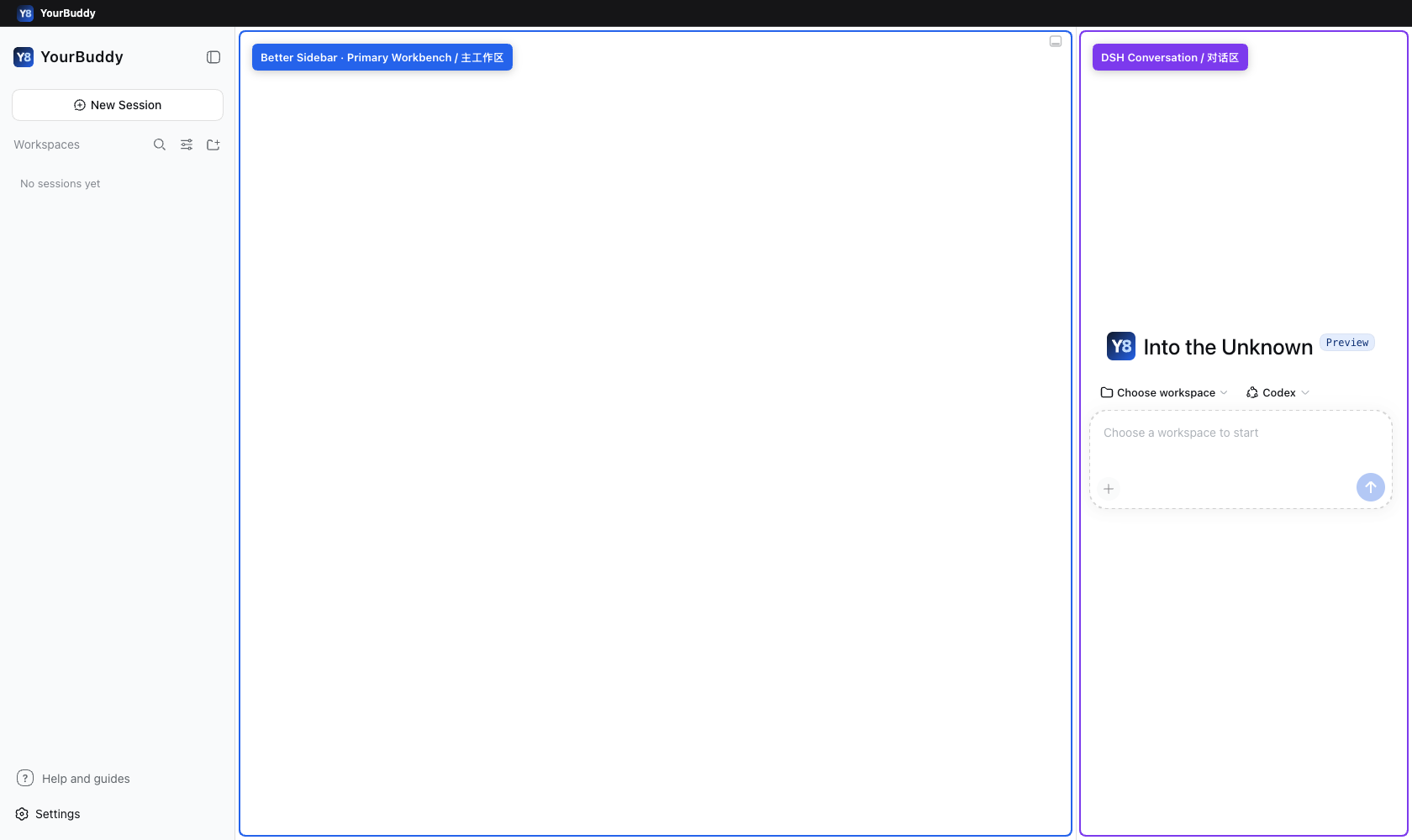
Better Sidebar occupies the primary workbench and the DSH conversation remains available on the right. The blue and purple outlines are release-evidence annotations added by the assembled desktop-shell smoke. / Better Sidebar 位于主工作区,DSH 对话保留在右侧;蓝色和紫色边框是组装桌面 Shell Smoke 添加的发布证据标注。
Verification / 验证资料
YourBuddy 0.3.6
YourBuddy 0.3.6
English
YourBuddy 0.3.6 makes enterprise proxy and custom CA settings consistent across the desktop application and every managed runtime it launches.
- On macOS, YourBuddy inherits
NODE_EXTRA_CA_CERTSfrom its launch environment, including a value provided throughlaunchctl, on the first launch. A CA selected in Settings → Network proxy takes precedence, and only that explicit selection is persisted. - Custom CA files must be absolute, canonical
.pemor.crtfiles containing currently valid X.509 certificates. Invalid, unreadable, not-yet-valid, and expired certificates are rejected with a specific error. - Test connection and Save and restart test both the native client and a fresh bundled Node process before settings are saved or the application restarts. A failure leaves the previous settings and running application unchanged.
- The selected proxy and CA are propagated to the Host, plugins, WSL, installers, provisioning, and updater after conflicting ambient proxy variables are removed. Diagnostics identify whether the CA came from Settings, the launch environment, or the system trust store; TLS verification remains enabled.
- Mixed
http://andhttps://declarations for the same loopback proxy endpoint are normalized to HTTP CONNECT so local enterprise proxy helpers work consistently. - The bundled product plugins are updated to Better Sidebar 0.18.1 and Harbor Evolution 0.9.5.
Install the Apple Silicon DMG from this release, or use Settings → General → Application lifecycle → Check for updates from an earlier YourBuddy installation. Existing YourBuddy data is retained and no migration is required. macOS 11 or later on Apple Silicon is supported. The application is not Apple Developer signed or notarized; first launch may require the documented macOS override.
中文
YourBuddy 0.3.6 让企业代理与自定义 CA 设置在桌面应用及其启动的所有托管运行时中保持一致。
- 在 macOS 上,YourBuddy 首次启动时会继承启动环境中的
NODE_EXTRA_CA_CERTS,包括通过launchctl设置的值。用户在设置 → 网络代理中选择的 CA 优先级更高,且只有该显式选择会写入持久化设置。 - 自定义 CA 必须是绝对、规范化路径下的
.pem或.crt文件,并包含当前有效的 X.509 证书。无效、不可读、尚未生效或已经过期的证书会返回明确错误。 - 测试连接和保存并重启会在写入设置或重启应用前,同时测试原生客户端与新启动的内置 Node 进程。任何一项失败都会保留原设置和当前运行状态。
- 选定的代理与 CA 会在清理冲突的环境代理变量后传递给 Host、插件、WSL、安装器、预配置流程和更新器。诊断信息会区分 CA 来自设置、启动环境还是系统信任库;TLS 验证始终保持启用。
- 同一回环代理端点上的
http://与https://混合声明会统一为 HTTP CONNECT,让本地企业代理辅助程序保持一致行为。 - 内置产品插件更新为 Better Sidebar 0.18.1 与 Harbor Evolution 0.9.5。
请从本 Release 安装 Apple Silicon DMG,或在旧版 YourBuddy 中使用设置 → 通用设置 → 应用生命周期 → 检查更新。现有 YourBuddy 数据会保留,无需迁移。支持 Apple Silicon 上的 macOS 11 及以上版本。当前应用尚未使用 Apple Developer 身份完成代码签名与公证,首次启动可能需要按文档执行 macOS 放行操作。
Verification / 验证资料
- Final bilingual verification record / 最终双语验证记录
- Downloadable verification archive / 可下载验证资料: 34,762 bytes; SHA-256
380e4d7b3d5b11696bc6824f83f75aa86b23977fdb7b36ee684857b150d64373; source commit6376122238c32376b90dee4dc9442eeccccdfa48; fresh unauthenticated download, byte comparison, and extraction passed. - Product release workflow: 34379057672. Archive PR: #23; attribution correction: PR #24; final correction CI: 34406199303.
- Product website deployment: 34389210312.
- The verification ZIP is a separate documentation asset. The release tag, five product assets, checksums, signature, and stable updater manifest were not replaced or moved.
Still unverified: native App startup, updater installation, packaged-WebView interaction, Apple Developer signing and notarization, a real enterprise proxy or organization CA, proxy authentication, Node 24.20.0 compatibility, visual-browser rendering of the website, Intel macOS, and Windows and Linux desktop products.
YourBuddy 0.3.5
YourBuddy 0.3.5
English
YourBuddy 0.3.5 restores desktop controls rejected by the application permission layer and repairs Codex preset delegation when a conflicting global skill is installed.
- Network proxy test, CA selection, save-and-restart, update checks, application restart, close preference, external links, and Plugin Marketplace links can reach their registered native commands from the YourBuddy workbench.
- Codex preset requests now use the bundled, tracked
subagent_codexroute even whencodexhost-delegationexists in the user's global skill directory, avoiding the misleadingcodexhost: command not foundfailure. Explicit/codexhost-delegationinvocation remains available for users who intentionally want that external route. - The release workflow checks the literal workbench command list against the Tauri permission file and resolves every allowed command through the real Tauri Runtime Authority for the exact desktop origin and window.
- The bundled DSH and product-plugin versions are unchanged from 0.3.4.
Install the Apple Silicon DMG from this release, or use Settings → General → Application lifecycle → Check for updates from an earlier YourBuddy installation. Existing YourBuddy data is retained and no migration is required. macOS 11 or later on Apple Silicon is supported. The application is not yet signed or notarized with an Apple Developer identity; first launch may require the documented macOS override.
中文
YourBuddy 0.3.5 修复了桌面控制项被应用权限层拒绝的问题,也修复了安装冲突全局 skill 时 Codex Preset 无法委派的问题。
- 网络代理测试、CA 选择、保存并重启、检查更新、重启应用、关闭偏好、外部链接和插件市场链接现在可以从 YourBuddy 工作台调用其已注册的原生命令。
- 即使用户的全局 skill 目录中存在
codexhost-delegation,Codex Preset 的普通委派现在也会使用内置、可追踪的subagent_codex路径,不再误报codexhost: command not found。用户仍可显式输入/codexhost-delegation来选择该外部路径。 - 发布流程会对照 Tauri 权限文件检查工作台中的字面命令清单,并通过真实 Tauri Runtime Authority 验证准确桌面 Origin 与窗口下的每一条允许命令。
- 内置 DSH 与产品插件版本和 0.3.4 相同。
请从本 Release 安装 Apple Silicon DMG,或在旧版 YourBuddy 中使用设置 → 通用设置 → 应用生命周期 → 检查更新。现有 YourBuddy 数据会保留,无需迁移。支持 Apple Silicon 上的 macOS 11 及以上版本。当前应用尚未使用 Apple Developer 身份完成代码签名与公证,首次启动可能需要按文档执行 macOS 放行操作。
Verification / 验证资料
- Complete immutable verification record / 完整不可变验证记录
- Verification bundle source commit / 验证资料包来源 Commit
- Download the verification bundle / 下载验证资料包
- Bundle size / 资料包大小:33,485 bytes
- SHA-256:
17b2c2d7e4bc0c03146897df1f37ea8e71bedfcac15c2f528c27d56305482bb5
The bundle was generated from the named bundle-source commit, uploaded as a separate evidence asset, then downloaded without GitHub authentication. Its byte count and SHA-256 matched the GitHub API digest, it was byte-identical to the uploaded file, and every archive member extracted successfully. The complete record link adds the later public-website and bundle-validation observations. Native startup, packaged-WebView controls, update installation, real Codex OAuth delegation, Apple Developer signing/notarization, and non-Apple-Silicon desktop platforms remain unverified.
资料包从列出的资料包来源 Commit 生成,作为独立证据附件上传后,再以无 GitHub 身份方式下载。其字节数与 SHA-256 和 GitHub API 摘要一致,下载文件与上传文件逐字节相同,全部归档成员均成功解压。完整记录链接另包含随后完成的公开官网与资料包验证观察。原生启动、安装包 WebView 控制项、Updater 实际安装、真实 Codex OAuth 委派、Apple Developer 签名/公证及非 Apple Silicon 桌面平台仍未验证。
YourBuddy 0.3.4
YourBuddy 0.3.4
English
YourBuddy 0.3.4 lets you ask about the open Harbor page directly from the ordinary conversation input.
- Captures the active Harbor page and selection when you send; explicit Harbor references take priority.
- Shows one compact, expandable context attachment inside the sent message. It adds no second input panel or Copilot status panel.
- Preserves a failed unsent message and its images without overwriting a newer draft. Restoring does not send; sending again captures the page then open.
- Includes Harbor Evolution
0.9.4and the matching Python adapter, while retaining the 0.3.3 startup-authentication fix.
Install the Apple Silicon DMG below, or use Settings → General → Application lifecycle → Check for updates. Existing data requires no migration. The public files, checksums, stable updater manifest, and updater Minisign signature were independently verified. An unchanged copy of the public DMG App reached authenticated Host readiness and boot complete with isolated data.
The App is ad-hoc signed, not Apple Developer signed or notarized, and Gatekeeper rejects it; first launch may require the documented macOS override. Visual inspection of the formal native window, Finder installation, an actual update from an older installation, OAuth, real model-provider quality, Candidate/Docker evaluation, and full Harbor PRD acceptance remain unverified.
中文
YourBuddy 0.3.4 支持直接在普通对话输入框中询问当前打开的 Harbor 页面。
- 点击发送时捕获当前 Harbor 页面与选区;显式 Harbor 引用优先。
- 已发送消息内只显示一个紧凑、可展开的上下文附件,不增加第二个输入框或 Copilot 状态面板。
- 准备失败时保留未发送的原文与图片,不覆盖新草稿。恢复不会自动发送;再次发送时捕获当时打开的页面。
- 内置 Harbor Evolution
0.9.4与配套 Python Adapter,并保留 0.3.3 的启动认证修复。
请下载下方 Apple Silicon DMG,或在设置 → 通用设置 → 应用生命周期 → 检查更新。现有数据无需迁移。公开文件、校验和、稳定更新清单和 Updater Minisign 签名均已独立核验;从公开 DMG 原样复制的 App 使用隔离数据达到 Host 认证就绪和 boot complete。
App 使用 ad-hoc 签名,未使用 Apple Developer 身份签名或公证,Gatekeeper 会拒绝;首次启动可能需要按文档放行。正式原生窗口可视检查、Finder 安装、从旧安装版实际更新、OAuth、真实模型质量、Candidate/Docker 评测及完整 Harbor PRD 验收仍未验证。
Verification / 验证资料
- Immutable verification record / 不可变验证记录
- Download verification archive / 下载验证资料包 — SHA-256
0bedbea62215e8afbf46d4ef9b352db70c1faa27ded6cfaea0aacd455cf985e4 - Desktop release workflow / 桌面发布工作流
- Website deployment / 官网部署
- 中文官网 · English website
The downloadable archive was re-downloaded anonymously and matched the local 880,773-byte ZIP exactly. Its 19 files, seven PNGs, JSON records, and 46 relative links passed extraction checks. The images are historical source validation with synthetic data and controlled models, not screenshots of the published native App.
验证资料包已匿名重新下载,与本地 880,773 字节 ZIP 逐字节一致;解压后的 19 个文件、7 张 PNG、JSON 记录和 46 条相对链接均通过检查。图片是使用合成数据与受控模型的历史源码验证,不是正式发布原生 App 的截图。