Skip to content

Conversation

@Venomalia
Copy link
Contributor

@Venomalia Venomalia commented Feb 11, 2022

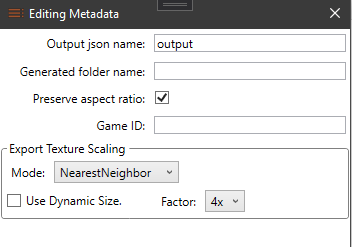
enables the scaling of textures during export, the desired scaling can be set in the metadata window.

grafik

Deactivated (Default) - Leaves the textures unchanged and keeps the current size.
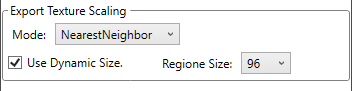
Dynamic - Calculates a good scaling size. (The smallest region of a texture is scaled to a specific pixel value.)
1x - 8x - sets the texture scaling to the specified size.

possible improvement would be
only scale up option
Setting the dynamic pixel value (at the moment 96 pixel)

@Venomalia Venomalia changed the title Autoscaling Texture scaling during export Feb 11, 2022
@iwubcode
Copy link
Owner

This isn't bad but I'm not sure if I want to add the extra code for this feature. My personal opinion is that scaling would be better handled by an AI upscaler or something like imagemagick. Both of these will provide a better visual experience.

I'd likely be more open to adding a feature to automatically trigger a command after export. The user could trigger a command to scale or do whatever post processing they desired.

@Venomalia
Copy link
Contributor Author

Venomalia commented Feb 14, 2022

I am interested in improving the usability so that you can change the scaling without redoing the package.
My thought is that an upscaler Ai only makes sense if the texture has other elements than buttons, but this is usually not the case. That's why I used the nearest neighbor, because that way the scale doesn't affect the storage size, however it improves the quality of the generated textures significantly.
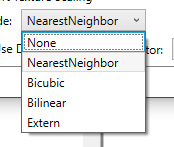
I could also let the user choose the scaling algorithm and passing it to an external program would also be a simple improvement.

Imagemagick would have an identical quality, but more options which we not need.

@iwubcode
Copy link
Owner

I am interested in improving the usability so that you can change the scaling without redoing the package.

Hmm, I see what you mean, I didn't think of it that way.

My thought is that an upscaler Ai only makes sense if the texture has other elements than buttons, but this is usually not the case.
That's why I used the nearest neighbor, because that way the scale doesn't affect the storage size, however it improves the quality of the generated textures significantly.

Yes, I see your point. I just would hate to limit the user when they do need to use some other tech (now or in the future)

I could also let the user choose the scaling algorithm and passing it to an external program would also be a simple improvement.

I think this would be a fair compromise. Something like a box that says "Custom scale operation" (if blank defaults to nearest neighbor).

Imagemagick would have an identical quality, but more options which we not need.

Yeah, I don't use Imagemagick very much, it's a good point.

@Venomalia
Copy link
Contributor Author

grafik
grafik
grafik
what would you think of this?
but i don't know yet which external programs i want to support or if we should leave it to the users for now.

@iwubcode
Copy link
Owner

The other mentions v2 but I'm assuming this is superseded. I'll close it but can reopen if desired

@iwubcode iwubcode closed this Feb 17, 2022
@Venomalia Venomalia deleted the Autoscaling branch February 17, 2022 08:47
Sign up for free to join this conversation on GitHub. Already have an account? Sign in to comment

Labels

None yet

Projects

None yet

Development

Successfully merging this pull request may close these issues.

2 participants