Skip to content

Pie chart blend space#1652

Closed
pavly-gerges wants to merge 11 commits into
jMonkeyEngine:masterfrom
Electrostat-Lab:newBLendSpaces
Closed

Pie chart blend space#1652
pavly-gerges wants to merge 11 commits into
jMonkeyEngine:masterfrom
Electrostat-Lab:newBLendSpaces

Conversation

@pavly-gerges
Copy link
Copy Markdown
Contributor

@pavly-gerges pavly-gerges commented Nov 13, 2021

An Enhancement to the new animation system :

  • Involves controlling the blendWeight, using a pie chart area and a pie chart sector.
  • Area of pie chart and sector area can be altered during runtime by altering both the radius and the sector angle respectively.

@stephengold
Copy link
Copy Markdown
Member

This will need a license and an example app.

@pavly-gerges
Copy link
Copy Markdown
Contributor Author

This will need a license and an example app.

Example app should be in a different PR or can be on the same PR ?

@stephengold
Copy link
Copy Markdown
Member

Same PR would be best, I think.

@pavly-gerges
Copy link
Copy Markdown
Contributor Author

pavly-gerges commented Nov 14, 2021

Added a simple testcase for the new piechart blend space, i hope everything is clear.

@pavly-gerges
Copy link
Copy Markdown
Contributor Author

Idk why this happens :
1s Run gradle/wrapper-validation-action@v1 with: min-wrapper-count: 1 allow-snapshots: false env: JAVA_HOME_11.0.13_x64: /Users/runner/hostedtoolcache/jdk/11.0.13/x64 JAVA_HOME: /Users/runner/hostedtoolcache/jdk/11.0.13/x64 JAVA_HOME_11_0_13_X64: /Users/runner/hostedtoolcache/jdk/11.0.13/x64 Error: getaddrinfo ENOTFOUND downloads.gradle-dn.com

@Sailsman63
Copy link
Copy Markdown
Contributor

The build failure seems to be due to a transient dns glitch in the wrapper-validation-action used by the CI workflow. See :
gradle/wrapper-validation-action#33

The build script is locked to v1, should probably be bumped to 1.0.4 to improve stability against this.

@stephengold
Copy link
Copy Markdown
Member

I'll re-run the GitHub jobs in the hope of more successful checks.

I've upgraded wrapper-validation-action in the "master" branch at 5820393 .

@Ali-RS
Copy link
Copy Markdown
Member

Ali-RS commented Nov 15, 2021

Can you please explain what is the use case for a pie chart blend space? How it is different from the default blend space in JME? And how many actions we are supposed to blend with this blend space?

Thank you

@pavly-gerges
Copy link
Copy Markdown
Contributor Author

pavly-gerges commented Nov 15, 2021

Can you please explain what is the use case for a pie chart blend space? How it is different from the default blend space in JME? And how many actions we are supposed to blend with this blend space?

Thank you

Hello @Ali-RS ,

1) BlendSpaces in general : they are mathematical spaces used to adjust the value of the BlendWeight, the blend weight is the delta value of interpolation, used to serially interpolate transforms (blend).

2) PieChartSpace introduces a different way of adjusting the blendWeight based on the Area of a circle sector, so multiple cases to be considered :

  • Max Blending value => can be achieved when (theta = 360) and radius = 1 (aka unit circle).
  • Blending value between 0 and 1 => can be achieved when (theta = ]0, 360[ ) or (radius = ]0, 1[ ).
  • Min Blending value (approaching zero or zero) => can be achieved by either using (theta = 0) or (radius = 0) or both.
  • An infinite number of blending values can be achieved when playing with a radius and an angle :-).

==> Parameters you can change to tweak the effect :

  1. Radius of the circle (adjusts the final scale factor).
  2. Angle of the sector (adjusts the final unscaled sector area to be used as a blending step).
  3. The Sector area directly.

3) How many actions ?

well, i thought of this question yesterday too, in general blending is done between 2 actions only, so passing an arg with more than 2 actions, needs a subsequent check for a progressive time if it reaches the end of the (length1 + length2) and if so then advance the firstActiveIndex and secondActiveIndex.

Currently, this blend space doesn't handle this, since t is not passed as an argument from getWeight(), so its a little bit chaotic about which would run (if more than 2 blendable actions are inserted).

this blend space should work of as many actions as you want, and it would actually blend between each 2 successive actions,
the current testcase (in this PR) uses only 2 actions (it works fine), but if you try to put more than 2 actions and the system would be confused about which is the firstActiveIndex and which is the secondActiveIndex.

I have looked now at LinearBlendSpace, it adjusts the firstActiveIndex and the secondActiveIndex based on the value, so they aren't automatically adjusted, they use a user value, i think i can do something similar, but i am trying to make it more like robust emerging from the system itself (to be as "you don't have to check for the time passed and compare it with the length of the actions on every update pass").

So, its currently 2 only and no handling for 3 or more, if you want 3 or more then a sequence tween with some blend actions each has 2 actions only would be the best.

@pavly-gerges
Copy link
Copy Markdown
Contributor Author

I think i will have to make another testcase TestPieChartSpaceMultipleActions so we can gain the max efficiency of blend spaces.

@Ali-RS
Copy link
Copy Markdown
Member

Ali-RS commented Nov 15, 2021

Thanks @Scrappers-glitch

I am fine with the max 2 limit.

Edit:
Maybe adding a test with Jame (the monkey model) walk/run blending action both with liner space and pie chart space playing side by side would be a nice demo.

You can copy/paste this example and modify it if you like.

public class TestAnimMigration extends SimpleApplication {

@pavly-gerges
Copy link
Copy Markdown
Contributor Author

Thanks for your reply, it actually points us to an important part, which is liberating the indices of the blendable actions through the blend space, I will do this change, this change would open the way to manually alters the indices in case you want to blend between 3 or more actions 🙂😉.

@pavly-gerges
Copy link
Copy Markdown
Contributor Author

Maybe adding a test with Jame (the monkey model) walk/run blending action both with liner space and pie chart space playing side by side would be a nice demo.

You can copy/paste this example and modify it if you like.

I plan to do some special use cases on another PR for the new Animation system including how to build your own blend space, using base actions to fire events on some moment of time in seconds and I will include this interesting testcase of using both linear and piechart blend spaces on Jaime.

@pavly-gerges
Copy link
Copy Markdown
Contributor Author

@Ali-RS Alright, you could check it now, added blending between more than 2 actions, but the user has to alter the slider on which 2 actions to play (use setFirstActionIndex(int i) and setSecondActionIndex(int j)).

@pavly-gerges
Copy link
Copy Markdown
Contributor Author

I have nothing else to add on this, please continue reviewing it.

@pavly-gerges
Copy link
Copy Markdown
Contributor Author

pavly-gerges commented Dec 18, 2021

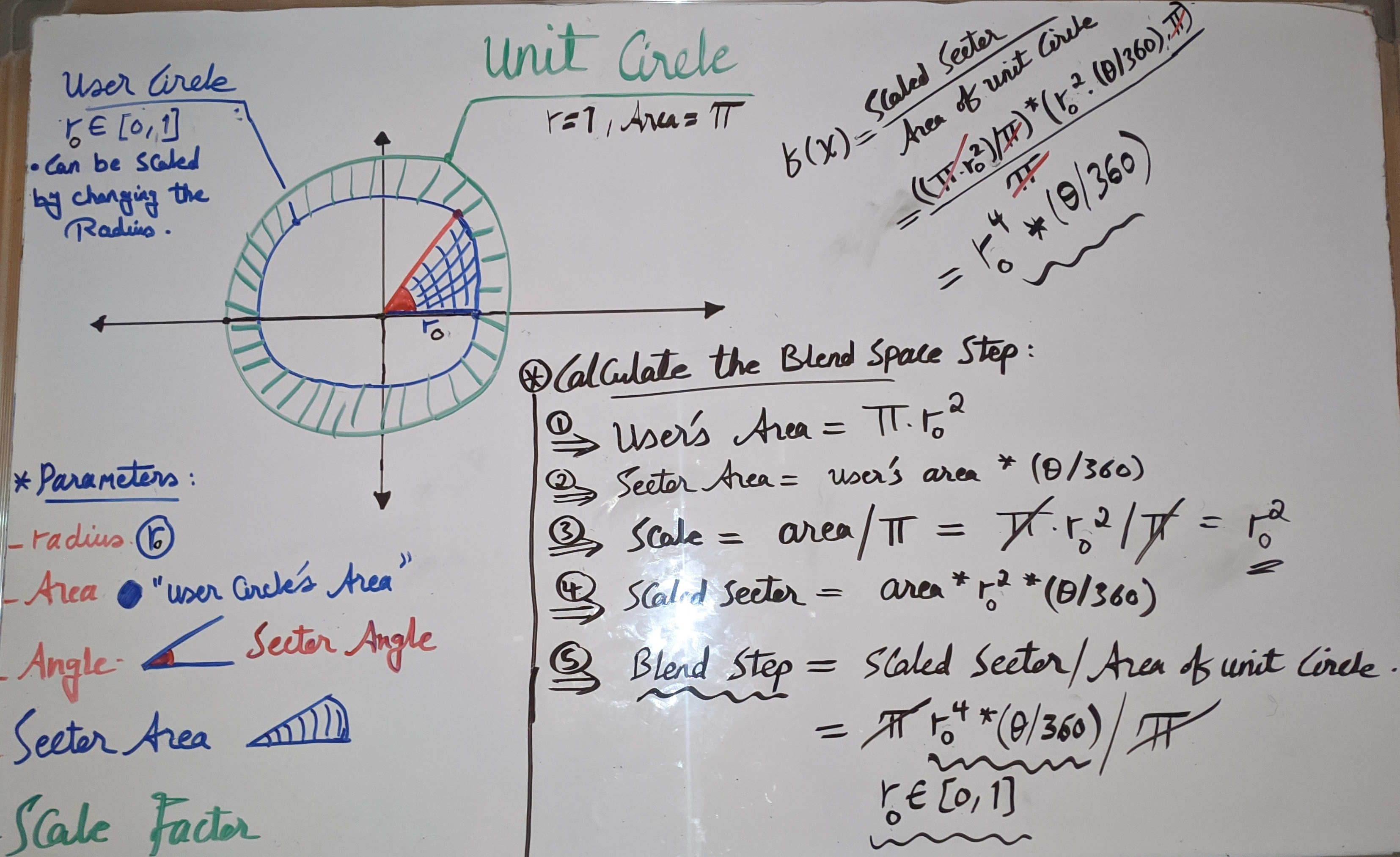
As requested, a very simple representation for this function :

Piechart

Parameters that alter the function :

  • Circle radius (will alter circle area).
  • Sector angle (will alter blend step).

Both of which will calculate the blendStep which is the user's sector area with respect to the unit circle area.

For users :

  • One can make the radius constant in his/her app and alter the angle towards 360 which will the alter the blend step.
  • Or make the angle constant and alter the radius towards 1 which will alter the circle area and also alter the blend step.
  • Or change both the angle and radius according to your preferences.

@Sailsman63
Copy link
Copy Markdown
Contributor

Sailsman63 commented Dec 18, 2021

Note: as you've written the diagram, you essentially have πr^4*(angle), due to multiplying user area by sector area.

EDIT: for visual clarity, the superscript4 was way smaller than I anticipated

@pavly-gerges
Copy link
Copy Markdown
Contributor Author

pavly-gerges commented Dec 18, 2021

Note: as you've written the diagram, you essentially have πr^4*(angle), due to multiplying user area by sector area.

EDIT: for visual clarity, the superscript4 was way smaller than I anticipated

the pi is eliminated, the final value is the blend step which would be used in linear interpolation.

the final value is r^4 * (theta/360) which is the blend step where r = [0, 1].

Why r^4 ?
Because the sector area is scaled before using it to calculate the blend step by scale factor = area/ unitCircleArea = r^2.
And the pi is eliminated when calculating the blend step.

@Sailsman63
Copy link
Copy Markdown
Contributor

But that still begs the question "why?"

What problem are you trying to solve that has an intuitive model in terms of r^4 * (theta/360), and why implement it in this series of steps with interim results when you can just calculate r^4 * (theta/360) in a single line of code with no local/instance variables?

@pavly-gerges
Copy link
Copy Markdown
Contributor Author

But that still begs the question "why?"

What problem are you trying to solve that has an intuitive model in terms of r^4 * (theta/360), and why implement it in this series of steps with interim results when you can just calculate r^4 * (theta/360) in a single line of code with no local/instance variables?

Do you want it in a single step ? I think being in multiple steps makes you understand better.

It's just a scaled sector area...notice that r is a fraction between zero and one so the r^4 would scale down the sector area because of applying the power law on a fraction.

@pavly-gerges
Copy link
Copy Markdown
Contributor Author

I will close this feature, since no response from the community.

Sign up for free to join this conversation on GitHub. Already have an account? Sign in to comment

Projects

None yet

Development

Successfully merging this pull request may close these issues.

4 participants