
codex-statusline-vscode is a small VS Code extension that watches local Codex rollout logs and shows a compact, sanitized view of recent Codex activity.
It is local-first, intentionally conservative, and designed to make Codex feel less opaque while it is working.
Install it from the Visual Studio Marketplace.
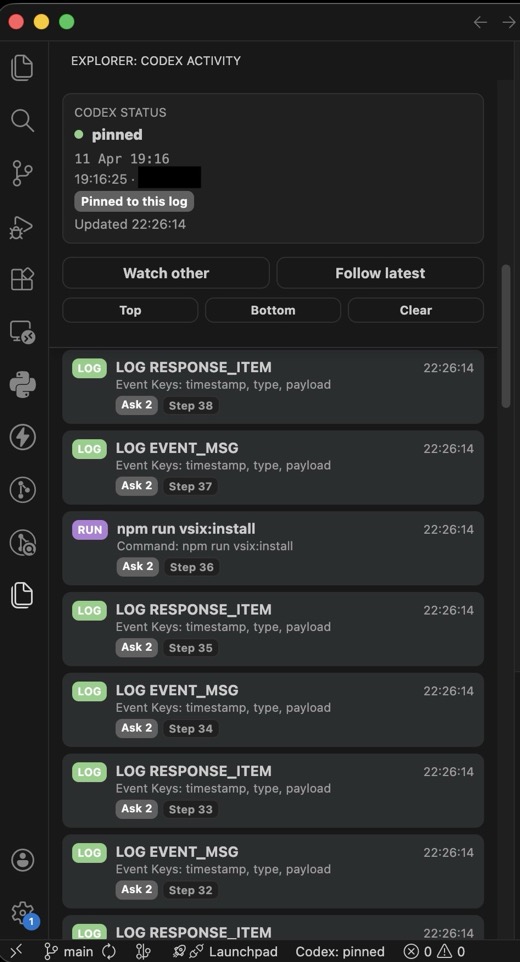
- Automatically watches local Codex rollout logs.
- Shows a compact status bar item, such as
Codex: pinned,Codex: running command, orCodex: no log found. - Adds a dockable
Codex Activitywebview view in Explorer. - Shows sanitized activity rows with short labels like
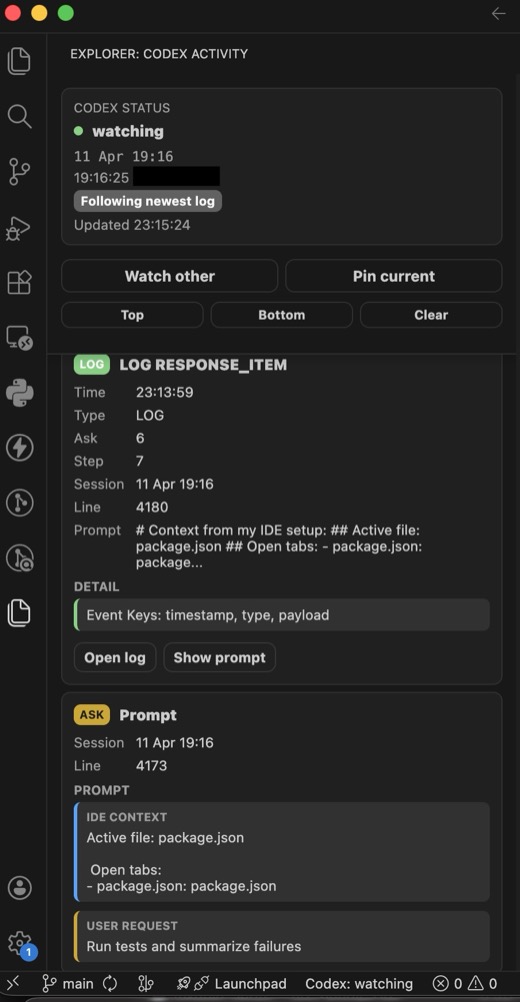
ASK,RUN,EDIT,TOOL, andLOG, plus a compact hint so repeated commands are easier to tell apart. - Lets you click an activity row to see richer sanitized event details and metadata, with an explicit action to open the source rollout log.
- Opens the source rollout log at the selected event line when line information is available.
- Links command/tool/edit rows back to the latest loaded user prompt when that prompt is still in recent activity.
- Supports pinned and follow-latest log modes for multi-Codex workflows.
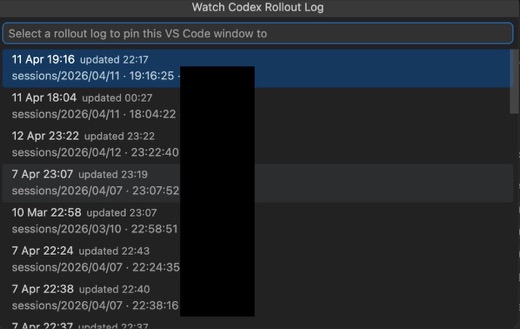
- Uses friendly rollout labels like
Today 19:16instead of longrollout-...jsonlfilenames. - Seeds the activity view with a small bounded slice of recent history when a log is first watched.
- Keeps the output channel opt-in for diagnostics.
- Handles malformed JSONL, partial trailing log lines, missing logs, file truncation, and newer rollout logs.
This extension reads local Codex rollout logs from your machine. It does not send log data to any service.
The UI deliberately shows compact operational summaries. It does not try to reconstruct hidden reasoning or expose full log payloads.
Important Privacy Note on User Prompts: This extension surfaces bounded previews of User Prompts (marked as ASK rows) read from the rollout logs. While assistant and system messages are suppressed, your own input to Codex will be visible in the VS Code sidebar. Be cautious when sharing screenshots or screen recordings of the Codex Activity view, as they may contain sensitive code or intent captured in these prompt previews.
Full Event Payloads: If you enable the showFullEventPayloads setting, the activity view will display raw JSON data for unrecognized events. This is highly useful for debugging but significantly increases the risk of leaking sensitive internal data (tokens, paths, reasoning) if you share screenshots or logs. Use with caution.
Opening a rollout log from the detail view is an explicit local action. The raw log can contain prompts, commands, file paths, and other sensitive context, so treat it like any other local development artifact.
Default sessions root:
- macOS/Linux:
~/.codex/sessions - Windows:
%USERPROFILE%\.codex\sessions
Expected rollout log shape:
- macOS/Linux:
~/.codex/sessions/YYYY/MM/DD/rollout-*.jsonl - Windows:
%USERPROFILE%\.codex\sessions\YYYY\MM\DD\rollout-*.jsonl
The Windows default was verified on a real Codex install. Separate desktop app logs may also exist under %LOCALAPPDATA%\Packages\OpenAI.Codex_...\LocalCache\Local\Codex\Logs, but those are not the rollout JSONL files this extension watches.
You can override the root with:
{
  "codexStatusline.sessionsRoot": "~/.codex/sessions"
}Codex Statusline starts in pinned mode.
- Pinned: the VS Code window pins itself to the first newest rollout log it sees. This helps prevent another Codex instance on the same machine from stealing the activity view.
- Follow latest: the extension follows the newest rollout log under the configured sessions root. This is useful when you intentionally want the newest global Codex activity, and it can pick up logs in new date folders after midnight.
Use the activity view buttons or command palette to switch modes:
Codex Statusline: Watch Another LogCodex Statusline: Pin Current LogCodex Statusline: Unpin and Follow Latest
Codex Statusline: Start WatchingCodex Statusline: Stop WatchingCodex Statusline: Refresh NowCodex Statusline: Show Activity ViewCodex Statusline: Watch Another LogCodex Statusline: Pin Current LogCodex Statusline: Unpin and Follow LatestCodex Statusline: Show OutputCodex Statusline: Copy Current StatusCodex Statusline: Clear Activity View
| Setting | Default | Description |
|---|---|---|
codexStatusline.enabled |
true |
Enables the watcher. |
codexStatusline.sessionsRoot |
~/.codex/sessions |
Root directory containing Codex rollout logs. Runtime fallback uses path.join(os.homedir(), ".codex", "sessions"). |
codexStatusline.showInStatusBar |
true |
Shows the compact status bar item. |
codexStatusline.showOutputChannel |
false |
Writes watcher events to the plain-text output channel. The activity view is the default surface. |
codexStatusline.pollIntervalMs |
3000 |
How often to scan for the target rollout log and read appended lines. Minimum is 1000. |
codexStatusline.idleTimeoutMs |
30000 |
How long without parsed activity before a working status falls back to watching/pinned. Minimum is 5000. |
codexStatusline.maxRecentEvents |
50 |
Maximum recent activity events retained in memory. |
codexStatusline.initialHistoryLines |
25 |
Target number of recent parsed activity events to seed into the activity view when a log is first watched. The watcher may read more raw rollout log lines because many records are intentionally hidden. Set to 0 to only show new activity. Maximum is 200. |
codexStatusline.showFullEventPayloads |
false |
Shows raw JSON in event details for unrecognized events (Safe vs. Full mode). |
codexStatusline.compactMode |
true |
Reserved for compact display behavior. |
codexStatusline.debug |
false |
Reserved for extra diagnostic output. |
- Node.js
- npm
- VS Code
- Local Codex usage that creates rollout logs
npm install
npm run compileOpen the repo in VS Code and press F5 to launch the Extension Development Host.
The Codex Activity view appears in Explorer by default. It auto-starts with the extension and can be moved/docked like other contributed VS Code views.
npm run compile
npm run watch
npm run check
npm test
npm run test:integration
npm run test:all
npm run vsix:package
npm run vsix:install
npm run vsix:reinstall
npm run marketplace:publish
npm test runs the pure Node unit tests. npm run test:integration launches a VS Code Extension Host smoke test using @vscode/test-electron.
npm run vsix:package builds a local .vsix with vsce. npm run vsix:install installs the already-built VSIX into the local VS Code CLI using --force. On macOS it can also fall back to the CLI bundled inside the VS Code app. Use npm run vsix:reinstall for the normal rebuild-and-reinstall loop.
npm run marketplace:publish runs the full test suite, packages the VSIX, and publishes that exact package to the VS Code Marketplace. Authenticate first with either npx vsce login jacsteyn or a VSCE_PAT environment variable.
If your VS Code CLI is not named code, set VSCODE_CLI:
VSCODE_CLI="code-insiders" npm run vsix:installCore modules:
src/config.ts: loads extension settings and resolves the default sessions root.src/logLocator.ts: recursively finds rollout logs and sorts newest first.src/logTailer.ts: seeds bounded recent history with line numbers, tails appended bytes, handles partial trailing lines, and recovers from truncation.src/eventParser.ts: defensively parses JSONL and emits sanitized operational events.src/followTarget.ts: pure pinned/follow-latest target selection logic.src/statusModel.ts: compact status model.src/watcher.ts: orchestrates config, discovery, tailing, parsing, status bar, and output channel updates.src/activityView.ts: dockable webview activity panel with CSP-protected local controls.src/extension.ts: extension activation, command registration, and view registration.
Current coverage includes:
- event parsing and sanitization
- distinguishable command summaries for repeated script commands
- user prompt previews from observed Codex message event shapes
- source line numbers for tailed/history log lines
- suppression of assistant message events
- command-like fields inside assistant message events
- rollout display formatting, including Windows-style paths
- recursive rollout discovery and missing-root behavior
- bounded history seeding, appended-line tailing, partial lines, and truncation
- pinned and follow-latest target selection
- VS Code Extension Host command and temporary sessions-root smoke test
Known test gaps:
- rendered webview DOM behavior
- click simulation for activity view controls
- visual validation in multiple dock positions
The extension is designed for macOS, Linux, and Windows:
- It uses Node and VS Code APIs rather than shell commands.
- It supports slash and backslash path display.
- Windows rollout root has been verified as
%USERPROFILE%\.codex\sessions. - The sessions root remains configurable for non-standard Codex installs.
- There is no official Codex API mapping a VS Code window to a specific rollout log. Default pinning is the best available approximation.
- If Codex starts a new rollout log for the same conversation while pinned, you may need to use
Follow latestorWatch other. - The parser intentionally recognizes only a conservative subset of event shapes.
- The output channel is plain text; rich display lives in the
Codex Activitywebview. - Prompt previews are bounded and sanitized; use
Open logfor full local log inspection.
Near-term:
- Add integration coverage for activity view commands and temporary log roots.
- Add sanitized fixtures from observed real rollout event shapes.
- Add rendered webview DOM checks or a Playwright-style UI validation path.
- Add Marketplace screenshots or a short GIF.
Later:
- Improve parser coverage for additional Codex event shapes.
- Add richer diagnostics behind an explicit debug setting.
- Consider a dedicated Activity Bar container if the Explorer location feels too hidden.
Contributions are welcome, especially around:
- resilient log parsing
- sanitized fixtures for different Codex log shapes
- VS Code integration tests
- UX polish for the activity view
- cross-platform validation
Please keep changes local-first and privacy-preserving. Avoid exposing raw message contents or hidden reasoning.
MIT