Built with ❤️ for the game development community
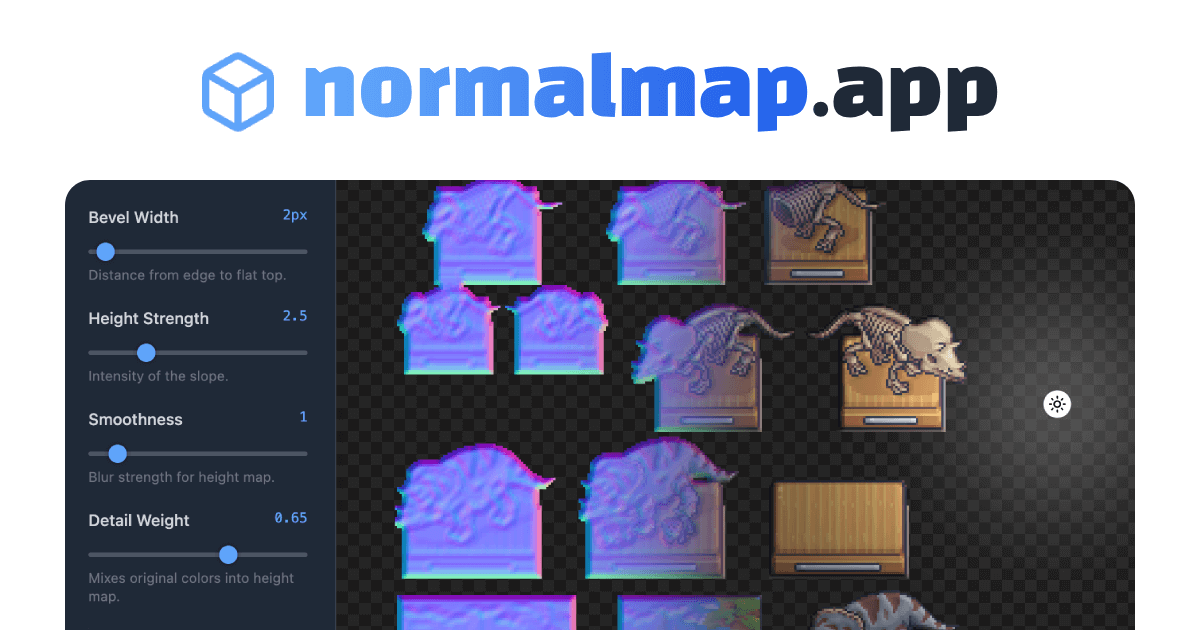
A free, open-source browser-based normal map editor designed specifically for pixel art and 2D games. Create realistic lighting effects with real-time preview and intuitive controls. No signup required. Works with Phaser, Unity, Godot, and more.


- 🎨 Real-time Normal Map Generation - Instantly see your changes as you adjust parameters
- 💡 Interactive Lighting Preview - Drag and drop light source to preview how your normal map responds
- 🎯 Pixel-Perfect Rendering - Optimized for pixel art with crisp edges
- ⚡ Fast Performance - Pure JavaScript implementation with optimized algorithms
- 🔧 Adjustable Parameters - Control bevel width, height strength, smoothness, and detail
- 🎭 Multiple View Modes - Switch between original, normal map, and lit 3D preview
- 📱 Touch Support - Works on tablets and mobile devices
- 💾 No Server Required - Everything runs in your browser, your images never leave your device
- 🆓 100% Free - No ads, no tracking, no registration
Simply visit https://normalmap.app/ and start creating!
- Click "Load Image" and select your pixel art PNG (with transparency)
- Adjust the parameters to get your desired effect
- Switch to "Lit 3D" mode to preview the lighting
- Click "Save Normal Map" to download your result
- Node.js 14+ (for build process)
- npm or pnpm
# Clone the repository
git clone https://github.com/jadhaidar/normal-map-app.git
cd normal-map-app

# Install dependencies
pnpm install

# Start development server
pnpm run dev

# Build for production
pnpm run buildnormal-map-editor/
├── src/
│ └── index.html # Source HTML with all code
├── public/ # Build output directory
├── build.js # Minification build script
├── package.json # Dependencies and scripts
├── vercel.json # Vercel deployment config
├── LICENSE # MIT License
└── README.md # This file
Normal maps are special textures that store surface direction information. Each pixel's RGB values represent the X, Y, and Z components of the surface normal vector at that point. When rendered with dynamic lighting, these normals create the illusion of 3D depth and detail on flat 2D surfaces.
The editor uses a multi-step process to generate normal maps from pixel art:
- Alpha Analysis - Detects opaque pixels from the alpha channel
- Distance Transform - Calculates distance from edges using a two-pass Manhattan distance algorithm
- Height Map Generation - Combines distance transform with luminance data to create a height field
- Gaussian Blur - Applies separable box blur for smoothing (optional)
- Normal Calculation - Uses Sobel filter to compute surface normals from the height map
- Normalization - Converts normal vectors to RGB color space (0-255)
Perfect for:
- 2D Game Development - Add depth and lighting to sprites in Phaser, Godot, Unity, etc.
- Pixel Art - Enhance retro-style graphics with modern lighting
- UI Elements - Create dynamic buttons and interface components
- Web Graphics - Add WebGL lighting effects to your websites
- Texture Creation - Generate normal maps for any 2D texture
Controls the distance from the edge to the flat center. Higher values create wider, more gradual slopes.
- Range: 0-50px
- Recommended: 3-8px for crisp edges, 10-20px for softer shapes
Adjusts how pronounced the slopes are in the normal map. Higher values create more dramatic lighting effects.
- Range: 0.1-10.0
- Recommended: 2-4 for subtle effects, 5-8 for dramatic lighting
Applies blur to the height map before generating normals, creating softer transitions.
- Range: 0-10
- Recommended: 0-2 for sharp details, 3-6 for smooth surfaces
Mixes the original image's luminance into the height map, preserving color-based details.
- Range: 0-1
- Recommended: 0.1-0.3 for subtle texture, 0.4-0.7 for pronounced details
Inverts the normal map direction. Use these if lighting appears from the wrong direction in your game engine.
Cmd/Ctrl + Z- UndoCmd/Ctrl + Shift + ZorCtrl + Y- RedoCmd/Ctrl + Scroll- Zoom in/out
// Load the normal map
this.load.image('sprite', 'sprite.png');
this.load.image('sprite-normal', 'sprite_normal.png');

// Create sprite with normal map
const sprite = this.add.sprite(400, 300, 'sprite');
sprite.setPipeline('Light2D');

// Add the normal map
this.textures.addNormalMap('sprite-normal', 'sprite');// Assign normal map to sprite material
Material spriteMaterial = spriteRenderer.material;
spriteMaterial.SetTexture("_BumpMap", normalMapTexture);
spriteMaterial.EnableKeyword("_NORMALMAP");# In sprite's material:
# Set 'normal_texture' to your normal map
material.set_texture(CanvasItemMaterial.LIGHT_MODE_NORMAL, normal_map)Contributions are welcome! Here's how you can help:
- Fork the repository
- Create a feature branch (
git checkout -b feature/amazing-feature) - Commit your changes (
git commit -m 'Add amazing feature') - Push to the branch (
git push origin feature/amazing-feature) - Open a Pull Request
- Add more normal map generation algorithms
- Export to different formats (TGA, DDS, etc.)
- Batch processing multiple images
- Custom lighting presets
- Animation preview mode
- Advanced edge detection options
- More blur algorithms (Gaussian, bilateral)
This project is licensed under the MIT License - see the LICENSE file for details.
Jad Haidar
- Website: jad.land
- GitHub: @jadhaidar
If you find this tool useful, please consider:
- ⭐ Starring the repository
- 🐛 Reporting bugs
- 💡 Suggesting new features
- 📢 Sharing with fellow developers