Home
Shrtn is a production URL-shortening platform and browser extension for creating persistent short links, generating QR codes, and tracking redirect analytics.
The project includes:
- A public URL-shortening website
- A Chrome and Brave browser extension
- A Node.js and Express REST API
- PostgreSQL persistence through Neon
- Production deployment on Railway
- Click analytics and QR-code generation
- Automated backend and extension tests
- OpenAPI and Postman documentation
| Resource | Link |
|---|---|
| Website | https://shrtn.up.railway.app |
| API health | https://shrtn.up.railway.app/health |
| Source code | github.com/jayasuryapazhani/shrtn |
| Latest release | Shrtn releases |
| Privacy policy | Shrtn Privacy Policy |
| Issue tracker | GitHub Issues |
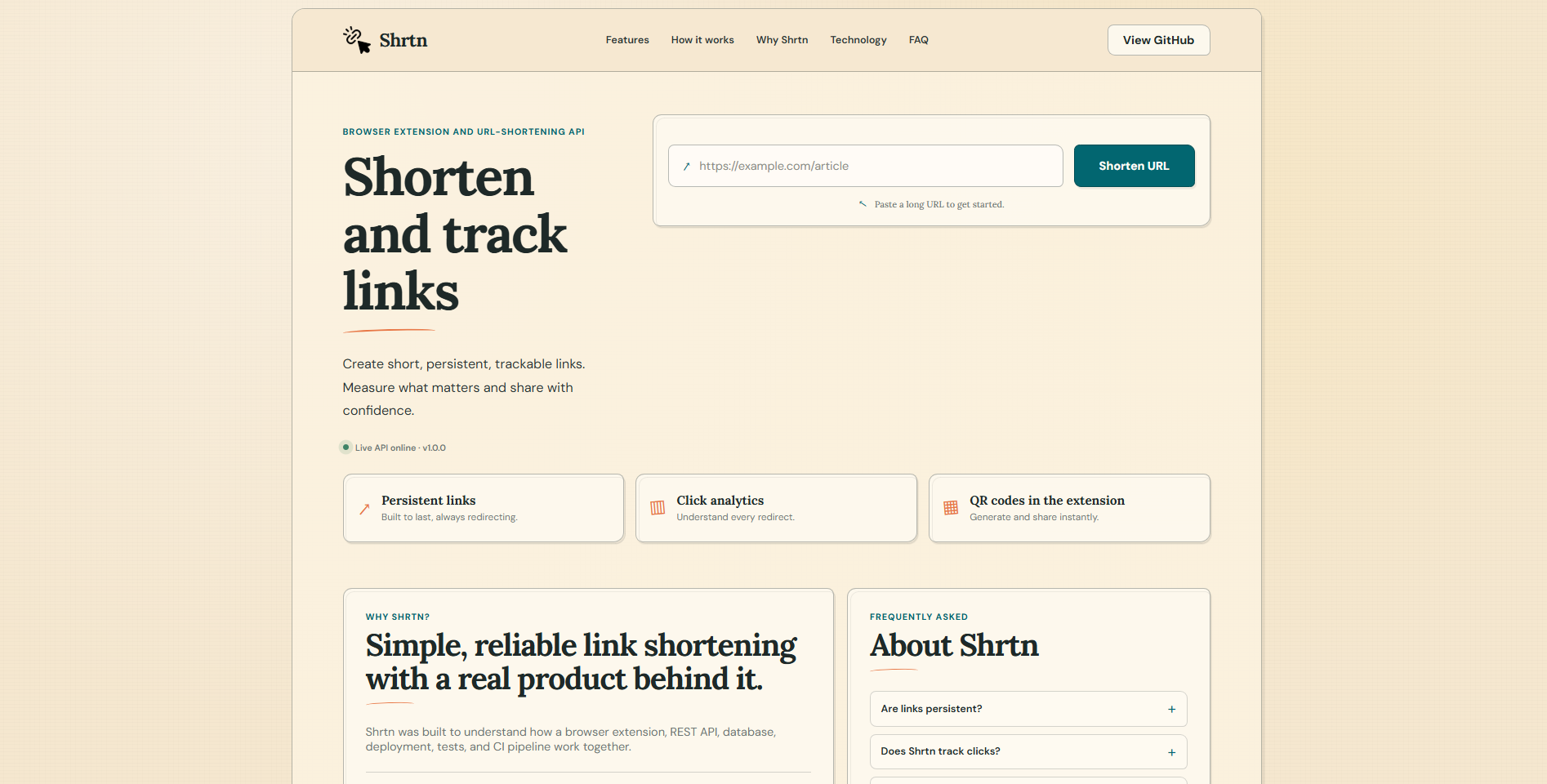
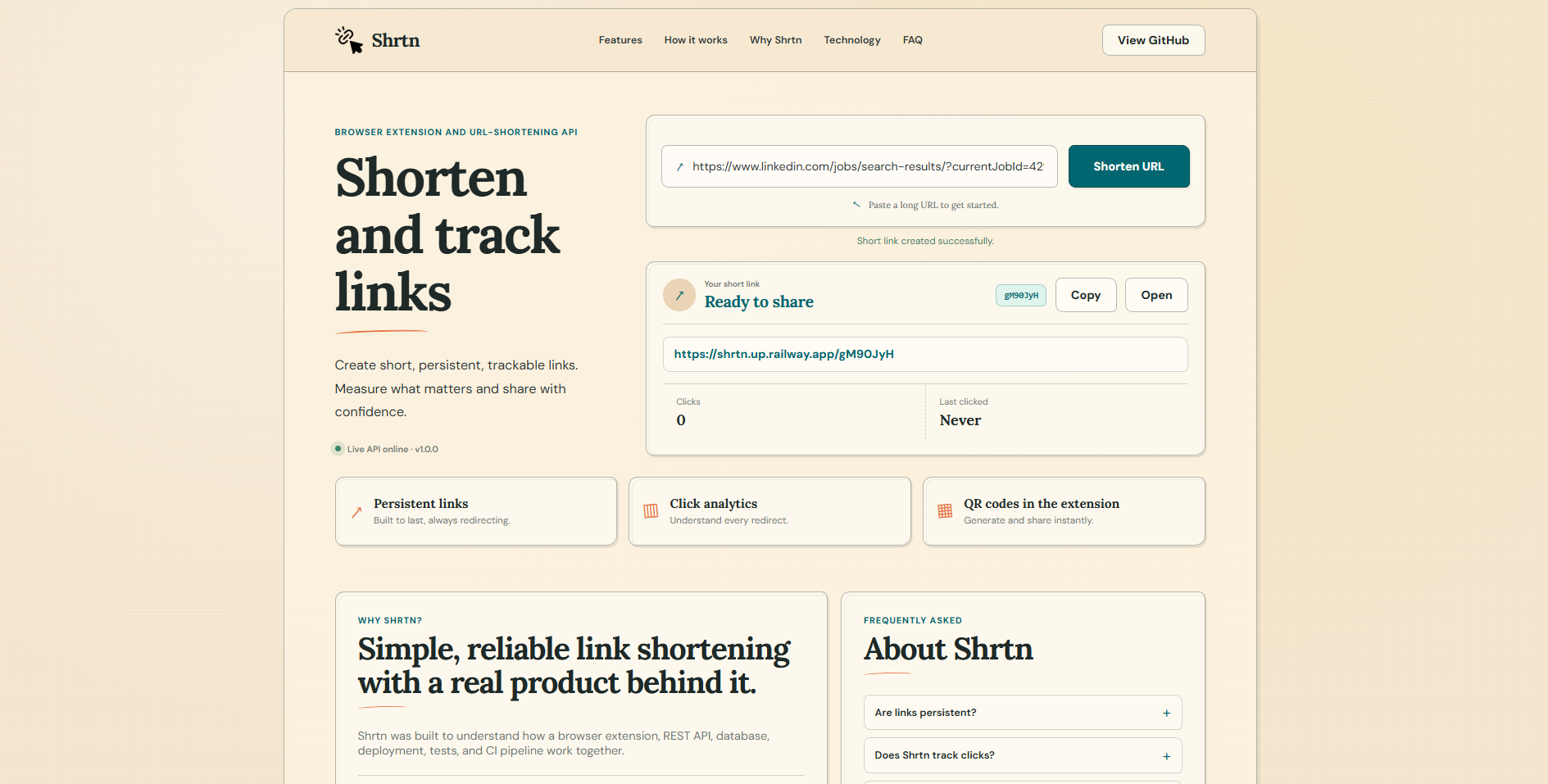
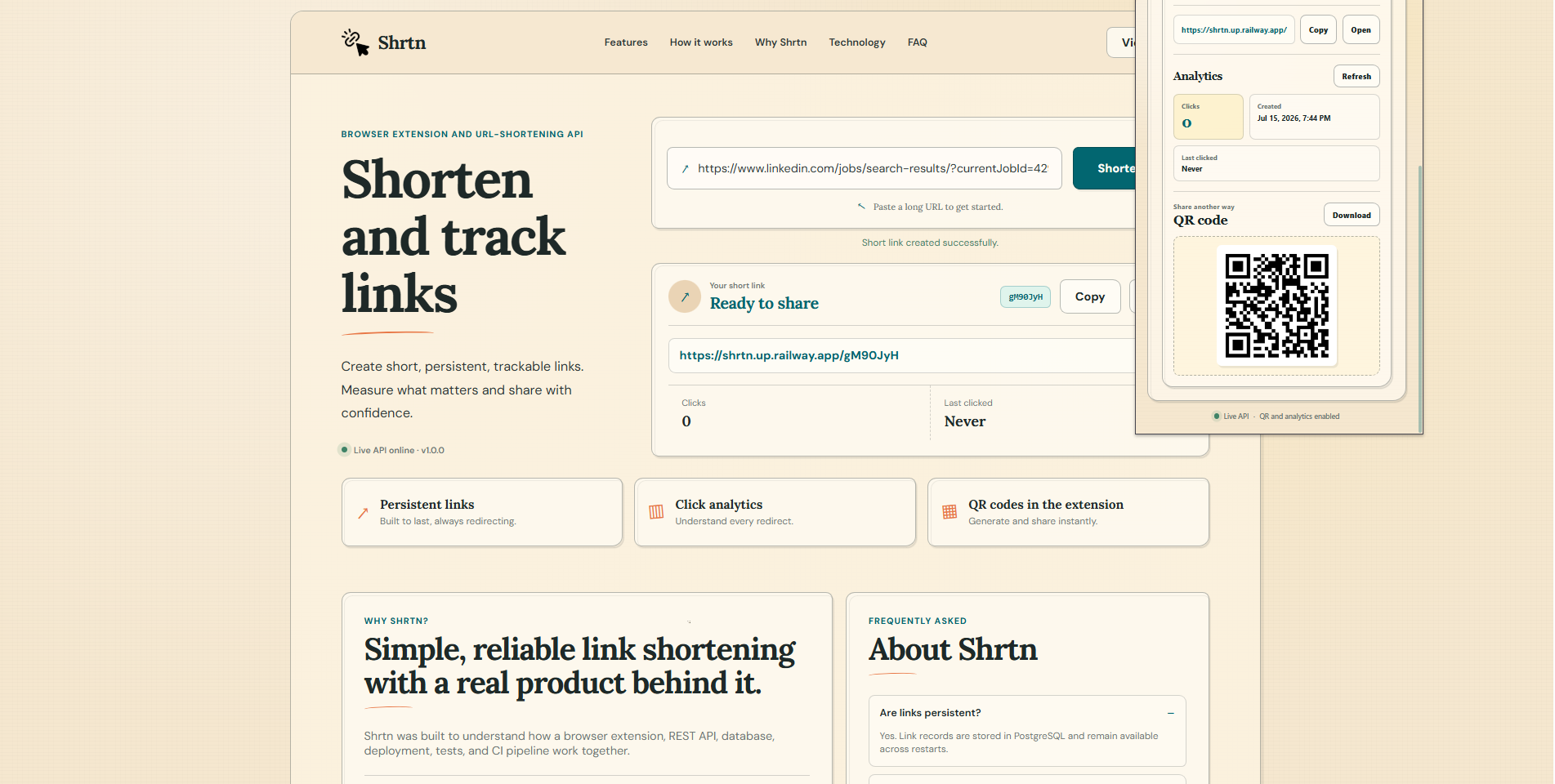
Shrtn lets users shorten URLs from either the public website or the browser extension.
- The user opens the Shrtn website or browser extension.
- The user enters a URL, or the extension reads the active tab URL.
- Shrtn validates that the URL uses HTTP or HTTPS.
- The API creates a unique seven-character short code.
- The original URL and short code are stored in PostgreSQL.
- Shrtn returns a public short URL.
- The extension generates a downloadable QR code.
- Every successful redirect increments the click count.
- Analytics show the creation time, click count, and most recent click timestamp.
- Create public seven-character short links
- Support HTTP and HTTPS destination URLs
- Reject unsupported URL protocols
- Return production-ready public short URLs
- Preserve generated links in PostgreSQL
- Detect the active browser tab URL
- Allow users to edit or replace the detected URL
- Create links from Chrome or Brave
- Copy generated links to the clipboard
- Open generated links in a new tab
- Generate downloadable QR codes
- Display click analytics
- Refresh analytics without recreating the link
- Public URL-shortening form
- Responsive sketch-style interface
- Loading spinner and skeleton state
- Copy and open actions
- Click-count display
- Last-clicked display
- Public API health indicator
- Track redirect click count
- Track the most recent successful redirect
- Preserve creation timestamps
- Retrieve analytics without incrementing the click count
- Helmet security headers
- Disabled
X-Powered-Bydisclosure - HTTP Strict Transport Security in production
- Request-body size limits
- URL and short-code validation
- API rate limiting
- Short-link creation rate limiting
- Redirect rate limiting
- Trusted proxy configuration for Railway
- Backend tests with Vitest and Supertest
- Extension tests with Vitest
- Static analysis with Oxlint
- Production extension builds with Vite
- GitHub Actions continuous integration
- Railway deployment from the
mainbranch
flowchart LR
    U[User] --> W[Shrtn Website]
    U --> E[Chrome or Brave Extension]

    W --> API[Shrtn REST API]
    E --> API

    API --> DB[(Neon PostgreSQL)]
    API --> R[Public Short URL]

    R --> D[Original Destination]
    R --> A[Click Analytics]
    A --> DB
Website or browser extension
          |
          v
https://shrtn.up.railway.app
          |
          v
Node.js and Express REST API
          |
          v
Neon PostgreSQL
          |
          v
Persistent public redirect
| Technology | Purpose |
|---|---|
| React | Extension interface |
| Vite | Development and production build |
| Manifest V3 | Chrome and Brave extension configuration |
| JavaScript | Client-side logic |
| QRCode | QR-code generation |
| Chrome Extensions API | Active-tab access and toolbar popup |
| Technology | Purpose |
|---|---|
| Node.js | JavaScript runtime |
| Express | REST API and static website |
| PostgreSQL | Persistent link and analytics storage |
| Neon | Hosted PostgreSQL database |
| Zod | Request validation |
| Nano ID | Short-code generation |
| Helmet | Security headers |
| Express Rate Limit | Request throttling |
| Technology | Purpose |
|---|---|
| Vitest | Backend and extension tests |
| Supertest | HTTP API testing |
| Oxlint | Static analysis |
| Postman | Manual API testing |
| OpenAPI 3.0 | API contract |
| GitHub Actions | Continuous integration |
| Railway | Production deployment |
shrtn/
├── .github/
│   └── workflows/
│       └── ci.yml
├── docs/
│   ├── database.md
│   ├── openapi.yaml
│   └── screenshots/
│       ├── extension-popup.png
│       ├── website-home.png
│       └── website-result.png
├── extension/
│   ├── public/
│   │   ├── assets/
│   │   ├── icons/
│   │   └── manifest.json
│   ├── src/
│   ├── tests/
│   └── package.json
├── postman/
├── server/
│   ├── migrations/
│   ├── public/
│   ├── src/
│   ├── tests/
│   └── package.json
├── .env.example
└── README.md
| Method | Endpoint | Purpose |
|---|---|---|
GET |
/health |
Check API health |
POST |
/api/v1/links |
Create a short link |
GET |
/api/v1/links/{shortCode}/analytics |
Retrieve link analytics |
GET |
/{shortCode} |
Redirect to the original URL |
The complete API contract is available in docs/openapi.yaml.
$body = @{
  originalUrl = "https://example.com"
} | ConvertTo-Json

Invoke-RestMethod `
  -Uri "https://shrtn.up.railway.app/api/v1/links" `
  -Method Post `
  -ContentType "application/json" `
  -Body $body
Example response:
{
  "data": {
    "originalUrl": "https://example.com",
    "shortCode": "AbC123x",
    "shortUrl": "https://shrtn.up.railway.app/AbC123x",
    "createdAt": "2026-07-15T01:00:00.000Z"
  }
}Invoke-RestMethod `
-Uri "https://shrtn.up.railway.app/api/v1/links/AbC123x/analytics"Example response:
{
  "data": {
    "originalUrl": "https://example.com",
    "shortCode": "AbC123x",
    "createdAt": "2026-07-15T01:00:00.000Z",
    "clickCount": 3,
    "lastClickedAt": "2026-07-15T02:00:00.000Z"
  }
}
Reading analytics does not increment the click count. Only successful short-link redirects update analytics.
Install:
- Node.js 20 or newer
- npm
- PostgreSQL or a Neon PostgreSQL database
- Chrome, Brave, or another Chromium-based browser
- Git
git clone https://github.com/jayasuryapazhani/shrtn.git
Set-Location .\shrtnnpm --prefix .\server install
npm --prefix .\extension installCreate the backend environment file:
Copy-Item .\.env.example .\server\.envUpdate server/.env:
DATABASE_URL=postgresql://USER:PASSWORD@HOST/DATABASE?sslmode=require
PUBLIC_BASE_URL=http://localhost:5056
DATABASE_URL is required.
PUBLIC_BASE_URL is optional for local development. When it is omitted, Shrtn builds short URLs from the incoming request origin.
Never commit server/.env.
Run:
npm --prefix .\server run db:migrateCurrent migrations:
001_create_links.sql
002_add_click_analytics.sql
The database stores:
- Original URL
- Short code
- Creation timestamp
- Click count
- Last-clicked timestamp
npm --prefix .\server run devLocal API:
http://localhost:5056
Health check:
curl.exe http://localhost:5056/healthExpected response:
{
  "status": "UP",
  "service": "shrtn-api",
  "version": "1.0.0"
}npm --prefix .\extension run buildThe production extension is generated in:
extension/dist
- Open
chrome://extensionsorbrave://extensions. - Enable Developer mode.
- Select Load unpacked.
- Choose the
extension/distdirectory. - Pin Shrtn to the browser toolbar.
- Open a normal HTTP or HTTPS page.
- Open Shrtn.
- Confirm that the active URL appears.
- Select Shorten URL.
- Test Copy, Open, Refresh, and Download QR.
The production extension communicates with:
https://shrtn.up.railway.app
Run all backend checks:
npm --prefix .\server run checkRun all extension checks:
npm --prefix .\extension run checkExpected validation:
Backend tests:   47 passed
Extension tests: 10 passed
Extension build: successful
Lint warnings:   0
Lint errors:     0
The backend and public website are deployed from the main branch.
Railway configuration:
Root directory: /server
Start command: npm start
Pre-deploy command: npm run db:migrate
Health endpoint: /health
Required Railway variables:
DATABASE_URL=<Neon PostgreSQL connection string>
NODE_ENV=production
PUBLIC_BASE_URL=https://shrtn.up.railway.app
Railway also supplies PORT and RAILWAY_PUBLIC_DOMAIN.
The production PostgreSQL database is hosted on Neon.
Database documentation is available in docs/database.md.
Used only when the user opens the extension to read and prefill the current tab URL.
Shrtn does not continuously monitor browser activity and does not read page content.
Used only when the user selects Copy to place the generated short URL on the clipboard.
https://shrtn.up.railway.app/*
Used only to create short links and retrieve analytics from the official Shrtn API.
Shrtn processes the current tab URL or a URL entered by the user when the user requests a short link.
Stored information includes:
- Original URL
- Short code
- Creation timestamp
- Click count
- Last-clicked timestamp
Shrtn does not require an account and does not intentionally collect names, email addresses, passwords, payment information, personal messages, or page content.
Shrtn does not sell user data or use it for advertising.
Read the complete policy:
https://shrtn.up.railway.app/privacy.html
Shrtn v1.0.0
Components:
Backend API:       1.0.0
Browser extension: 1.0.0
Version 1 includes:
- Public URL-shortening website
- Chrome and Brave extension
- Persistent PostgreSQL links
- Public redirects
- Click analytics
- QR-code generation
- Production deployment
- Automated tests
- Sketch-style website and extension UI
- Teal and cream extension icon set
Confirm that:
- The page uses HTTP or HTTPS
- The extension was opened from the toolbar
- The page is not an internal browser page such as
chrome://extensions - The extension has been reloaded after rebuilding
npm --prefix .\extension run buildThen reload the extension from the browser extensions page. Remove and load the unpacked extension again if the icon remains cached.
curl.exe https://shrtn.up.railway.app/healthThen inspect Railway deployment and runtime logs.
Confirm that the backend environment contains:
PUBLIC_BASE_URL=https://shrtn.up.railway.appRestart or redeploy the backend after changing the value.
Open the generated short URL so a redirect occurs, then refresh analytics.
Reading the analytics endpoint by itself does not increase the click count.
Recommended wiki pages:
- Home
- Getting Started
- Browser Extension Guide
- Website Guide
- API Reference
- Architecture
- Database
- Deployment
- Security and Privacy
- Troubleshooting
- Release History
Shrtn Version 1 provides the complete URL-shortening workflow:
Active browser tab or entered URL
              |
              v
       Public short link
              |
              v
        Downloadable QR
              |
              v
     Persistent redirect
              |
              v
        Click analytics
For defects, feature requests, and technical questions, use: