This repository will actually serve as a aid to help you get started with your own template. You should copy the raw form of this readme into your own, and use this template to write your own. If you want to draw inspiration from other classmates, feel free to check this directory of all students!.
- Table of Contents
- CircuitPython_Servo
- Hello_CircuitPython
- Motor_Control
- Robot_Arm
- Temperature_sensor
- rotary_Encoder
- Photointerrupters
- NextAssignmentGoesHere
- Project_PID
I am making a motor spin 180 degrees, with two buttons
# Jabari Bright
# CircuitPython Servo
# Pressing one button moves a servo clockwise, pressing the second button moves it back.

import time
import board
from digitalio import DigitalInOut, Direction, Pull
from adafruit_motor import servo
import pwmio

btn = DigitalInOut(board.D4)
btn.direction = Direction.INPUT
btn.pull = Pull.UP

pwm = pwmio.PWMOut(board.D2, duty_cycle=2 ** 15, frequency=50)
my_servo = servo.Servo(pwm)
angle = 180


btn2 = DigitalInOut(board.D6)
btn2.direction = Direction.INPUT
btn2.pull = Pull.UP

while True:
    if not btn.value:
        print("BTN is down")
        for angle in range(0, 180, 9):  # 0 - 180 degrees, 9 degrees at a time
            my_servo.angle = angle
            time.sleep(0.1)
    else:
        print("BTN is up")
        pass
    if not btn2.value:
        print("BTN2 is down")
        for angle in range(180,0, -9):  # 180 degrees - 0, -9 degrees at a time
            my_servo.angle = angle
            time.sleep(0.1)
    else:
        print("BTN2 is up")
        pass

    time.sleep(0.1) # sleep for debounce
Thanks Will H for the code!
Video.mov
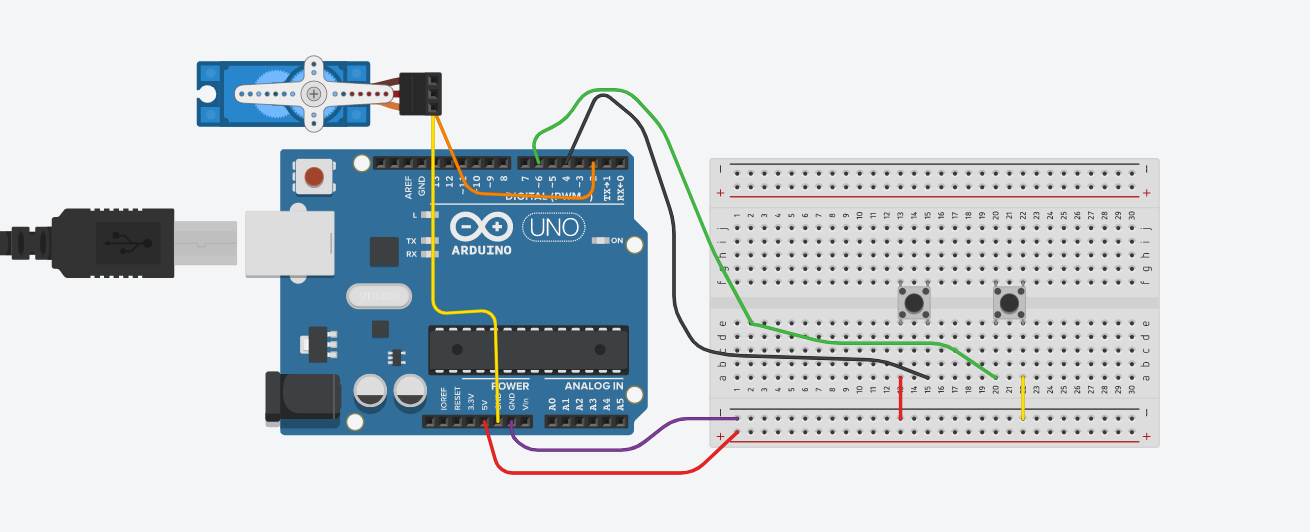
This was really hard because I didnt know how to start with the code, but thanks to my fellow classmate Will H for the code! I got it done, but another problem to where the motor wouldnt turn right, but thanks to my teacher I got that figured out.
import board
import neopixel

dot = neopixel.NeoPixel(board.NEOPIXEL, 1)
dot.brightness = 0.5

print("Make it red!")

while True:
    dot.fill((0, 0,255))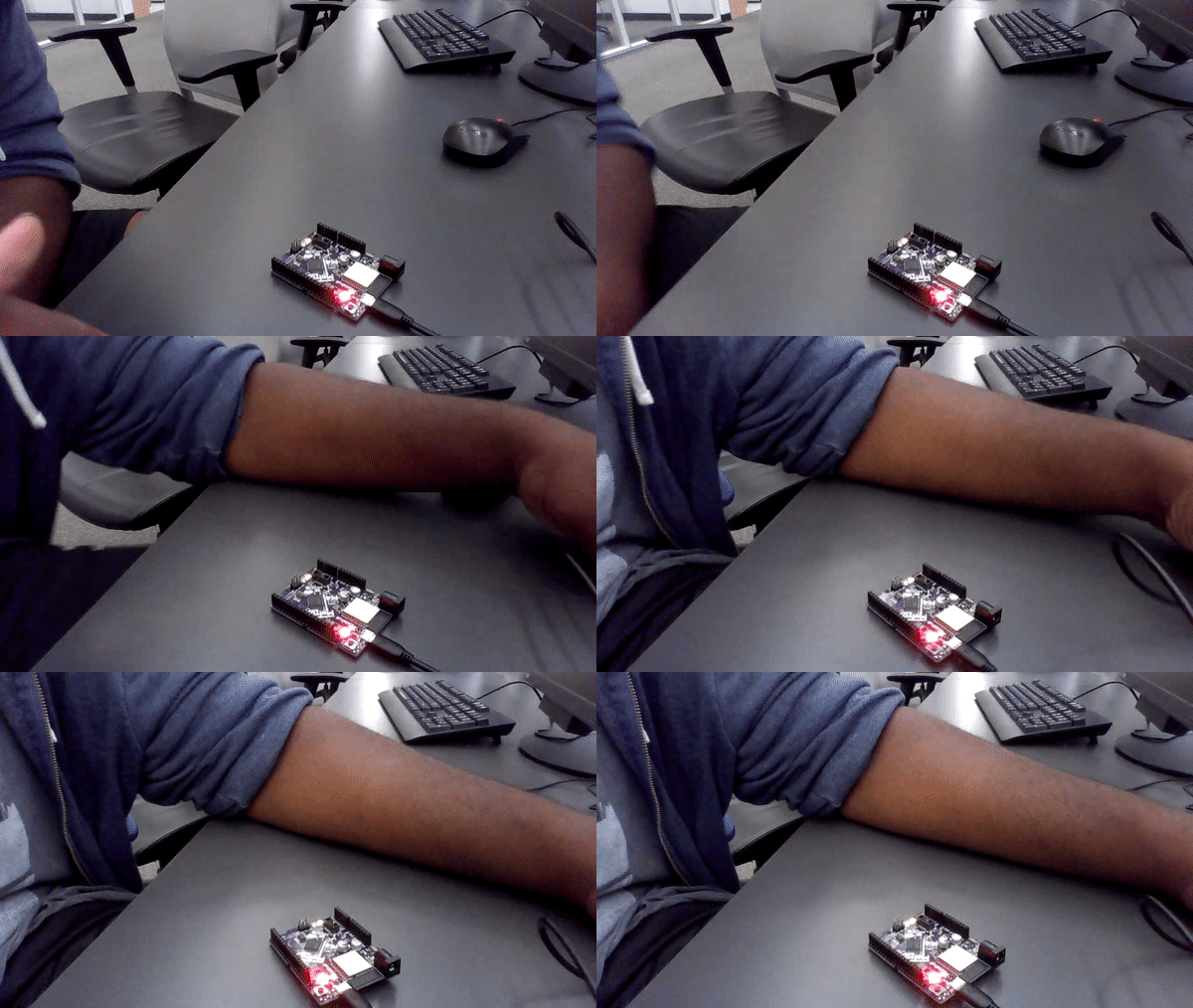
No wiring
it wasnt really hard all you really had to do was copy a code from the assighnment code on canvas:https://cvilleschools.instructure.com/courses/37129/assignments/493863
#Jabari Bright
#Controlled dc motor with potentiometer
#Code is credited to Grant Gastinger & Kaz Shinozaki & Mason Divers
import board               #[lines 1-4] Importing neccesary libraries
import time
from analogio import AnalogOut, AnalogIn
import simpleio

motor = AnalogOut(board.A1) #[lines 5 & 6] Definining the motor and potentiometer
pot = AnalogIn(board.A0)

while True:
    print(simpleio.map_range(pot.value, 96, 65520, 0, 65535)) #Print mapped potentiometer value to motor inputs
    motor.value = int(simpleio.map_range(pot.value, 96, 65520, 0, 65535)) #Write the mapped value to motor
    time.sleep(.1)
Thanks Mason D, Kazuo S, Grant G for the code!
Pictures / Gifs of your work should go here. You need to communicate what your thing does.
Cooper M and Jabari B is making a anthropomorphic robot arm that plays rock paper scissors with you
import board
from digitalio import DigitalInOut, Direction, Pull
import digitalio
import time
import pwmio
from adafruit_motor import servo
import random
from random import randint
from lcd.lcd import LCD
from lcd.i2c_pcf8574_interface import I2CPCF8574Interface       #imports

i2c = board.I2C()
led = digitalio.DigitalInOut(board.D13)      #led in pin 8
led.direction = digitalio.Direction.OUTPUT      #led as output
btn0 = DigitalInOut(board.D3)
btn0.direction = Direction.INPUT
btn0.pull = Pull.UP
btn1 = DigitalInOut(board.D2)
btn1.direction = Direction.INPUT
btn1.pull = Pull.UP
btn2 = DigitalInOut(board.D4)
btn2.direction = Direction.INPUT
btn2.pull = Pull.UP
btn3 = DigitalInOut(board.D5)
btn3.direction = Direction.INPUT
btn3.pull = Pull.UP                             #all 4 buttons as inputs
pwm1 = pwmio.PWMOut(board.D9, frequency = 50)
pwm2 = pwmio.PWMOut(board.D8, frequency = 50)       #continuous servo pin and freq

lcd = LCD(I2CPCF8574Interface(i2c, 0x27), num_rows=2, num_cols=16)      #use 0x3f if not working at 0x27
prev_state1 = btn1.value        #player ROCK input
prev_state2 = btn2.value        #player SCISSORS input
prev_state3 = btn3.value        #player PAPER input
lcd.backlight = True
prev_state0 = btn0.value
servo_1 = servo.ContinuousServo(pwm1)
servo_2 = servo.ContinuousServo(pwm2)

while True:
    cur_state0 = btn0.value       #btn0 outputs its current val
    if cur_state0 != prev_state0:     #if current state isn't previous state
        if not cur_state0:       #if button pressed
            print("btn0 is down")
            led.value = True
            time.sleep(0.6)
            led.value = False
            time.sleep(0.6)
            led.value = True
            time.sleep(0.6)
            led.value = False
            time.sleep(0.6)
            led.value = True
            time.sleep(0.6)
            led.value = False       #blink led 3 times
            r1 = random.randint(1, 3)       #produce a random integer between and including 1 - 3
            if r1 == 1:
                print("ROCK")
                servo_1.throttle = 0.13
                servo_2.throttle = 0.28
                time.sleep(1.0)
                servo_1.throttle = 0
                servo_2.throttle = 0
                cur_state2 = btn2.value       #btn2 outputs its current val
                if cur_state2 != prev_state2:     #if current state isn't previous state
                    if not cur_state2:
                        u1 = random.randint(1,10)        #random number
                        if u1 == 1:
                            lcd.print("Your mom looks    like a pig")
                        if u1 == 2:
                            lcd.print("Your parents don'tlove u")
                        if u1 == 3:
                            lcd.print("You're maidenless")
                        if u1 == 4:
                            lcd.print("scanning...braincell count: 0")
                        if u1 == 5:
                            lcd.print("u humans really suck at this")
                        if u1 == 6:
                            lcd.print("You're a walking disaster")
                        if u1 == 7:
                            lcd.print("ur as smart as a mcchicken")
                        if u1 == 8:
                            lcd.print("You never stood a chance")
                        if u1 == 9:
                            lcd.print("I saw all 14,000,605 outcomes")
                        if u1 == 10:
                            lcd.print("ur a lower life form after all")
                        time.sleep(6)
                    else:
                        lcd.clear()
                cur_state1 = btn1.value       #btn1 outputs its current val
                if cur_state1 != prev_state1:     #if current state isn't previous state
                    if not cur_state1:       #if button pressed
                        lcd.print("Good Game")
                        time.sleep(6)
                        lcd.clear()
                else:
                    lcd.clear()
                cur_state3 = btn3.value       #btn3 outputs its current val
                if cur_state3 != prev_state3:     #if current state isn't previous state
                    if not cur_state3:       #if button pressed
                        lcd.print("Good Game")
                        time.sleep(6)
                        lcd.clear()
                else:
                    lcd.clear()
                time.sleep(3.0)     #turn servo for 1 second then stop for 5 seconds
                servo_1.throttle = -0.115
                servo_2.throttle = -0.185
                time.sleep(1.5)
                servo_1.throttle = 0        #turn the servo back to start position
                servo_2.throttle = 0
            if r1 == 2:
                print("SCISSORS")
                servo_1.throttle = 0.13
                servo_2.throttle = 0
                time.sleep(1.0)
                servo_1.throttle = 0
                cur_state3 = btn3.value       #btn3 outputs its current val
                if cur_state3 != prev_state3:     #if current state isn't previous state
                    if not cur_state3:
                        u2 = random.randint(1,10)        #random number
                        if u2 == 1:
                            lcd.print("Your mom looks    like a pig")
                        if u2 == 2:
                            lcd.print("Your parents don'tlove u")
                        if u2 == 3:
                            lcd.print("You're maidenless")
                        if u2 == 4:
                            lcd.print("scanning...braincell count: 0")
                        if u2 == 5:
                            lcd.print("u humans really suck at this")
                        if u2 == 6:
                            lcd.print("You're a walking disaster")
                        if u2 == 7:
                            lcd.print("ur as smart as a mcchicken")
                        if u2 == 8:
                            lcd.print("You never stood a chance")
                        if u2 == 9:
                            lcd.print("I saw all 14,000,605 outcomes")
                        if u2 == 10:
                            lcd.print("ur a lower life form after all")
                        time.sleep(6)
                    else:
                        lcd.clear()
                cur_state1 = btn1.value       #btn1 outputs its current val
                if cur_state1 != prev_state1:     #if current state isn't previous state
                    if not cur_state1:       #if button pressed
                        lcd.print("Good Game")
                        time.sleep(6)
                        lcd.clear()
                else:
                    lcd.clear()
                cur_state2 = btn2.value       #btn2 outputs its current val
                if cur_state2 != prev_state2:     #if current state isn't previous state
                    if not cur_state2:       #if button pressed
                        lcd.print("Good Game")
                        time.sleep(6)
                        lcd.clear()
                else:
                    lcd.clear()
                time.sleep(3.0)     #turn servo for 1 second then stop for 5 seconds
                servo_1.throttle = -0.115
                time.sleep(1.5)
                servo_1.throttle = 0        #turn the servo back to start position
            if r1 == 3:
                print("PAPER")
                servo_1.throttle = 0
                servo_2.throttle = 0        #servos at rest
                time.sleep(1.0)
                cur_state1 = btn1.value       #btn1 outputs its current val
                if cur_state1 != prev_state1:     #if current state isn't previous state
                    if not cur_state1:
                        u3 = random.randint(1,10)
                        if u3 == 1:
                            lcd.print("ur mom looks    like a pig")
                        if u3 == 2:
                            lcd.print("ur parents don'tlove u")
                        if u3 == 3:
                            lcd.print("ur maidenless")
                        if u3 == 4:
                            lcd.print("scanning...braincell count: 0")
                        if u3 == 5:
                            lcd.print("u humans really suck at this")
                        if u3 == 6:
                            lcd.print("You're a walking disaster")
                        if u3 == 7:
                            lcd.print("ur as smart as a mcchicken")
                        if u3 == 8:
                            lcd.print("You never stood a chance")
                        if u3 == 9:
                            lcd.print("I saw all 14,000,605 outcomes")
                        if u3 == 10:
                            lcd.print("ur a lower life form after all")
                        time.sleep(6)
                    else:
                        lcd.clear()
                cur_state2 = btn2.value       #btn2 outputs its current val
                if cur_state2 != prev_state2:     #if current state isn't previous state
                    if not cur_state2:       #if button pressed
                        lcd.print("Good Game")
                        time.sleep(6)
                        lcd.clear()
                else:
                    lcd.clear()
                cur_state3 = btn3.value       #btn3 outputs its current val
                if cur_state3 != prev_state3:     #if current state isn't previous state
                    if not cur_state3:       #if button pressed
                        lcd.print("Good Game")
                        time.sleep(6)
                        lcd.clear()
                else:
                    lcd.clear()
        else:
            print("btn0 is up")      #if button isn't pressed
            led.value = False       #led off
            servo_1.throttle = 0
            servo_2.throttle = 0        #servos at rest

    prev_state0 = cur_state0        #make the utton sticky
time.sleep(0.1) #debounceimport time
import board
import adafruit_hcsr04
sonar = adafruit_hcsr04.HCSR04(trigger_pin=board.D5, echo_pin=board.D6)
# Code to control Hbridge
from time import sleep
from digitalio import DigitalInOut, Direction, Pull
from pwmio import PWMOut
from adafruit_motor import motor as Motor
DEBUG = True # mode of operation; False = normal, True = debug
OP_DURATION = 5 # operation duration in seconds
drv8833_ain1 = PWMOut(board.D9, frequency=50)
drv8833_ain2 = PWMOut(board.D10, frequency=50)
drv8833_bin1 = PWMOut(board.D11, frequency=50)
drv8833_bin2 = PWMOut(board.D12, frequency=50)
drv8833_sleep = DigitalInOut(board.D3)
motor_a = Motor.DCMotor(drv8833_ain1, drv8833_ain2)
motor_b = Motor.DCMotor(drv8833_bin1, drv8833_bin2)
# print status of motor
def print_motor_status(motor):
if motor == motor_a:
motor_name = "A"
elif motor == motor_b:
motor_name = "B"
else:
motor_name = "Unknown"
print(f"Motor {motor_name} throttle is set to {motor.throttle}.")
# Basic control of motor
def basic_operations():
# Drive forward at full throttle
motor_a.throttle = 1.0
if DEBUG: print_motor_status(motor_a)
sleep(OP_DURATION)
# Coast to a stop
motor_a.throttle = None
if DEBUG: print_motor_status(motor_a)
sleep(OP_DURATION)
# Drive backwards at 50% throttle
motor_a.throttle = -0.5
if DEBUG: print_motor_status(motor_a)
sleep(OP_DURATION)
# Brake to a stop
motor_a.throttle = 0
if DEBUG: print_motor_status(motor_a)
sleep(OP_DURATION)
# Main
drv8833_sleep.direction = Direction.OUTPUT
drv8833_sleep.value = True # enable (turn on) the motor driver
if DEBUG: print("Running in DEBUG mode. Turn off for normal operation.")
# use this loop to test motor
# while True:
# basic_operations() # perform basic motor control operations on motor A
setpoint = 20
while True:
dis = 0
# grabs the current distance
try:
dis = sonar.distance
print(dis)
except RuntimeError:
print("Retrying!")
time.sleep(0.1)
# ask are we at the setpoint
if dis > setpoint:
print('move foward')
motor_a.throttle = 1.0
motor_b.throttle = 1.0
elif dis < setpoint:
print('move back')
motor_a.throttle = -0.5
motor_b.throttle = -0.5
else:
print("stop")
motor_a.throttle = 0
motor_b.throttle = 0
the project is that you have to wire up a temperature sensor and also make the temperature show up on an LCD screen
import board
import analogio
import time
import board
import time
import digitalio
from lcd.lcd import LCD
from lcd.i2c_pcf8574_interface import I2CPCF8574Interface

# turn on lcd power switch pin
lcdPower = digitalio.DigitalInOut(board.D8)
lcdPower.direction = digitalio.Direction.INPUT
lcdPower.pull = digitalio.Pull.DOWN

# Keep the I2C protocol from running until the LCD has been turned on
# You need to flip the switch on the breadboard to do this.
while lcdPower.value is False:
    print("still sleeping")
    time.sleep(0.1)

# Time to start up the LCD!
time.sleep(1)
print(lcdPower.value)
print("running")

i2c = board.I2C()
lcd = LCD(I2CPCF8574Interface(i2c, 0x27), num_rows=2, num_cols=16)


TMP36_PIN = board.A0  # Analog input connected to TMP36 output.


# Function to simplify the math of reading the temperature.
def tmp36_temperature_C(analogin):
    millivolts = analogin.value * (analogin.reference_voltage * 1000 / 65535)
    return (millivolts - 500) / 10


# Create TMP36 analog input.
tmp36 = analogio.AnalogIn(TMP36_PIN)

# Loop forever.
while True:
    # Read the temperature in Celsius.
    temp_C = tmp36_temperature_C(tmp36)
    # Convert to Fahrenheit.
    temp_F = (temp_C * 9/5) + 32
    # Print out the value and delay a second before looping again.
    print("Temperature: {}C {}F".format(temp_C, temp_F))
    time.sleep(1.0)
    lcd.set_cursor_pos(0,0)
    lcd.print("Temp C: {}C".format(temp_C))
    lcd.set_cursor_pos(1,0)
    lcd.print("Temp F: {}F".format(temp_F))
Thanks Mr.Helmstetter for the code and wiring to fix LCD
IMG_4439.1.mp4

this assighnment was somewhat easy, i had trouble finding code so i aksed a teacher and they helped me out, and in the end we got that done, but there was another problem,there was something going on with my computer to where everytime I plug my board up,it wouldnt connect, so i had to ask the teacher for some help, it took 3 teachers to figure out was was wrong. we tried switching out the board but we eneded up realizing that wasnt the problem, so we tried plugging the board soewhere else and it worked. what I learned is that you can rely on your teachers if you need help.
import time
import rotaryio
import board
from lcd.lcd import LCD
from lcd.i2c_pcf8574_interface import I2CPCF8574Interface
from digitalio import DigitalInOut, Direction, Pull


encoder = rotaryio.IncrementalEncoder(board.D3, board.D2)
last_position = 0
btn = DigitalInOut(board.D1)
btn.direction = Direction.INPUT
btn.pull = Pull.UP
state = 0
Buttonyep = 1


i2c = board.I2C()
lcd = LCD(I2CPCF8574Interface(i2c, 0x27), num_rows=2, num_cols=16)


ledGreen = DigitalInOut(board.D8)
ledYellow = DigitalInOut(board.D9)
ledRed = DigitalInOut(board.D10)
ledGreen.direction = Direction.OUTPUT
ledYellow.direction = Direction.OUTPUT
ledRed.direction = Direction.OUTPUT


while True:
    position = encoder.position
    if position != last_position:
        if position > last_position:
            state = state + 1
        elif position < last_position:
            state = state - 1
        if state > 2:
            state = 2
        if state < 0:
            state = 0
        print(state)
        if state == 0:
            lcd.clear()
            lcd.set_cursor_pos(0, 0)
            lcd.print("Go")
            ledGreen.value = True
            ledRed.value = False
            ledYellow.value = False
        elif state == 1:
            lcd.clear()
            lcd.set_cursor_pos(0, 0)
            lcd.print("Caution")
            ledYellow.value = True
            ledRed.value = False
            ledGreen.value = False
        elif state == 2:
            lcd.clear()
            lcd.set_cursor_pos(0, 0)
            lcd.print("Stop")
            ledRed.value = True
            ledGreen.value = False
            ledYellow.value = False
    if btn.value == 1:
        time.sleep(.1)
        Buttonyep = 1
    last_position = position
thanks Nick B for the code and rotary wiring!
IMG_4473.mp4

wasnt really difficult, i used a fellow students wiring and code his name is Nick B, so thanks to them i got this done, The only difficult thing was trying to get led lights to match the traffic light singals on the LCD screen and like nick B did in there project, but it was difficult than expected, i tried asking a teacher but that didnt work, so after trying and trying, i just didnt do the Led thing and ended up just letting the lcd screen show the traffic light signals, other than that no other difficulties, project made me realize that its ok to use other peoples code as long as you give credit to them.
wire up a photointerrupter and make it keep track of how many times it was interrupted
## Jabari Bright Photointerrupter
#Thanks Mason Divers and  River Lewis for the code
#rivques
import time # Import the time module for time-related functions
import digitalio # Import the digitalio module for working with digital I/O pins
import board # Import the board module for working with board-specific pin names

# Set up a digital input pin for the photoI sensor
photoI = digitalio.DigitalInOut(board.D7)
photoI.direction = digitalio.Direction.INPUT # Set the direction of the pin as input
photoI.pull = digitalio.Pull.UP # Enable the internal pull-up resistor for the pin

last_photoI = True # Initialize the previous state of the photoI sensor as True (HIGH)
last_update = -4 # Initialize the last update time as -4 seconds ago

photoICrosses = 0 # Initialize the counter for photoI sensor crossings as 0

while True: # Start an infinite loop
    if time.monotonic() - last_update > 4: # Check if 4 seconds have passed since the last update
        print(f"The number of crosses is {photoICrosses}") # Print the number of crossings
        last_update = time.monotonic() # Update the last update time to the current time

    if last_photoI != photoI.value and not photoI.value: # Check if the state of the photoI sensor has changed from HIGH to LOW (crossing detected)
        photoICrosses += 1 # Increment the counter for photoI sensor crossings
    last_photoI = photoI.value # Update the previous state of the photoI sensor with the current state
thanks mason D and river L for code
IMG_4520.mp4

the assignment wasnt hard, the canvas page for this project basically told you what to do, and i got the code from from mason D and river L
Code goes here