Audiobook Organizer is a single Go binary for previewing, organizing, renaming, and inspecting audiobook libraries. It works with local folders, Audiobookshelf libraries, metadata.json, embedded EPUB/MP3/M4B metadata, and metadata field mappings.


Use this README as the quick project overview. The generated documentation site is the primary home for installation details, first-run guidance, workflow pages, troubleshooting, and generated screenshots/GIFs.
Getting Started | Installation | Choose An Interface | Audiobookshelf
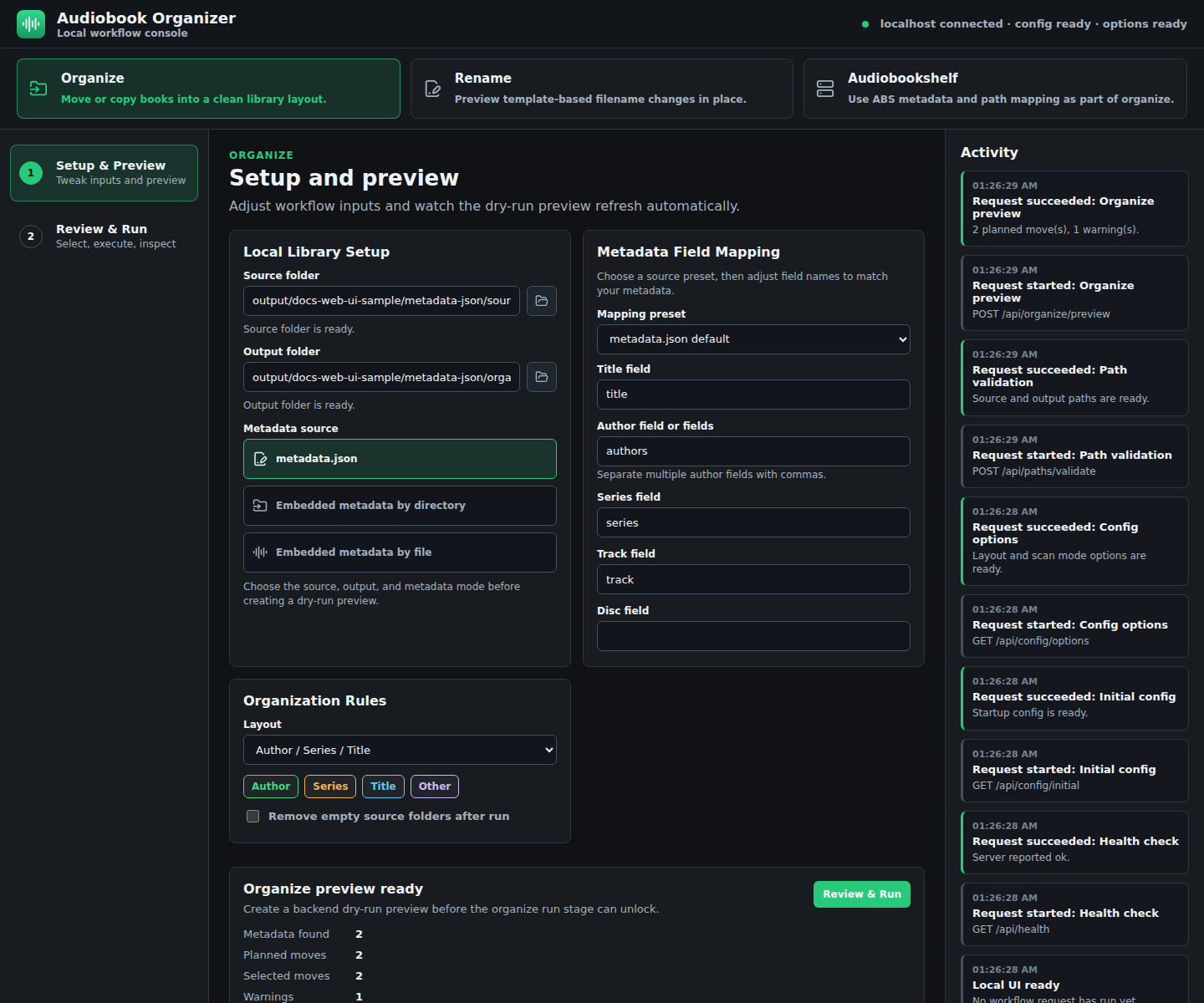

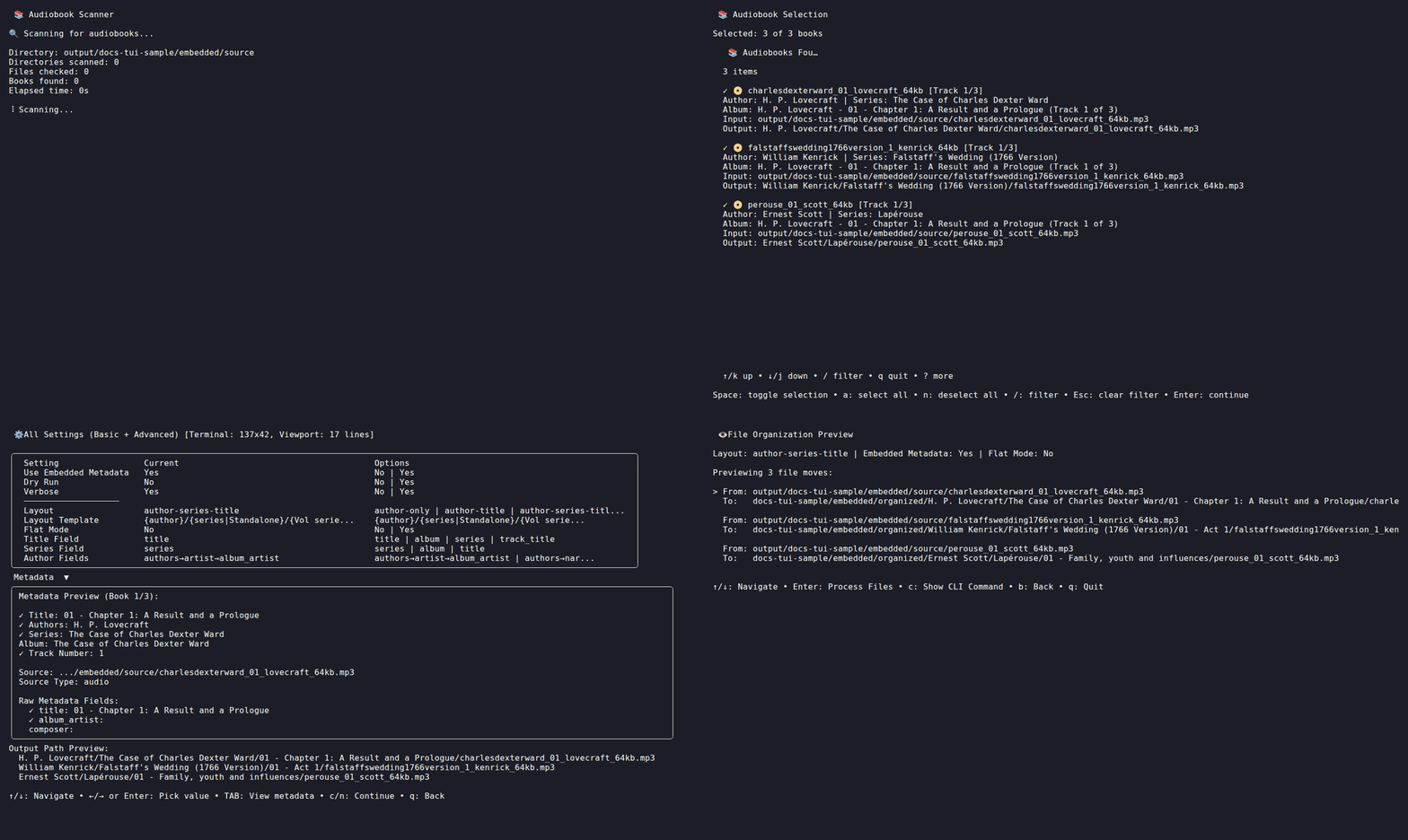
Use it when you want to:
- preview filesystem changes before moving or renaming audiobook files;
- organize messy folders into predictable layouts such as
Author/Series/Title; - rename files from metadata templates;
- inspect and map metadata from
metadata.json, embedded tags, and Audiobookshelf; - trigger Audiobookshelf scans after filesystem changes;
- undo organization and rename operations from generated logs.
If Audiobookshelf is your metadata source, configure ABS to store metadata beside each book before organizing. In the Audiobookshelf library settings, enable Store metadata with item. When ABS metadata is generated or updated, Audiobookshelf writes a metadata.json file into each book directory.

That metadata.json file is the safest first metadata source for local organization because it keeps the book-level title, author, series, narrator, and year data next to the audio files:
/audiobooks/The Case of Charles Dexter Ward/
  metadata.json
  01 - Chapter 1.mp3
  02 - Chapter 2.mp3
Preview the organizer against those metadata.json files before moving files:
audiobook-organizer \
  --dir=/audiobooks \
  --out=/organized-audiobooks \
  --dry-run \
  --verbose
When metadata.json exists beside MP3 or M4B files, Audiobook Organizer can use hybrid metadata: book-level fields come from metadata.json, while track-level fields can come from embedded audio tags. If your library does not have metadata.json files, use embedded metadata mode instead:
audiobook-organizer \
  --dir=/audiobooks \
  --out=/organized-audiobooks \
  --use-embedded-metadata \
  --dry-run
Audiobook Organizer moves files on disk; it does not rewrite Audiobookshelf database rows directly. After a real organization run, Audiobookshelf may briefly show old paths as missing until the library scans and reconciles the moved files. If that happens, open the ABS Issues view:

Then use the missing-books cleanup action:

The Enable folder watcher for library setting may help ABS detect some moved files, but a deliberate scan after filesystem changes is still the safer habit. See Audiobookshelf for the full setup, cleanup, path mapping checks, and scan workflow.
Homebrew:
brew tap jeeftor/tap
brew install audiobook-organizer
Go:
go install github.com/jeeftor/audiobook-organizer@latestDocker:
docker pull jeffsui/audiobook-organizer:latestTo run the local web UI in Docker, bind the server to all container interfaces, publish the container port, and keep the session-token URL private:
docker run --rm -p 8080:8080 \
  -v /path/to/audiobooks:/books \
  -v /path/to/output:/output \
  jeffsui/audiobook-organizer:latest \
  web --host=0.0.0.0 --port=8080 --no-open
Open the tokenized URL printed in the container logs at
http://localhost:8080/. When using Traefik or another reverse proxy, route
to container port 8080, not the host-side published port.
Release archives and Linux packages are available from GitHub Releases. See the installation guide for package details and platform notes.
Start with a dry run against a small source folder and a separate output directory:
audiobook-organizer \
  --dir=/path/to/books \
  --out=/path/to/organized \
  --dry-run \
  --verbose
Review the planned paths and warnings. Run for real only after the preview looks right:
audiobook-organizer \
  --dir=/path/to/books \
  --out=/path/to/organized
Organization writes .abook-org.log; rename writes .abook-rename.log. Keep those logs until you are satisfied with the result. See Getting Started and Safety And Undo.
| Interface | Command | Best For |
|---|---|---|
| Local web UI | audiobook-organizer web |
Browser setup, metadata field mapping, visual previews, rename review, Audiobookshelf connection checks |
| Organize | audiobook-organizer --dir=/books |
Main workflow for repeatable scripts and batch organization |
| Organization TUI | audiobook-organizer tui |
Keyboard-first interactive organization |
| Rename Files | audiobook-organizer rename --dir=/books |
Scriptable filename cleanup |
| Rename TUI | audiobook-organizer rename-tui --dir=/books |
Interactive rename previews and field mapping |
| Explore Metadata | audiobook-organizer metadata --dir=/books |
Text, pretty, or JSON metadata inspection |
| Audiobookshelf CLI | audiobook-organizer abs ... |
ABS library discovery, path mapping, organization, and scan workflows |
Full comparison: Choose An Interface.
| Task | Use |
|---|---|
Organize books into Author/Series/Title |
audiobook-organizer --dir=/books --layout=author-series-title --dry-run |
| Rename files from title, author, series, track, or disc fields | audiobook-organizer rename --dir=/books --dry-run |
No metadata.json, but audio files have tags |
audiobook-organizer --dir=/books --use-embedded-metadata --dry-run |
| Flat folder of individual audiobooks | audiobook-organizer --dir=/books --flat --dry-run |
| MP3 tags use non-standard fields | map fields with --author-fields, --title-field, --series-field, --track-field, or --disc-field |
| Previous organization needs to be reverted | audiobook-organizer --dir=/books --undo |
See Organize, Explore Metadata, Metadata Sources, and Safety And Undo.
Start the local browser UI:
audiobook-organizer webPreview an organization run:
audiobook-organizer --dir=/books/source --out=/books/organized --dry-runRename files with a template:
audiobook-organizer rename \
  --dir=/books/source \
  --template="{author} - {series} {series_number} - {title}" \
  --dry-run
Inspect metadata:
audiobook-organizer metadata --dir=/books/source
audiobook-organizer metadata --dir=/books/source --pretty
Check Audiobookshelf path mapping:
audiobook-organizer abs scan \
  --abs-url=http://localhost:13378 \
  --abs-token="$ABS_TOKEN" \
  --abs-path-map="/audiobooks:/mnt/media/audiobooks" \
  --dir=/mnt/media/audiobooks \
--check-filesThe generated documentation site is the canonical long-form guide:
https://jeeftor.github.io/audiobook-organizer/
The README should stay a compact GitHub landing page: what the tool does, how to install it, how to run safely, and where Audiobookshelf users must start. The docs site owns the full workflow pages, troubleshooting, detailed reference material, and generated visual demos.
Repo docs:
- Installation
- Getting Started
- Choose An Interface
- Organize
- Rename Files
- Explore Metadata
- Local Web UI
- CLI
- TUI
- Audiobookshelf
- Metadata Sources
- Layouts
- Configuration
- Troubleshooting
- Changelog
Pull requests upload generated screenshots and GIFs as short-lived Actions artifacts for review. master publishes the same generated visuals to stable GitHub Pages paths under assets/generated/.
Regenerate locally:
make docs-publish-siteSee Docs Visuals.
Common checks:
make test
make web-build
make docs-verify
See AGENTS.md for repository workflow rules and maintainer guidance.