Bundling Guide
How to build your own bundle from scratch. Use this when:
- The model you want isn't in the prebuilt list
- You need to pin different dependency versions
- Your customer's policy forbids
docker pullfrom third-party registries
Output: a single self-contained .tar.gz. Bundle once, transfer, run forever offline.
  connected builder   ──►  python jina-on-prem.py bundle  ──►  docker build
  (network + Docker)         (reads catalog.json)            stage 1: HF download + patch
                                                              stage 2: pinned deps + server + OFFLINE=1
                                                                    │
                                                                    ▼
                                                    docker save | gzip ──► MODEL-cpu.tar.gz
                                                                    │
                                                                    │  SCP / USB / approved channel
                                                                    ▼
                                                          air-gapped host (Docker only)
                                                                    │
                                                                    ▼
                                                    docker load < tar.gz
                                                    docker run -p 8080:8080
| Requirement | Notes |
|---|---|
| Linux x86_64 | Ubuntu 22.04 tested. macOS works via Docker Desktop but slow |
| Docker 24+ with BuildKit | comes with modern Docker |
| Python 3.10+ | CLI is single-file, stdlib only |
| Disk: 30 GB+ | 200 GB if bundling multiple models |
| Network | bundle phase pulls weights from HuggingFace |
| For GPU bundles | no GPU needed at build time; Dockerfile uses pre-built PyTorch CUDA base |
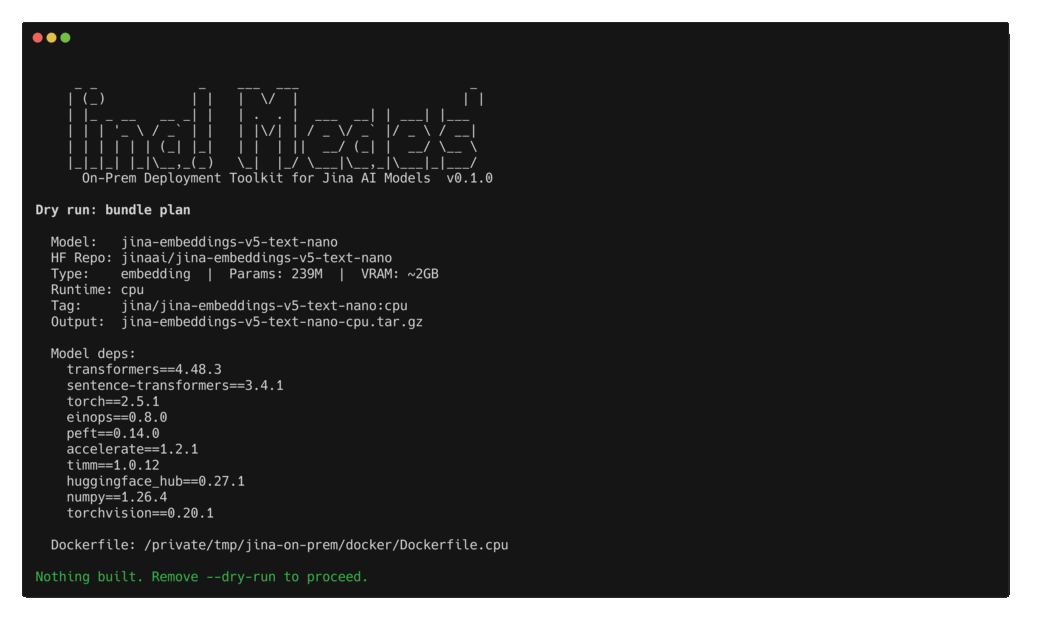
The repo ships scripts/bootstrap-gcp.sh, a one-shot provisioner. It creates a g2-standard-4 + L4 instance with Docker + NVIDIA Container Toolkit + the repo pre-cloned:
git clone https://github.com/jina-ai/jina-on-prem.git
cd jina-on-prem
./scripts/bootstrap-gcp.sh                                   # defaults
GPU_COUNT=0 MACHINE_TYPE=e2-standard-4 ./scripts/bootstrap-gcp.sh   # CPU-only builder
PROJECT=other-proj ZONE=us-east4-a ./scripts/bootstrap-gcp.sh        # different project/zone
L4 stockouts are common in popular US zones. If the script errors with "does not have enough resources", retry in
us-west1-a,us-east4-a,europe-west4-a, orasia-southeast1-a. See Troubleshooting -> L4 stockout.
After provisioning, the script prints the SSH command. From inside:
cd ~/jina-on-prem
sg docker -c 'python3 jina-on-prem.py bundle --model jina-embeddings-v5-text-nano --cpu-only --yes'
sg docker -c '...' is only needed in the same session that installed Docker. After SSH reconnect, plain docker works.
Any Linux box with Docker. Skip the GCP step:
git clone https://github.com/jina-ai/jina-on-prem.git
cd jina-on-prem
python3 jina-on-prem.py bundle --model jina-embeddings-v5-text-nano --cpu-only --yes
python3 jina-on-prem.py list                              # all models
python3 jina-on-prem.py list --type embedding --verbose   # filter + extras
python3 jina-on-prem.py list --json                       # machine-readable

python3 jina-on-prem.py bundle                            # interactive picker
python3 jina-on-prem.py bundle --model MODEL              # GPU runtime
python3 jina-on-prem.py bundle --model MODEL --cpu-only   # CPU image
python3 jina-on-prem.py bundle --model MODEL --yes        # non-interactive (CI)

python3 jina-on-prem.py deploy --image PATH.tar.gz        # load + run (testing)
python3 jina-on-prem.py serve --model MODEL               # no Docker, requires deps installed
Backward-compatible aliases: pack -> bundle, load -> deploy.
A successful bundle produces:
jina-embeddings-v5-text-nano-cpu.tar.gz       # for --cpu-only
jina-embeddings-v5-text-small-gpu.tar.gz      # for GPU runtime
Sizes: 2-4 GB for nano/small text models, up to ~8 GB for v5-text-small GPU, up to ~12 GB for omni/v4.
| CPU image | GPU image | |
|---|---|---|
| Base image | python:3.11-slim |
pytorch/pytorch:2.5.1-cuda12.1-cudnn9-devel |
| Image size | smaller (~2-4 GB) | larger (~8-12 GB) |
| Runs on host with GPU | yes (ignores GPU) | yes |
| Runs on host without GPU | yes | no (CUDA missing) |
| Inference speed | ~10x slower | full speed |
| Build wall-clock | ~3-15 min | ~10-30 min |
If unsure, build both. The runtime host decides which to load.
Measured on g2-standard-4 (4 vCPU + 1xL4) in asia-southeast1-a (May 2026):
| Model | Runtime | Build time | Output size |
|---|---|---|---|
| jina-embeddings-v5-text-nano | cpu | 3.5 min | 766 MB |
| jina-embeddings-v5-text-small | gpu | 14 min | 4.4 GB |
GPU bundle wall-clock is dominated by the pytorch CUDA base image pull (~6 GB).
Each bundle accumulates: built image + tarball + BuildKit cache. Reclaim between bundles:
docker builder prune -af      # reclaim BuildKit cache (always safe)
docker system prune -f        # remove dangling layers
rm jina-OLDMODEL-*.tar.gz     # remove tars you've already transferred
df -h /                       # confirm
The CONTRIBUTING.md batch-build pattern iterates this for all 6 priority models on a single host.
The .tar.gz is one self-contained file. Move it however your policy allows:
| Channel | Notes |
|---|---|
| SCP | fastest if both ends are on a routable network |
| SFTP / FTPS | if SCP is blocked |
| Object storage (S3, GCS) | if the air-gapped side can reach it |
| USB / removable disk | true air-gap, sneakernet |
| Optical media (DVD, BD-R) | maximum-security customer DC |
| Whatever Change Management approves | most regulated customers have a fixed channel |
On the target host:
docker load < jina-MODEL-cpu.tar.gz
docker run -d -p 8080:8080 jina/MODEL:cpu
curl http://localhost:8080/health
That's the entire air-gapped deploy. The image has HF_HUB_OFFLINE=1 and TRANSFORMERS_OFFLINE=1 baked in - any code path that would call out to HuggingFace fails immediately rather than silently downloading.
- Each model's
transformersversion is pinned. See Troubleshooting -> Transformers version pins. - Reranker models load as
CrossEncoder, notSentenceTransformer. Handled in the server, relevant only if youservedirectly. - v5-omni models need ~30 GB free disk during build (large base + flash-attn compile).
- The bundle deletes each model repo's
requirements.txtto prevent runtime auto-upgrade. This is intentional.
Full debug history: CONTRIBUTING.md "Known Caveats".
- Quick Start - test the bundle you just built
- API Reference - what the server exposes
- Troubleshooting - build and deploy errors