FOrcaSlicer 2.3.2-fos.8.6.0

Collapse English notes
FOrcaSlicer 2.3.2-fos.8.6.0
The 8.6 release. It supersedes 8.5.7-beta.1 and beta.2 and includes everything from both, so
these notes cover the whole line since 8.5.6.
The theme of this release is mixed nozzle printing that is honest about itself. FOrcaSlicer
can now map any filament to any nozzle, slice each one for the nozzle it will actually print
through, and refuse to slice when the combination cannot physically work. Alongside that comes
support for multi-material supply systems, starting with multiACE, and a large performance fix
that affects everyone.
Upgrading from 8.5.7-beta.2? Read Upgrade notes near the bottom first — one stored
setting carries over in a form that fails silently.
New: filament to nozzle mapping
Until now a filament printed on the nozzle with its own number: filament 3 went to nozzle 3, and
nothing else was possible. On a printer with different nozzle sizes fitted, that made most of the
machine unusable.
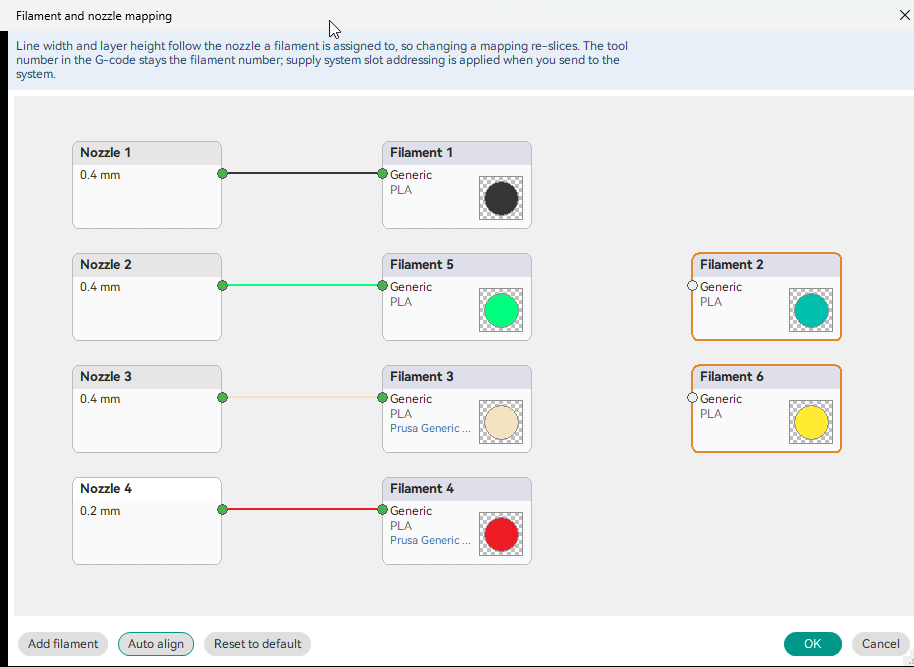
How the map works
The new filament to nozzle map breaks that assumption. Open it from the nozzle panel and wire
each filament to the nozzle you want it on, by dragging between pins:
- Any filament can go to any nozzle. More filaments than nozzles is fine.
- Each filament is sliced for its nozzle — line widths, speeds and flow all follow the nozzle
it is mapped to, not its index. - The filament dropdowns filter to presets that match the nozzle a filament is assigned to, so a
0.2 mm slot only offers filaments profiled for 0.2 mm. - Unassigned filaments are shown as unattached, and slicing stops until they are wired up (see
Safety guards below). - On a fresh start the map is the obvious one — filament 1 to nozzle 1, and so on for as many
nozzles as the printer has. Filaments past that are left unassigned for you to place.
The map is stored in the project, not in the printer profile, so it travels with the 3mf.
New: per-nozzle process presets for any nozzle count
(from 8.5.7-beta.1)
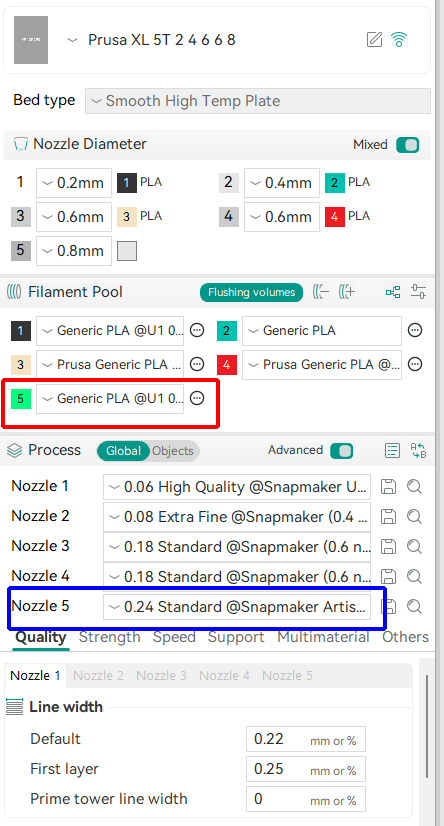
What changed
The per-nozzle process preset rows, and the per-nozzle tabs inside Quality > Line width and
Speed, were built for exactly four slots. A printer with more than four nozzles got four rows,
and slots five and up silently fell back to Nozzle 1's values when slicing.
The whole set now follows the printer's declared nozzle count, with no upper bound. Each slot has
its own preset dropdown filtered to that slot's nozzle diameter, and each resolves its own line
widths and speeds into the slice. Verified in software on 5- and 8-toolhead machines.
Also fixed from that beta: the per-nozzle tab strips no longer need a page switch to appear after
adding a printer or changing to one with a different nozzle count.
New: multi-material supply support, starting with multiACE
FOrcaSlicer can now be told that a multi-material supply system feeds the printer, and can talk to
it. Everything lives under Printer settings > Machine > Accessory:
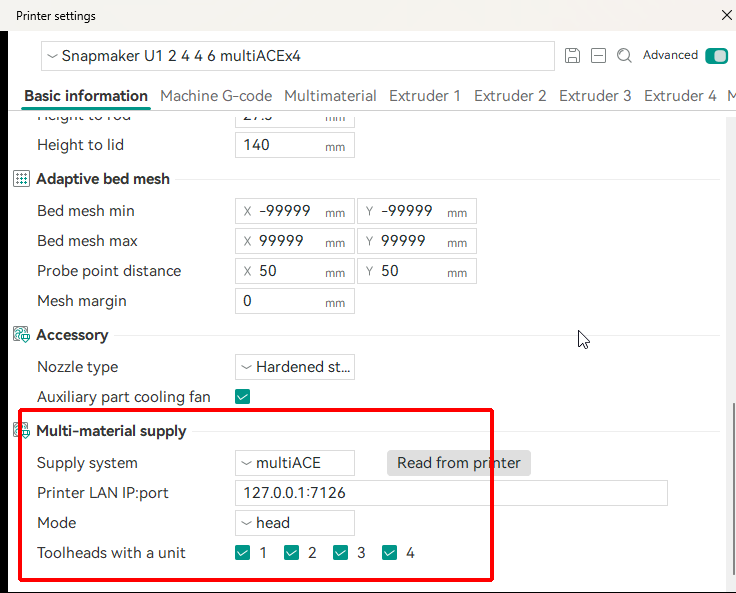
Settings, sending, and pin labels
- Supply system — currently multiACE. Sidecar is listed but not implemented.
- Printer LAN IP:port, used by the two features below.
- Mode —
normal,multiorhead, using multiACE's own vocabulary so the same word means
the same thing in both applications. Mode decides how many filaments can be loaded per nozzle,
which is a slicing input, so it has to be set before slicing rather than at send time. - Supply units / Toolheads with a unit, depending on the mode.
- Read from printer — asks the machine for its current mode, unit count, unit-driven toolheads
and fitted nozzles, shows you the full picture, and fills the fields in only after you confirm.
It never overwrites nozzle diameters; if the machine disagrees with the profile it says so and
leaves the decision to you.
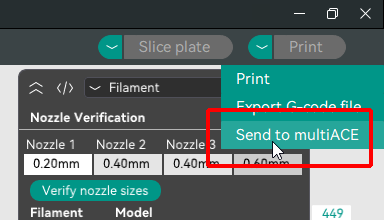
Send to multiACE appears under the print dropdown when a supply system is selected, and uploads
the sliced file straight to the machine's inbox.
Exported G-code now always carries the machine's physical nozzle diameters in the header
(fos_physical_nozzle_diameter), so the supply system can match what the file demands against what
the machine actually has fitted.
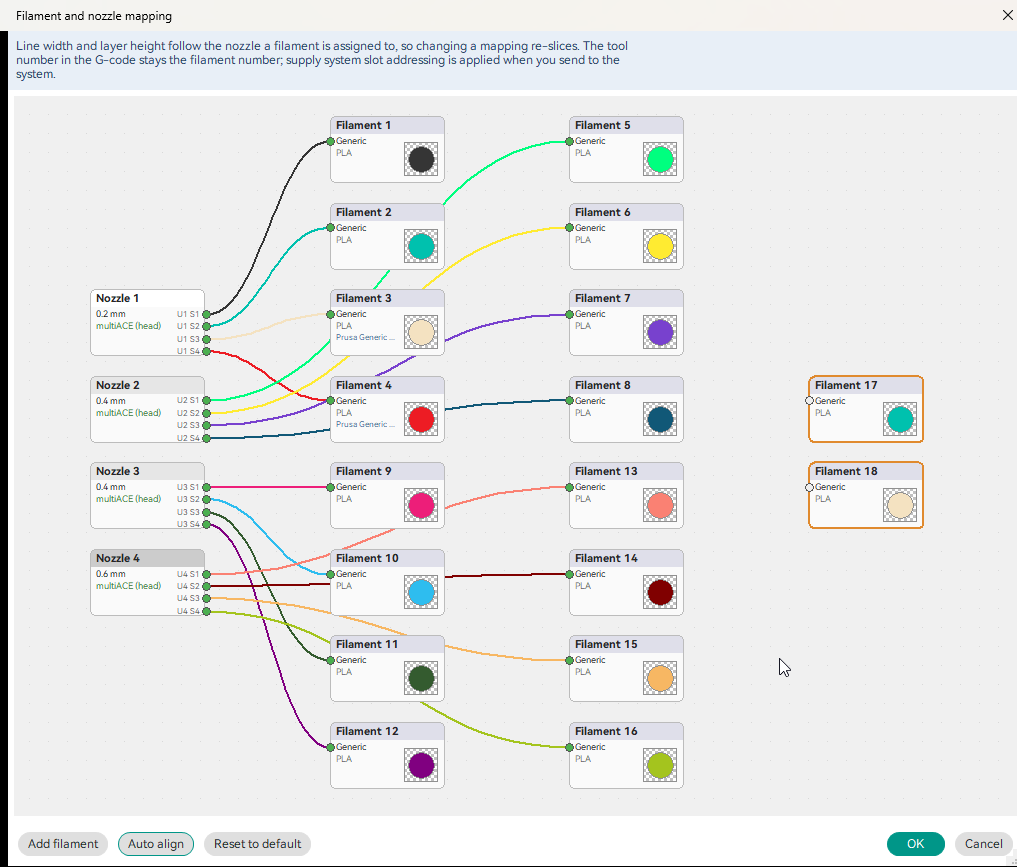
In the map window, each nozzle's pins are labelled Un Sn — unit and slot — because a pin
means a different thing in each mode: in multi a pin is a unit, in head it is a slot. A stored
assignment that no longer fits the current wiring is kept and drawn in red as N/A rather than
being silently discarded.
New: translucent filaments
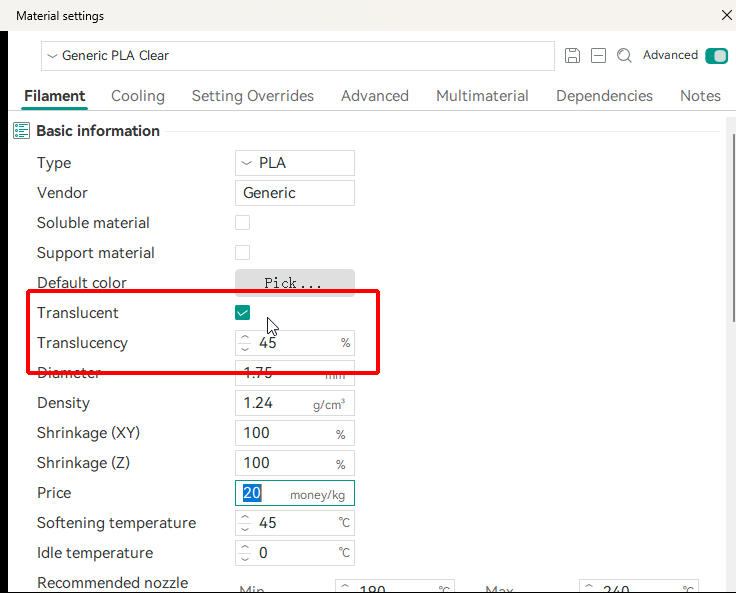
Filaments can be marked Translucent in filament settings, with a Translucency percentage
from 1 to 99. Both appear on the Filament page; the percentage is greyed out until the filament is
marked translucent.
Where the translucent mark is used
The mark is used in two places:
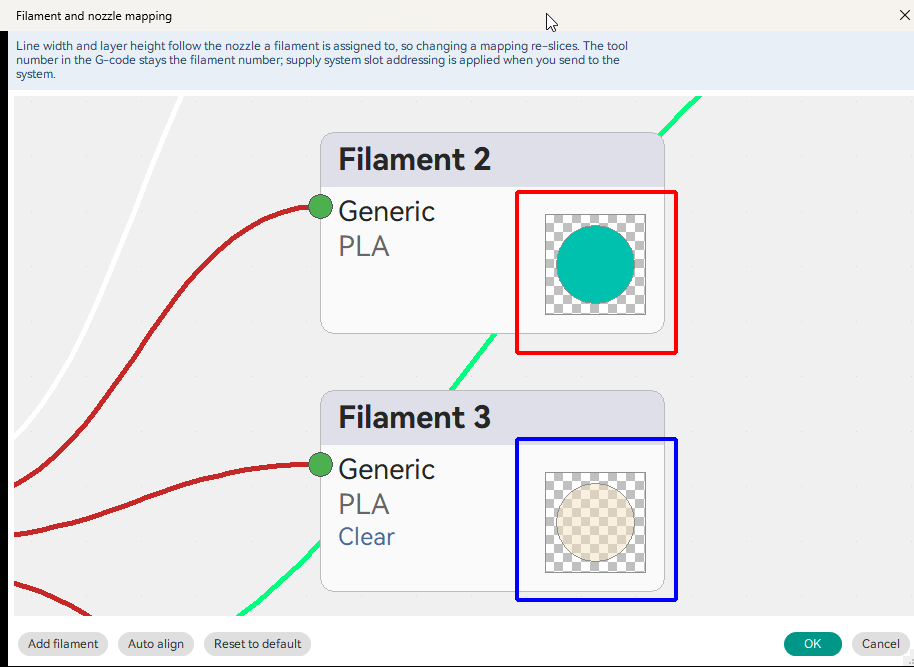
- The filament to nozzle map draws translucent filaments' colour swatches over a checker
background, so a clear PLA reads differently from an opaque one of the same colour.
- The sliced preview can draw them see-through, at each filament's own percentage. A
Solid | Translucent switch next to the slice buttons turns this on; it defaults to Solid at
every launch and only appears when a translucent filament is actually in use.
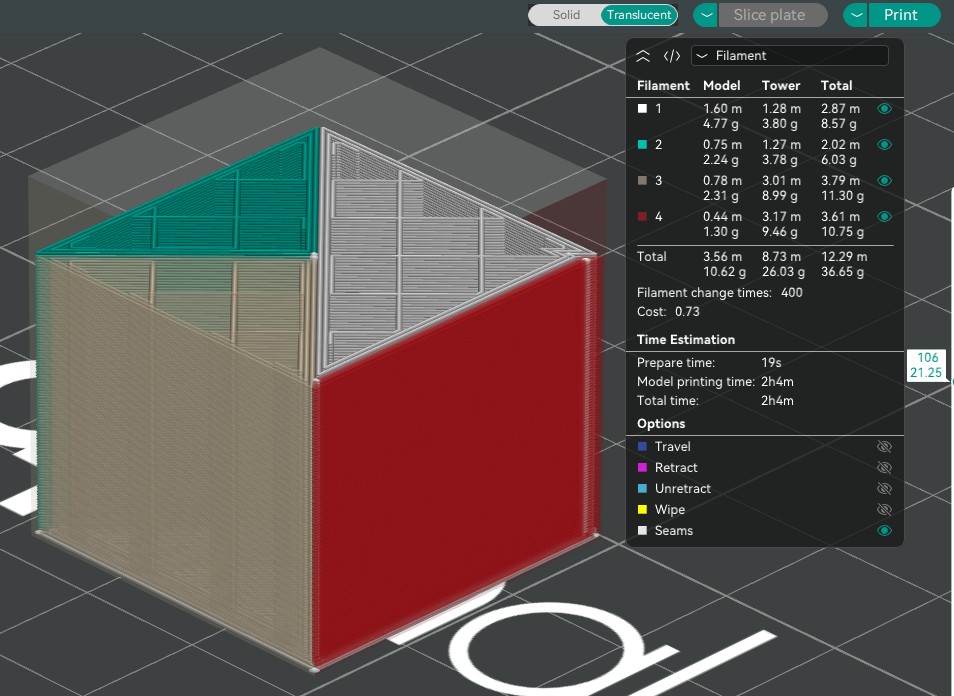
This is a visual aid only — it has no effect on slicing or on the G-code.
New: hex colour entry in the filament colour picker
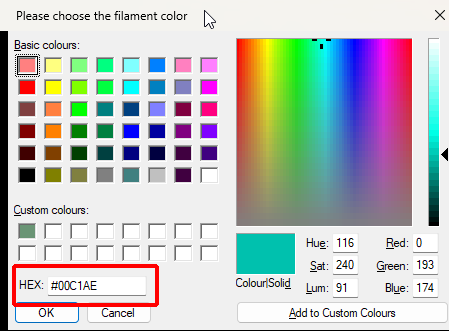
The filament colour dialog now has a HEX field. Type or paste a colour as #RRGGBB or
RRGGBB and the picker, the swatch and the HSL/RGB boxes follow as you type; pick a colour
anywhere in the dialog and the field shows its hex value, ready to copy. The field sits where the
Define Custom Colours >> button used to be — that button was permanently disabled here, because
FOrcaSlicer always opens the dialog fully expanded.
About the dialog
This is the standard Windows colour dialog with the field added inside it, so basic and custom
colours, and everything else in it, work exactly as before. On macOS the native colour picker
already has a hex field.
New: update notification
(from 8.5.7-beta.2)
How the check behaves
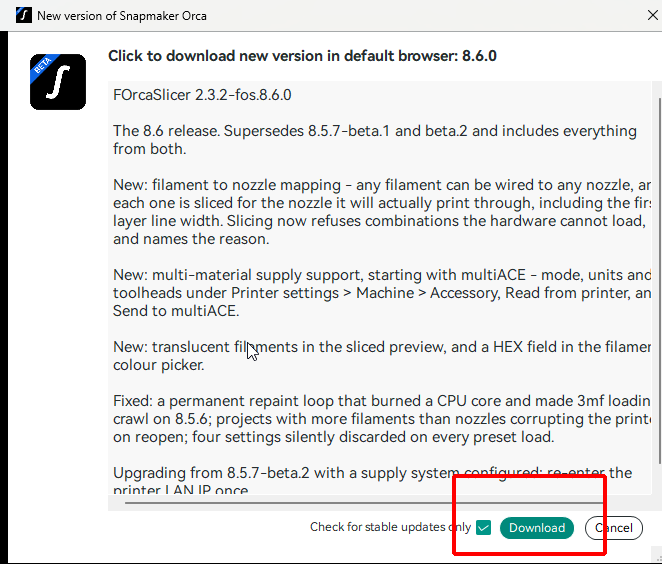
FOrcaSlicer checks for new releases at startup and on demand instead of you having to watch the
repository. A beta channel checkbox controls whether pre-releases are offered, Skip this
version suppresses one version without turning checking off, and the download button opens the
release page in your browser — FOrcaSlicer never downloads or installs anything itself. The check
uses GitHub and falls back to a self-hosted server for networks where GitHub is blocked.
Mixed nozzle printing: correctness and safety guards
The three guards
This is the part of the release most likely to change what happens when you press Slice. Three
situations that used to produce quietly wrong G-code now either slice correctly or stop with an
explanation.
First layer line width now follows the nozzle. It was a single value applied to every nozzle,
so on a machine with 0.2 and 0.8 mm heads fitted, layer 1 extruded the same width through both —
correct for one of them and badly wrong for the other. Each process preset's own first layer line
width is now used for the nozzle it belongs to, including for brim, skirt and support. This
affected even the simplest identity mapping, so it is worth re-slicing anything you printed on a
mixed machine.
Slicing stops when a used filament has no nozzle. Previously such a filament silently inherited
nozzle 1's diameter and offsets. The message names every unassigned filament and how it is being
used — painted on the model, a Filament for Features setting, an object or part filament, a height
range, support, the prime tower, or a filament change in custom G-code.
Slicing stops when the map and the hardware cannot agree. What is checked depends on the setup:
| Setup | What is required |
|---|---|
| No supply system | A filament must be mapped to the nozzle that will actually print it, or to one of the same diameter. |
| Supply system, wiring not declared | The diameter a filament was sliced for must exist on some nozzle. |
| Supply system, wiring declared | Additionally, no more filaments may demand a diameter than the wiring can physically load at once. |
The last case is the useful one: with four filaments sliced for a single 0.2 mm nozzle but only two
supply units connected, the print is refused before it wastes your time, with the counts spelled
out.
Support and prime tower filaments must also be chosen explicitly on a mixed machine, rather than
defaulting to whatever happens to be loaded.
Performance and stability
What was fixed
A permanent repaint loop is gone. Two tab strips added in the 8.5 line were built on a control
that, in this context, re-invalidated itself from inside its own paint handler. The result was
300-400 repaints per second, sustained indefinitely, burning a full CPU core from the moment the
print settings pages were built until the application was closed. It made project loading slow and
got worse the longer the app stayed open. Idle CPU is now zero.
If you have seen FOrcaSlicer hang or crawl when opening 3mf files on 8.5.6, this is very likely the
cause — that version contains the same control.
The same change fixes those tab strips in dark mode, where they previously rendered with the
system theme instead of the application's.
Project import no longer fights the UI. The import progress callback fired far more often than
the displayed percentage changed, and each update yielded to the event loop. It now updates at most
ten times a second.
Updated: Snapmaker profile bundle 02.02.55.02
(from 8.5.7-beta.2)
What changed in the bundle
Brought up to date from 02.02.47.00. Many filaments gained per-nozzle variants for 0.2, 0.6 and 0.8
alongside 0.4 — Generic and Snapmaker ABS and ASA, Generic PC, Support For PLA, PVA, PLA Silk, PLA
Wood, PLA-CF, TPU 90A and TPU 95A HF — plus new filaments including PETG Translucent, PLA
Translucent, PLA Glow, PLA Marble and PLA Full Spectrum. A rename map carries over U1 filament
presets that upstream renamed, and 20 stray duplicate profile files were removed from the bundle.
Bug fixes
The list
- Saving a project with more filaments than nozzles corrupted the printer on reopen. A project
with 20 filaments on a 4-nozzle machine came back as a 20-nozzle printer, and the supply system
settings were lost. The project now records the printer as configured. - Four settings were silently discarded on every preset load (beta.2) — Color patch enabled,
Color patch loops, Outer wall seam position, Inner wall max layer height. This also produced
hundreds ofcontains incorrect keyserrors in the log at every launch, on the bundled profiles
as well as your own. The log is now clean. - The filament to nozzle map was empty on a fresh start, showing only filament 1 on nozzle 1,
because it was built before the printer profile had been selected. - Filament preset filtering assumed filament number equals nozzle number, so on a machine with
more filaments than nozzles the list offered by the UI and the diameter used by the slicer could
disagree for one filament. - The nozzle panel rebuilt itself repeatedly during preset changes, causing visible flicker.
- Various map window fixes: theme changes now refresh it, and the printer LAN IP field is wide
enough for a full address and port.
Upgrade notes
Read this before upgrading
Coming from 8.5.7-beta.2 with a supply system configured: re-enter the printer LAN IP once.
The address was stored per-extruder in beta.2 and carries over as a single joined string
(127.0.0.1:7126,127.0.0.1:7126,...). It looks plausible in the field but fails at send with a
curl: URL using bad/illegal format error. Retyping it once clears the stored value. The supply
system dropdown resets to None on upgrade, which is expected — just re-select it.
Projects saved before this release carry a printer with one nozzle per filament. Re-save them
once from this version; the filament to nozzle map inside them is read correctly either way.
Projects saved before the four repaired settings were fixed load those four at their defaults
until the project is saved once from this version.
Duplicate profiles are not removed from an existing installation. FOrcaSlicer copies bundled
profiles into your settings folder but never deletes ones that disappear from a later version. If
you upgraded rather than installed fresh, delete every file ending in copy.json or _old.json
from %APPDATA%\FOrcaSlicer\system\Snapmaker\process\. Nothing else in that folder should be
touched.
Known limitations
The list
-
The translucency preview is a visual aid, not a render of how the print will look. Overlapping
translucent paths in particular are approximate. -
Filament arrangement is not optimised for you. FOrcaSlicer will tell you when a map cannot
work, but choosing which filament belongs on which nozzle for the fewest filament changes is
still yours to make. Automatic arrangement is planned for a later release. -
Only the U1 has been exercised on hardware. Machines with 5 and 8 toolheads are verified in
software only — preset assignment, per-nozzle behaviour and the resolved widths and speeds in the
G-code. -
macOS builds are unsigned and unnotarized. The project has no Apple Developer certificate, so
macOS refuses the first launch with "FOrcaSlicer can't be opened because Apple cannot check it for
malicious software." That is expected and does not mean the download is damaged. After moving the
app to Applications, clear the quarantine flag once:xattr -dr com.apple.quarantine "/Applications/FOrcaSlicer.app"Or attempt to open it, then go to System Settings > Privacy & Security and click "Open Anyway".
On macOS 15 and later that is the only route through the interface.
Verifying your download
Checksums
Windows:
certutil -hashfile FOrcaSlicer_Windows_Installer_V2.3.2-fos.8.6.0.exe SHA256
macOS:
shasum -a 256 FOrcaSlicer-2.3.2-fos.8.6.0-macos-universal.dmg
Windows Installer  SHA-256  7ab3f269d01e283d88648f75ee9ddd285be4ff2a62f8b3349f46d72bdcadfe5c
Windows Portable   SHA-256  24e3bcc6e3c7ae77cf01fb34d4e6ae4c745a2aab79186cf915b0a742890e4a5a
macOS dmg          SHA-256  31409068e578001fa531dfbdd321dd2e216d9bcbe9f7c9a69a09981df0ea8f5f
Reporting problems
What to include
Please open an issue on the FOrcaSlicer repository. The most useful reports right now involve mixed
nozzle setups: state which nozzles are fitted, how each filament is mapped, whether a supply system
is configured and in which mode, and attach the project file. If slicing was refused, include the
exact message — it is written to name the specific filaments and the reason.
展开中文说明 / Expand Chinese notes
FOrcaSlicer 2.3.2-fos.8.6.0(中文)
8.6 正式版。取代 8.5.7-beta.1 与 beta.2,并包含两者的全部内容,因此本说明涵盖自 8.5.6 以来的整条更新线。
本次发布的主题是 让混合喷嘴打印如实反映自身。FOrcaSlicer 现在可以把任意耗材映射到任意喷嘴,
按每种耗材实际使用的喷嘴进行切片,并在组合在物理上无法成立时拒绝切片。与之配套的是多材料供料系统
支持(首先支持 multiACE),以及一项影响所有用户的重要性能修复。
从 8.5.7-beta.2 升级? 请先阅读下方的 升级说明 —— 有一项已保存的设置会以静默失效的形式沿用过来。
新增:耗材到喷嘴的映射
此前耗材只能使用与其编号相同的喷嘴:3 号耗材走 3 号喷嘴,没有别的可能。在装有不同口径喷嘴的打印机上,
这让机器的大部分能力都无法使用。
映射如何工作
新的 耗材到喷嘴映射 打破了这一假设。从喷嘴面板打开它,在接点之间拖动,把每种耗材接到你想要的喷嘴上:
- 任意耗材可接到任意喷嘴。耗材数多于喷嘴数也没有问题。
- 每种耗材都按 它自己的 喷嘴切片 —— 线宽、速度和流量都跟随它所映射到的喷嘴,而不是它的编号。
- 耗材下拉列表只显示与该耗材所分配喷嘴相匹配的预设,因此 0.2 mm 的槽位只提供按 0.2 mm 配置的耗材。
- 未分配的耗材会显示为未连接状态,在接好之前切片会停止(见下方的 安全防护)。
- 全新启动时使用最直观的映射 —— 1 号耗材接 1 号喷嘴,依此类推,直到用完打印机的喷嘴数。
超出部分的耗材会刻意保持未分配,交由你来放置。
映射保存在 项目 中,而不是打印机配置中,因此它随 3mf 一同传递。
新增:任意喷嘴数量的分喷嘴工艺预设
(来自 8.5.7-beta.1)
变更内容
分喷嘴工艺预设行,以及 质量 > 线宽 和 速度 中的分喷嘴选项卡,原本只为四个槽位设计。
喷嘴多于四个的打印机只会得到四行,第五个及以后的槽位在切片时会静默回退到 1 号喷嘴的数值。
现在整套界面都跟随打印机声明的喷嘴数量,没有上限。每个槽位都有自己的预设下拉列表,按该槽位的
喷嘴口径过滤,并各自把线宽和速度解析进切片。已在 5 工具头和 8 工具头机型上完成软件验证。
同样来自该 beta 的修复:添加打印机或切换到喷嘴数量不同的打印机后,分喷嘴选项卡不再需要切换页面才出现。
新增:多材料供料系统支持,首先支持 multiACE
现在可以告诉 FOrcaSlicer 有一套多材料供料系统在为打印机供料,并且可以与之通信。
相关设置都位于 打印机设置 > 机器 > 附件:
设置、发送与接点标签
- 供料系统 —— 目前为 multiACE。Sidecar 已列出但尚未实现。
- 打印机局域网 IP:端口,供下面两项功能使用。
- 模式 ——
normal、multi或head,沿用 multiACE 自身的术语,使同一个词在两个程序中含义一致。
模式决定每个喷嘴可装载多少种耗材,这是切片的输入,因此必须在切片前设定,而不是发送时。 - 供料单元数 / 配备单元的工具头,取决于所选模式。
- 从打印机读取 —— 向机器询问当前的模式、单元数量、由单元驱动的工具头以及已装配的喷嘴,
完整展示给你看,只有在你确认后才填入字段。它绝不会覆盖喷嘴口径;若机器与配置不一致,
会明确提示并把决定权留给你。
选择了供料系统后,打印下拉菜单中会出现 发送到 multiACE,可将切片文件直接上传到机器的收件目录。
导出的 G-code 现在始终在文件头中携带机器的物理喷嘴口径(fos_physical_nozzle_diameter),
供料系统据此可以把文件的需求与机器实际装配的喷嘴进行比对。
在映射窗口中,每个喷嘴的接点都标注为 Un Sn(单元与槽位),因为接点在不同模式下含义不同:
在 multi 模式下一个接点代表一个单元,在 head 模式下代表一个槽位。已保存但与当前接线不再匹配的
分配会被保留,并以红色 N/A 绘出,而不是被静默丢弃。
新增:半透明耗材
可以在耗材设置中将耗材标记为 半透明,并设置 1 到 99 的 半透明度 百分比。两者都在耗材页面上;
在勾选半透明之前,百分比处于灰显状态。
半透明标记的两处用途
该标记用于两处:
- 耗材到喷嘴映射 会把半透明耗材的色块绘制在棋盘格背景上,因此透明 PLA 与同色的不透明耗材看起来不同。
- 切片预览 可以按每种耗材各自的百分比把它们绘制成透视效果。切片按钮旁的
实心 | 半透明 开关用于启用;每次启动都默认为实心,并且只有在确实使用了半透明耗材时才出现。
这仅是视觉辅助 —— 不影响切片,也不影响 G-code。
新增:耗材颜色选择窗口中的十六进制输入
耗材颜色对话框现在有一个 HEX 字段。以 #RRGGBB 或 RRGGBB 输入或粘贴颜色,
拾色器、色块以及 HSL/RGB 数值会随输入同步更新;在对话框中任意位置选取颜色,该字段都会显示其
十六进制值,可直接复制。该字段位于原先 规定自定义颜色 >> 按钮的位置 —— 该按钮在这里始终处于
禁用状态,因为 FOrcaSlicer 总是以完全展开的方式打开这个对话框。
关于该对话框
这是 Windows 标准颜色对话框,只是在其内部加入了该字段,因此基本颜色、自定义颜色以及其中的其他一切
与以往完全相同。在 macOS 上,系统原生拾色器本身已带有十六进制字段。
新增:更新提醒
(来自 8.5.7-beta.2)
检查行为
FOrcaSlicer 现在会在启动时以及手动触发时检查新版本,无需你自己盯着仓库。beta 通道 复选框
控制是否提供预发布版本,跳过此版本 可在不关闭检查的前提下屏蔽某一个版本,下载按钮会在浏览器中
打开发布页面 —— FOrcaSlicer 自身绝不下载或安装任何内容。检查使用 GitHub,并在 GitHub 无法访问的
网络环境下回退到自建服务器。
混合喷嘴打印:正确性与安全防护
三重防护
这是本次发布中最可能改变你按下"切片"后结果的部分。三种过去会静默产生错误 G-code 的情形,
现在要么正确切片,要么带说明地停下。
首层线宽现在跟随喷嘴。 它过去是一个应用于所有喷嘴的单一数值,因此在同时装有 0.2 与 0.8 mm
喷头的机器上,第 1 层通过两者挤出的宽度相同 —— 对其中一个正确,对另一个则严重错误。现在每个工艺预设
自身的首层线宽都会用于它所属的喷嘴,边缘、裙边和支撑同样如此。这一问题即使在最简单的一一对应映射下
也会出现,因此在混合机器上打印过的模型值得重新切片。
当已使用的耗材没有喷嘴时,切片会停止。 此前这类耗材会静默继承 1 号喷嘴的口径和偏移。
提示信息会列出每一种未分配的耗材 以及它的使用方式 —— 在模型上绘制、"按特征指定耗材"设置、
物体或零件耗材、高度范围、支撑、擦料塔,或自定义 G-code 中的换料。
当映射与硬件无法一致时,切片会停止。 检查内容取决于配置:
| 配置 | 要求 |
|---|---|
| 无供料系统 | 耗材必须映射到实际打印它的喷嘴,或映射到口径相同的喷嘴。 |
| 有供料系统,未声明接线 | 耗材切片所用的口径必须在某个喷嘴上存在。 |
| 有供料系统,已声明接线 | 此外,要求某一口径的耗材数量不得超过接线一次能实际装载的数量。 |
最后一种情形最为实用:四种耗材都按单个 0.2 mm 喷嘴切片,但只连接了两个供料单元时,
打印会在浪费你的时间之前被拒绝,并给出具体数量。
在混合机器上,支撑和擦料塔耗材也必须明确选择,而不是默认使用碰巧已装载的那一种。
性能与稳定性
修复内容
持续重绘循环已消除。 8.5 更新线中加入的两处选项卡条使用了一个控件,该控件在此场景下会在自身的
绘制处理函数内部再次让自己失效。结果是每秒 300-400 次重绘,持续不断,从打印设置页面构建完成起
一直占满一个 CPU 核心,直到程序关闭。这让项目加载变慢,且程序开得越久越严重。现在空闲 CPU 占用为零。
如果你在 8.5.6 上遇到过打开 3mf 文件时 FOrcaSlicer 卡死或极慢,很可能就是这个原因 ——
该版本包含同一个控件。
同一处改动还修复了这些选项卡条在 深色模式 下的显示,此前它们使用系统主题而非程序主题渲染。
项目导入不再与界面争抢。 导入进度回调的触发频率远高于显示百分比的变化频率,且每次更新都会让出
事件循环。现在最多每秒更新十次。
更新:Snapmaker 配置包 02.02.55.02
(来自 8.5.7-beta.2)
配置包变更
从 02.02.47.00 更新而来。许多耗材在 0.4 之外新增了 0.2、0.6 和 0.8 的分喷嘴变体 ——
Generic 与 Snapmaker 的 ABS 和 ASA、Generic PC、Support For PLA、PVA、PLA Silk、PLA Wood、
PLA-CF、TPU 90A 和 TPU 95A HF —— 并新增了 PETG Translucent、PLA Translucent、PLA Glow、
PLA Marble 和 PLA Full Spectrum 等耗材。一份重命名映射表用于沿用上游改名的 U1 耗材预设,
并从配置包中移除了 20 个多余的重复配置文件。
问题修复
完整列表
- 保存耗材数多于喷嘴数的项目会在重新打开时损坏打印机配置。 一个在 4 喷嘴机器上使用 20 种耗材的
项目,重新打开后会变成 20 喷嘴打印机,供料系统设置也会丢失。现在项目会按实际配置记录打印机。 - 每次加载预设时都有四个设置被静默丢弃 (beta.2) —— 色块启用、色块圈数、外墙接缝位置、
内墙最大层高。这还会在每次启动时产生数百条contains incorrect keys日志错误,
自带配置和你自己的配置都会受影响。现在日志已经干净。 - 全新启动时耗材到喷嘴映射为空,只显示 1 号耗材接 1 号喷嘴,原因是它在打印机配置被选定之前就已构建。
- 耗材预设过滤此前假定耗材编号等于喷嘴编号,因此在耗材数多于喷嘴数的机器上,
界面提供的列表与切片器实际使用的口径可能对某一种耗材不一致。 - 喷嘴面板在预设变更期间反复重建,造成可见的闪烁。
- 映射窗口的多项修复:主题切换后会刷新,打印机局域网 IP 字段的宽度足以完整显示地址和端口。
升级说明
升级前请阅读
从 8.5.7-beta.2 升级且已配置供料系统:请重新输入一次打印机局域网 IP。
该地址在 beta.2 中按挤出机分别保存,升级后会以一个拼接后的字符串形式沿用
(127.0.0.1:7126,127.0.0.1:7126,...)。它在字段中看起来是合理的,但发送时会失败并报
curl: URL using bad/illegal format。重新输入一次即可清除旧值。供料系统下拉列表在升级后会重置为
"无",这是预期行为 —— 重新选择即可。
本次发布之前保存的项目 携带的打印机是每种耗材一个喷嘴。请用本版本重新保存一次;
其中的耗材到喷嘴映射无论如何都能被正确读取。
在上述四个设置修复之前保存的项目,这四项会以默认值加载,直到用本版本保存一次为止。
已有安装中的重复配置文件不会被自动移除。 FOrcaSlicer 会把自带配置复制到你的设置目录,
但从不删除后续版本中已消失的文件。如果你是升级而不是全新安装,请删除
%APPDATA%\FOrcaSlicer\system\Snapmaker\process\ 中所有以 copy.json 或 _old.json
结尾的文件。该目录中的其他内容请勿改动。
已知限制
完整列表
-
半透明预览只是视觉辅助,并非打印成品外观的渲染。尤其是重叠的半透明路径,只是近似效果。
-
耗材编排不会自动优化。 FOrcaSlicer 会在映射不可行时提示你,但为了尽量减少换料次数而决定
哪种耗材放在哪个喷嘴,仍然由你决定。自动编排计划在后续版本中提供。 -
只有 U1 经过硬件验证。 5 工具头和 8 工具头机型仅经过软件验证 —— 预设分配、分喷嘴行为,
以及 G-code 中解析出的线宽和速度。 -
macOS 版本未签名、未公证。 本项目没有 Apple 开发者证书,因此 macOS 会在首次启动时拒绝并提示
"FOrcaSlicer can't be opened because Apple cannot check it for malicious software."
这是预期行为,并不表示下载文件已损坏。把应用移动到"应用程序"后,清除一次隔离标记:xattr -dr com.apple.quarantine "/Applications/FOrcaSlicer.app"或者先尝试打开,再进入"系统设置 > 隐私与安全性"点击"仍要打开"。在 macOS 15 及以后,
这是界面上唯一可行的途径。
校验下载文件
校验和
Windows:
certutil -hashfile FOrcaSlicer_Windows_Installer_V2.3.2-fos.8.6.0.exe SHA256
macOS:
shasum -a 256 FOrcaSlicer-2.3.2-fos.8.6.0-macos-universal.dmg
Windows Installer  SHA-256  7ab3f269d01e283d88648f75ee9ddd285be4ff2a62f8b3349f46d72bdcadfe5c
Windows Portable   SHA-256  24e3bcc6e3c7ae77cf01fb34d4e6ae4c745a2aab79186cf915b0a742890e4a5a
macOS dmg          SHA-256  31409068e578001fa531dfbdd321dd2e216d9bcbe9f7c9a69a09981df0ea8f5f
反馈问题
请附上哪些信息
请在 FOrcaSlicer 仓库提交 issue。目前最有价值的反馈是关于混合喷嘴配置的:说明装配了哪些喷嘴、
每种耗材如何映射、是否配置了供料系统以及处于何种模式,并附上项目文件。如果切片被拒绝,
请附上完整的提示信息 —— 它会指明具体的耗材和原因。