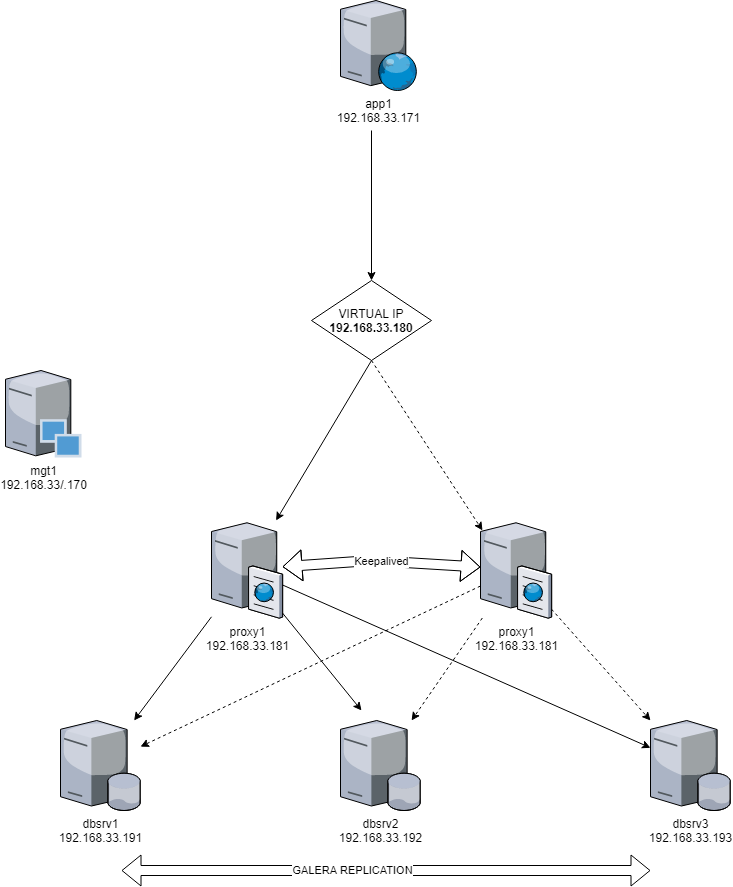
# sudo sh installSoft.sh
# source profile
# vsetupVMs vstart
.... Take a long time ....
# vlist
# vssh_copy mariadb1,mariadb2,mariadb3,mariadb4,haproxy1 ./scripts/utils.sh /etc/profile.d/utils.sh
# vssh_copy mariadb1,mariadb2,mariadb3,mariadb4,haproxy1 ./scripts/bin /opt/local root 755
# vssh_cmd mariadb1,mariadb2,mariadb3,mariadb4 "hostname -s" silent
# vssh_cmd haproxy1 "hostname -s"
# vssh_exec mariadb1,mariadb2,mariadb3,mariadb4 scripts/1_system/2_s silent
# vssh_cmd haproxy1 "hostname -s"
Helper Bash script for MySQL multi instance management on one server
This tools is a simple Bash script that help you to clone and manage several MySQL server instances on the same server. It supports 6 main features:
- clone
- destroy
- start
- stop
- restart
- status
- Use a standard Linux and Bash shell
- Download mysqlutilities
- A classic MySQL or MariaDb server
# git clone https://github.com/jmrenouard/easymysql
# curl https://github.com/jmrenouard/easymysql/archive/master.zip
# unzip master.zip
# source mysql_functions.sh
This parameters are set at the begin of mysql_functions.sh script.
ROOT_DIR=/var/lib
TYPE=mysql
GENERAL_OPTIONS="--log-bin=mysql-bin --pid-file=clone.pid --explicit_defaults_for_timestamp --plugin-dir=/usr/lib64/mysql/plugin"
MUSER=mysql
RPASSWORD=admin
MAIN_CFG_FILE=/etc/my.cnf
ETC_DIR=/etc/my.cnf.d/
Identifier is the only concept your really need to handle all instances.
For example, MySQL instance with id=x gets the following properties:
- Port: 3306+X
- Datadir: /var/lib/mysql + X
- Server id: X
- Socket: Datadir/mysqlX.sock
-
Clone a existing and running instance
mclone < ID DESTINATION > [ < ID SOURCE > ] -
Start one or several MySQL instance
mstart < ID1 > [ < ID2 > ] [ < ID3 > ] ... -
Stop one or several MySQL instance
mstart < ID1 > [ < ID2 > ] [ < ID3 > ] ... -
Restart one or several MySQL instance
mrestart < ID1 > [ < ID2 > ] [ < ID3 > ] ... -
Get status of one, several or all MySQL instances
mstatus [ < ID1 > ] [ < ID2 > ] ... -
Destroy one or several MySQL instance
mdestroy < ID1 > [ < ID2 > ] [ < ID3 > ] ...
# source mysql_functions.sh
# mclone 1
# source mysql_functions.sh
# mclone 2 1
# source mysql_functions.sh
# mdestroy 2
# source mysql_functions.sh
# mstatus
ID      DIRECTORY       PORT    STATUS  PID
PRI     /var/lib/mysql  3306    ON      2144
1       /var/lib/mysql1 3307    ON      3029
2       /var/lib/mysql2 3308    ON      3048
# source mysql_functions.sh
# mstop 2
# mstatus
ID      DIRECTORY       PORT    STATUS  PID
PRI     /var/lib/mysql  3306    ON      2144
1       /var/lib/mysql1 3307    ON      3029
2       /var/lib/mysql2 3308    OFF
# source mysql_functions.sh
# mstart 2
# mstatus
ID      DIRECTORY       PORT    STATUS  PID
PRI     /var/lib/mysql  3306    ON      2144
1       /var/lib/mysql1 3307    ON      3029
2       /var/lib/mysql2 3308    ON      3049
# source mysql_functions.sh
# mrestart 1 2
# mstatus
ID      DIRECTORY       PORT    STATUS  PID
PRI     /var/lib/mysql  3306    ON      2144
1       /var/lib/mysql1 3307    ON      3029
2       /var/lib/mysql2 3308    ON      3049
# source mysql_functions.sh
# for i in `seq 1 10`; do mclone $i; done
# mstatus
ID      DIRECTORY       PORT    STATUS  PID
PRI     /var/lib/mysql  3306    ON      2144
1       /var/lib/mysql1 3307    ON      3029
10      /var/lib/mysql10        3316    ON      4018
2       /var/lib/mysql2 3308    ON      3048
3       /var/lib/mysql3 3309    ON      3562
4       /var/lib/mysql4 3310    ON      3627
5       /var/lib/mysql5 3311    ON      3692
6       /var/lib/mysql6 3312    ON      3757
7       /var/lib/mysql7 3313    ON      3822
8       /var/lib/mysql8 3314    ON      3887
9       /var/lib/mysql9 3315    ON      3952
# source mysql_functions.sh
# mstart `seq 1 10`
# source mysql_functions.sh
# mdestroy `seq 1 10`
# source mysql_functions.sh
# mclient 7
mysql> ...
# source mysql_functions.sh
# mclient 4 select @@server_id
@@server_id
4
https://github.com/jmrenouard/easymysql/issues