Releases: jobshimo/ha-filament-ledger
Release list
Filament Ledger v2.5.0

A finished print is charged even when the printer never says it finished
Until now the ledger learned that a print had stopped in exactly one way: the
bambu_lab_event that ha-bambulab fires on the bus. That event is not delivered when the
printer's connection drops across its own ending — upstream fires it only on a transition it
observed, and a reconnection resets the state it compares against.
The failure is silent and it costs real filament. On the reference machine a seven-hour print
finished at 21:12:29 UTC on 2026-08-08; the sensor had gone unavailable at 21:08:13 and came
back already finished. No event was ever fired. The job stayed Running in the panel, and
248.41 g were never deducted. Nothing in the system would ever have closed it.
It is not a rare shape. That instance recorded 25 endings over the previous five days and
every one arrived correctly — the sensor dropped seven times in the same period and only this
one happened to land on an ending. Which is to say: it worked until the day it didn't, and
then it lost a whole spool's worth of accounting without a word.
This release gives the lifecycle a second, independent way to notice. The printer's status
sensor is now watched for finish and failed — never offline or pause, which describe
the connection and the machine rather than the job. It is read two ways:
- Live, as the sensor arrives at a terminal state, for a print that ends while Home
Assistant is up. - Once at startup, as a level, for the machine that stopped while nothing was listening —
a restart, a reload, or the dropout that swallowed the event.
What you will notice
- A print that finishes while the printer is dropping its connection is now charged normally,
instead of sitting in the panel as Running forever. - A job left open by a restart is closed the next time Home Assistant starts, and its
consumption recorded then. - Nothing changes for a healthy print. Both signals report it, and the ledger records it once.
What it will not do
An inferred ending can only ever close a job the ledger already believes is running. It
can never open one, and it never closes a job that a later print has already superseded. This
matters: an idle printer reports finish for as long as it sits there, and on the reference
machine it bounced finish → offline → finish five times in the ten minutes after a print
stopped. Anything that took that at face value would invent a print, and charge the previous
one's plan again, on every restart and every dropout.
A cancelled print reached through this path is recorded as failed rather than cancelled.
The status sensor does not distinguish them — upstream tells them apart by an error code that
travels on the MQTT payload and not on the sensor — and both open a review for you to decide,
so the difference is a word on a card rather than a number in the ledger. An ending announced
on the bus is still classified exactly as before.
Upgrading
Nothing to do. No schema migration, no settings to check, no re-sync.
Restart Home Assistant after updating, as usual. On that first start the new pass looks at
every machine once: if the ledger is holding a job open for a printer that has already
stopped, it is closed and its consumption recorded. If you have such a job, that is when it
will be settled.
Filament Ledger v2.4.0
Prints are charged from what the printer actually published
This release fixes filament being charged wrongly — or not at all — when a print finished.
What was happening. The per-tray figure was read from the printer's weight sensor at the single instant a print started or ended. Two measured facts made that a coin toss: the sensor is republished in bursts that alternate between carrying the per-tray breakdown and carrying none of it, and the print-started event arrives before the sensor holds the new job's figures. On the reference machine that produced a 937-layer print charged 2.1 g (the previous job's figure) and a 220-layer two-colour print charged nothing at all.
What it does now. The integration follows that sensor for the whole print and keeps the last reading that actually carried the per-tray breakdown. A print starting discards whatever preceded it, so no job can inherit its predecessor's figures, and a print ending is charged with what was published during its own run. If nothing was published, the job goes to the review queue instead of being charged a number nobody measured.
Restarting Home Assistant or changing a setting mid-print no longer loses the figure: in that case the number is read from the sensor directly, because the process that was not there for the start can trust what the sensor holds now.
Also in this release
- The Inventory tab no longer shows an unlabelled count. It was derived state — nothing to act on and no way to dismiss it — and the same figure is named in the summary card underneath (Needs weighing).
- A malformed figure from the printer can no longer raise inside Home Assistant's event loop.
Worth knowing
The figure is the planned weight from the slice, not a measurement — no printer weighs its filament. A finished print deducts automatically; correct it from the panel whenever it does not match, exactly as before.
After upgrading
Restart Home Assistant. No migration runs. Prints recorded before this release keep whatever they were charged; check anything that looks wrong against the printer's own history.
Filament Ledger v2.3.0
Reels open at their own weight
Bambu writes each spool's nominal weight into its RFID tag. Until now a spool registered by detection always opened at the configured default (1 kg), which is right only for 1 kg reels. Now:
- Automatic registration opens the balance at the weight the tag reports — a 250 g or 750 g reel is born with its own figure.
- The sync dialog's registration form pre-fills the same number instead of the default, so registering by hand and letting detection do it no longer disagree about the same reel. It is a pre-fill, not a lock: type over it when the reel is not new.
- A tag that does not report a weight is treated as saying nothing, and the configured default is used. A missing figure is never read as zero.
Worth knowing
The tag carries the weight the reel held new — that is all an RFID can know. A half-used spool still opens overstated, exactly as it did with the default, and the confidence badge asks you to weigh it rather than inventing a correction. The printer's own remain percentage is not used for this: on the reference machine it reads 100 % on every tray, including visibly half-used ones (see docs/12 — Field Notes).
After upgrading
Restart Home Assistant. Nothing else: no migration runs, and spools already registered keep the opening weight they were given.
Filament Ledger v2.2.2
What changed since v2.0.0
New
- Spools register themselves. A Bambu reel with a readable tag, material and colour is registered the moment a tray reads it — with your configured default weights, the vendor set to Bambu Lab, and a label that names its colour ("Bambu PLA Basic Green" / "Verde", following your instance language). A second reel of the same batch is registered as a deliberate duplicate and the panel asks which is which instead of guessing. The new auto_register_on_detect option (on by default) turns the whole behaviour off if you prefer registering by hand.
- Finished spools get their own tab. Depleted spools no longer clutter the Inventory; they sit in the new Finished tab together with discarded ones, with their full history and actions.
Fixed
- Scrolling works everywhere. The panel used to trap wheel and touch scrolling unless the pointer sat over the tab strip — on phones it felt completely stuck. The panel now sizes itself to the real screen and scrolls from anywhere, on desktop and mobile.
- A finished view-entry animation no longer lingers in a state that some mobile browsers refuse to scroll inside.
After upgrading
- Restart Home Assistant, then reload the panel page (or reopen the app). Nothing else: no database migration runs in this range, and your spools, history and settings carry over untouched.
Filament Ledger v2.0.0
What's Changed
- feat: a tray knows which printer it belongs to by @jobshimo in #46
- feat: the ledger follows more than one printer by @jobshimo in #47
- chore: promote 2.0.0 to staging by @jobshimo in #48
- release: 2.0.0 — more than one printer by @jobshimo in #49
- chore: release v2.0.0 by @jobshimo in #50
- chore: promote v2.0.0 to staging by @jobshimo in #51
- release: v2.0.0 by @jobshimo in #52
Full Changelog: v1.4.0...v2.0.0
Contributors

Assets 2
Filament Ledger v1.4.0
What's Changed
- feat: the confidence badge says what it means and why it changed by @jobshimo in #39
- feat: the printer's own clock, and the hours this ledger has watched by @jobshimo in #40
- chore: promote 1.4.0 to staging by @jobshimo in #41
- release: 1.4.0 — the printer, and a confidence that means something by @jobshimo in #42
- chore: release v1.4.0 by @jobshimo in #43
- chore: promote v1.4.0 to staging by @jobshimo in #44
- release: v1.4.0 by @jobshimo in #45
Full Changelog: v1.3.0...v1.4.0
Contributors
Assets 2
Filament Ledger v1.3.0
What's Changed
- feat: a tray's consumption may be charged to more than one spool by @jobshimo in #33
- chore: promote 1.3.0 to staging by @jobshimo in #34
- release: 1.3.0 — attribution by @jobshimo in #35
- chore: release v1.3.0 by @jobshimo in #36
- chore: promote v1.3.0 to staging by @jobshimo in #37
- release: v1.3.0 by @jobshimo in #38
Full Changelog: v1.2.0...v1.3.0
Contributors
Assets 2
Filament Ledger v1.2.0
What's Changed
- feat: filter the global history in SQL by @jobshimo in #24
- feat: the content scrolls, the chrome stays put by @jobshimo in #25
- feat: a spool's actions get a home, and a reel can be marked finished by @jobshimo in #26
- feat: the headings stay put and the history can be narrowed by @jobshimo in #27
- chore: promote 1.2.0 to staging by @jobshimo in #28
- release: 1.2.0 — the panel's shape by @jobshimo in #29
- chore: release v1.2.0 by @jobshimo in #30
- chore: promote v1.2.0 to staging by @jobshimo in #31
- release: v1.2.0 by @jobshimo in #32
Full Changelog: v1.1.1...v1.2.0
Contributors
Assets 2
Filament Ledger v1.1.1
What's Changed
- feat: the brand mark, and the HACS check that guards the submission by @jobshimo in #16
- chore: promote the brand mark and the HACS check to staging by @jobshimo in #17
- fix: the review pass lands — two accounting fixes, two orderings, and the documents behind them by @jobshimo in #18
- chore: promote the review pass to staging by @jobshimo in #19
- release: 1.1.1 — the review pass, the brand mark, and the HACS check by @jobshimo in #20
- chore: release v1.1.1 by @jobshimo in #21
- chore: promote v1.1.1 to staging by @jobshimo in #22
- release: v1.1.1 by @jobshimo in #23
Full Changelog: v1.1.0...v1.1.1
Contributors
Assets 2
Filament Ledger v1.1.0
The panel gets a face.
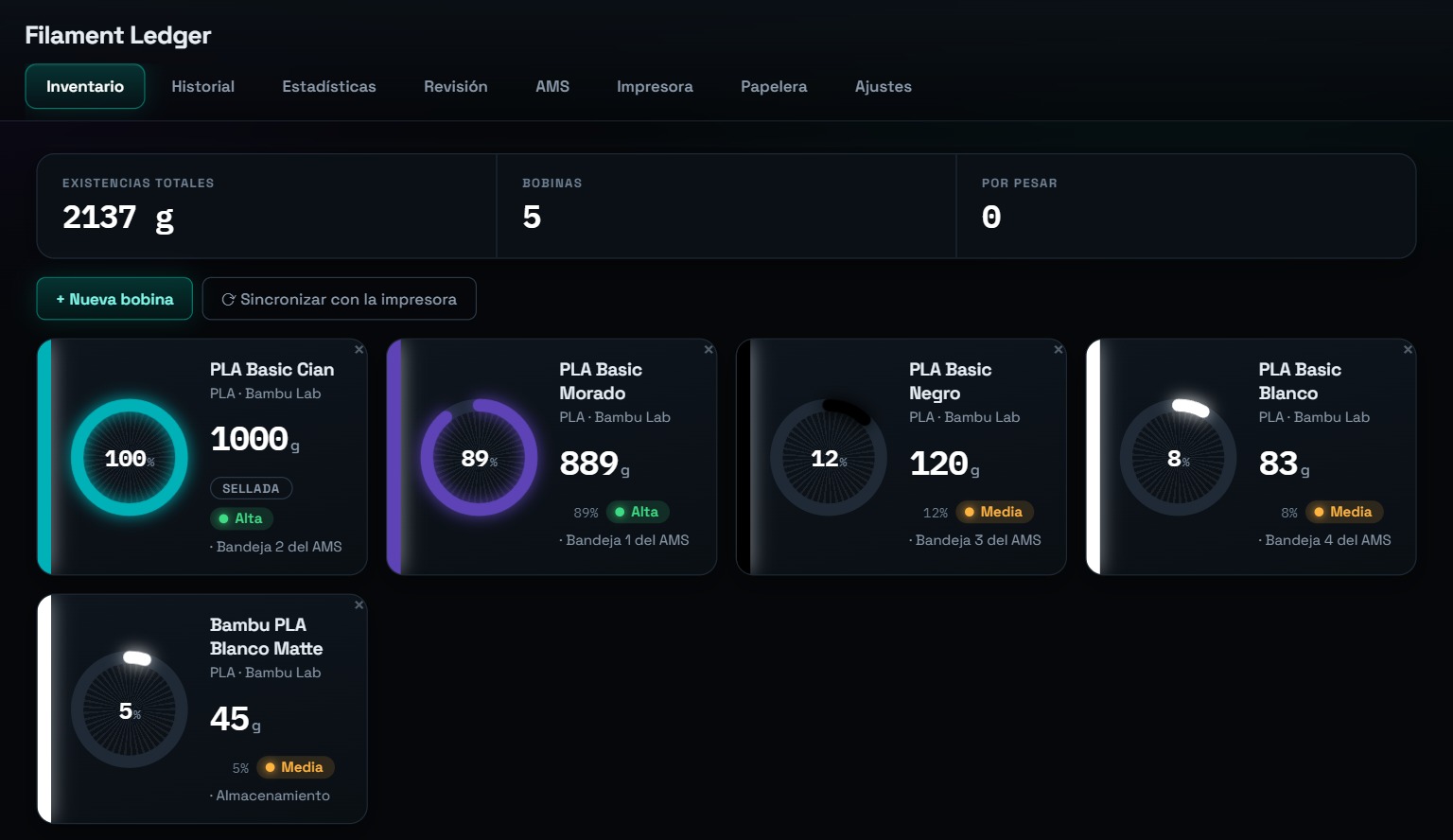
Read this first
The panel no longer follows your Home Assistant theme.
It now renders its own fixed dark appearance — the same in a light theme, a dark theme, and a custom one. There is no toggle, and there is no cheap route to adding one.
This is a decision, not a defect. The reasoning, and its costs stated plainly, are in ADR-0008. The short version: this is a full-page sidebar panel, not a card sitting among other cards. It is the only thing on screen while it is open, and it is read by somebody standing at a printer deciding whether an estimate was right. A dense instrument that is instantly recognisable is worth more in that moment than one that colour-matches the rest of the house.
If you run a high-contrast or accessibility theme, you lose it inside this panel. Contrast is now our obligation rather than yours, and a report that we got it wrong is a real bug — please open one.
What is new
A spool looks like a spool. Each one is drawn as an arc of its own filament colour, at three sizes: on the inventory card, in an AMS slot, and face-on in the detail view with the winding and the core.
The view keeps itself current. A print finishing, a review resolved, a correction made in another browser — all of it now reaches an open panel without a reload. The integration pushes over one websocket subscription; the panel never polls and never asks twice.
Typefaces of its own, self-hosted. Space Grotesk for text, IBM Plex Mono for every figure. Nothing is fetched from Google or any third party — an integration that phoned home for a typeface would tell that party every time you opened it.
Responsive to the panel, not the window. Pinning or collapsing the Home Assistant sidebar now reflows the panel with no reload. A media query cannot see that difference; the sidebar takes its width from the same viewport.
Smaller things that matter at a printer: tap targets at 44 px, prefers-reduced-motion honoured properly, and safe-area padding so the last row is not under a phone's home indicator.
For contributors: a styleguide page at /filament_ledger_static/1.1.0/styleguide.html renders every surface the panel has, driven by the panel's own code.
Upgrading
Nothing to do. No schema change, no migration, no setting to check. Update through HACS and restart.
The panel is now served from a versioned path and cached for a month, so an upgrade fetches the new one immediately rather than serving you last month's from cache.
Under the hood
907 tests, up from 898. No new runtime dependencies — still none at all.
Two typefaces ship under the SIL Open Font License 1.1 rather than this repository's MIT: Space Grotesk and IBM Plex Mono. Their licences travel beside them in www/fonts/.